
Knowledge Hub
How To Turn Store Visitors Into Leads That Become Customers
By John Butterworth · October 1, 2026
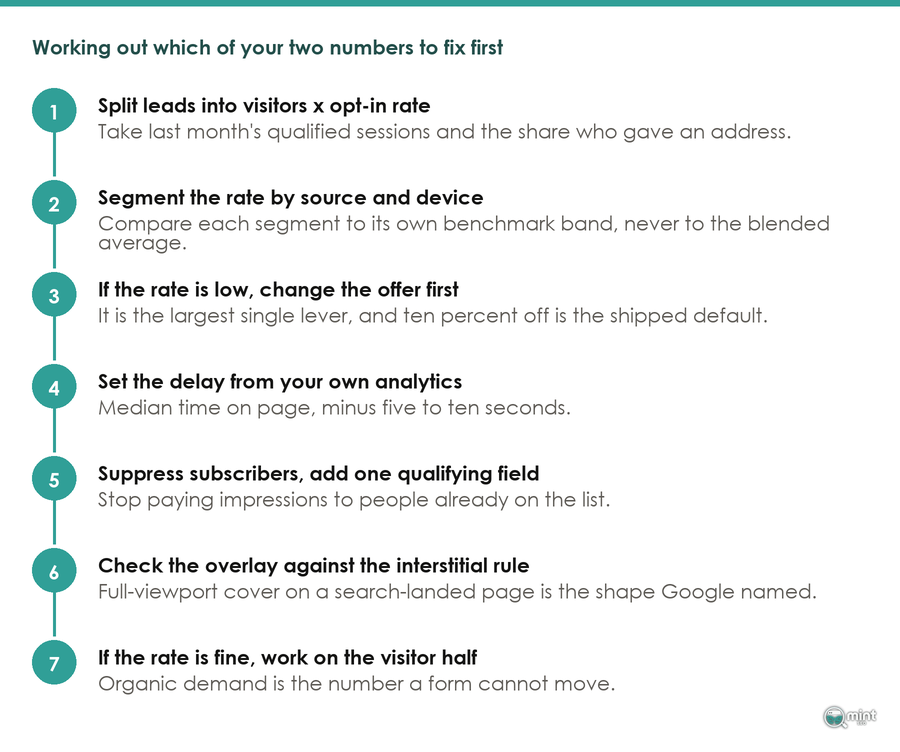
On a store, ecommerce lead generation means getting a shopper to leave an email address or a phone number before they go, even when they don’t buy. It pays when you ask straight after the shopper shows interest, with an offer small enough to protect your margin.
The clearest of those moments is a sold-out product. I’d set up a ‘notify me’ form on every sold-out item and variant, because a shopper who fills it in has named the exact thing they want to buy.
Forms also need visitors to ask, and buying guides that people search for bring them in. Once a form is live, check it against the orders its subscribers place, since a list that never buys still costs money to email.
Ask For The Email Right After A Shopper Shows Intent
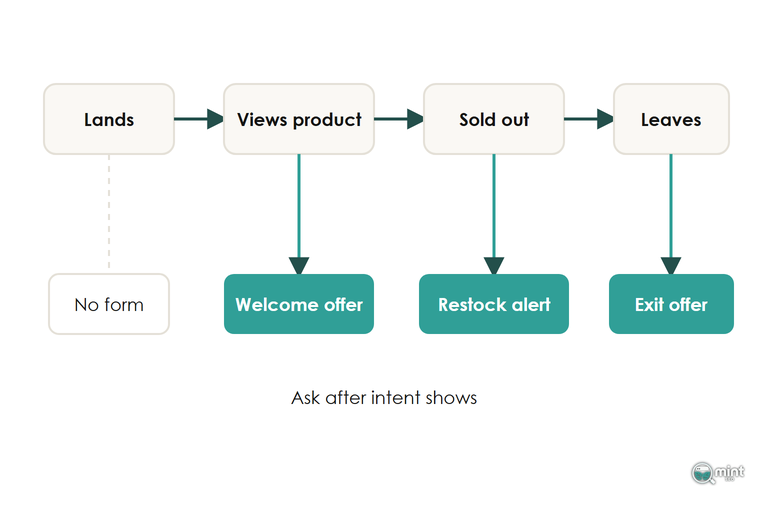
In ecommerce lead generation, the lead worth capturing has just shown you what they want. Ask for the email at that moment, while the reason to sign up is still in front of them.
On a store that moment turns up in more than one place, and each place deserves its own form with an offer worded for what the shopper has just done.
Hold The Welcome Offer Until The First Product View
A welcome popup that fires the second someone lands asks for an email before they have seen anything worth signing up for. Set the trigger to the second page view or to a scroll on a product page. By then the form meets a shopper who already likes something.
A form that waits a few seconds catches more signups than one shown on arrival, and one that waits more than half a minute catches fewer again.
The exit moment is a second chance with a different job. A shopper moving to leave is about to go anyway. That lets an exit form carry a stronger offer than the welcome form without teaching the shoppers who stay to hold out for it.
Put A Restock Alert On Every Sold-Out Product
A shopper who types an email into a 'notify me when it's back' form has told you the exact product they want to buy. That makes a back in stock alert the strongest lead your store collects. In Omnisend's automation data, back-in-stock emails converted at 6.46%, ahead of every other automated email it tracked.
Put the form on every sold-out product and every sold-out variant, in place of a greyed-out button. Send the email as soon as stock lands, while the shopper still wants the thing they asked about.
Put A Matching Offer Inside Every Buying Guide
A reader on a buying guide has already told you which decision they are stuck on. Offer the download that settles it in return for an email address: a sizing chart for clothing, or a side-by-side sheet of the three products the guide recommends.
I’d place the offer right after the point where the guide answers the question. There it reads as the next step in the reader's decision.
Plain question searches now often end on Google's AI answer, and a 'what is' guide sends fewer visitors than it used to.
Searches that still send clicks are the ones where a shopper compares two products, looks for an alternative to a brand, checks a brand's pricing or reads a best-products roundup. Those readers are close to buying, and the store guides that bring buyers in are the ones worth an inline offer of their own.
Keep The Lead Offer Small And Single Use
The offer decides who joins your email list, and that decides what each lead is worth. Start with a small first-order discount or free delivery, issue it as a discount code that works once, and give it an expiry.
A Deeper Discount Can Lower Signups From New Visitors
To a shopper who has never heard of your store, a big first-order discount can read as a warning about your prices. They stop to look for the catch instead of typing an email, and deeper offers also pull in people who only ever buy at a discount.
Because of that, test any bigger offer by running both versions on the same traffic in the same weeks. Comparing a month on the smaller offer with the next month on the bigger one mixes the offer up with everything else that changed between those two months.
Single-Use Codes Stop Old Customers Claiming The New-Customer Offer
A signup form only knows the email address typed into it. An existing customer who signs up with a second address looks new, and a discount code meant for first orders ends up paying for their next order.
Coupon sites are the other risk. A code that works more than once gets posted there, anyone can use it, and it stops being a lead offer.
Issue each code once and limit it to one use per customer to stop both problems. Where your discount setup allows it, check first-order codes against past orders at checkout.
An expiry of a week or two gives the new subscriber a reason to buy now. That is a job for urgency, and a deeper discount does it badly.
A Wheel Or A Quiz Lifts Signups When The Prizes Stay Small
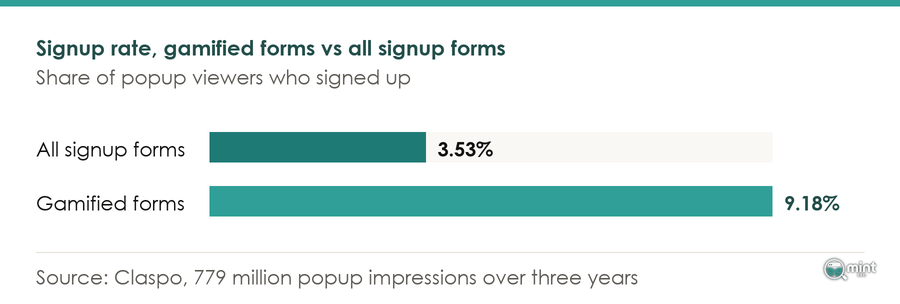
Game formats capture far more addresses than a plain form. Across 779 million popup impressions over three years, Claspo recorded gamified forms converting at 9.18% against 3.53% for signup forms as a whole.
The prize table decides what those extra signups cost you. I'd make free delivery the prize most people win and keep the big discounts rare.
A quiz can ask what the shopper is looking for before it asks for the email, which also tells you which products to send them. On a phone, open the wheel from a small tab the shopper taps, and the full-screen game appears only when they choose it.
Stop Your Lead Generation Forms Costing Sales And Rankings
A capture popup that chases a shopper from page to page loses more leads than it wins. Shopify Forms lets you limit a popup by page, by device and by how often it appears. Cap the frequency before anything else, and let a shopper who has closed the signup form once browse the rest of your store in peace.
Hide The Welcome Offer From Subscribers And Past Buyers
A welcome offer shown to someone who subscribed last month or already used the code fills the screen with an offer they can't use. It captures no new lead either. Shopify Forms has no setting that hides a signup form from leads already on your email list.
For signed-in customers, a signup through the store's newsletter form sets the customer's accepts_marketing attribute to true. A few lines of theme code can check that flag and hide the signup form from existing subscribers.
For guests, set a cookie or a browser storage flag when the form is submitted. Skip the popup whenever the flag is there.
Keep The Signup Form To A Banner Google Can Read Past
A signup popup that covers the product the shopper came for is the first thing they close, and some close the tab with it before you capture anything.
Google also treats that kind of overlay as a problem for the page. Its guidance, updated in December 2025, says intrusive dialogs "may lead to poor search performance". It names newsletter sign-up prompts as a job for "banners that take up only a small fraction of the screen".
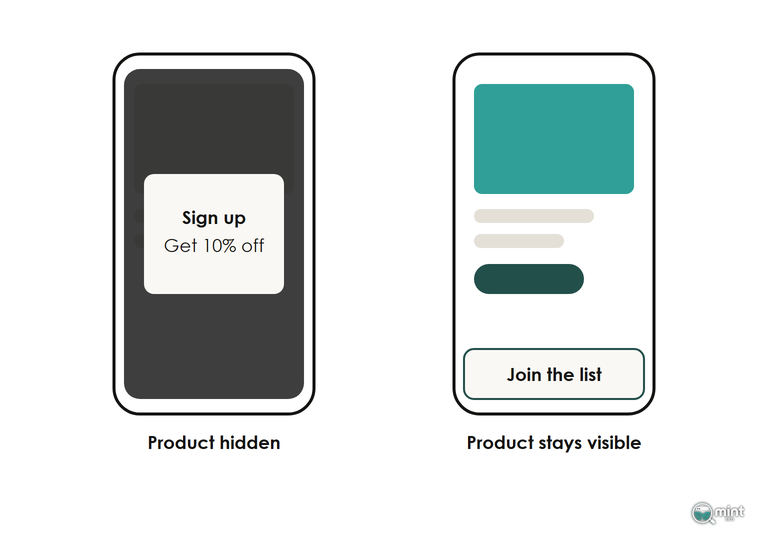
On mobile, capture leads with a slim signup bar or a small tab at the bottom of the screen and keep the page readable behind it. Open your own store from a Google result and check what that first screen shows.
Never let the form cover the entire page. There's more on the mobile layout a store needs if your phone pages need wider work.
Judge Each Lead Capture Form By The Orders Leads Place
A placed order is the result that counts in ecommerce lead generation. Report each form on the orders its segment places in your email platform, and treat opens and clicks as early signals only.
A subscriber is worth what your welcome emails earn from them, and Klaviyo's 2026 benchmarks put the average welcome email at $5.75 in revenue per recipient. Set each form's subscribers against your own welcome-email average. A form whose subscribers earn far less than that average is filling the list with people who came for the code.
Tag Each Form And Give Each Offer Its Own Code Prefix
Shopify Forms can add a customer tag to everyone who submits a form. Give each form a tag for where it sits, and give each offer's codes their own prefix as well.
Read your orders by tag and by prefix, and compare each capture point with your normal orders.
A form whose codes are rarely used, or whose buyers never come back to pay full price on a later order, is collecting addresses that don't pay for themselves.
Compare Revenue Per Visitor Against A Holdout With No Form
Signup rate only measures the form, while revenue per visitor measures the whole visit and shows when a form collects more addresses and loses more sales.
I'd hold back one visitor in ten from ever seeing the form and compare revenue per visitor between the two groups over the same weeks.
You need a few thousand visitors on each side before the difference means anything. A smaller store should lean on the tags and code prefixes and make one big change at a time. Data-led decisions need a change big enough to show up, and there's more on running a store test properly if you want to set one up.
Bring In More Search Visitors Worth Capturing
A restock alert only fills up when shoppers can find the sold-out product, and an offer inside a buying guide only works on the readers Google sends to that guide. Neither form can create the visitors it depends on.
Guides like that are what our content writers produce, planned around the searches your shoppers make so each form has readers to ask. That writing is one part of the work we do as an SEO agency for Shopify stores building their own email lists.
Before you plan any of it, send for a free SEO audit and see which searches could feed your forms. Page two lists valuable commercial keywords competitors win where you are not on page one, with the monthly demand for each. It comes back the same day as a two-page PDF, with no call and nothing to pay.

About the author
John Butterworth
John Butterworth is the founder of Mint SEO, a Manchester ecommerce SEO agency he started in 2024. He has 11 years in SEO and digital marketing, previously running SEO departments for market-leading brands and several agencies. He specialises in Shopify and ecommerce SEO, and his work has ranked over 100 websites and driven more than 3 million organic visits. He speaks at industry events including the SEO Mastery Summit.
Connect on LinkedIn →