
Knowledge Hub
Ecommerce Keyword Research: Give Every Search One Page To Win
By John Butterworth · September 27, 2026
Shoppers search for your products in their own words, and those words are rarely the names you gave your collections.
That mismatch is what ecommerce keyword research fixes. You gather the words shoppers already type and check how many people search each one. Every keyword then gets a single page to rank, starting with collection pages for your biggest category terms. Those searches are getting longer as well: Google's review of a year of AI Mode found the average search there is triple the length of a traditional query.
I build a keyword map before anyone rewrites a page for a store that hires our Shopify SEO agency. My name's John Butterworth, and every later decision about collections, product pages and the blog depends on that map.
Collect The Words Your Shoppers Already Type
Start with words shoppers have already used, because each one comes with proof that a real person typed it. As founder, I've opened the same three places on every store I've audited in 11+ years of SEO work, and between them they usually hold most of the list before any tool is opened.
Search Console Shows The Searches Already Finding You
In Search Console, open the list of queries for the last three months and sort it by impressions. Each row is a search where Google showed one of your pages.
Large stores get a shortcut. In October 2025 Google added query groups to the Insights view of Google Search Console, which puts variations of one search together under a single line. They only appear on properties with a large volume of queries. A smaller store groups its own queries by hand as part of its ecommerce keyword research.
Look hard at pages that are indexed but earn almost no impressions. Google can find them and nobody searches for the words on them. That is a keyword problem, and the fix is changing the words on the page.
Your Search Bar Records What Shoppers Call Your Products
Your keyword sheet should also carry the phrases people type into your own search box, tagged with where they came from. In Shopify they sit in two reports under Analytics > Reports, 'Searches by search query' and 'Searches with no results'.
Visitors who use the search box are some of the likeliest buyers on the site, because they have named what they want. A term that returns nothing is usually a product you stock under a different name. Add that wording to the product title, its tags and the collection name, and it becomes a keyword you can target on Google as well.
Rival Category Names Show Words A Tool Will Not Suggest
List the collection and filter names used by the three largest retailers in your category, then set them beside your own.
Large retailers rename collections when their own site search and sales data tell them to, which is why their labels change over time. Where their name and yours differ, theirs is usually the word shoppers have learned.
This matters most when two words are both correct. A keyword tool will rank 'trainers' against 'sneakers' by volume, and a translation tool will tell you both are right. Neither can tell you which one your buyers expect to see on a collection page, and a big retailer's navigation shows you that. Take the words from their navigation and write your own copy around them.
Check Every Volume Figure Against Search Console
Keyword tools give every ecommerce keyword a monthly search volume, and that figure is an estimate. Use it to rank the keywords on your list against each other, and let Search Console decide which ones earn a page. Only Google holds the real search numbers, so a keyword tool models its volumes, and a large share of the figures on any keyword list are wrong enough to change a decision.
Keyword Planner was built for advertisers buying clicks, which explains most of its errors. It asks for billing details before it will suggest keywords, and it rolls misspellings and close variations into one figure. Add up the volumes for 'linen duvet cover' and 'linen duvet covers' and you've counted the same searchers twice.
To run that check, pick five keywords where one of your pages already sits on page one.
Note the monthly impressions Search Console shows for each and set them beside the tool's volume. Say the tool shows 1,000 and Search Console shows 400: the tool is overstating by two and a half times in your niche. Discount its figures for new keywords by the same margin.
A keyword with no page yet has no impressions to check it against. Use the ratio from the five you checked, and fill in the real figure once its page has been live for a couple of months.
Read keyword difficulty the same way, as a comparison between terms on your list.
Give Each Keyword One Page, Chosen By What Google Ranks
Give every ecommerce keyword on your list a page type. Google has already chosen one, so search each keyword logged out in a private browser window and write down the kind of page filling the first page of results.
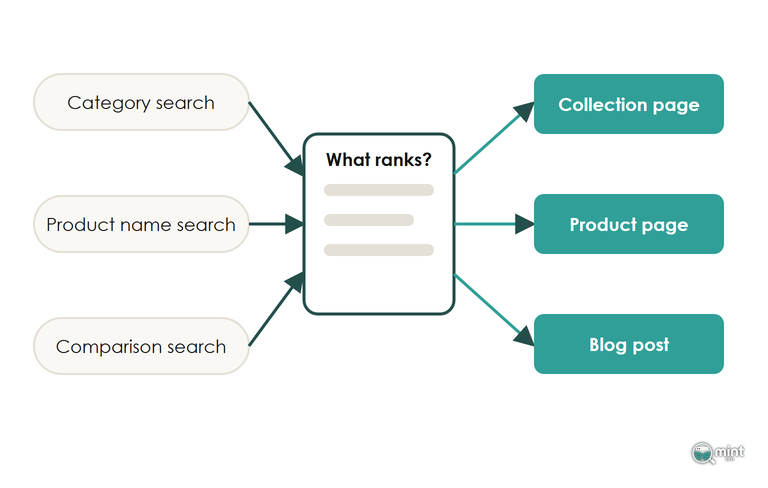
- Category listings in the results mean commercial intent: map the keyword to a collection.
- Single products in the results mean the searcher has chosen: map the keyword to a product page.
- Guides and comparisons mean informational intent: map the keyword to a blog post.
- One brand's own site means navigational intent, and the keyword stays off your map.
Category Searches Belong On A Collection Page, Built First
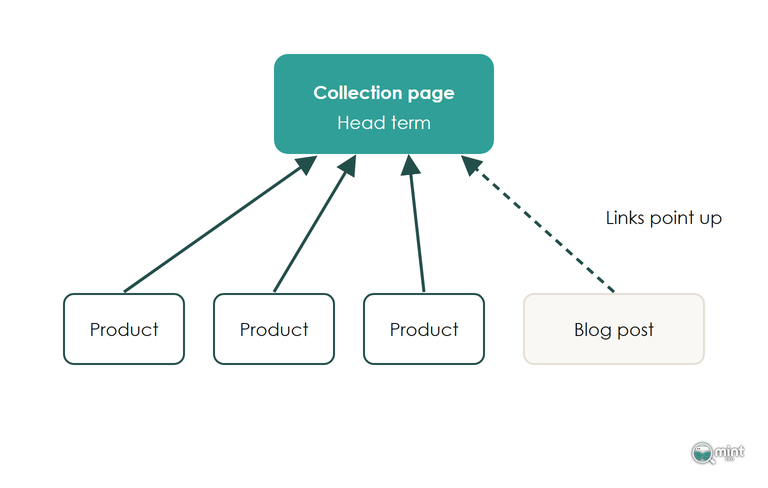
Map your head terms first. These broad keywords with the most searches go on collection pages, and those pages get built before any long-tail keyword gets a page of its own. The product pages and blog posts you build later need something to link up to.
Those links send the head-term page the authority it needs to compete for the hardest keyword on your list.
When we worked with the Los Angeles florist Hidden Garden Flowers, the homepage took the head term 'florist los angeles' because it held the strongest backlinks on the site. No page existed yet for searches such as 'flower delivery Santa Monica', so we built one for each delivery area.
We also rewrote generic headings like 'Trending Now' around the keywords each page served. Page-one keywords went from 67 to 2,228, as the full Hidden Garden write-up sets out.
Send Model And Brand Searches To The Product Page
Your keyword list will include searches such as 'hoka clifton 9 womens' that name one product, and each of those keywords belongs on that product's page. The shopper's already chosen, and a collection page would make them choose again.
Put the brand, model and product type in the product title, the URL handle and the first line of the description. Colour and size variants of one item normally share a page, so 'merino jumper navy medium' is served by the jumper's page with the variant selected. Images, reviews and the rest of that page are set out in our guide to product page optimisation.
A Filter Earns Its Own Page Only When People Search For It
A filter combination earns an indexable page when your keyword list shows people searching for it. 'Waterproof walking boots' shows demand of its own in Search Console and in keyword tools. It gets an automated collection built on the product tag, with its own intro.
Brown size 9 walking boots with a leather lining shows none. On a catalogue with thousands of filter URLs, each combination like it spends Google's crawling on a page nobody will look for.
Google's review of AI Mode also found that shoppers most often add details such as price, colour and brand. Your filters already carry those.
Filter labels written the way shoppers phrase a need, such as 'wide fit' or 'for long hikes', match those longer AI Mode searches as well. Every other combination stays out of the index, and our post on handling filter URLs covers how.
Point The Blog At Comparison And Pricing Intent
Informational and comparison searches are won by articles, so the blog takes them. Its best-selling keywords are comparisons, 'alternative to' searches, best-of roundups and pricing questions. Someone typing those is close to buying, and the article can link straight to the product.
AI Mode is growing fastest where shoppers choose between products. CMSWire's write-up of that Google report found searches starting with 'which' grew 40% faster than AI Mode queries overall over six months. Write the comparison your buyers are making, answer it plainly and link each post to the collection or product it compares.
Informational posts still help, because they build relevance around your collections.
Plan them after the comparison and pricing posts, which are the ones that bring in orders.
Money-Driving Blog Keywords
The people you want here are searching bottom-of-funnel keywords directly related to your products, your brand, your competitors’ products and your competitors’ brand. Each of the four keyword types below catches a shopper at a different point in choosing between them.
I’ve already argued that the blog should chase comparison and pricing intent. Each type needs its own post, and its keywords go through the same ecommerce keyword research as every collection and product page.
Vs Keywords
Anyone searching ‘[your brand] vs’ or ‘[competitor brand] vs’ wants a direct comparison, because they’re weighing the two against each other. Their shortlist is already down to two names, and one of them can be yours.
Store owners are always hesitant to publish content that names a competitor, and I get it: you don’t want to give a rival any promotion. But people are running that search anyway. Your only choice is whether they hear directly from you why they should pick you.
These are also some of the easiest keywords to rank for. Your brand name is in the keyword, and your own site is the most obvious answer to a search that names you.
Alternative keywords
‘[Brand name] alternatives’ keywords are searched every single month. The people typing them are frustrated with a competitor and weighing up alternative suppliers, so they’ve decided to leave and are only choosing where to go.
Target those keywords with a post that places your brand as the clear alternative. Speak to the frustration that sent them searching and show how your product answers it.
Pricing Keywords
‘[Brand name] pricing’ keywords are a goldmine. Some brands hide their pricing until they receive an enquiry, which is particularly common for SaaS businesses that depend on sign-ups. Anyone who wants the number before talking to a salesperson has nowhere to find it.
A blog post revealing the competitor’s price brings those searchers onto your site, where you can present your product as the alternative. If yours works out cheaper, be sure to write that up and show the difference.
Review Keywords
Review keywords work much like pricing keywords. Write an honest and fair review of a competitor’s product, then frame yours as the alternative for the shoppers it doesn’t suit.
Your own products need reviews on the blog too. Lean heavily on social proof and third-party endorsements, so that anyone searching your brand name with ‘review’ reads the verdict of customers and independent sources on a page you control.
Get Your Keyword Map Built And Checked
A keyword map usually exposes two faults as soon as it's built: searches with no page to land on, and pairs of pages competing for one search. Mint SEO's SEO audit covers both. It sets out the technical issues and the missing content and keywords behind them, in the order we'd fix them.
Every audit starts from the store's own Search Console data and the same ecommerce keyword research described above, and I run each one myself. You get the finished map and the priority list, and the work that follows is measured on revenue from organic search. To see which searches your store is missing, get your SEO audit.

About the author
John Butterworth
John Butterworth is the founder of Mint SEO, a Manchester ecommerce SEO agency he started in 2024. He has 11 years in SEO and digital marketing, previously running SEO departments for market-leading brands and several agencies. He specialises in Shopify and ecommerce SEO, and his work has ranked over 100 websites and driven more than 3 million organic visits. He speaks at industry events including the SEO Mastery Summit.
Connect on LinkedIn →