
Knowledge Hub
Which Filter Pages Google Should Index (And How To Keep The Rest Out)
By John Butterworth · September 23, 2026
Good SEO faceted navigation comes down to one decision per filter: which filter pages Google should index, and how to keep every other filter URL out of its crawl. Your collections have filters for colour, size and price, and Google Search Console now lists hundreds of URLs you never built. Get the decision wrong and Googlebot spends its visits on copies of your collections while the pages that sell wait longer to be recrawled.
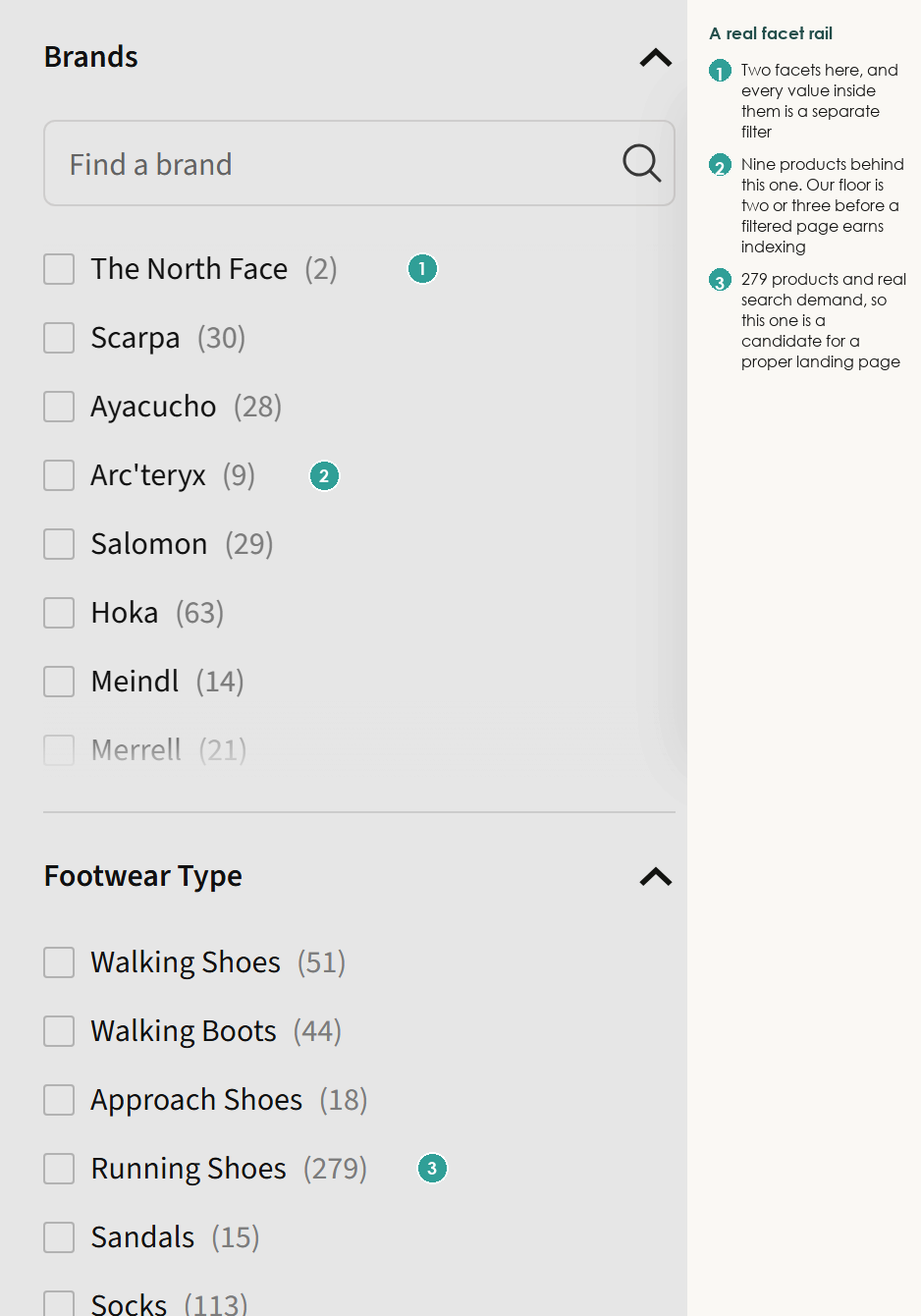
Give A Filter Its Own Page Only When People Search For It
SEO for faceted navigation starts with one question per filter value: whether people type that exact phrase into Google. Faceted navigation is the filter panel on a collection page, and each value it offers can become a page. Give a value its own indexable page only when a real search matches it and enough products sit behind it, then build it as a collection with its own title and copy.
Working out which filter URLs deserve Google's attention takes up a good part of my week. I'm John Butterworth, founder of a Manchester agency that specialises in Shopify SEO, with 11+ years in search and a talk at the SEO Mastery Summit.
Stop At Two Filters And A Handful Of Products
A filter value passes when two things are true. Someone types it into Google, and the range behind it gives a shopper a real choice when they land. Search the phrase yourself to check the demand. When the sites ranking for 'sofas' drop away for 'black leather sofas', and category pages built around that exact phrase take their place, the demand is there.
Once the demand is there, stock decides the rest of the test. A filter that returns two or three products gives the shopper less than the parent collection does, so leave it pointing at that collection until the range grows.
Stop at two filters combined. 'Black leather boots' is a phrase people type into Google; 'black leather boots size 9 under 80' is not, and the page behind it holds a handful of products at best.
Mass-producing these pages carries its own risk. Glenn Gabe's case studies of Google's August 2026 spam update include a site that lost its rankings after 'the site was programmatically crafting categories and product pages' from another retailer's catalogue. Generating a page for every filter combination is that same move on a smaller scale, so every page you build needs a search and a range behind it.
Build The Winners As Collections With Their Own URL
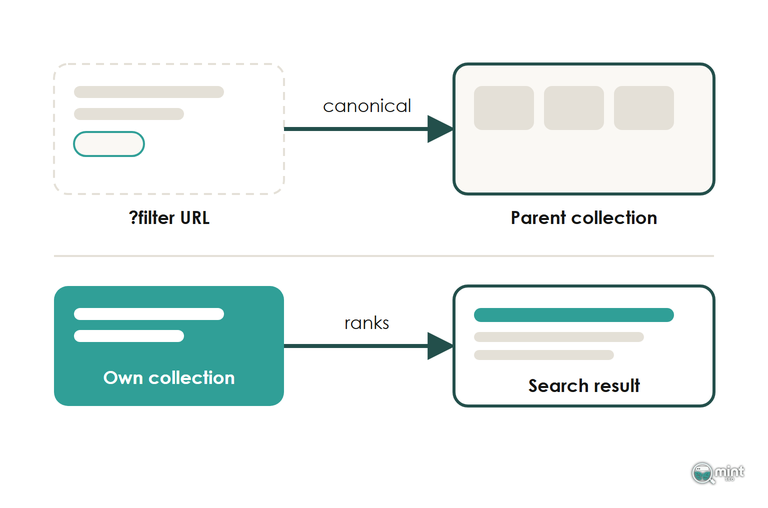
A filter value that passes becomes a collection with a clean URL, its own title, its own opening copy and a self-referencing canonical. The filter's parameter URL then points its canonical at the new collection, so links and ranking signals gather on one URL.
Large retailers already run their filters this way. IKEA's 'Black sofa' filter landing page sits on its own clean path on IKEA's UK site with a canonical pointing at itself. Apply that colour as a ?filters= parameter and the page points its canonical at the unfiltered sofas category, as both versions did on 22nd September 2026.
On Shopify, a winning filter value becomes a manual or automated collection for that phrase, linked from the parent collection and your menu. Give it a title and an opening paragraph written for the phrase. Our guide to SEO for ecommerce category pages covers the titles, copy and internal links a new collection needs.
Keep Googlebot Off The Faceted Navigation URLs Nobody Searches For
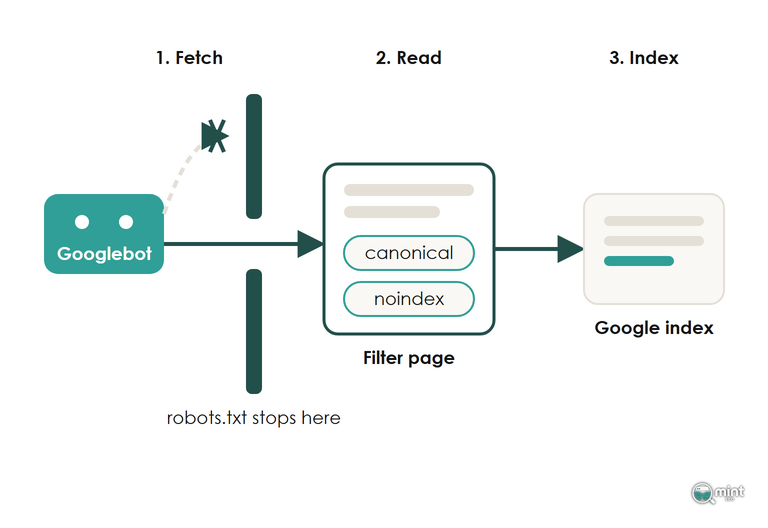
Every faceted navigation URL that fails the test still needs one of four SEO signals: a robots.txt block, a canonical, a noindex or a not-found status. Which signal a filter URL gets depends on whether anyone links to it. On Shopify, the default leaves most single-filter URLs open to Googlebot, which our check of 225 stores below measures.
Robots.txt Saves Crawling But Hides Every Other Signal
John Mueller, a Search Advocate at Google, put the scale plainly on Search Off the Record in July 2026. With filters and sort orders in play, he said, 'we could potentially find an infinite number of pages on your site.'
Mueller weighed robots.txt against noindex on the same episode and named the catch with blocking: a blocked URL can still be shown in search.
Use it for the long tail of filter combinations nobody links to or searches for, because it is the one signal that stops Googlebot requesting the page. Googlebot never reads a blocked page, so a noindex or canonical sitting on it doesn't do anything, and the bare URL can still show in results when other pages link to it.
Never pair a disallow with a noindex on the same URL. Block the combinations with no links and no demand, and leave the rest crawlable so the next signal can do its job.
Canonical And Noindex Only Work On A Page Google Can Fetch
A filter URL that shoppers share, or that has picked up backlinks, still carries value worth keeping. A canonical from that URL to the collection folds its links back in, and a noindex keeps the copy out of results. Both need a crawl first, and Mueller confirmed on the same episode that Google keeps crawling a noindexed page.
A canonical is also a hint that Google weighs against your internal links and sitemap. Keep filter URLs out of the sitemap and point menu links at the collection itself, so every signal says the same thing. Expect a few weeks before Google settles on the canonical you chose.
Empty Filter Results Should Return A 404
A filter combination with no products left is an empty page. Served as a normal working page, it looks real to Googlebot, which keeps coming back to it. A not-found status tells Googlebot the URL has nothing on it. Return one for every empty filter combination.
Test it on your own store by picking two filter values that no product shares and loading the URL. If the page loads as a normal page, ask your developer or filter app provider to return a not-found status for empty results. Our guide to crawl budget on ecommerce sites covers the wider crawl checks.
A Shopify Filter Page Gets Crawled But Cannot Rank
Our numbers come from 225 sites in the Tranco top 100,000 (list 8P4GV) that run on Shopify, identified by the address range their domains resolve to and confirmed by the Shopify rules in their robots.txt. On 22nd September 2026 each one was sent '/collections/all?filter.v.availability=1', the in-stock filter on the all-products page, and we recorded the canonical tag and crawl rule that came back.
221 of them left a single-filter collection URL open for Google to crawl. That means Googlebot can request a page for every filter value those stores offer, and each request spends crawl on a copy of a collection it already knows.
Of the 217 filter pages that loaded, 212 carried a canonical tag pointing back at the unfiltered collection. Each of those pages tells Google it is a copy of the collection.
Put together, those defaults mean Google can crawl every single-filter page on a typical Shopify store while each page says it is the collection. None of them can rank for its own phrase. On Shopify, a filter value that deserves traffic has to become a collection.
Shopify Blocks Filter Pairs But Leaves Single Filters Open
211 of the 225 stores blocked the two-filter version of the address. That block comes from Shopify's default robots.txt, which also stops sort orders and plus-joined tag combinations, and our ecommerce SEO site audit guide walks through the rest of that file. None of its rules covers a URL carrying one filter.
Adding that rule yourself takes one extra Disallow line per filter parameter in your theme's robots.txt.liquid. Look for filter URLs that already bring in clicks before adding it, since those lose their traffic along with everything else behind the rule.
The April 2026 Change Stripped The Filter From Old Links
From 16th March 2026, Shopify's option filters stopped writing their value into the URL. A size filter that used to read ?filter.v.option.size=Large now carries an ID such as gid://shopify/FilterSettingGroup/123 in place of the word. Old filter links still loaded after the cut-over on 24th April, with no error on the page to warn anyone.
EasySell, the team behind a Shopify checkout app, set out what happened: 'After April 24, the old text-based URLs still load your collection page, but the filter doesn't apply.' Only option filters changed. Tag, vendor, price and availability filters kept working. In the same write-up's words, 'Not all filters are affected.'
So any option filter URL you had indexed, linked from an email or used in an ad now sends shoppers to the whole collection. Give each filter value that matters its own collection and point the old links at it.
Check What Google Is Already Doing With Your Filter URLs
Start in the Page indexing report in Search Console. Filter URLs piling up under the crawled but currently not indexed status are the crawl cost of open filters. Filter URLs marked as indexed though blocked by robots.txt mean a disallow went in after Google had indexed them. Google can't read the canonical on a blocked URL.
Then check which filter URLs still earn traffic. In Search Console, open Performance and type ?filter. into the Page filter. The list that comes back shows the filter pages Google still ranks for a phrase, and those are the values to rebuild as collections before you block the rest.
Allow for a lag once the changes are live, because Google can keep a URL grouped as a duplicate for a couple of weeks after a canonical change. Skip the removal tool as a shortcut too. Mueller explained on the podcast that it hides a URL from results while Googlebot carries on crawling it.
How We Clean Up Filter Crawling On Shopify Stores
Sorting a store's filters into new collections, blocks and canonicals is the practical side of SEO faceted navigation. It takes three things side by side: a crawl of the live store, its Search Console data and its theme code. That is the work our Technical SEO and Page Speed service covers at Mint SEO: crawlability and indexation, site architecture and the Shopify-specific fixes that go with them.
The collections worth building are the ones that bring revenue from organic search your store owns. To see which of your filters deserve one, in priority order, get your SEO audit.

About the author
John Butterworth
John Butterworth is the founder of Mint SEO, a Manchester ecommerce SEO agency he started in 2024. He has 11 years in SEO and digital marketing, previously running SEO departments for market-leading brands and several agencies. He specialises in Shopify and ecommerce SEO, and his work has ranked over 100 websites and driven more than 3 million organic visits. He speaks at industry events including the SEO Mastery Summit.
Connect on LinkedIn →