
Knowledge Hub
What To Fix In Ecommerce Technical SEO (And What To Leave Alone)
By John Butterworth · September 23, 2026
You've opened Search Console or a crawl report on your store and found thousands of flagged URLs. Deciding which of those flags cost you sales is the heart of ecommerce technical SEO, and on a hosted store most of them cost nothing.
The flags that cost money sit on your product and collection pages. Some of those pages have been crawled and left out of the search index. Others compete with duplicate copies your own theme links to, or load so many app scripts that they fail on a phone.
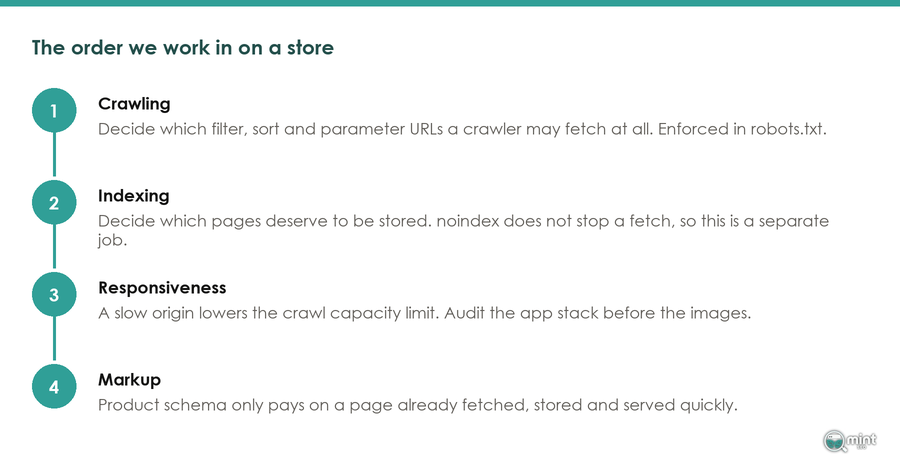
Technical SEO on an online store works in a fixed order: get the pages that sell crawled and indexed first, which includes clearing duplicate URLs, then deal with speed and product markup.
Technical SEO On A Store Means Google Can Reach, Keep And Read The Pages That Sell
Technical ecommerce SEO covers four jobs on the pages that sell. Googlebot has to reach your product and collection pages, and Google has to keep them in its index. They have to load quickly on a phone, and their structured data has to describe the product accurately.
John Butterworth here, founder of the agency behind this blog. After 11+ years in SEO, the Shopify audits I've run still trace most lost sales to three places: the theme, the apps and the product markup.
Fix Crawling And Indexing Before Speed, And Speed Before Markup
Work in dependency order. Speed and markup fixes only pay on pages Google has crawled and kept, so a product page outside the index gains nothing from either.
Missing pages are common even on well-run stores. Adam Gent tracks the index status of important URLs through the Search Console URL Inspection API. In his February 2026 analysis he found that 'Ecommerce websites didn't have as many indexing issues, but still had less than 90% Index Coverage score for all the monitored pages.'
Shopify Already Builds The Sitemap, Canonical Tags And A Default Robots File
Shopify writes these for every store, so strike them off any crawl report that calls them missing; our ecommerce website checklist shows live stores get them right. Your share is theme links, app scripts and the markup apps add.
Speed Faults On A Store Usually Come From Apps And Theme Choice
Among the biggest online stores, Core Web Vitals failures come down to responsiveness, and scripts are what slow responsiveness down.
Matt Suffoletto's PageSpeed Matters study matched stores on four ecommerce platforms against real-user speed data from the browser. Good Interaction to Next Paint (INP) rates fell from 94.6% of long-tail stores to just 45.3% of the largest, and the biggest stores are the ones running the most apps and features.
Check for leftover app code first, because removing an app often leaves its scripts behind in the theme files. Your theme sets the baseline underneath all of it, since some themes shift their layout far more than others as a page loads.
That's why the fix starts with an app inventory, and our guide to speeding up a Shopify store walks through it. How much a theme settles before the first app goes in is covered in choosing a theme for SEO.
Indexing On An Online Store, And Which Warnings Cost Sales
For an online store, technical ecommerce SEO problems show up first as product and collection pages missing from Google's index. The Page indexing report in Search Console lists every URL Google knows on the store, split into indexed and not indexed, with a reason for each exclusion.
Indexing faults usually hit a whole template at once, so one broken product template can drop hundreds of product pages from search. Count how many product and collection pages Google has kept, and read why it left out the rest.
Start there rather than with a crawl tool's warnings. A third-party crawler reports its own guesses about your store, while Search Console shows what Google itself has crawled and kept.
Open each status and check whether its example URLs are carts and filters or products that sell. A handful of repeated patterns usually explains thousands of rows of indexing problems, and the fix sits in the template that produces them.
Collection And Filter URLs Give Google Copies Of Each Product
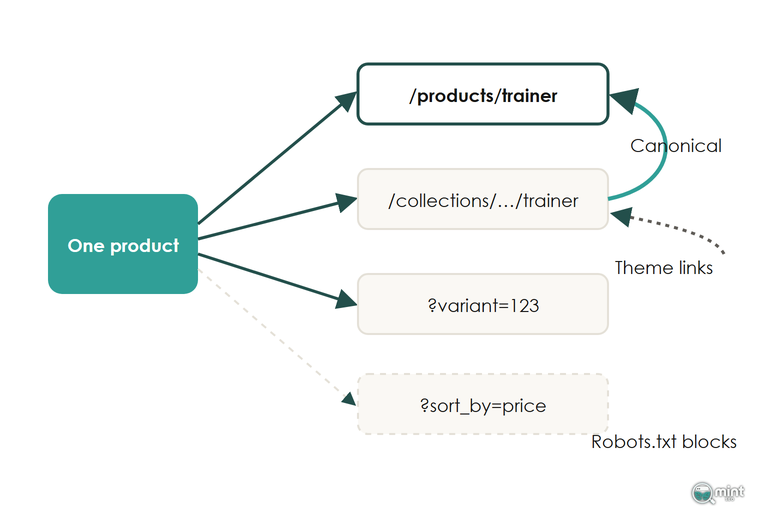
Search engine optimisation for an online store needs one URL per product, and duplicates break that: collection-scoped theme links and filter URLs give Google copies to crawl and rank. Point theme links at /products/ and let the default robots file block the rest; our ecommerce SEO checklist covers both fixes. The exceptions, filter pages worth keeping in the index, are covered in which filter pages to keep indexable.
A Product Page Stuck In Crawled Or Discovered Is Being Judged On Value
Once duplicate URLs are ruled out, a product or collection page stuck in crawled or discovered but not indexed is usually being judged on value. Google has seen the URL and decided the page isn't worth keeping.
When Google has concerns about the overall quality of a website, it reduces the number of pages it indexes and spends less time on the site. A catalogue of thin product pages that repeat the manufacturer's description drags down the coverage of the whole store.
Rewrite those pages so they say something the supplier's copy doesn't, and point more internal links at them from your collections. Work on earning links to your collection pages next, because a stronger collection lifts the products it links to.
A Sudden 403 Spike Usually Means Bot Protection Is Blocking Googlebot
If the report suddenly shows hundreds of 403, 404 or 410 errors on pages that load fine for you, check your host or CDN before you touch the pages. Google's John Mueller has explained that bot protection which switches on under heavy crawling can serve Googlebot those errors or a challenge page.
That same challenge page causes a second symptom: many pages suddenly treated as duplicates of some random other page. It's a sign of a soft block aimed at crawlers, because Googlebot received the identical page on every request.
Allow Googlebot through the firewall, then press Validate fix in Search Console. Google tests a sample of the pages you've marked as fixed and, if they pass, usually triggers a faster recrawl of the other pages.
Structured Data For Ecommerce SEO And What Breaks It
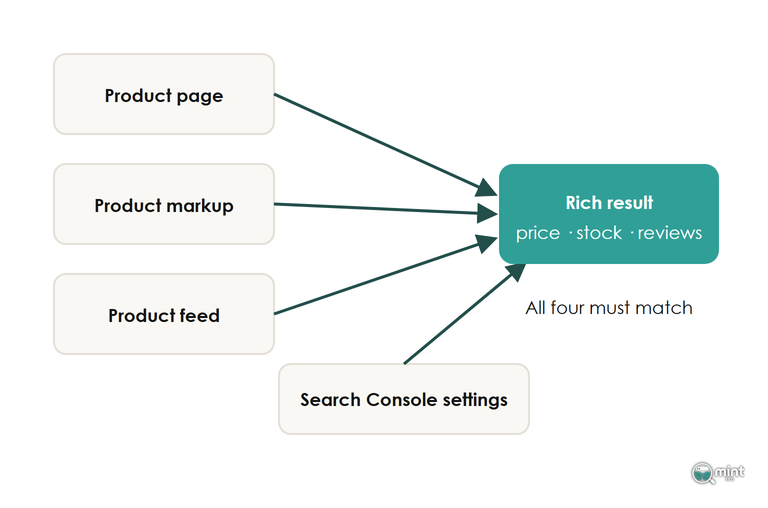
Structured data is the fourth job of technical ecommerce SEO: telling Google what each product page sells, what it costs and whether it's in stock. It's what turns a ranking product page into a rich result showing price, stock and reviews in Google.
Shopify stores start with this SEO job partly done, because Theme Store themes have to output Google's rich product snippets on every product page.
A common markup problem that costs rich results is a second Product block added by an app. An SEO or review app that adds its own Product schema on top of the theme's leaves Search Console reporting duplicate items, and Google can drop the rich result from search.
Check one product page's source code for Product blocks, and switch off whichever duplicate the app or the theme lets you remove, so search engines read one set of product data.
Keep the product facts identical everywhere Google reads them. Search Console settings take priority: shipping and returns details you enter there override the same details in your structured data.
If a product page's price, stock status or returns window disagrees with its markup, fix the page first. Google checks the markup against the page, so the page is the source of truth.
How We Run Technical SEO On Shopify Stores
If you'd rather hand the report over, our SEO audit takes every flag on your store and marks it fix or leave. It then orders the fixes the way this guide does. The ecommerce technical SEO work then starts with the product and collection pages Google hasn't kept. We took Hidden Garden Flowers from 251 to 24,021 monthly organic visitors in 12 months.
Our Technical SEO & Page Speed service covers crawlability, indexation and site architecture. It also covers Core Web Vitals, structured data and the Shopify fixes in this guide, from theme links to robots.txt.liquid rules. What you're buying is predictable revenue from organic search, on a channel you own.
If your own report is full of flags and you want them sorted and prioritised for you, get your SEO audit.

About the author
John Butterworth
John Butterworth is the founder of Mint SEO, a Manchester ecommerce SEO agency he started in 2024. He has 11 years in SEO and digital marketing, previously running SEO departments for market-leading brands and several agencies. He specialises in Shopify and ecommerce SEO, and his work has ranked over 100 websites and driven more than 3 million organic visits. He speaks at industry events including the SEO Mastery Summit.
Connect on LinkedIn →