
Knowledge Hub
The Checks Your Store Fails (And The Ones Your Platform Already Handled)
By John Butterworth · August 12, 2026
Every ecommerce website checklist opens with the domain and the hosting, moves to the theme and the product pages, and ends at the payment gateway and launch day.
That sequence is how you build a store. It is a poor sequence for checking one, because it starts with the work Shopify and WooCommerce already did for you.
I took 114 storefronts that merchants had posted to Shopify's Store feedback board between March and August 2026, and checked all of them against the items every ranking launch checklist names. Eighty-seven were still reachable on 12th August, and I got to a product page on 74.
I'm John Butterworth, and I've run ecommerce SEO for eleven years. I open these same checks in every audit, so I had a guess about which lines would fail.
Half of that guess was wrong. Items at the top of every published list passed almost universally, because Shopify does that work for the merchant. What failed were the lines a platform cannot write for you.
An Ecommerce Website Checklist You Can Work Down
Every Check, With The Condition That Passes
A checklist item you cannot check is only a task. Each line below is written as a condition your store either meets or does not, and the last column is the share of live stores that failed it.
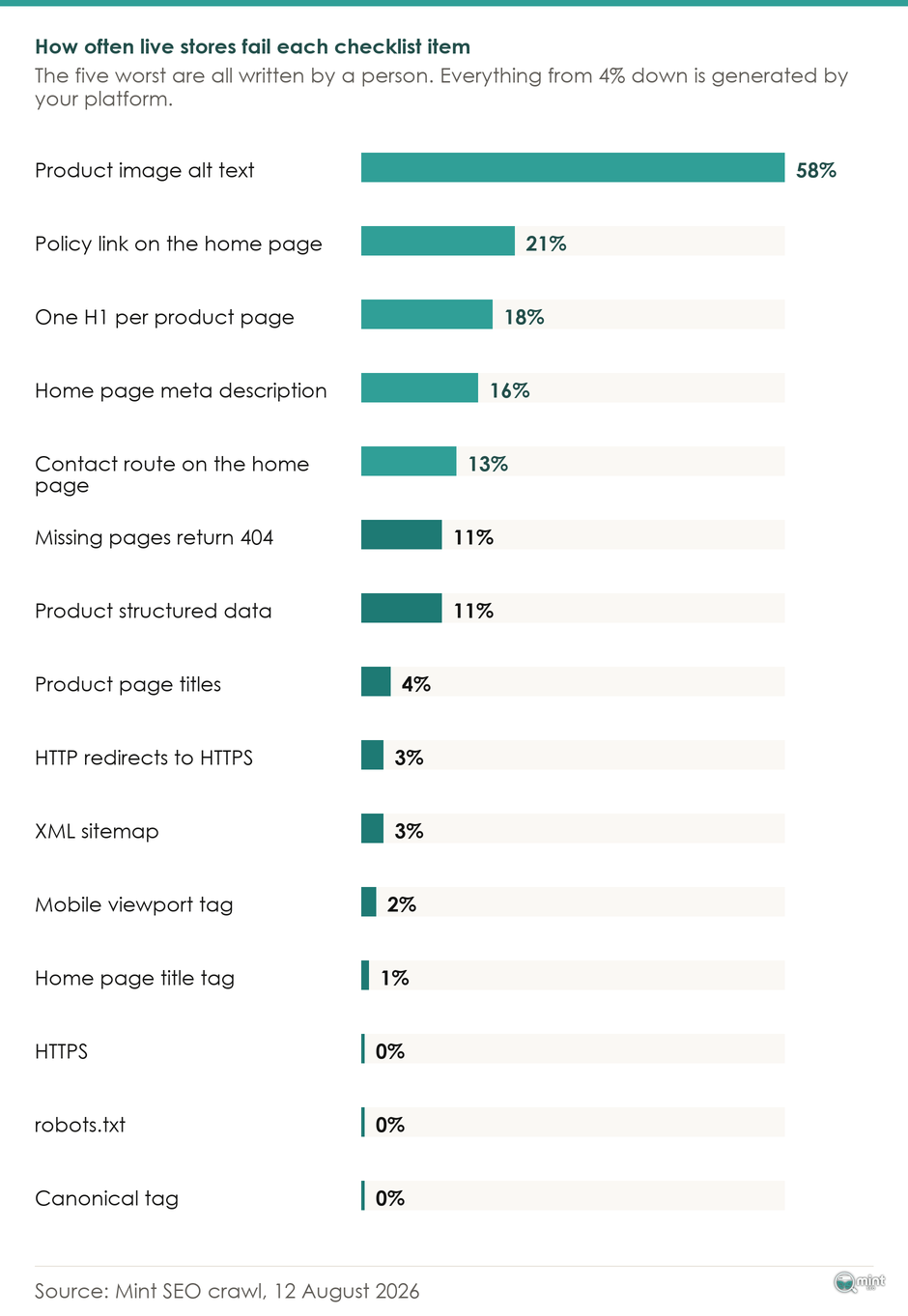
Of the sixteen checks I could run on every store with a product page, eight stores passed all sixteen. The other 66 failed at least one.
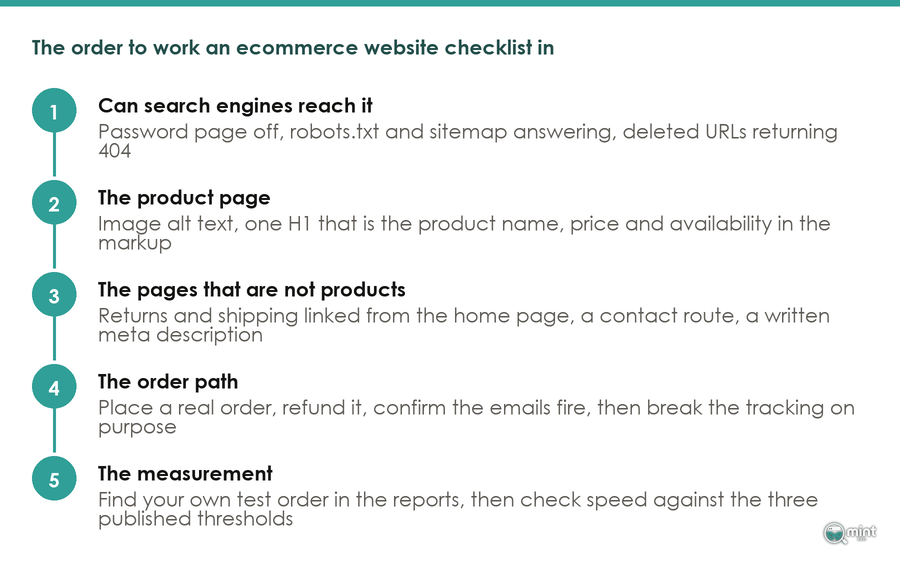
Which Checks To Do First
Which checks to do first is decided by that failure column.
The five checks that failed most often across the sample were image alt text, a policy link on the home page, a single H1 on the product page, a home page meta description, and a contact route.
None of those is generated by a platform. Every line at the bottom of the table is.
Doing those five checks first is the whole reason to reorder this ecommerce website checklist. Work down a build-order list instead and your first afternoon goes on three checks your store passed before you opened the laptop.
Every store I audit has already been through a launch checklist. Lists are not the problem.
What I find is a store that ticked fourteen boxes its platform had already ticked. It left four that need a person.
Read the bottom of that table against what the store runs on. Of the 87 reachable stores, 79 were on Shopify, two on WooCommerce and six on something else.
Bottom half of that table therefore describes Shopify's defaults as much as anyone's work. If you are on a smaller platform or a custom build, treat those rows as real checks you still have to make.
The SEO Basics, And Which Ones You Can Tick Immediately
HTTPS, robots.txt, Sitemaps And Canonical Tags
Every one of the 87 stores served the storefront over HTTPS, and every one had a valid robots.txt. Every one of the 74 product pages I reached carried a canonical tag, and 84 of the 87 stores named their sitemap inside robots.txt.
Three of the 87 stores did not redirect plain HTTP to HTTPS, so the same store answered on two protocols. That is the only line in this group most stores need to fix.
The platform produces those numbers. Shopify generates a sitemap for every store, ships a preconfigured robots.txt template, and writes canonical tags into its themes.
Checking them therefore takes one URL load each. Open yourdomain.com/robots.txt and yourdomain.com/sitemap.xml, and if both answer, tick both lines.
For what belongs inside one and when it genuinely needs attention, we've written that up separately in our guide to the ecommerce sitemap.
The Page That Answers For A URL You Deleted
Ten of the 87 stores answered a URL that does not exist with something other than a 404. That line is worth ten minutes of your time.
A missing page has to say it is missing, and that is the one line on this ecommerce website checklist a store can pass by accident. Answer 200 instead and a deleted product stays in the index, so your store keeps taking clicks to a page that sells nothing.
Google calls that a soft 404. Its indexing pipeline only drops a URL once the page returns a genuine one.
Platform split here is sharp. Splitting the sample by platform, the 79 Shopify stores answered a missing URL correctly 74 times, while only three of the eight stores on something else did.
Test it in ten seconds. Type any nonsense path onto your domain and read the status code in your browser's network tab.
The Password Page That Hides Your Store
A password page left switched on outranks everything else on the list, and switching it off is one tickbox.
Shopify's documentation states that when your password page is active, search engines find and display only the password page of your online store. Other pages such as product pages are hidden and are not displayed in search results.
A sitemap cannot be read at all while a store is password protected. Password protection itself comes off only once you pick a pricing plan.
Your store looks finished from the inside and is invisible from the outside. The setting sits under Online Store, in Preferences, under Store access.
Five of the 114 stores were serving Shopify's own shop-unavailable page by the time I looked, and fifteen refused an automated request outright with a 403 or 409 before any check could run.
What A Finished Product Page Has On It
Three checks live on this one template. All three are things a person has to write, and between them they account for the top of the failure column.
How Much Alt Text Is Missing
43 of the 74 product pages I reached had alt text on fewer than nine in ten of their images. Across those same pages the median one carried alt text on roughly six images in seven.
That median is the interesting figure. Sorted by alt-text coverage, 31 of the 74 product pages were at nine in ten images or better.
Another 32 sat between half and nine in ten. Eleven were below half, and those are the pages where a shopper using a screen reader gets almost nothing.
That spread is the tell, because almost nobody skips alt text entirely. A theme fills some fields, the merchant fills a few more, then the job stops.
Nobody notices a job that is most of the way done. It stays that way for years.
Small stores are not alone in this. WebAIM's February 2026 Million report found that 16.2% of all home page images, an average of 10.8 per page, had missing alternative text, and that one out of every four linked images was missing alternative text.
In the same report Shopping was one of the two worst categories measured, averaging 71.0 accessibility errors per page against a million-page average of 56.1. Pages built on Shopify averaged 75.1 errors.
What Good Product Image Alt Text Says
Google publishes a standard for this, which turns it into a writing job with a finish line.
Google uses alt text along with computer vision algorithms and the contents of the page to understand the subject matter of the image. Its own image documentation ranks a bare filename worst and a single word like "puppy" better, with "Dalmatian puppy playing fetch" best of all.
Stuffing the attribute with keywords risks your site being seen as spam, so this is not a place to bury search terms.
Innes, an interiors retailer in Scotland, does it properly. Its opening image on the Audo Passage Counter Stool page is described as "Audo Passage Counter Stool in Natural Oak, Black Foot Ring", and the alt then says which kind of shot it is.
Every image over 200 pixels on that page carried alt text. Naming the finish and the foot ring is what makes the second variant's alt different from the first, so eight photographs of one stool stop being eight copies of one sentence.
Exactly One H1
13 of the 74 product pages did not have exactly one H1, either none at all or several.
Compare that with the title tag. 86 of the 87 stores had a title tag on the home page, because the platform writes one from the store name.
Product titles land almost as reliably. 71 of 74 product pages carried a title different from the home page's, generated from the product name.
An H1 comes from the theme, and a theme that prints two of them prints two on every product. Reading the copy never reveals a duplicate heading, which is why it survives every proofread.
Open a product page, view the source, search for h1. One result, and it says the product name.
Product Markup Carrying Price And Availability
Eight of the 74 product pages carried no structured data holding both a price and an availability value.
Google requires the schema.org values price, priceCurrency, availability and condition for automatic item updates. It also states that structured data must match the values that are shown to the customer.
That second half catches stores which marked this up once and moved on. A sale price in the markup and a different price on the page counts as a failure.
On a large catalogue this becomes a template job, and the same logic applies to your collection pages.
Your Standard Pages, And Whether A Shopper Can Reach Them
Pages that answer a buyer's doubts fail differently from a product page. They fail by being absent from where the buyer is standing, which makes them invisible to a proofread.
The Returns Link A Buyer Goes Looking For
18 of the 87 home pages had no link to a shipping, delivery, returns or refund policy anywhere on the page.
Those pages usually exist. In almost every case I found one by guessing the URL, and a buyer scanning a footer has no way to do that.
68 of the 79 Shopify stores linked a shipping or returns policy from the home page. Only one of the eight stores built elsewhere did, which tells you how much of this is a platform putting the link in a footer template for you.
A Contact Route A Buyer Can See
11 of the 87 home pages had no contact link and no visible email address or phone number. One store in eight offered a first-time buyer no way to ask a question before handing over a card.
A buyer with an unanswered question does not ask it. They leave, and you never learn what the question was.
A reachable contact route and an about page are answering the same doubt, which is whether there is anyone behind the storefront.
The Description Google Shows Under Your Name
14 of the 87 home pages had no meta description. Nearly all of them had a title tag.
Hold those two numbers next to each other and you have this whole ecommerce website checklist in one line. A title is generated from the store name, and a description is generated from nothing.
No platform writes it, so one store in six has not written one. Google will pick a sentence off the page instead, and it will not be the sentence you would have chosen.
Can You Take An Order And Send The Emails
Everything above is checkable by looking. Whether your store can take an order and tell the customer about it is only checkable by buying something.
Place A Real Test Order And Refund It
The first thing I do on an audit is open the store on my phone on mobile data, buy something, and refund it. Twenty minutes, and it finds more than a crawl does.
Things that break are the things that only happen once money moves. A crawler never sees them.
Merchants describe the same habit. A Shopify Partner posting on the platform's own board writes that "we always run a complete dummy order test". They place a live order and mark it shipped with a test tracking number, and check the notification emails carry tracking links that resolve.
Shopify gives you a test payment gateway for exactly this. It covers the checkout and order handling. Inventory, shipping, email alerts and tax run through it too.
That breadth is also why one caveat matters if you are already trading. Customers cannot place live orders while your payment providers sit in test mode. Do this before you open or inside a quiet window.
Testing A Delayed Or Failed Delivery
A successful test order proves the happy path. Your customer will meet the other one.
Partners on that same thread push the test further, and they are right to. Send a delayed or invalid tracking update, because that is where a customer's expectations and the delivery they get come apart.
Confirm the shipping confirmation email is switched on under Settings, in Notifications. Put an order status link in your footer as well as the post-purchase email.
Merchants who skip this describe the consequence the same way every time. Their first customer messages asking where the order is, and they have no idea how tracking works on their own store.
Set Up Analytics, Then Prove The Tracking Records
Finding Your Test Order In The Reports
Installing a tag is not the check. Finding your own order in the reports is.
You placed a test order in the previous section, so go and look for it. An analytics setup that records nothing is worse than none at all, because you will trust the empty number.
Give it a day, and confirm the order, the revenue figure and the landing page all appear.
Core Web Vitals And The Published Thresholds
Speed is checkable against three published numbers. A score out of a hundred is the wrong target.
Google's Core Web Vitals thresholds are an LCP within 2.5 seconds, an INP of 200 milliseconds or less and a CLS of 0.1 or less.
Its stated threshold is the 75th percentile of page loads, segmented across mobile and desktop. Three quarters of your visits have to clear the bar. A single test run on office wifi tells you nothing.
We've gone deeper on what moves those numbers in our guide to Shopify store speed.
Worth saying where this sits against the algorithm, since that is the usual reason people rush these checks. Google ran a core update from 21st May to 2nd June 2026.
None of the checks above is an output of the ranking algorithm. They are platform defaults, published documentation and things a person either wrote or did not, so a core update does not move them.
Treat this list as maintenance you run because the checks are right. An update landing is a poor reason to start one.
Deciding Which Failure To Fix First
You can run every check above yourself in an afternoon. Harder from the inside is deciding which failure costs you money this month and which can wait until next quarter.
That answer depends on your catalogue, your traffic and what your competitors have already fixed. A technical SEO audit from us does that prioritising, because it is the one job a crawler cannot finish.
A crawler can tell you the alt text is missing. It cannot weigh that against the four product pages your competitors outrank you on, and weighing those two against each other is what we spend the audit doing.
Most of what we change on an engagement sits in the top half of the table above. On BedShelfie the product and collection pages were where the work went, and twelve weeks of it returned 256% more sales from Google Search.
If you would rather know which of these lines your store fails before you spend a weekend on it, get your SEO audit.

About the author
John Butterworth
John Butterworth is the founder of Mint SEO, a Manchester ecommerce SEO agency he started in 2024. He has 11 years in SEO and digital marketing, previously running SEO departments for market-leading brands and several agencies. He specialises in Shopify and ecommerce SEO, and his work has ranked over 100 websites and driven more than 3 million organic visits. He speaks at industry events including the SEO Mastery Summit.
Connect on LinkedIn →