
Knowledge Hub
Headless Ecommerce: What It Is (And Whether Your Store Needs It)
By John Butterworth · August 12, 2026
Ask what is headless ecommerce and you tend to get an architecture diagram. The plain version is this. Your storefront becomes a separate application that asks your commerce platform for products, prices and stock through an API.
Your catalogue, your cart and your checkout still run on the platform. It stops deciding what your pages look like.
I run Mint SEO from Manchester, and I've spent over eleven years on ecommerce SEO campaigns, most of them on Shopify catalogues.
Replatform questions reach my desk most months, and they arrive the same way every time. Somebody has been told their platform is holding them back, and a developer or an agency has proposed going headless.
Shopify keeps a public list of live storefronts built on Hydrogen, its own headless framework. I crawled every one of them the way a search engine would.
Those results are in the organic search section below, and they cut against both of the stories usually told about headless.
So this article covers what is headless ecommerce in plain terms. Then what changes when you do it, what it does to the traffic you already earn, and the three conditions that make it worth paying for.
What Headless Ecommerce Actually Is
Your customer sees and touches the front end, and that is the head. In a normal Shopify or WooCommerce store, the platform generates it from a theme.
Going headless removes that generated front end. Your own application takes its place, talking to the same commerce backend over an API.
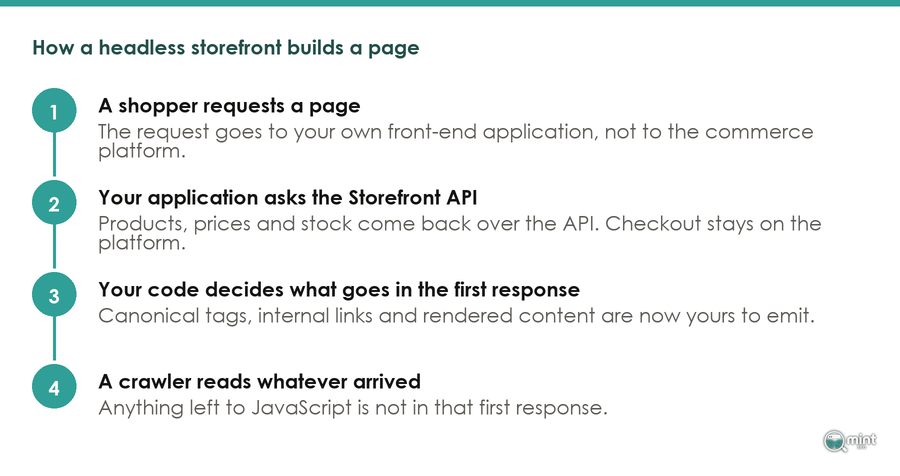
Nothing moves out of the backend, though. Your products, inventory, orders and checkout stay where they are. What changes is who builds the pages.
That distinction matters, because the constraint being removed is narrower than it sounds. Safia Marmon puts the limitation precisely in the Women in Tech SEO Knowledge Hub.
Her point is blunt. "if you're using Shopify, you have to customize everything in Shopify's Liquid language", she writes in the Knowledge Hub.
The commercial version of that same Liquid constraint is worth having too. MobiLoud publishes a guide on when Hydrogen makes sense.
It puts the trade plainly. You need React developers, and you lose access to many Shopify themes and apps.
Headless means building more than configuring. That is the line I would read twice before signing anything.
Fontis, an ecommerce development agency that builds these storefronts, is blunter about what changes hands. Its guide for CTOs calls headless a strategic choice that shifts responsibility onto developers.
Responsibility is the operative word, and it is what the rest of this article is about.
There is an organisational cost underneath the technical one. Spring 2 Digital, writing on headless SEO problems, notes that the biggest issue "often comes from maintaining two separate systems, potentially requiring two engineering teams."
Read that as the summary of the whole trade. You are not buying a feature so much as taking on a second thing to run.
How That Differs From The Store You Are Running Now
Architecture is not where the difference bites. Work your theme currently does without being asked becomes work somebody on your side has to build and own.
A theme is a bundle of decisions made before you arrived. On every page it emits a canonical tag, and between your collections and products it generates the links.
Your merchandiser also gets a button that changes a page. That button belongs to the theme.
None of that lives in the backend, which is why none of it survives the swap.
MobiLoud names the bill that follows. "The cost most merchants underestimate is that headless storefronts need a developer on call", its guide warns.
What You Gain: The Parts A Theme Will Not Let You Change
Headless buys you the URL path, and that is the clearest gain of the lot. It is the one on-page area a Shopify theme will not hand over.
Shopify decides that your categories sit under a `/collections/` segment and your products under `/products/`. No amount of theme work changes it.
That is also why ecommerce category page SEO is mostly about what sits on the page itself.
To show the difference, Marmon sets two real brands side by side, both selling temporary tattoos on Shopify.
As Marmon puts it, "Both are eCommerce brands that use Shopify to sell temporary tattoos; however, Inkbox uses headless" and lands on inkbox.com/japanese-tattoos. Ezink stays on ezink.co/collections/japanese-tattoos.
That is a real gain and worth naming plainly. It is also worth asking how much revenue sits on the difference between those two URLs. For a store selling in one country to one audience, the honest answer is usually not very much.
What You Take On: Everything The Platform Was Doing Quietly
Marmon's list of what breaks reads best as a job list. "headless systems can disrupt internal linking because APIs focus on delivering content rather than establishing logical link structures", she notes.
Metadata goes the same way. "Managing metadata (such as title tags and meta descriptions) is straightforward with conventional CMS platforms like WordPress" but not on a headless build.
Nothing generates your internal links any more. Somebody has to design them and put them in the served HTML.
Your images need that same attention. Improperly linked or misconfigured file paths "could prevent search engines from scanning and indexing photos". No themed store has that problem, because the theme handled the paths.
Retiring a page becomes your job too. Keeping your ecommerce sitemap honest does as well.
Marmon is direct about that consequence. "Headless systems can lack proper workflows to manage outdated or expired pages" and orphan pages stay indexed. Headless builds "can lack proper workflows to manage outdated or expired pages, leading to orphan pages that are still indexed by search engines." A theme had an answer for that. Your application will have whatever answer you write for it.
What Going Headless Does To Your Organic Search
Anyone asking what is headless ecommerce going to do to my rankings deserves a straight answer. By itself, nothing.
What it moves is your on-page search foundation, from the platform's responsibility to yours. Whether that costs you anything depends on who picks it up.
Fontis states the position more usefully than either of the stories you will have heard.
"Headless commerce doesn't kill SEO, poor implementation does."
Rankings can be preserved and even improved with server-side rendering and careful redirects. None of it is automatic. A headless build "won't magically boost search performance".
In the ecommerce audits I run, stores that lose organic traffic through a replatform almost never lose it to the architecture. They lose it to work nobody was assigned.
That redirect map is one. Templates that stopped emitting a canonical are another. So are internal links that used to be generated and now are not.
That is also what makes it preventable. It is the same failure pattern we see across ecommerce migrations generally.
What A Crawler Actually Receives From A Headless Storefront
The argument is settleable, so here are the numbers behind it. "I crawled all 16 live storefronts on Shopify's own published Hydrogen list on 12th August 2026", taking the sample frame from the list Shopify publishes so the classification is theirs and not mine.
A control group of fourteen Liquid-theme stores went through the identical process on the same afternoon.
That crawl gave a reassuring answer to what is headless ecommerce doing to a crawler. Those head tags held up.
Sixteen of sixteen served a title. Thirteen of sixteen served a meta description, and thirteen of sixteen a canonical.
Structured data held up too. "On structured data the headless group came out ahead" of the themed one.
Eleven of the sixteen headless storefronts carried JSON-LD schema against nine of the fourteen themed stores. Twelve of sixteen carried an H1 against nine of fourteen.
Tags were never the gap. "The gap was not in the tags, it was in the page. The 14 Liquid-theme stores I measured the same way served a median of 1,608 words" of text to the crawler before any JavaScript ran, against a median of 678 on the headless group.
That is under half, and the tail is thinner still. "Three of the 16 headless storefronts served fewer than 150 words to the crawler", and on those the whole page is assembled after the first response.
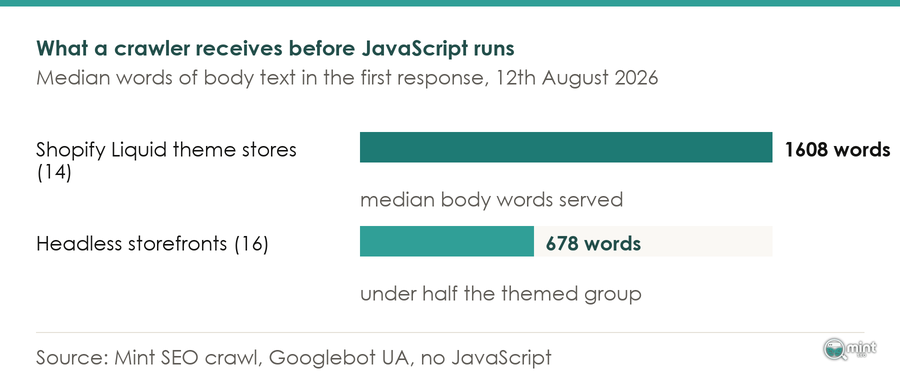
Two things follow from that table. They point in opposite directions.
Teams that build a front end deliberately often do the on-page basics better than a theme does. That is why the schema and H1 numbers favour the headless group.
Against that, "Every one of the 14 Liquid-theme stores served a canonical tag, 14 of 14", against thirteen of sixteen on the headless group. The platform had been emitting it whether anyone thought about it or not.
Two things about that sample are worth stating, because Shopify compiled the list and I did not. "Three of the 16 storefronts on Shopify's Hydrogen list were still serving" Liquid theme assets, so the boundary between headless and not is blurrier in practice than the pitch suggests. A second, denimtears.com, answered a 404 on the path the list pointed at.
The Canonical Tag Is The One To Watch
Google processes a JavaScript site in stages. It crawls the raw HTML first and renders afterwards, and canonicalisation happens on both passes.
Timing is what makes this specific. "Google confirms that canonicalization can occur before rendering and after rendering", according to one reading of the updated documentation, which leaves room for two different canonical URLs on the same page.
What follows is short enough to hand straight to a developer. Canonical tags should be "consistent in both raw HTML and rendered HTML". Avoid changing them via JavaScript unless necessary, and make sure only one canonical URL remains after rendering.
Server-rendering the tag is not the end of it. "In hybrid setups where server-rendered HTML is hydrated by JavaScript, canonical tags can accidentally change during hydration", and that is common in React-based frameworks.
The underlying reason is timing. "Canonicals present in raw HTML are processed earlier and more reliably than JavaScript-injected ones."
This is the check I would put at the top of any headless launch plan. It belongs alongside the rest of a proper pre-launch crawl and indexation pass.
A related trap sits in how a custom front end builds its filter URLs. Sophisticated filtering can "produce huge numbers of low-value URLs". Where each combination generates a crawlable page, search engines spend their time on near-duplicate variants instead of priority pages.
What Stops Working The Day You Switch
Losses that catch merchants out are operational ones. They land on the first day the new storefront is live.
One merchant wrote that first day up on the Shopify Merchants Community in May 2025. "This thread is both a question of what to do and a cautionary tale for those who are going to use hydrogen as their main store", their post begins.
They had launched during a rebrand. Hydrogen could not serve as their main store, which meant two domains and a redirect theme to get product links working.
Those redirects then cost them something else. Google blocked their store from its shopping feed the following day, they wrote, "because we redirect users from product pages using redirects".
A workaround adopted to make the storefront function had broken a different Google surface. Support could not resolve it. They contacted technical support twice, and the second time were referred to app developers or the community.
Your Theme-Injected App Layer Stops Running
The app store is where the day-one damage concentrates. "The majority of Shopify apps are built to inject code into Liquid themes. In a Hydrogen storefront, those theme-based apps don't function", MobiLoud's guide states.
Anything that reaches your storefront by dropping a widget into the theme is in that category:
- Review and ratings widgets on product pages
- Upsell and bundle blocks in the cart
- Subscription selectors on the product page
- Loyalty and referral panels
- Cookie and consent banners
- Live chat and help widgets
Each one needs a headless-compatible version from its vendor, or a replacement your developers build and then maintain.
Some vendors ship headless-compatible versions through APIs or SDKs, and plenty of others never have.
Your installed app list is therefore the real migration scope, and it is knowable this afternoon. Work down it and mark each app as vendor-supported on headless, replaceable, or gone.
That third column is where replatform budgets tend to break.
Nobody Can Edit A Page Without A Developer Any More
Your theme editor belongs to the Online Store channel, and the commerce backend never had it. Decoupling the front end leaves it behind.
Somebody has to choose what replaces it. "One of the first questions every Hydrogen project runs into" on a Shopify Community thread is how the marketing team changes a page.
On the Shopify catalogues we audit, the pages that earn the most organic revenue are almost always the ones a merchandiser can edit without booking developer time.
That is what a replatform takes away. It rarely appears on the quote.
Maintenance does not stop at launch either. "Shopify's Hydrogen release v2026.4.0 in April 2026 carried two breaking changes", an agency changelog analysis records: the Storefront API proxy became always enabled and backend consent mode became the default.
Those notes also record the deprecation of the `shopify/remix-oxygen` package. It completes Hydrogen's move from Remix to React Router as its routing layer. A themed store leaves that afternoon to somebody else.
How To Tell Whether Any Of This Applies To Your Store
Headless earns its cost when there is something the business cannot do on its current platform. For the majority of stores that ask me, the honest answer is that there is not.
The gains they hope to buy are still available on the platform they already have.
Three conditions make the case properly, and they are worth checking against your own store before anything else.
A store meeting none of those three is paying the ownership cost without reaching the thing that repays it. Where the real goal is a faster, better-organised store, an ecommerce SEO strategy reaches it on the platform you already run.
Work out what is headless ecommerce worth to you specifically. "The question I ask a store owner before anything else is what they cannot currently do that they need to do."
If the honest answer is a design change or a page speed score, that is not a headless problem.
When somebody asks me about going headless, I check three things before anything else. Are the pages they want to rank already being crawled, do those pages carry a unique title, and do they answer the question the searcher typed?
In most site audits I run, at least one of those three is missing. Each of them is fixable on the platform the store already has.
The platform is almost never the binding constraint on a store's organic performance.
Timing deserves a thought as well, because the tooling is still moving. In its Spring 2026 Edition Shopify rebuilt Hydrogen from an opinionated React framework into a modular commerce toolkit. It can now be brought to Next.js and Astro.
A platform still changing shape is an argument for letting somebody else go first.
Where a deadline is forcing the decision, name it as such. Shopify Scripts reaches end of life on 30th June 2026, and custom checkout logic has to migrate to Checkout Extensibility whatever your front end is built on.
That is a checkout migration. It is not an argument for rebuilding your storefront at the same time.
Get A Straight Answer On Your Own Store Before You Rebuild Anything
Weigh a replatform decision against what your store is losing in search right now. That is measurable before you spend anything.
In the ecommerce audits I run, the stores that lose organic traffic through a replatform almost never lose it to the architecture. A new front end carries those problems across intact.
Book a free 30-minute consultation and bring the replatform quote with you. We can go through which of the gains it promises are already reachable on your current setup, and which genuinely need the rebuild.
If headless does turn out to be right for you, you will go into that build knowing which parts of your search foundation have to be rebuilt deliberately. That beats discovering them afterwards.
Most of these calls end in one of two places. You leave knowing exactly what to brief a developer on, or you leave with a list of pages worth more than a rebuild would cost.

About the author
John Butterworth
John Butterworth is the founder of Mint SEO, a Manchester ecommerce SEO agency he started in 2024. He has 11 years in SEO and digital marketing, previously running SEO departments for market-leading brands and several agencies. He specialises in Shopify and ecommerce SEO, and his work has ranked over 100 websites and driven more than 3 million organic visits. He speaks at industry events including the SEO Mastery Summit.
Connect on LinkedIn →