
Knowledge Hub
Every Shopify App Is Rated 4.8. Here Is How I Pick The Ones Worth Paying For
By John Butterworth · August 14, 2026
Nearly every app on a Shopify shortlist is rated somewhere between 4.7 and 5.0. That means the star rating can't tell you which of the best Shopify apps for ecommerce is worth paying for.
I've audited Shopify stores for eleven years at Mint SEO in Manchester, and those audits keep finding money in the app stack that owners forgot they had ever committed to.
So I have named the app I install for each job a store has and totalled what that stack costs. Along the way it covers the six jobs Shopify has taken over itself, and it ends on one check to run on an App Store listing before you install.
How I rank an app when every rating looks the same
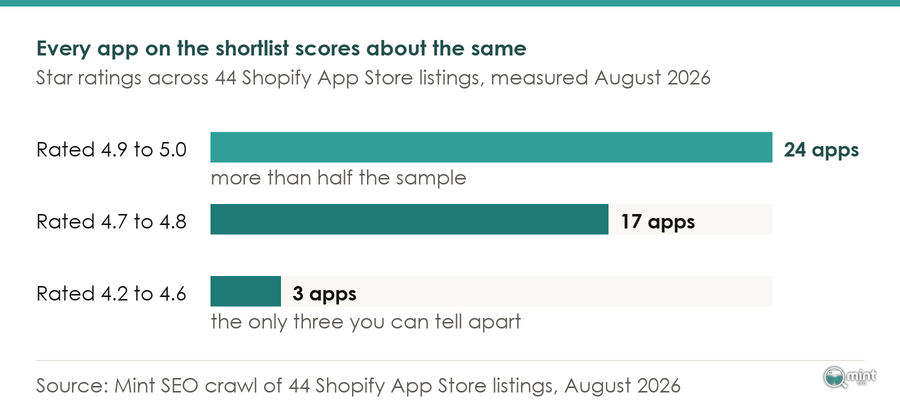
In August 2026 I crawled the Shopify App Store across fourteen store jobs, recording every rating, review count and entry price. 41 of the 44 Shopify App Store listings we measured score 4.7 or better and the median is 4.9.
24 of the 44 apps we measured sit at 4.9 or higher, so more than half the sample shares the top tenth of a star.
A rating clustered that tightly tells you nothing about which app to install.
Nor does the Built for Shopify badge separate them. Thirty-seven of the 44 carry it, and the programme requirements set the bar at "a minimum of five reviews", so certification on five of them sits beside certification on forty thousand.
Pop-ups show it at its sharpest. Attrac rates 5.0 across 1,032 reviews and Wisepops 4.9 across 63, which is a tenth of a star apart. Wisepops costs thirty-three times what Attrac does, and the star column can't show you any of that.
Four things do vary, so those are what I rank on. First is whether your store has the job at all, and second is whether Shopify already covers it free.
Those two are quick to check. Third is the price at the tier you end up on once the free period and the upgrades are behind you, and fourth is how it puts code on your storefront.
Review volume is the fifth signal, and the one listing number that still discriminates. Judge.me carries 43,393 reviews at 5.0 while Trustoo Ali Reviews Importer carries 121 at 4.9. On stars they are near-identical; on evidence one has more than 350 times as much.
The picks, by the job your store actually has
Six jobs cover most of what a growing store asks a Shopify app to do, so these are the best Shopify apps for ecommerce arranged by job. The table underneath carries every rating and entry price.
Reviews: Judge.me
Judge.me is the reviews pick for most stores. Its 43,393 reviews are what earn it that place, since a 5.0 on its own tells you nothing. Loox comes closest at 8,965 reviews and starts at more than three times Judge.me's entry tier. That premium buys photo and video collection, which earns its money on a product people want to see in someone's home.
Email: start with Shopify Messaging, move to Klaviyo when segmentation earns it
Shopify Messaging gives every store 10,000 free emails at the start of each month. Its email pricing charges a dollar per thousand after that, and abandoned checkout automations never count towards the limit.
Against that free allowance, Klaviyo's entry tier buys segmentation rather than sending. It earns the money the moment your campaigns depend on what someone browsed and bought, which a monthly newsletter to four thousand people is not.
Omnisend and Seguno both rate above Klaviyo. Neither being higher rated makes either the better tool for your store.
Upselling: Upsell.com ReConvert
Upsell.com ReConvert is the cheapest entry point in our whole sample, and it works on the page where the shopper has already paid, so nothing it does can get between anyone and the checkout.
Frequently Bought Together puts recommendations on the product page instead. More shoppers see it and more of them can be distracted by it, so make that trade once the post-purchase offer is already earning.
Loyalty: Smile
Smile, BON, Rivo and Growave all start at exactly the same monthly price. Price is off the table, so something else has to decide it.
That something is integration. A points balance your email tool cannot see is a balance nobody gets reminded about, and what customer retention looks like before the first order lands covers where the payback sits.
Support: Gorgias
Gorgias is the lowest-rated app in our entire sample at 4.2, and I'd still put it in front of a store handling real ticket volume. It is built around order context rather than chat sessions, so whoever answers can see what was bought and when it shipped.
A 4.2 that tells you something beats a 4.9 that tells you nothing. Chatty and Tidio both rate higher and both suit a store with somebody sat there to answer.
SEO and image weight: Tiny SEO
Tiny SEO rates 5.0 across 2,257 reviews. It does the two jobs software can do unattended on a Shopify storefront, which are compressing images and managing redirects. Everything else an SEO app advertises is theme work or content SEO work. No app performs either for you, so buy the utility and read the rankings language on the listing as marketing.
Six jobs Shopify now does itself
The Winter and Summer '26 Editions moved paid-app work into the platform without much noise. A shortlist written a year ago will still tell you to buy several of these.
Theme testing is the clearest of these cases. Shopify's Rollouts, introduced in the Winter '26 Edition and found under Markets, separates a launch from an experiment, and experiments need the Grow plan or higher.
Before buying any testing app, read what your traffic level lets you test. Few stores have the volume to run one meaningfully.
The rest are free first-party apps, and each publishes the point at which it stops being enough. Shopify Forms is free, rates 4.5 across 666 reviews, and writes pop-up signups straight into the customer list Shopify Messaging sends from. Shopify Inbox is free, rates 4.6 across 5,491 reviews, and covers storefront chat.
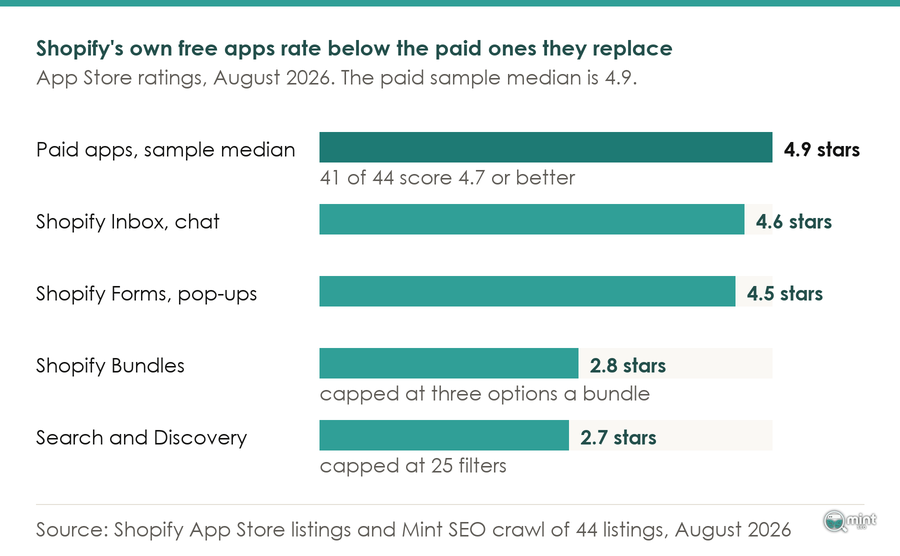
Two of them rate badly for a reason worth sitting with. Shopify Bundles is free and creates fixed bundles and multipacks from the admin, and it rates 2.8 across 543 reviews because of a hard limit of three options per bundle.
Shopify's own Search and Discovery app is free and adds synonyms, filters and product boosts from the admin. It rates 2.7 across 458 reviews, with reviewers naming a 25-filter limit as the reason.
Those are the lowest-scoring apps in this article and I would install both before paying for anything, because a documented limit is a different thing from a broken product.
You can read that limit before you install and decide whether it binds on your catalogue. Where it does, Kaching Bundles clears the bundle ceiling and Boost clears the filter ceiling.
On when that filter spend is justified, what your store's search does when a shopper spells it wrong goes into it properly. Collection sort and cross-sell moved into the admin too, which changes which merchandising decisions are yours.
Counting email, that is six jobs the platform now covers, and I applied the same reasoning to AI tooling in the AI tools worth paying for.
What the app stack costs per month and per year
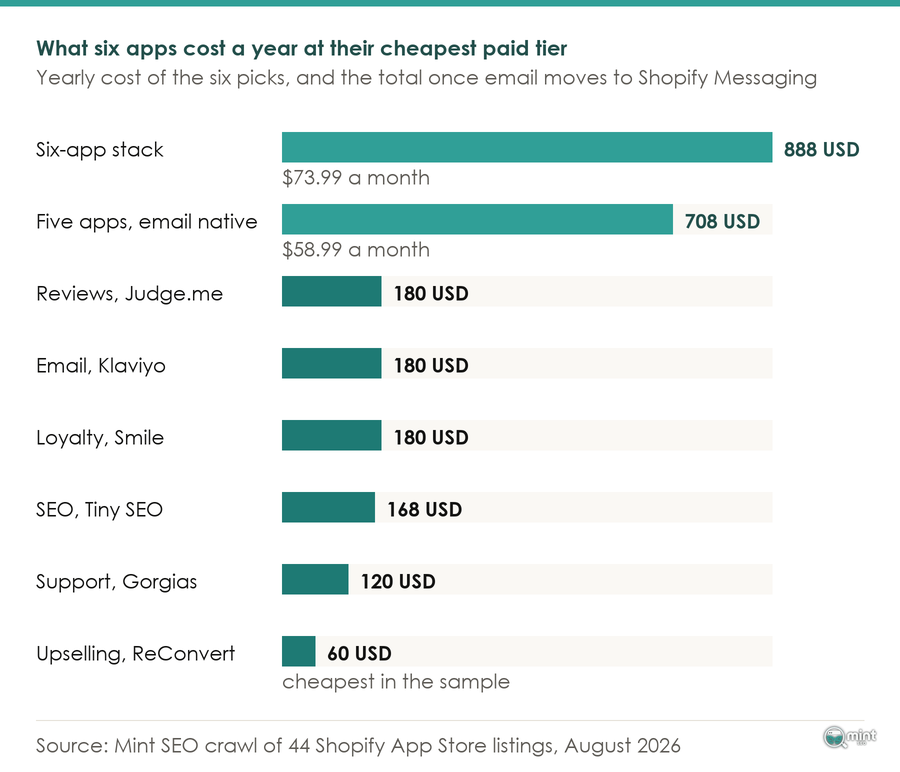
Take the six picks above at their cheapest paid tier and the same analysis puts the running total at $73.99 a month, or $887.88 over a year before anything moves to the tier you will end up on.
Now drop the email line, because the section above showed the native tool covers it to 10,000 sends. That same analysis puts the leaner stack at $58.99 a month and $707.88 a year, and it loses no job at all.
For scale, StoreCensus, tracking 2,184,727 active stores, puts the average Shopify store at 6 apps. 18% of stores run no third-party apps at all and 12% run ten or more, so a six-app stack sits comfortably in the middle of that distribution.
That yearly figure still surprises most owners, because nobody adds it up. Pricing is the part of choosing the best Shopify apps for ecommerce that gets checked once at install and never again.
One more finding from that crawl cuts both ways. Every one of the 44 apps offers a free plan, so nothing here has to be paid for on day one, and that is also why stacks grow without anyone noticing.
What Shopify allows an app to cost your storefront
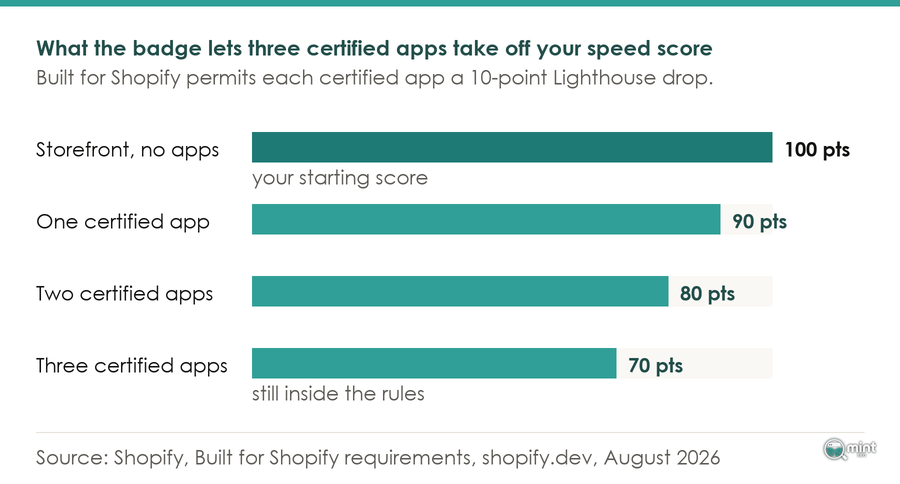
Apps slowing stores down is the oldest complaint on the platform. What usually goes missing from it is that Shopify publishes an actual number. To earn the Built for Shopify badge, "Your app must not reduce the storefront Lighthouse performance score by more than ten points." Ten points is the permitted cost of one certified app, so three of them can legitimately take thirty.
Those same requirements govern apps loading in the Shopify admin. Largest Contentful Paint must hold at 2.5 seconds or less, while Cumulative Layout Shift must hold at 0.1 and Interaction to Next Paint at 200 milliseconds, both at the 75th percentile. Back on the storefront, page builders spend more of that ten-point allowance than most, because they render the whole page themselves.
Shopify publishes that measurement too. Shopify's web performance report is built on Real User Metrics from actual visitors, and its chart marks app installations against your Core Web Vitals over time.
That's your check, and one install runs it. Note the date, leave it a few days for the data to land, then see whether the line moved.
If it moved, you now know what that app costs in something other than money. Reading those numbers honestly is its own skill, which why your Shopify speed score is lying to you goes into.
Owners describe that as a step change. A Shopify Partner answering a community thread on app hosting put it plainly: once a store leans on several critical apps, its LCP and INP values plunge together.
How to tell whether an app can be removed cleanly
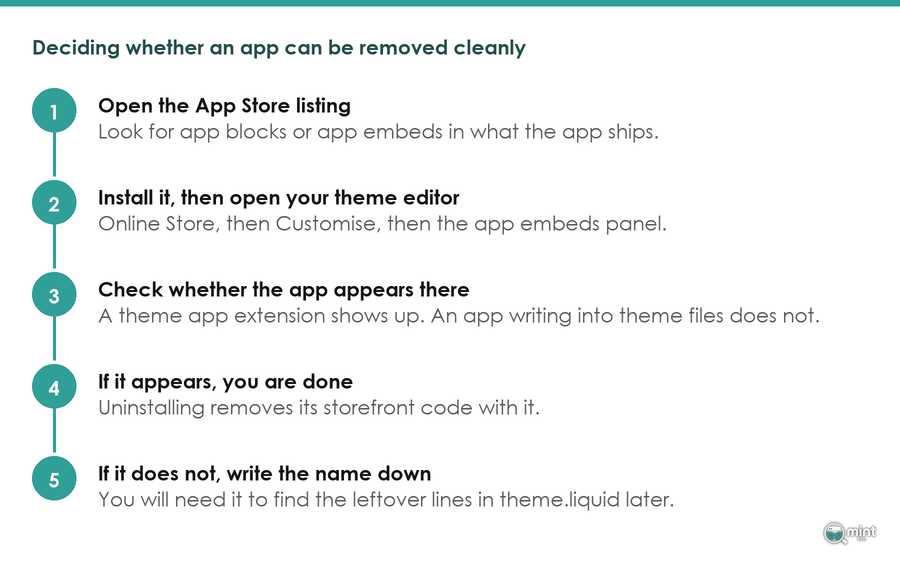
Nobody asks at the install screen what happens at the uninstall screen.
It has a real answer and you can check it first.
That answer is plain enough. Shopify's documentation says theme app extensions "automatically expose your app in the theme editor", so nothing has to be edited by hand.
They ship as app blocks and app embeds. Shopify's own phrasing is that "merchants won't need to manually edit their theme code". Anything built that way is added and removed from the theme editor, so it leaves when the app leaves. Anything writing into your theme files instead does not.
On that second kind, the Shopify Community carries years of threads from owners who uninstalled something and found it still running. One merchant traced an upsell app still sitting in theme.liquid months later, spotted in a Lighthouse run.
It took a Shopify Partner to identify the exact leftover lines for them, which opened with a window.BOLD declaration. That's the cost of not checking, paid months after the decision that caused it.
This is worth doing this month, because the ground under it is still moving. Shopify Scripts stopped executing entirely back on 30th June 2026. The next date has not landed yet, and post-purchase apps meet it first. Open your app list and pick out anything that writes to the Thank You or Order Status page after checkout.
If one of them still injects with script tags, it goes quiet on 26th August 2026 everywhere below Shopify Plus. You'll hear that from a customer long before the developer emails you.
Getting a second opinion on your stack
Nine times out of ten a store asks me which of the best Shopify apps for ecommerce will fix a revenue problem. The answer usually sits on pages an app never touches.
When we worked with BedShelfie, a Shopify store leaning heavily on paid traffic with under-ranking product and collection pages, we ran a twelve-week seasonal programme of on-page SEO work across products and collections. It added technical fixes and buyer-intent content timed to peak demand, and it produced 256% more sales from Google Search.
That programme drew on a system of eight disciplines against one job. Keyword strategy, technical SEO and on-page SEO cover the store itself.
Content funnel work, product feed visibility and agentic optimisation cover how demand finds it. Digital PR and answer engine optimisation cover how a store gets cited off-site.
On a Shopify store, that starts with an audit of what is already installed. A stack grown one app at a time is the cheapest thing to fix.
Whether your app stack is costing you sales as well as money is worth pinning down. Book a free 30-minute call with me and I will tell you which it is.

About the author
John Butterworth
John Butterworth is the founder of Mint SEO, a Manchester ecommerce SEO agency he started in 2024. He has 11 years in SEO and digital marketing, previously running SEO departments for market-leading brands and several agencies. He specialises in Shopify and ecommerce SEO, and his work has ranked over 100 websites and driven more than 3 million organic visits. He speaks at industry events including the SEO Mastery Summit.
Connect on LinkedIn →