
Knowledge Hub
What Social Proof Is Worth Showing On Your Store (And Where To Put It)
By John Butterworth · August 16, 2026
There are twelve types of ecommerce social proof a store can show, and only two are worth your morning. Here they are, ranked and placed on the page.
Social proof is the evidence other customers leave behind, and only a few forms of it do real work on an online store.
Those few are reviews and star ratings on the product page, real photographs from customers, and the review count sitting beside the average.
That ranking comes from somewhere, so here is where. I am John Butterworth, founder of Mint SEO, and across 11+ years of Shopify and ecommerce SEO one finding keeps coming back in our audits: the reviews app is already installed, already paid for, and doing about half its job.
Later in this article I put a number on that half, from a crawl of 57 live product pages.
What changed this year is the rulebook around all of it. Google rewrote part of its review guidance in July, and a UK regulator started opening cases in March. Both arrive later, because both change what you are allowed to do.
What To Show On Your Store, And Where To Show It
Of all the social proof sold to ecommerce stores, reviews deserve your effort first and photographs second. Treat the rest as optional.
That order follows from what a review can do. It is the only form of social proof about the exact product being looked at. That lets it settle the question the shopper is asking.
A badge in the footer talks about your store in general. It cannot settle a doubt about this jumper in this size.
Reviews, Photos, Popups And Badges, In Order Of What They Are Worth
Reviews and star ratings come first, and they pay most where the product costs most. Researchers at Northwestern University, working with PowerReviews, put numbers on that in their review of retailer data. When reviews were displayed for a lower-priced product, the conversion rate increased 190%, and for a higher-priced product the conversion rate increased 380%.
Twice the effect, for the same work. If you cannot do the whole catalogue at once, begin at the expensive end of it.
One detail decides how much that rating is worth to a shopper. Always show the review count next to the average. A score with no sample size attached gives the shopper nothing to weigh it against.
A bare 4.6 gives them nothing to work with. Put 312 reviews beside that same 4.6 and the score has 312 opinions under it; put three beside it and the shopper knows to go and read all three, which is also useful.
Both numbers are usually there for the taking. Most review widgets display them by default, and plenty of themes then hide the count to save space.
Photographs from customers come second, and they are the one thing a competitor cannot copy off your product page, because they show your product in somebody's house.
Better still, collecting them is a setting you switch on. Every serious reviews app has a tick box that adds a photo field to the request email.
Third, and a distant third, come recent-purchase notifications: the popups announcing that somebody in Leeds bought this an hour ago. Those work only when the activity behind them is real and frequent.
Run one on a store doing four orders a day and it either sits empty or starts recycling. A recycled notification is a claim a shopper can disprove by refreshing the page, which is worse than showing nothing.
Last of the four come trust badges, which borrow somebody else's credibility for a moment.
That still has a use. One payment mark or a returns guarantee near the buy button is worth having, while a stack of eight seals reads as a store arguing with an accusation nobody made.
Where Each One Belongs On The Page
Ranking the four is half the job. The other half is placement, and it starts with the rating. That belongs in the same screenful as the price and the add-to-cart button.
Proof changes a decision only if the shopper meets it before deciding. A review block halfway down the page therefore reaches people who already chose to keep scrolling.
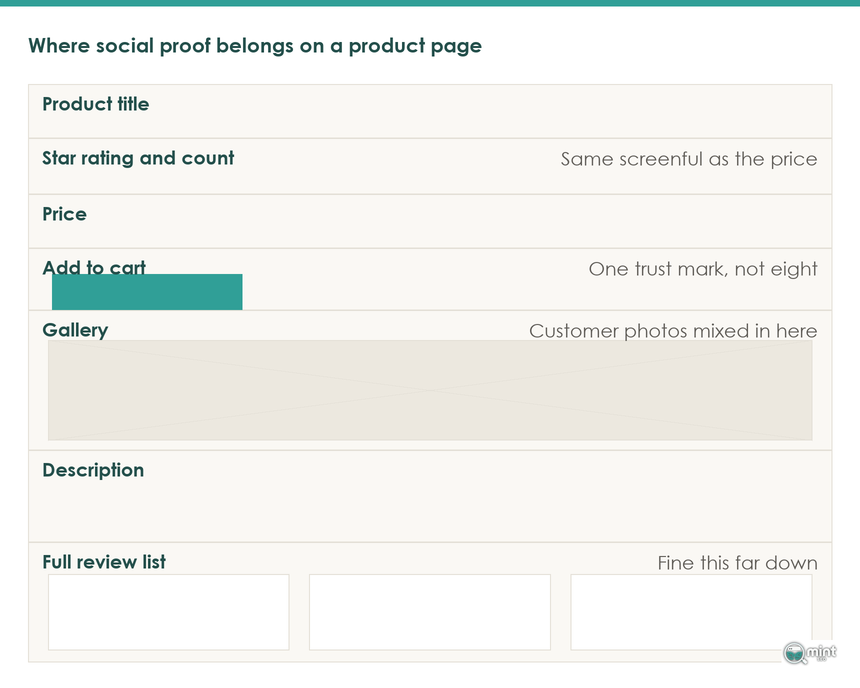
By the same logic, photographs belong in the gallery or immediately below it, mixed in with your own shots. Quarantining customer pictures in a section at the bottom wastes them.
Those gallery shots are working on someone who already clicked. Ratings in the collection grid do the job one step earlier, deciding which product gets clicked at all.
Turn rating badges on if your theme supports them on collection cards, and our guide to ecommerce CRO covers the rest of that template.
Trust badges get their moment further down the funnel, at the two points where money changes hands. Those are the cart and the checkout.
Testimonials, last of all, belong on the home page and almost nowhere else. A shopper on a product page wants to know about the product.
All of that is configuration work. In the Shopify audits I run, the first job is nearly always moving a block that already sits on the page, and it costs a morning.
Getting To A Rating Shoppers Actually Believe
Five real reviews per product is the target, and the average you want sits just below perfect.
Asking For The Review, And What You Are Allowed To Offer
Getting to five starts with the ask, and the timing of it does most of the work. Send the email a few days after the thing has arrived, since shipping confirmation is too early, and ask once before following up once.
Ask for the photograph in that same message. Somebody already writing will often add a picture, and almost nobody comes back later to do it.
Plenty of stores sweeten the ask with a discount code, and that is still allowed. Whether it is fine or a violation turns on one thing, and it is not the code.
It is what the published review says about the code. Since 24th July 2026 the wording a store has to avoid is spelled out in the review-snippet guidelines: "reviews written in exchange for a benefit … that don't clearly and prominently disclose the incentivization" are a violation. Disclosure has to appear on the review a shopper reads.
Silence is what breaches the guidance, so the fix is a line of text. Keep the discount, and make the app stamp the disclosure onto every review it produces.
Watch out for the obvious reaction here, because it is the wrong one. Drop the incentive and you lose the reviews while gaining nothing, because the guidance was never aimed at the discount.
A bigger stick sits behind the same principle in Britain, and it is pointed at ordinary retailers. The Competition and Markets Authority opened five investigations into review practices in March 2026, and it can now fine a business up to 10% of global turnover. The CMA has also swept more than 100 review publishers, of which 54 got advisory letters.
Ninety per cent of those firms then changed something, which is not the signature of an industry full of fraudsters.
Those businesses were displaying reviews in a way nobody had thought about, which is the position most stores reading this are in.
American enforcement has landed differently, bolted onto other cases. A final order against the supplement seller TruHeight, issued on 15th July 2026, carried a $4 million judgment suspended on payment of $750,000, and the review rule was the only basis for the money.
Commissioner Mark Meador, writing alongside another of those cases, put the part that matters to an honest store plainly. The fraud "defeated the efforts of diligent consumers who went to extra lengths to try to hire reputable providers with good reviews". Fake reviews do their worst damage to the shopper who researches hardest, which is the shopper you were trying to win.
Closer to home for a Shopify store, one trap is worth knowing before you send anything. Merchants in Shopify's own community forum have spent months reporting that the Shop app emails its own review request to Shop Pay customers.
Those reviews then land inside Shop, never on the store's product pages, and they cannot be exported into the reviews app the merchant pays for. A customer answers the first email they receive, so if that email is Shop's, your product page never sees the review.
What Star Rating To Aim At, And Why Five Is The Wrong Target
With reviews arriving, the question becomes what average to aim at. PowerReviews analysed ratings across more than 20 million product pages on over 1,000 retail sites, and its finding is blunt: 4.75 to 4.99 stars is the optimal product rating for conversion.
Look at the top of that scale, though, and it turns strange. Products with average ratings of 5 stars have comparable conversion rates to products with 3.0 to 3.49 stars.
That is not a quirk of the data. A flawless score reads as a filtered score, so shoppers discount it, which is why the three-star reviews are worth leaving up. They are what makes the four-star ones believable.
Volume follows the same shape, and its curve has a knee in it too. In the Northwestern work, the marginal benefit of additional reviews begins diminishing rapidly after the first five.
Spreading effort across the catalogue therefore beats piling three hundred reviews onto one hero product.
Two stores from our August crawl sit either side of all this. Kettlewell Colours shows 5.00 from 5 reviews on the product page and marks up the same 5.00 and the same count. That is honest, and it reads as honest.
Chilly's took the harder decision. Chilly's shows 3.7 from six reviews, a score well below the category norm and displayed anyway, and a shopper can weigh that.
Worse than either is the third state we kept finding. Seven of the 57 stores had a reviews app installed and rendering on the product page with nothing in it, an average of zero and no reviews to show, and an empty widget advertises the absence.
Why Your Star Ratings Do Not Show Up In Google
Everything above works on a shopper who already reached your page. This is the half of ecommerce social proof that reaches the shoppers who never got there, and because no guide we read covers it, we went and measured it ourselves.
What The Crawl Found
On 16th August 2026 we read 57 live Shopify product pages, across two pre-registered groups of fashion and mixed consumer brands.
Every page went through twice, the second pass with scrolling and a long wait, so review widgets that inject themselves late were captured.
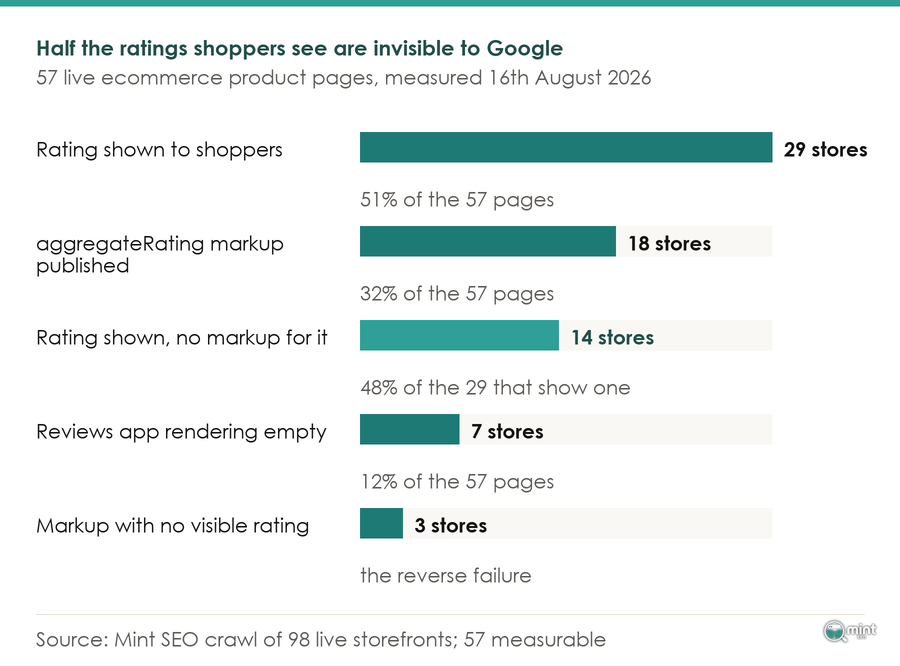
Row three of that chart is the one costing stores money. Of 57 live Shopify product pages, 29 showed the shopper a star rating or a review count, and fourteen of those 29 published no aggregateRating markup at all.
Call that what it is: almost half the stores doing the work are handing Google nothing to read.
None of that is carelessness. Review apps paint their rating into a theme widget, while structured data is a separate output that has to be switched on, so the two numbers come from different places. On those 14 stores only one of them exists.
Ridge shows how little review volume protects you. Our crawl found Ridge's product page showing 4.8 from 51,525 reviews and publishing no aggregateRating markup at all, so the largest review count in the sample counts for nothing in a search result.
Three stores managed the reverse, marking up a rating that nothing on the rendered page showed. The review-snippet guidance is written against exactly that: marked-up review content has to be available to users on the page itself.
One of the three was a swimwear brand. Cupshe published markup carrying a perfect score on a product page where our crawl found nothing rendered for a shopper to see.
Beyond that visibility rule, two further rules govern what you can mark up at all. Ratings a business hosts about itself earn no stars when marked up as a local business, so product-level markup is the one that pays for a store.
You may not import another site's numbers either, so borrowing a Trustpilot score while your own count is thin is out.
Checking Your Own Product Page
Checking your own store takes a minute. Open a product page, view the source, and search it for aggregateRating. An empty search result is the same finding those 14 stores produced.
Fixing it is usually a setting in the reviews app. Turn the option on, reload the page, and search the source again.
With the markup live, read the numbers. Watch your conversion tracking to see whether the extra clicks became orders, remembering that stars win the click and nothing else. The rest is the product page's job.
Where We Fit In
Running through all of this is one pattern. In ecommerce, social proof rarely needs buying: a store usually already owns it while getting half the value from it.
A sensible next step is having somebody look at the store. Our SEO audit goes through the technical setup, the on-page SEO work and the content, then hands back the order to fix them in.
Review markup and product page structure sit inside the same eight-discipline system we run for retainer clients. That system produced Hidden Garden's 9,470% growth in organic visitors over twelve months.
That audit is the thorough route. The quicker one is to book a free 30-minute consultation, which is half an hour with me and no sales rep. Send a product URL ahead of it and I will have already read the page twice, once as a shopper and once as a crawler.

About the author
John Butterworth
John Butterworth is the founder of Mint SEO, a Manchester ecommerce SEO agency he started in 2024. He has 11 years in SEO and digital marketing, previously running SEO departments for market-leading brands and several agencies. He specialises in Shopify and ecommerce SEO, and his work has ranked over 100 websites and driven more than 3 million organic visits. He speaks at industry events including the SEO Mastery Summit.
Connect on LinkedIn →