
Knowledge Hub
Ecommerce Checkout Process: Seven Steps And Where Each One Loses The Sale
By John Butterworth · October 11, 2026
Shoppers abandon a checkout at the step that surprises them. In an ecommerce checkout process, the surprise to fix first is a delivery charge the shopper only meets in checkout. A forced account sign-in comes next, then wallet buttons missing on a phone.
Find the failing step in Shopify's funnel report before you change anything. Compare the sessions that reached checkout with the sessions that completed it, then change one setting at a time.
Beyond those, the checkout problems I find include too many form fields and no one-click upsell. Below Shopify Plus the checkout settings cover sign-in, the phone field and wallets, while an upsell needs an app added in the checkout editor. Anything on the product page or basket is Shopify theme work rather than a setting.
Every Checkout Runs In A Fixed Order From Basket To Confirmation
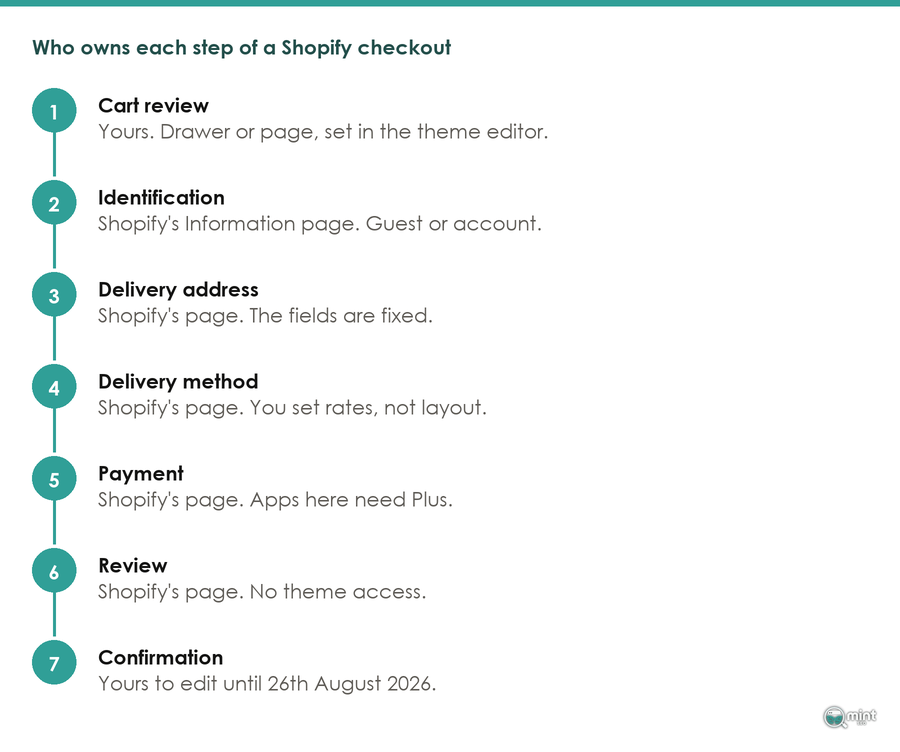
Every online checkout takes the shopper through the same sequence, whether it's a two-product Shopify store or a national retailer's site:
The order is set by arithmetic: delivery can only be priced once there is an address, and payment can only be taken once delivery has a price. That’s why the ecommerce checkout process looks the same on every platform.
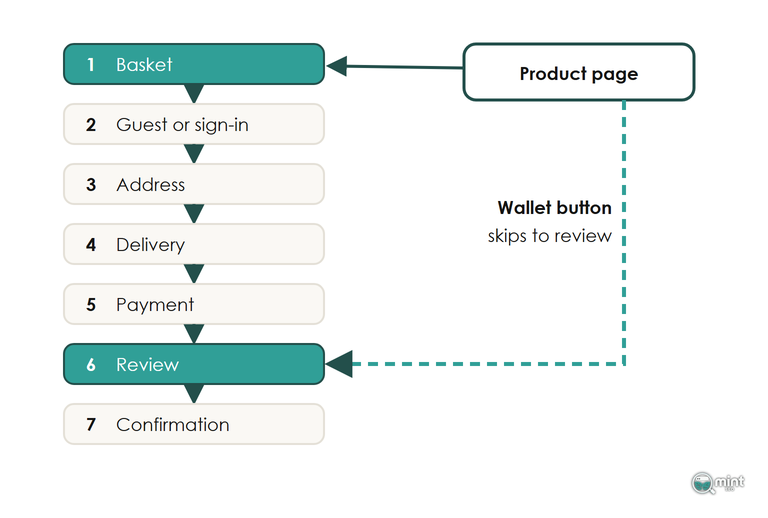
A wallet button on the product page is the one shortcut. Tapping it skips the basket, fills the address and card from the shopper's phone, and drops them at the review step.
Whether those steps sit on one page or across three matters far less than how many boxes the shopper fills in on the way. Most checkouts ask for more than an order needs. A split first-name and surname field is a common trip, because plenty of shoppers type their whole name into the first box.
Fix The Checkout Step Where Shoppers Abandon
Shoppers abandon checkout at the steps where something new appears, such as a cost they hadn’t seen, a sign-in they didn’t expect or a payment method they don’t use. Fix those checkout steps first, since the rest of the checkout runs the same way on every store.
Shopify's Funnel Report Shows Which Step Loses Them
In Analytics, read the two checkout rows first: sessions that reached checkout and sessions that completed it. If most people make the first row and few make the second, the problem sits inside the seven checkout steps.
A store where plenty of people reach checkout and almost nobody finishes has its problem in those checkout steps. A store losing people before they reach checkout needs the rest of the funnel above the checkout looked at first.
Make it a data-led decision: read the report and find the checkout step, then change one big thing and give it enough orders to show whether it worked.
Below Shopify Plus You Change Checkout Settings, Not Pages
On the standard plans, the information, delivery and payment steps of the checkout run on pages the platform owns. You can't move checkout fields around, vary them by country or add your own content to those three checkout pages, because the apps that customise them are only open to Plus stores.
On those plans, redesigning the middle of your checkout is off the table. What you do control lives in Settings > Checkout. Guest checkout, a required or optional phone number and the wallets you switch on are all set there.
You can add text and banners too, but below Plus they only appear on the pages a shopper sees after paying.
If your store ever relied on Shopify Scripts to change discounts or delivery rates at checkout, those scripts no longer run. That logic now has to come from Shopify Functions or an app built on them, so test any custom discount you set up a few years ago.
Hidden Fees Added At Checkout Now Break UK Law
A cost the shopper sees for the first time at checkout is the surprise I'd fix before any other. Put the delivery price, delivery time and returns window on the product page beside the price, so nothing new appears after they've decided to buy. I've written up how to lay out delivery and returns on the product page.
StubHub UK found out what a late fee costs under the UK's DMCC Act, which treats a compulsory charge added after the headline price as drip pricing. The consumer regulator fined StubHub UK £889,200 and ordered refunds to 51,350 customers, because its delivery and service fees only appeared on the very last checkout screen.
Optional extras such as next-day delivery can still be priced at the delivery step, but any charge every buyer has to pay belongs in the price they see first.
Forcing A Sign-In Also Hides Your Express Buttons
Making shoppers create or log into an account before they pay costs you twice on Shopify. The wall itself turns away people who only wanted to buy. Switching on the sign-in requirement also hides Apple Pay and the other express buttons from your cart, so nobody can skip past it, and Shopify itself warns that hiding them can cost you conversions.
Leave sign-in optional, so a guest can always pay without making an account. Offer the account on the thank-you page once the order is in, when the shopper has a reason to want order tracking.
Put The Wallets Above The Card Form
A wallet saves the shopper typing an address and a long card number on a phone keyboard. The latest UK Finance payment figures, published in August 2026, put 65 per cent of UK adults on at least one mobile payment service, so most of your buyers carry one.
Because so many carry one, Shopify places the express options at the top of checkout and orders them by what each shopper is likeliest to use.
Wallet use falls away sharply among older shoppers, though, so a store selling to retired buyers still needs a card form that is quick to fill in.
Switch on every wallet your payment provider supports, and keep the Buy it now button on your product page, since it sends a ready buyer straight past the basket.
Buy now pay later sits at this step too. Since 15th July 2026 it has been regulated by the Financial Conduct Authority, with affordability checks and clearer repayment terms. A first-time buyer on a bigger basket now gets more protection than they used to.
Give Shoppers A Real Reason To Pay Today
Open Orders > Abandoned checkouts in your admin and every name there typed an email and then stopped short of paying. I'm a big fan of urgency because of that list: give buyers a reason to purchase right now, otherwise they delay.
Urgency is a different lever from discounting, and it doesn't need a code. An order-by time for next-day delivery, real stock levels and an offer with a genuine end date all give a deadline without cutting your margin. Keep every one of them real. A countdown timer that resets itself is banned in the UK under the same consumer rules as drip pricing. I’d only recommend urgency that is true, and a real cut-off does it without the risk.
Check The Thank-You Page With One Test Order
For every non-Plus Shopify store, the final page of its ecommerce checkout process changed in summer 2026. Under Shopify's thank-you page upgrade, 26th August 2026 was the deadline to move to the new thank-you and order status pages. Stores that hadn't upgraded by then were moved over automatically, losing their old Additional Scripts along with any app code injected there.
After the switch, orders still go through and on the surface nothing looks broken, which is exactly why a stopped purchase tag goes unnoticed. An ad tag pasted into the old scripts box no longer fires, and your reports undercount sales without any warning. One test order, run in this order, shows whether your tracking survived:
- 1. Place the order on your phone, through the same checkout a shopper uses.
- 2. Check that Google Analytics and each ad platform recorded exactly one purchase at the right value. If a tag has gone, rebuild purchase tracking on web pixels.
- 3. Open the thank-you and order status pages for that order and confirm any upsell or survey still shows on both, since they're set up separately in the checkout editor. If an upsell app is missing from the editor's app block list, check the Apps tab first. One that still doesn't appear was never rebuilt for the new pages and needs swapping for an app that was.
Go Through Your Checkout Funnel
Start with the two checkout rows in Analytics and the options under Settings > Checkout. Between them they show where your shoppers drop and which setting changes it, using your own order numbers.
Where a fix sits on the product page or the basket rather than in the settings, our Shopify theme development work can build it. That work sits alongside the ecommerce SEO services that bring shoppers to your basket, since a checkout can only convert the traffic that reaches it.
If the traffic side needs looking at too, the free audit covers it. Page one charts twelve months of organic traffic alongside your top keywords. The second sheet lists commercial searches your competitors win where you're not on page one, with the monthly demand behind each.
You get it as a two-page PDF the same day, with no call and no obligation. Get a free SEO audit of your store to see the half of the problem that sits before checkout.

About the author
John Butterworth
John Butterworth is the founder of Mint SEO, a Manchester ecommerce SEO agency he started in 2024. He has 11 years in SEO and digital marketing, previously running SEO departments for market-leading brands and several agencies. He specialises in Shopify and ecommerce SEO, and his work has ranked over 100 websites and driven more than 3 million organic visits. He speaks at industry events including the SEO Mastery Summit.
Connect on LinkedIn →