
Knowledge Hub
International Ecommerce SEO: Rank Abroad Without Losing Your Home Market
By John Butterworth · October 11, 2026
A store selling abroad has to rank in each new country without its home pages losing their place. That is the job of international ecommerce SEO, and it comes in three steps taken in order.
First, give each market its own folder on the domain that already ranks. Next, add hreflang tags so searchers in each country land on the page meant for them. Last, make each version local in price, delivery and wording. Translation covers part of that final step and neither of the first two.
On Shopify, the first thing I’d check is whether each market has a folder at all. A newly added single-country market shares your UK URLs unless you give it one, and Shopify writes no hreflang for a market without its own URLs. Open Settings > Markets and fix that before you spend anything on translation.
Give Every Market A Folder On The Domain That Already Ranks
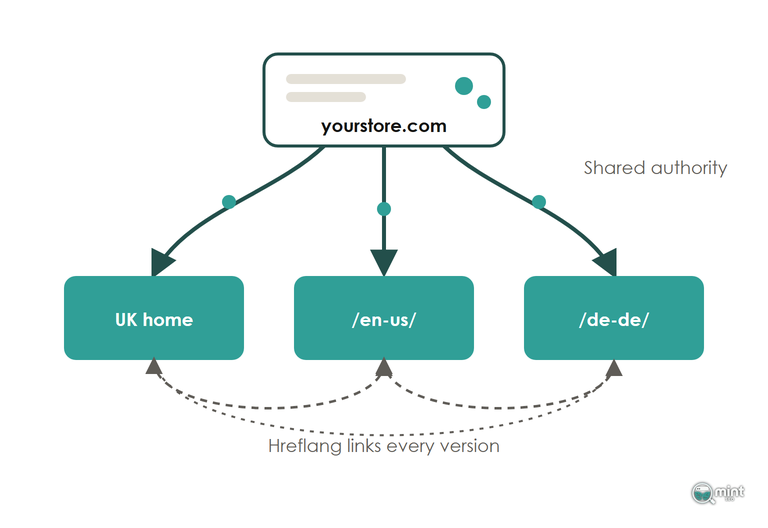
For most stores the right structure is one folder per market on the domain the UK store already ranks with. The UK keeps yourstore.com, America gets yourstore.com/en-us/ and Germany gets yourstore.com/de-de/.
Each folder sits on a domain Google already trusts, and the authority your main site has built carries straight into the new market from the first day. Because of that head start, I'd default to folders for any store going abroad.
For a typical store, the other two options cost more than they give back. A subdomain such as de.yourstore.com tends to be read as a separate site and builds its own standing slowly.
A country-code domain such as yourstore.de goes the other way, sending the clearest country signal of the three. That signal is expensive: every one needs its own registration and upkeep, some come with residency rules and each starts its rankings from zero.
I treat a country-code domain as the exception a store has to justify. A separate legal entity in that country can justify one, and so can a different brand name or a catalogue run by its own local team.
Wanting to look local is a weaker reason, since a well-localised folder reads as local to the shopper anyway.
Stores already running separate country domains can still move to folders, as long as it's handled as a migration. Map every old URL to its new folder URL and keep the pages matching. Redirect each one, and plan for a short dip that recovers in weeks when the work is done properly.
I've set out a mapped migration with redirects step by step.
Hreflang Keeps Your UK Pages Ranking In The UK
Hreflang is a set of tags in the head of each page. Each tag names the language and country one version serves, and together they list every version of that page.
Each Version Must Name Itself And Every Sibling
A hreflang set only works when it's complete. Your UK page lists itself, its US twin and its German twin, and each of those lists the same three.
If two pages don't both point at each other, Google ignores the pairing. One missing return tag is enough to take a market out of the set.
Point every tag at a live final URL that doesn't redirect, and add an x-default tag naming the page for shoppers whose country you haven't built a version for.
Those tags only help if Google can reach every version, and routing decides that. Googlebot mostly crawls from the US and sends no language preference, so a store that swaps content by IP address or browser language shows Google its American version and little else.
Offer shoppers a country selector or a suggestion banner, and let every market URL load for anyone who asks for it.
Check finished sets with a Screaming Frog crawl, which lists every page missing a return tag. A canonical pointing at the wrong market overrides the lot, so the tags have to agree with the rest of a store's crawl and indexing setup.
Identical English-Speaking Versions Get Folded Into One
A US, Irish or Australian folder carrying the same words, prices and delivery terms as the UK pages looks like a copy to Google. It tends to pick one version as the canonical and fold the rest into it.
Hreflang can still swap the right URL into the results when that happens. Clicks get reported against the canonical, though, and the new market looks empty in your reports.
Google treats this as consolidation of pages it can't tell apart, and no penalty comes with it. What tells them apart is covered in the section on building each market's pages.
Shopify Only Writes Hreflang For Markets With Their Own Folder
On Shopify you don't write the tags yourself. Shopify Markets builds the hreflang, the canonicals and the sitemaps from two settings: the URL each market uses and the languages published to it.
It only writes tags between distinct URLs, so a market without a folder or domain of its own gets none.
Plenty of stores are in that position and don't know it. Since Shopify's May 2023 change, a newly added single-country market shares your primary URLs unless you give it a subfolder. Shoppers there see their own currency, but Google has no URL to rank in that country and no hreflang to read.
Open Settings > Markets, choose the market and assign it a subfolder under Languages and domains. On a secondary market the folder needs a language and a country code, such as /en-us/ or /fr-ca/.
If you ever close one of your markets, redirect its folder. Otherwise every URL Google indexed for it starts returning a 404, and whatever that folder had earned in rankings goes with it.
Shopify Can Drop Your Home Market's Own Tag
Because Shopify generates the tags from your language settings, a change to those settings rewrites them without telling you. A UK home market published with only generic English can lose its own en-GB line, and Google starts showing other market versions to people searching in the UK.
After any change in Markets, view the source of your home page and one collection page. You should see a line for the page itself, a line for each market and an x-default.
If one is missing, fix it in the language settings.
A tag pasted into the theme by hand sits beside Shopify's automatic set, and two sets that disagree send Google mixed signals.
Build Each Market's Category Pages From Its Own Searches
Pages written from each market's own searches are what international ecommerce SEO rests on. A translated UK keyword list misses the words people abroad type: trainers become sneakers, jumpers become sweaters, and a German category name is often a compound no translation tool would choose.
Begin with the terms your best UK collections already rank for, and find what shoppers in each market call the same things. The method is the same as for picking keywords for a store.
Every tool's volume for a new market is directional at best, so treat it as a starting guess for the budget. Once the folder has impressions, filter Search Console by country and see which queries bring people in, then adjust the pages to match.
Category and product pages come first, because they earn the revenue. Blog posts can follow once those rank.
Price, Deliver And Word Each Page Locally
A localised product page shows the price in the local currency and the delivery time for that market. It also states the delivery cost and any duties the shopper will pay at the door, so nothing new appears at checkout.
Its wording follows the market too, down to the US page asking for a zip code where the UK page asks for a postcode.
Google judges a page's language from its visible text. A page with translated buttons and English body copy reads as English, whatever the folder says.
On Shopify, set local prices in Markets and adapt the copy for each one in Translate & Adapt. Your US version can then say sneakers while the UK keeps trainers.
Earn Links From Each Market's Own Press
A new market version earns its strongest links from that market's own press and publishers. Press coverage is the best link a store can get: it comes from trusted sites with real authority, and unlike a bought post it sends shoppers.
Pitch that market's journalists and roundups once the version is live and the pages are localised. I've covered where a store's off-page links come from in more detail.
Look At How Google Reads Your Markets
Problems with international ecommerce SEO tend to show up on two screens: the Markets settings in Shopify and the country report in Search Console. Open both and compare which version Google shows in each country, and which pages carry no tags at all.
Where the fix is hreflang, subfolders or redirects, our technical SEO work handles it end to end. If you’d rather hand the whole setup over, that’s the work of an SEO agency for Shopify stores with overseas markets like ours.
Before you add another market, get a free SEO audit of your store. It charts twelve months of organic traffic and shows how much of it relies on branded search, so you know what your home market is worth protecting. It comes back the same day as a two-page PDF, with no call and nothing to pay.

About the author
John Butterworth
John Butterworth is the founder of Mint SEO, a Manchester ecommerce SEO agency he started in 2024. He has 11 years in SEO and digital marketing, previously running SEO departments for market-leading brands and several agencies. He specialises in Shopify and ecommerce SEO, and his work has ranked over 100 websites and driven more than 3 million organic visits. He speaks at industry events including the SEO Mastery Summit.
Connect on LinkedIn →