
Knowledge Hub
Site Migration SEO Checklist: A Pass Test For Every Step
By John Butterworth · September 26, 2026
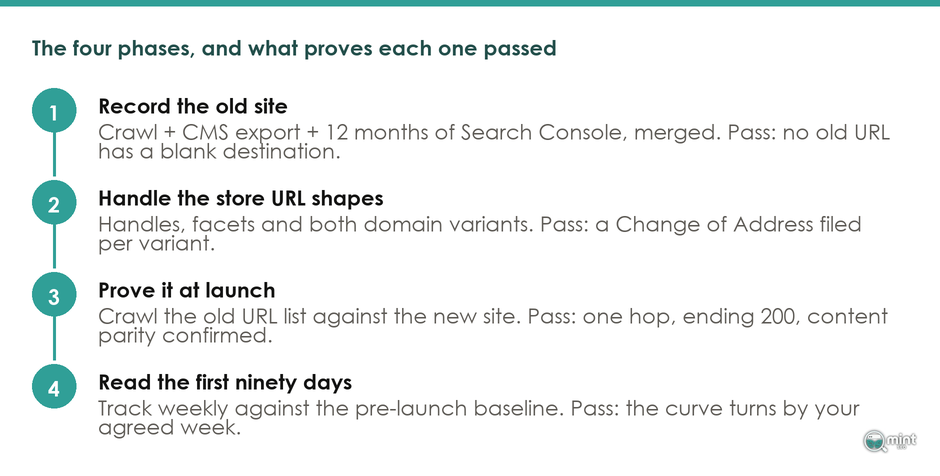
Rankings come through a store migration when three things arrive intact. Every old URL that earned traffic lands on its closest new page in one redirect, every page keeps its titles and copy, and Google can crawl the new store on launch day.
This website migration SEO checklist covers those three in the order the work happens, each with a test that proves it is done. Get all three right and the usual result is a short dip in organic traffic that settles within weeks, while missing one leaves the drop in place until someone finds the cause.
I'm John Butterworth, and checking migrations before they go live is some of the most useful work I do for stores. Every item below is cheap before the switch and expensive after it. Most of my 11 years in SEO have been on ecommerce sites, and each migration I've seen go wrong in that time failed on one of these three conditions.
Your Type Of Move Decides How Much Of The Checklist Applies
Start the website migration by naming what is changing, because a platform move, a domain move and a redesign break different things.
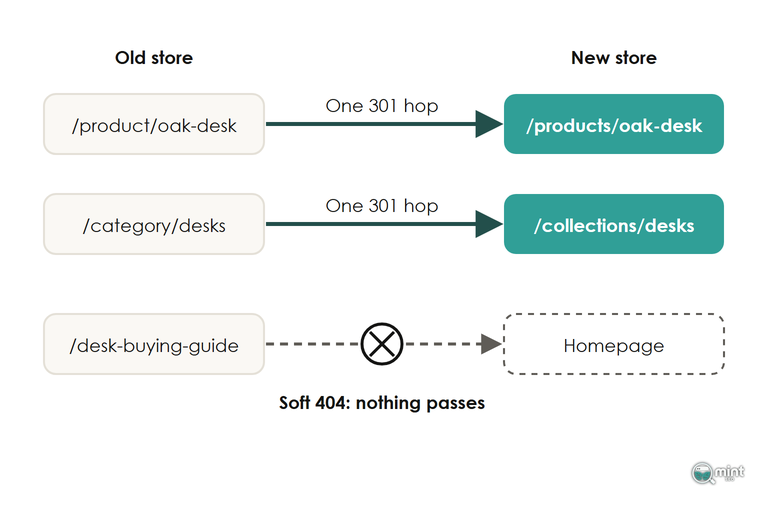
Moving from WooCommerce to Shopify, the oak desk that lived at /product/oak-desk/ now lives at /products/oak-desk, and the desks category moves from /product-category/desks/ to /collections/desks. Multiply that by every product and category you sell and you have the list the redirect map has to cover.
A new domain keeps the paths but adds work in Google Search Console on top of the map, because Google has to be told the whole domain has moved as well as each page. That Change of Address step is the one item on this website migration SEO checklist that only a domain move needs.
Before launch, list every version of the old domain Google might know: the bare domain, the www version and any subdomain such as a blog or help centre. Google's site move guide wants a Change of Address request for each verified one, including versions you stopped using years ago, so verify them all in Search Console first. A variant you never verified can't be moved.
Move the whole site in one go where you can. A store that moves its shop to a new domain but leaves its support pages on the old one leaves part of the old domain's history behind with those pages. If you are merging two or three stores into one, move them one at a time and let traffic settle between each move.
Keep the redesign separate from the domain move too. Google then reassesses one change at a time, and you can tell which change caused any drop.
Send Every Old URL That Earns Traffic Or Links To One Matching Page
A redirect map is the part of a website migration that decides whether your rankings move with you, and it is the step the failed migrations I've looked at went wrong on. An import tool moves product data, and even one that creates redirects for you can't judge where each old URL should point.
A Crawl Alone Misses The Old URLs That Earn Clicks And Links
Crawl the old site with Screaming Frog, and add every page from the Search Console performance report, every analytics landing page and every URL with backlinks in Ahrefs. A crawl only finds pages your navigation still links to, so a retired product that still earns links won't be on it. Search Console's interface caps its exports, so pull larger sites through the API.
Record each URL's organic clicks, backlinks and revenue beside it. That one sheet is the input to the redirect map and the baseline you'll read the first weeks against.
Parameter variations that never earned a click or a crawl can stay off the sheet.
A Redirect To The Homepage Is Treated As A Missing Page
Point each old URL at the page that replaces it: the old category at its new collection, the old product at the same product.
Google's site move guide is plain that sending many old URLs to one irrelevant page, such as the home page, might be treated as a soft 404. Google then handles the old URL as a missing page, and no value passes through the redirect.
Where nothing on the new site replaces a page, let it return a 404 or 410 instead. A store that consolidated five thin guides into one can still redirect all five to it, because that page is the replacement. Redirect straight to the final destination as well, since Google's site move guide recommends no more than three hops in any chain.
Leave the redirects running long after the new store settles, and keep the old domain registered if you've changed it. Once an old domain lapses into a separate site, Google stops treating it as part of your store, and backlinks still pointing at the old addresses no longer reach you.
Shopify Only Follows A Redirect When The Old Path Returns A 404
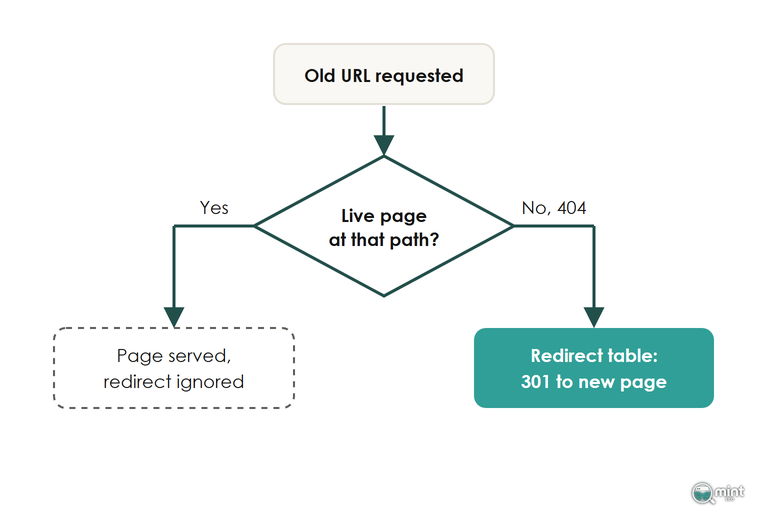
Upload the map to Shopify and it will still ignore any row whose old path loads a live page. According to Shopify's help page on URL redirects, redirects only work from broken URLs, the ones showing Page not found.
A product imported under its old handle, or a page recreated at the old path, silently cancels its own redirect.
Shopify's page lists three more limits that matter in a migration. Collection tag filter URLs can't be redirected at all, URLs carrying query strings might not work as expected, and making a hidden collection visible again deletes its redirect automatically. Standard plans allow 100,000 redirects, which covers almost any store's map.
Upload the map through the CSV import with relative paths starting with a slash, and prove it with live requests to the store. Run the full old-URL list through Screaming Frog in list mode with Always Follow Redirects switched on, and read the final status for every row.
Check Each Page Arrives With Its Titles, Descriptions, Copy And Reviews
A migration import can move every product across and still leave the fields that win clicks behind. On WooCommerce stores the meta descriptions usually live in the SEO plugin, and alt text sits on the media library, so a product import can land both blank.
Nothing looks broken when that happens, because a product with an empty SEO description still gets a search snippet, cut from the opening of its product description. You see the loss weeks later as lower click-through on pages that kept their rankings.
If your import app says it carries these fields, check a sample of products before you rely on it.
Reviews need their own plan too, since a standard product import doesn't bring them across, so pick a review app that imports them before launch.
Edits made during the move cause the other parity losses. Renaming categories during the move, rewriting product copy or dropping the schema your old theme printed all change what a page ranks for.
Keep names and copy the same for launch, and improve them once the move has settled. For the full list of what a platform move carries across and what it leaves behind, my breakdown of what an ecommerce migration moves covers the data side.
On Launch Day, Open The Store To Google And Retest The Map Live
On launch day of a website migration, the checklist items that matter are the ones that open the new store to Google and prove the redirect map on the live site. The staging copy of a migrating store is hidden from search engines on purpose. On Shopify the store sits in private mode behind a password page until you remove it, which hides every page and the sitemap.
Leave the old sitemap in Search Console next to the new one. Watching the old file's indexed pages fall towards zero while the new file's count climbs is the quickest way to see Google following your redirects page by page.
Expect Googlebot to crawl the migrated site harder than usual for a while, since Google's move guidance says a newly moved site is crawled more heavily as it follows the old URLs across. Rerun the section two list against the live store once the switches are done, because Shopify only honours a redirect once the old path returns a 404 there.
Place a test order on the migrated store last. If the purchase doesn't reach analytics with the right revenue, fix it the same day, because you can't read the first weeks without it.
Read The First Weeks Against Your Baseline, Technical Causes First
After a website migration, read organic clicks, keyword rankings and organic revenue for each page group against the baseline your URL list recorded. Read them week by week, because a short dip after a migration is normal.
Judge each page group by its direction over several weeks, and ignore the first week's total. Google's move guidance expects a small or medium store to need a few weeks for most pages to move, so a group still falling after that has a fault worth finding.
A Drop On Every Channel Points At Tracking, Not Rankings
Rankings can't move paid search, email or direct traffic. When all of them fall on launch day together, look at the analytics setup first. Compare the revenue your analytics reports with the orders in your store admin for the same days: if analytics comes up short, a tag stopped firing on the new templates, and fixing the tag restores the numbers on its own.
An Organic Drop On Some Page Groups Points Back At The Map
When organic traffic falls on some page groups and holds on others, find the date the fall started and check what changed on those pages. Run their old URLs through list mode again to find any broken URL, homepage redirect or chain, and compare their titles and copy with the old versions.
Look at whether a Google update landed the same week only after those checks come back clean, because a broken redirect or a lost title can be fixed the same day. If you want to see what published store migrations report about traffic afterwards, my review of published ecommerce migration results sets out the range.
Have Your Migration Checked Before The Switch
Most tests in this checklist are redirect, crawl and sitemap work that our Technical SEO service handles. On a migration that work starts before launch with the URL list and its baseline. It then runs through the map proved in list mode, the staging crawl compared with the live site and the rerun on launch day. I measure it against the organic revenue the store keeps and builds after the move.
If you're moving soon and want to know where your current store would lose rankings, start with a free audit of the old site. Mint SEO is a Shopify SEO agency for stores changing platform, so the audit reads your old URLs the way the move will.
Or talk it through first: book a free consultation and we'll go through your move before anything changes.

About the author
John Butterworth
John Butterworth is the founder of Mint SEO, a Manchester ecommerce SEO agency he started in 2024. He has 11 years in SEO and digital marketing, previously running SEO departments for market-leading brands and several agencies. He specialises in Shopify and ecommerce SEO, and his work has ranked over 100 websites and driven more than 3 million organic visits. He speaks at industry events including the SEO Mastery Summit.
Connect on LinkedIn →