
Knowledge Hub
What An Ecommerce Migration Moves And What It Leaves Behind
By John Butterworth · August 11, 2026
Your platform is costing you more than it returns, and every guide you open tells you to move. None of them puts a price on what the move takes off you.
What you lose is the honest place to start. An ecommerce migration carries your products and prices and customer records across, and leaves your passwords, your order history and your SEO data behind.
Passwords, order history and SEO data all come straight from the destination platforms' own import documentation, quoted in full further down.
Most of the migration work that reaches my desk is already too late. A store has moved, the revenue has gone with the rankings, and somebody wants to know which of the last six months caused it.
My name is on the agency, so I will say plainly where I am standing. I've spent 11 years on ecommerce search and driven over 3 million organic sessions, and the pattern I see is that the catalogue reaches me only once the platform is settled.
Arriving after the platform is chosen is why I wrote this.
Writing it therefore runs in this order. The shape of the project, then the list of what your new platform will refuse to take, then the condition under which the right answer is to stay where you are.
An Ecommerce Migration Is Three Jobs Running At Once
A migration gets quoted as one project and delivered as three. There is a data transfer, a front-end rebuild and a search project, and paying for one of them is how the other two end up belonging to nobody.
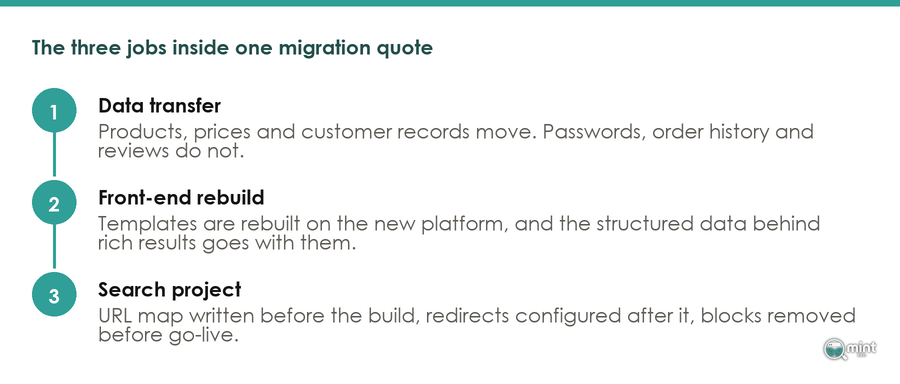
The three jobs inside one migration quote, and what each one carries.
Your Old Store Is A Database And A Rulebook
Your store is two things at once. It holds a set of records, and it holds the platform logic built around them. Only the records travel.
Credit for the distinction goes to a comparison of export limits across five source platforms, where the migration agency Optimum7 reaches one conclusion. “The pattern across every row is the same: structured records move, and the platform-specific logic around them does not.”
Owners underestimate the second half of that sentence. An existing storefront gets rebuilt in Liquid “along with the structured data that earned your rich results”, the same guide records.
Your review stars and price snippets are markup, and markup lives in the templates you are throwing away. Those results return only if somebody rebuilds them.
The Job Nobody Is Quoted For
Look at how the work gets packaged and you can see where the search job goes missing. WooCommerce publishes its migration guide as six phases. Discovery and audit comes first and launch day comes last.
In between sit platform setup, integrations, payments and testing.
Read that list again. Search appears in none of the six names, and each phase closes on a checklist of build tasks.
Shopify is straighter about its own tooling. Its 2026 guide says that “The Store Migration app is best for fast imports of specific objects; it's not a full replatforming by itself.”
Read that as a description of a data importer and it is honest. Merchants tend to hear it as a description of the whole move.
A third job exists whether or not anybody prices it. Someone owns the URLs and the metadata through the move, or the store launches without them.
What Your New Platform Will Refuse To Import
No migration guide prints the next list, which is why I went to the source documents instead.
On 11th August 2026 I read the published import documentation for the two most common destinations in an ecommerce migration, Shopify and WooCommerce, and logged every entity each platform states it will not carry. That is four documents across two platforms on one date, and every line below is quoted from the platforms' own pages, with the URL of each beside it.
What the two most common destination platforms state they will not carry, read from their own import documentation on 11th August 2026.
The Casualty List Nobody Puts In The Quote
Start with the item that reaches every customer you have. Shopify's customer import documentation puts it plainly. “Because passwords are encrypted outside of Shopify, you can't migrate customer passwords from another online store using a CSV.”
Every account holder therefore resets on their next visit. That is a login step nobody budgeted for, landing in the fortnight your traffic is already unsettled.
Customer value goes the same way as the passwords. The same page records that “The Total Spent and Total Orders columns aren't imported with customer details”, so your VIP segment is a calculation over data the importer drops.
Orders sit outside that import altogether. “You can't import order information using a customer CSV file”, the same page adds. Order history is its own project with its own budget line.
A fuller admission comes from Shopify itself. Its July 2026 guide to the free Store Migration app prints a two-column table, and the right-hand column opens: “What it doesn't import: Orders and order history. Collections.”
Navigation menus and SEO data follow, with blog posts, reviews and apps behind them.
Seven casualties, named by the platform doing the receiving.
Of those seven, read the SEO data line again. The tool built to move you carries your products and leaves the rankings that sell them on the old server.
The Search Assets You Paid To Write
Several items on that list are assets you commissioned and paid somebody to produce. An importer treats every one of them as optional, starting with the images.
Those images carry alt text, and alt text is the clearest case of the lot. If somebody wrote it across a few thousand products, the importer that moves the pictures will not move the words.
On alt text the WooCommerce documentation is blunt: “The core CSV importer cannot add, edit, or update alt text for product images.”
Product images can fail on their own terms too. The same importer will not take “URLs behind redirect scripts” for images.
Custom fields fail more silently still. “Any unrecognized columns are not imported by default”, the same documentation records.
Anything your old store kept in a custom field therefore lands empty unless a person maps it by hand.
Markup is the costliest of them, and it sat in the templates you are rebuilding. Rich results come back by hand or they go. That gap is what I find when I run an ecommerce SEO site audit on a store six months after it moved.
Every one of these is written down by the platform and left out of the quote. An hour with that documentation before you sign is the cheapest hour in the project.
Whether Your Store Should Move At All
Now the question the field never asks. You have the cost side in front of you, in records and in markup, so you can weigh it against the upside. None of the guides ranking for this search will help you do that.
Who Is Telling You To Migrate
I checked who writes them. On 11th August 2026 I fetched every page ranking for the search “ecommerce migration”, the top ten results plus the buried tier below them.
Then I classified all 14 publishers by what each company sells, as stated on its own site.
All 14 are published by a company that gets paid only if you go ahead. Seven sell the destination platform and four sell the migration project.
The remaining three sell a product you buy during one.
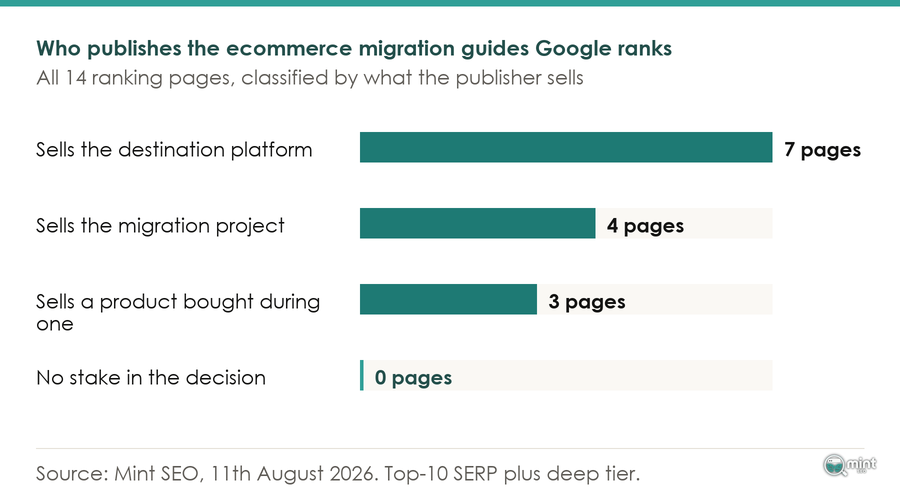
Every page ranking for this search is published by a company that profits if you migrate.
Not one is published by a party with no stake in the decision. That does not make any of them wrong. It does explain a shape in the guides themselves.
One platform vendor's guide lists seven reasons to migrate and offers no condition under which a store should stay where it is.
Another replatforming guide opens its eight steps with Requests for Proposals and a systems-integration partner, before any data moves.
My own writing carries the same tilt in reverse, so apply the test here too.
I have argued elsewhere about the platform that gives a store its best shot at ranking. Read who pays me before you weigh the recommendation.
The Condition That Says Stay
Start with your own dissatisfaction, because it carries less evidence than it feels. “Only 14% of businesses are satisfied with their current ecommerce platform, and 77% feel urgency to migrate within the next year”, reports a roundup of replatforming survey data, which also reports that “83% of data migration projects fail or exceed budgets”.
Unhappiness with your platform is therefore the normal condition, and an overrun is the normal outcome.
This month's research gives you a sharper test, in an August 2026 Optimum7 analysis of 4,000 AI responses to 1,000 replatforming questions across ChatGPT, Gemini, Claude and Grok. Asked what a bad move costs, all four systems answered in the same range. Poorly executed ecommerce migrations lose 20-40% of organic traffic and take 6-12 months to recover.
Treat that range as the market's received wisdom about a bad move. What makes it useful is where all four models put the blame.
Flawed execution was the only risk that study graded at critical severity, and every other risk sat at least one tier lower. How the move is run counts for more than which platform you land on.
The condition is therefore narrower than the field implies. Move when your platform blocks an operational job you cannot work around.
A catalogue it will not hold counts, and so does a fulfilment process it will not support.
Frustration on its own is the case for staying. The cost of a move lands in full on launch day while the benefit builds over quarters, and the seven-reasons guides leave that asymmetry out.
One more thing about the stores moving right now, from a migration operator's April 2026 report. “A striking trend this month is the significant number of established stores, many operating for 5-10+ years (some dating back over two decades according to WHOIS data), undertaking large-scale migrations.”
Those established stores are the ones with most to lose, because a decade of trading is a decade of accumulated casualties. Stage a move that size; do not abandon it.
Staging it well means knowing what recovery looks like, so read the outcome data first. I went through what eleven published migrations and 892 tracked moves report about organic traffic after a migration, including how long recovery takes.
Who Owns The Search Work On Your Migration
Every part of the search job is a preparation task, and each one becomes unrecoverable the moment the new store goes live. Give it a named owner before the build starts, while every one of those tasks is still open.
The Mapping Is A Planning Document
Sequence is the whole of it, and Google Search Central is explicit. “Prepare a URL mapping from the current URLs to their corresponding new format” comes first. Configuring the redirects comes afterwards.
That sequence puts the mapping on the build side of an ecommerce migration, which decides who writes the thing.
Treated as a build input, the mapping changes hands. A version produced during planning tells your developers which collection handles have to survive, which lands as a specification.
Produced in launch week instead, the same document is somebody reconciling two spreadsheets at midnight.
Google's own guidance moved this summer, which is worth knowing if your plan was drafted last year. On 17th June 2026 Google updated its site-move documentation to say a domain migration should include Change of Address requests for all subdomain variants.
A plan drafted from a 2025 checklist is therefore one revision behind already, which is the ordinary state of this work.
What To Verify Before Anyone Says Go Live
Failures that cost the most are the ones a five-minute check would have caught.
One check outranks the rest, and it takes a minute. Ask whoever pushed the site live whether the staging protection came off, because leaving it on is the first entry on Google's list of migration mistakes.
A store can pass every redirect test and still be invisible, because a redirect works perfectly into a page nobody is allowed to index. I have seen a store spend weeks wondering why nothing ranked when the answer sat in one line of a file.
Then check what the import left for a human. Shopify puts it plainly enough.
“Orders, reviews, and navigation menus require separate tools or manual setup after import.” Those are three things a shopper sees on a first visit.
A launch missing them reads as broken, and it costs you the trust a rebuild was meant to buy.
Batching is the other risk worth naming. “You can only import customer CSV files that are 15 MB or smaller”, so a large customer list lands in pieces and nobody counts them afterwards.
None of this is exotic. It is the everyday crawl and indexation work an online store needs, run to somebody else's build schedule. The fuller version, with a pass condition against every item, sits in the store migration checklist.
Get The Search Side Of Your Move Handled
Your developers own the build and your platform partner owns the data. The third job is the one I do, and the one that tends to reach launch with no name against it.
On a move that means holding the URL map while the templates are still being drawn, and arguing about a collection handle in week two, when changing it is still free.
Mint SEO is mine and it runs from Manchester, backing stores wherever they trade. Migration cover is the technical strand of the eight disciplines.
Mostly it means being in the room when the URL structure gets decided.
If a move is coming, book a free 30-minute consultation and we will go through your catalogue, your URL structure and what your new platform will refuse to take. Bring the quote you have been given, and I will tell you which of the three jobs it covers.

About the author
John Butterworth
John Butterworth is the founder of Mint SEO, a Manchester ecommerce SEO agency he started in 2024. He has 11 years in SEO and digital marketing, previously running SEO departments for market-leading brands and several agencies. He specialises in Shopify and ecommerce SEO, and his work has ranked over 100 websites and driven more than 3 million organic visits. He speaks at industry events including the SEO Mastery Summit.
Connect on LinkedIn →