
Knowledge Hub
How To Choose An Ecommerce Platform In Five Checks
By John Butterworth · October 8, 2026
Run five checks on every option on your shortlist, and you’ll only have to choose an ecommerce platform once. For most stores the deciding check is who will maintain the code. With nobody on the team who writes code, Shopify runs the hosting and checkout for you. If you already pay a developer to look after a site, WooCommerce gives you more control.
The other checks catch costs that turn up a year later. Keep the add-on load light, since what you install moves page speed more than the platform underneath it. Last of all, put one real order through the payment provider you’ll use and read every fee on it.
I’d treat the URL check as the one you can’t take back. A new URL structure after launch is a site move, with a redirect for every product and category. Write down the address each one will live at, then confirm the platform allows it on a test store before you speak to a developer.
Run These Five Checks Before You Commit To A Platform
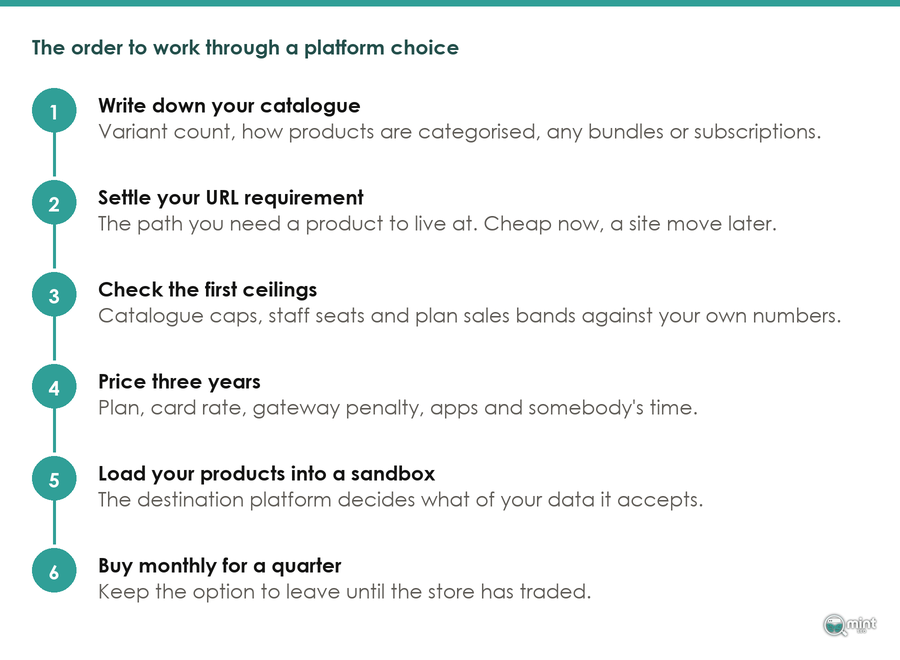
Run them in this order on every platform on your shortlist, because each check narrows the list the next one works on. The first two rule options out, and the last three tell you what the survivor will cost to run.
Write Down What Your Catalogue Needs Before You Compare Features
When you choose an ecommerce platform, your catalogue rules options in or out long before any feature list does. Write down how many variants your biggest product has and how many options it needs, such as size, colour and material.
Add whether you sell bundles, subscriptions or made-to-order items. List the systems the store has to talk to as well, from a shop till to stock software and any marketplace you sell on. Each one needs a maintained connector on the platform you pick.
A feature comparison rules almost nothing out, because every mainstream option has a checkout and a discount engine. Variant limits are where the catalogue check bites first.
Ceilings on variants do move, and the apps sitting on top of a platform don't always keep up. On Shopify, an app still built on its older product API can break on a product with more than a hundred variants, even though Shopify itself now allows far more.
Test your biggest product against every app you'd rely on to sell it. On most platforms bundles and subscriptions come from an app. Its limits and monthly fee become yours.
Decide Who Will Maintain The Code, Because That Picks Shopify Or WooCommerce
This is the check that settles it for most stores. A platform tends to hold a store back in three ways: its codebase, the bloat it carries and how far you can customise it. Who looks after the code decides which of those you can live with.
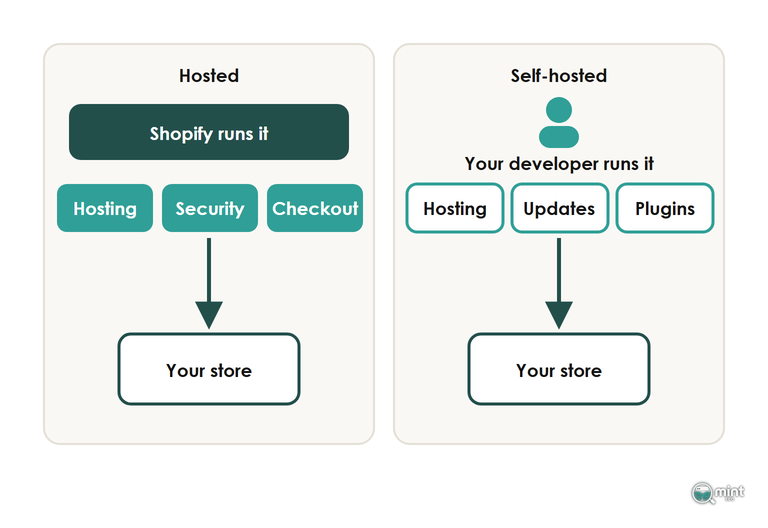
If nobody on your team writes code, choose Shopify. It runs the hosting and the checkout for you, security included, and switches new features on for every store at once.
Its Summer '26 Edition on 17th June 2026 turned agentic commerce on by default, so every catalogue became readable by AI shopping agents with no setup. On WooCommerce, whether a catalogue reaches those agents depends on the version and plugins your developer keeps current.
Market share is worth a glance for one reason only, which is how easily you can hire help later. A crawl of a million domains in early 2026 put Shopify behind 42.6% of the stores it found and WooCommerce behind 24.6%, so freelancers exist for both.
Shopify sets the date your old code stops, too. Apps lost the ability to create or update script tags on 1st October 2026, and the remaining tags go dark on storefronts on 1st March 2027. If your theme still pulls in an older review widget that way, budget the rebuild before spring.
If you already pay someone to keep a WordPress site running and the blog pulls its weight, WooCommerce is the pick. The same person can move the product base in an afternoon and edit the PHP behind every template.
That control comes with the hosting and the updates. WooCommerce releases regularly raise the minimum WordPress version they need, and somebody on your side has to keep both current.
Leave drag-and-drop builders such as Wix off the list if you want the store found on Google. I'd steer a store that wants organic traffic away from builders, however good the design looks.
I've ranked the main platforms for organic search in a separate piece on how the main platforms rank for SEO. Weighing headless ecommerce instead? It works when you have developers to build and run it, and fails when you don't.
Decide The URL Every Product Will Live At Before You Launch
Write down the address you want a product and a category to live at, then check the platform will let you have it. A new URL structure after launch is a site move, which makes this the cheapest decision on the list now and one of the dearest later.
Shopify's fixed paths are fine for almost every store, and every competitor on Shopify has the same ones. What matters is knowing them before you design your categories.
If you move onto Shopify later, every product and category URL you have will change. Every customer has to set a new password too, because passwords never transfer between platforms.
Changing a structure that can be changed is risky too. Wix's own help page warns that getting it wrong "can drastically change your site" and hurt its search ranking.
That said, a move run properly settles within weeks. Published guidance on site moves expects most pages of a small or medium site to move across within a few weeks. Our ecommerce migration guide has the full method for when a move can't be avoided.
Keep the redirects in place for at least a year, because that is how long the signals take to move to the new URLs.
Keep The Add-On Load Your Store Will Carry Light
What you add to a store decides how fast it loads more than the platform you add it to. Count what you'll need on day one before you choose. Start with the add-ons almost every store installs:
- Product reviews (most platforms leave them to an app).
- Subscriptions or bundles, if you sell them.
- Search and filters for a large catalogue.
- Translation or currency tools for selling abroad.
- Email and popup tools that load on every page.
The platform underneath moves page speed less than you'd think. In June 2026 Chrome field data, 80.1% of Wix sites passed all three Core Web Vitals against 76.5% of Shopify sites. A builder owns the theme and the scripts, so it can tune speed for every store at once.
The fastest platform there is a builder I'd steer a store away from for traffic, which tells you speed won't pick the platform for you. It matters first because a slow store loses sales.
The analysis that came with those figures also explains where the speed goes. A hosted platform controls the theme, the images and the scripts for every store at once, whereas a self-hosted store carries whatever plugins its owner has piled on. On WooCommerce, the plugins you choose and the host you put them on are the speed result.
Shopify stores hit a version of it too. Apps that wrote code straight into the theme can leave it loading after you uninstall them, and a store that has tried a dozen of them can run slower than its app list suggests.
A mistake I see often is code loaded above the page content, with cart drawer code and tracking scripts the usual culprits. It pushes the product and category copy down and stops Googlebot reading what the page is about.
That is why my rule is fewer apps, less bloat. Favour the platform that handles more of your list in the theme, and use our list of Shopify apps worth keeping to start pruning.
Put A Real Order Through The Payment Provider You Will Use
- 1. Open a test store and import a real slice of your catalogue, including your biggest product.
- 2. Install the apps or plugins from your add-on list.
- 3. Put one order through the payment provider you'll use and read every fee on it.
That order shows you the per-sale fees, and once a store is trading those fees can outgrow the monthly plan.
On Shopify, taking payment through any provider other than Shopify Payments adds a transaction fee to every sale on top of what that provider charges. WooCommerce charges nothing for the plugin and bills you through hosting, paid extensions and developer hours instead.
Add plan, card fees, apps and help and you have the three-year price before the cost no trial store will show you. A UK shop owner who changed platforms in 2012 wrote on a small-business forum that the "TRUE COST of a project like this" includes lost trade and staff hours, which came to around 20k for their shop.
Put the budget into the platform that makes your category and product pages easy to build well, because those pages earn its fee back first. Blog content can come once they rank.
Settle Your Platform Choice Before You Build
Owners who choose an ecommerce platform on their own most often get two checks wrong: the URL decision and the add-on count. Both look harmless until a store has traded for a year.
Our website design service builds online stores on any platform. If you settle on Shopify, we build stores on lean Liquid code, with target keywords and a technical SEO foundation in place before launch. We also move stores across from WooCommerce, Magento or Wix with the 301 redirects done.
Both jobs come from an ecommerce SEO agency that builds search in from the start, so a new store is ready to rank on launch.
For a store that is still being planned, the free audit is one to request after launch. If you already sell and wonder whether your platform is holding you back, it charts twelve months of your organic traffic. It also lists commercial keywords competitors win where you're not on page one, and the two-page PDF is sent the same day. Before you weigh a move, get a free SEO audit of your store and see what search sends you now.

About the author
John Butterworth
John Butterworth is the founder of Mint SEO, a Manchester ecommerce SEO agency he started in 2024. He has 11 years in SEO and digital marketing, previously running SEO departments for market-leading brands and several agencies. He specialises in Shopify and ecommerce SEO, and his work has ranked over 100 websites and driven more than 3 million organic visits. He speaks at industry events including the SEO Mastery Summit.
Connect on LinkedIn →