
Knowledge Hub
Black Friday Ecommerce Tips That Stop The Sale Breaking On The Day
By John Butterworth · October 8, 2026
This year's sale weekend runs from Friday 27th November 2026 to Cyber Monday on the 30th. With a few weeks left, the Black Friday ecommerce tips worth acting on are the jobs with a lead time. Do them in the order they run out of time, with stock and the offer first and the emails last.
Test your discounts, sale page and theme on a phone, the way a sale shopper meets them. Some of the costliest faults I find at checkout are discount codes it rejects and no express option, and a sale weekend is the worst time to discover either.
Before you plan this year, check whether search lifted last year's sale. Compare last November's organic clicks with the weeks either side, and note which searches brought those visits.
The Black Friday Jobs, In The Order Each One Has To Start
Each job below has a last sensible start date counted back from 27th November, and that timing is the core of my Black Friday ecommerce tips. Anything with a supplier, a developer or a search crawler on the critical path goes first, because none of them speed up when you ask.
Reorder Best Sellers From The Supplier's Real Lead Time
A product that sells out on the day was usually lost in October, when the reorder went in too late. Count back from the sale date using the lead time your supplier really delivered on its recent orders. Ignore the one on its price list, and add a week for slippage.
Size each order from what that best seller sold in last year's sale week. A yearly average hides the spike, and an order sized from it runs short on exactly the products people came for.
Price The Offer Against Each Best Seller's Break-Even
Work out the break-even discount on your ten best sellers before you choose a headline percentage.
Divide each product's margin by its selling price, and that percentage is the deepest discount it can take before each sale loses money.
Put the cost per item into your product admin first, or no margin report can tell you which deals made money. Discount depth didn't drive last year's results anyway: Klaviyo's recap of that sale weekend found consumer spending rose 11% while discounts fell 10%.
Keep the discount a pricing decision, whether it runs automatically or as a discount code. A reason to buy today is a separate job, covered under countdowns below.
Put The Sale On One Undated URL That Is Live Now
Your sale page earns links and rankings only while its address exists, so give it one URL with no year in it and reuse it every November. A page with last year's date in its address starts from nothing the following year, and a redirect into a page you later deleted throws the old links away.
Put the year in the heading instead, and have the page live in October collecting sign-ups. Out of season, Lookfantastic keeps its sale page live with a note that the event has passed and links to current offers.
Run Sale Timers Only Where The Deadline Is Real
Urgency stays on my list of Black Friday tips for any ecommerce store, because a shopper with no reason to buy today puts it off until they forget.
In the UK the Competition and Markets Authority can now fine a retailer directly without going to court. It has already settled with Emma Sleep over countdown timers that restarted when the page was refreshed. If your countdown app resets on reload, your store is doing the same thing.
Set each timer to the offer's true end date and quote a was-price the product genuinely sold at. Shoppers do check: a year of price tracking by Which? found 83% of the products on offer were cheaper or the same price at least once outside the sale.
For the tactics themselves, see our guide to urgency and scarcity marketing.
Show The Delivery Cut-Off And Returns Window On Each Product Page
Sale-week support is the same few questions on repeat: will it arrive before Christmas, can I return it, does my code stack with the sale price. Put your Christmas delivery cut-off and returns window on the product page where the buyer hesitates. Add your code rules too, and repeat all three in the order confirmation email.
Expect the support queue to climb over the weekend as address changes and returns requests pile up on top of those questions.
Test Every Discount Combination In One Real Cart
Black Friday traffic is the one load a Shopify store doesn't have to plan for. Between April and October last year, Shopify's engineers ran five full-scale load tests of the whole platform at the traffic they forecast for the sale, so checkout capacity is their problem and they rehearse it.
Your store's own changes are what Shopify can't test for you, and they cause the Black Friday failures your customers see: the discounts you set up, your theme edits and the apps you add.
On WooCommerce nobody rehearses that capacity for you, because the server is yours. Ask your host for a load test at last year's peak traffic before the theme freeze on 20th November, then run the cart test below, the theme freeze and the phone test with your discount plugin in place of Shopify's settings.
When two discounts can't combine, Shopify applies whichever gives the customer the bigger saving, and nothing in your admin shows you which one won. Your discount settings can look right while checkouts come in deeper or shallower than you planned.
Build one test cart with several products that triggers everything you'll run at once. That means the automatic discount on sale items, the email code, free delivery over your threshold and any discount an app creates for itself. Read the line totals at checkout on a phone, then repeat with two different items.
App discounts count because they enter the same combination rules as the ones you made by hand. If you relied on Shopify Scripts for stacked offers last year, rebuild that logic with native combinations before you test. Editing and publishing new Scripts ended on 15th April 2026, and Shopify Scripts stopped running on 30th June 2026.
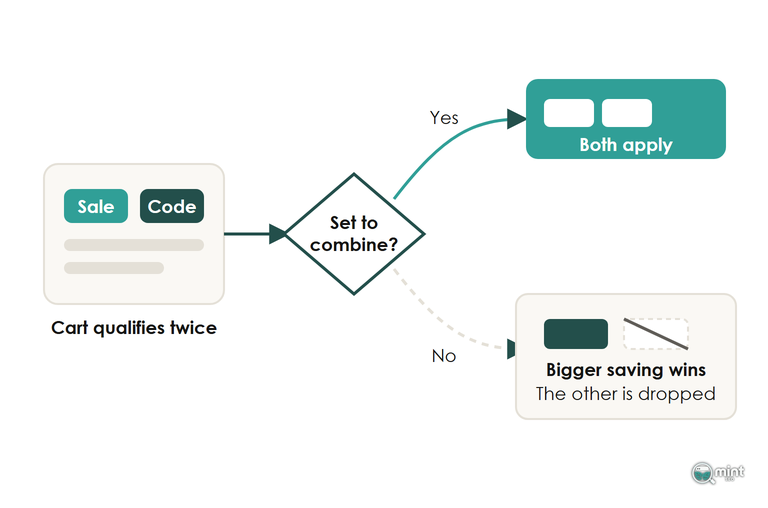
A stack nobody tested ships orders below cost, and nothing on the order screen tells you which ones lost money. You find out at the January reconciliation.
Test again after any change to an app or a code during November.
Write The Sale Emails Last
Emails depend on no supplier and no developer, which is why the send copy can wait until the offer and the page are fixed. Building the email list starts now, through every sign-up your sale page collects in October.
Lock The Theme And App Set-Up A Week Before The Sale
A snippet added to the theme in the last few days is the riskiest change a Shopify store can make in sale week. Make every theme and app change by 20th November, then change nothing until December.
Before the freeze, open the Discounts page and count what's active, because Shopify allows 25 automatic discounts and every one an app creates counts towards that limit. Uninstall any sale app you haven't used since last November, then run the cart test above again. Our guide to Shopify apps worth keeping covers which ones earn their place after the sale.
Name one person for each of these Friday-night jobs and write their phone number next to it, because deciding at midnight costs you hours of the busiest trading of the year:
- Switch off the ad spend if the site or an offer breaks.
- Swap the homepage banner the moment a headline product sells out.
- Remove a broken discount before more orders go through at the wrong price.
Test The Sale On A Phone With The Popups Switched On
Run the whole sale path on a phone, logged out and on mobile data, because that's where Salesforce's figures for last year's Cyber Week put 70% of online orders. Start at the sale page, add two products and apply the code before checking out with Shop Pay or whichever express wallet you offer. Keep every popup, banner and countdown switched on while you do it.
If a sign-up popup covers the first screen before the product loads, delay it to the second page. Speed matters here for sales first: a slow sale page loses the buyer before anything has loaded. Our mobile ecommerce guide goes deeper on the phone experience. The payment step has its own walk-through in our guide to the ecommerce checkout process.
Take The Sale Prices Off The Morning After Cyber Monday
Export your products to CSV before you change a single price, and check the file includes the compare-at price column. That file is your only record of normal prices, and on 1st December you import it again to end the sale cleanly.
Then open your sale collection and check that no product is still showing a sale badge.
Buyers who found you for the first time are worth more than the sale itself, because their second order comes without the discount. What to send them next is covered in customer retention for ecommerce.
Get A Free SEO Audit Of Your Store Before The Sale
The weeks before the sale are enough for the quick wins, provided you know where they are. Bigger ranking gains have no reliable clock: they depend on your niche and how many stores you compete with, and most sites wait for Google's next core update to see them. The work worth starting now is aimed at next year's sale as much as this one.
A seasonal page has to rank before its season opens, so the planning starts months ahead. That planning is the day job of an SEO agency for Shopify stores with a peak trading season.
The free audit is a two-page PDF. Beyond the traffic chart and keyword positions, page two lists the commercial keywords competitors win where you are not on page one, and checks your loading speed against Google's thresholds.
To see where your store stands, get your free audit before the sale. It comes back the same day with no call and nothing to pay, so there is time to act before the sale traffic lands.

About the author
John Butterworth
John Butterworth is the founder of Mint SEO, a Manchester ecommerce SEO agency he started in 2024. He has 11 years in SEO and digital marketing, previously running SEO departments for market-leading brands and several agencies. He specialises in Shopify and ecommerce SEO, and his work has ranked over 100 websites and driven more than 3 million organic visits. He speaks at industry events including the SEO Mastery Summit.
Connect on LinkedIn →