
Knowledge Hub
Ecommerce Site Search Best Practices That Rescue The Searches You Are Losing
By John Butterworth · October 7, 2026
Your search bar can only match the words that sit in each product record. That is why ecommerce site search best practices start with your product titles, product types and descriptions, plus your platform's free settings. A search app comes much later, if at all.
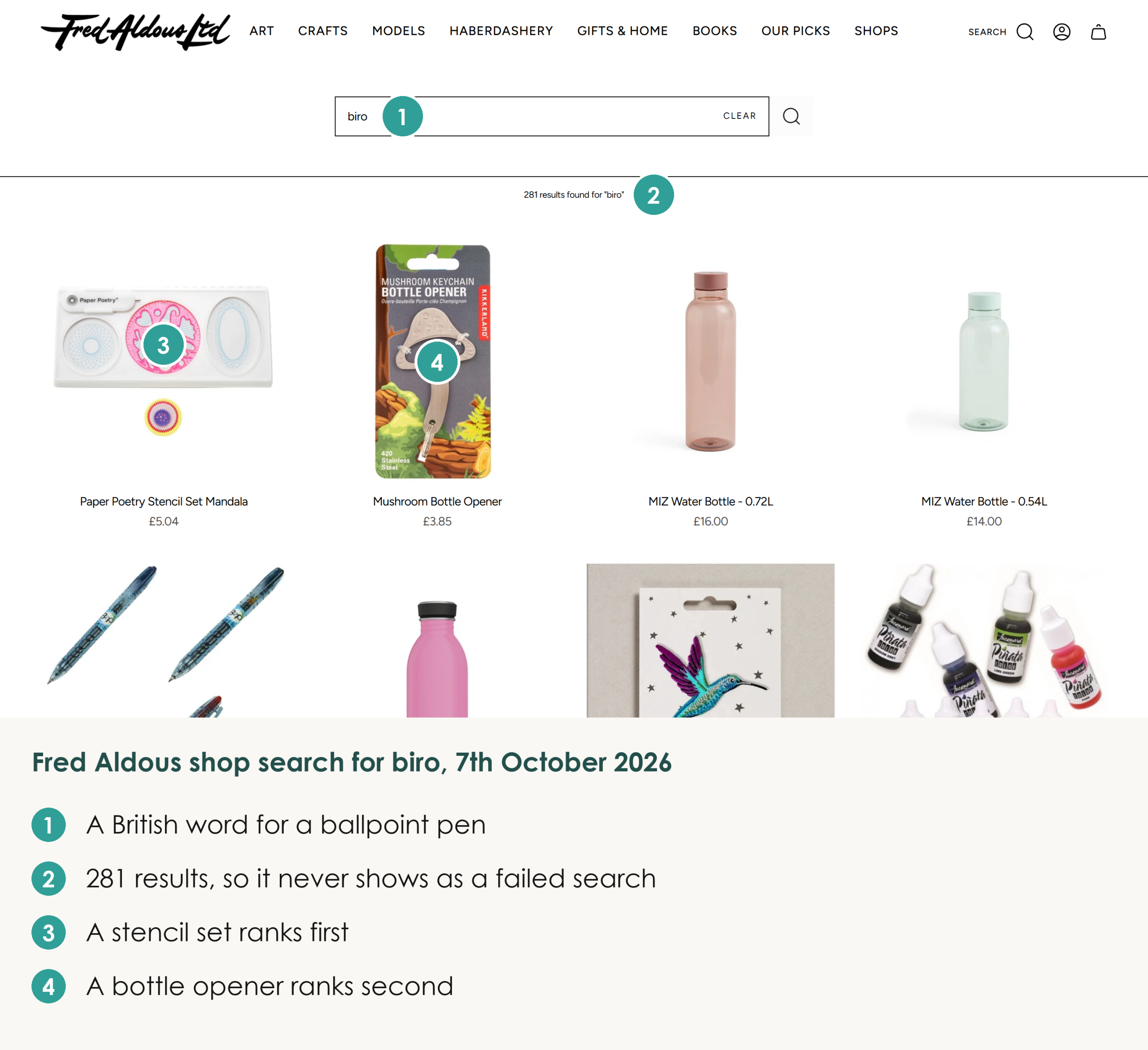
Fred Aldous, the Manchester art and craft shop, shows what a missing word costs. A search there for 'biro' ranks a stencil set above the BIC pens it stocks, because 'biro' isn't a word in their titles.
It hurts twice, in your search bar and on Google. When a product page isn't ranking, I check first whether it has been given a keyword. If it hasn't, I add that word throughout the page. So search your own store for the words shoppers use before anything else.
Six Fixes Ranked By How Many Lost Searches Each One Recovers
Searchers come first because they already know what they want, and the search box is where they type it. Among the health and beauty retailers in one study of 609 million retail searches, shoppers who searched were a quarter of the traffic and brought in 57% of the revenue.
Site search fails on missing words far more often than on spelling. Fred Aldous's catalogue runs to over 30,000 products, and each one is only as findable as the words in its record. The ecommerce site search best practices below start with the product record and end with search apps, ranked by how many failed searches each rescues and then by cost.
Add The Words Shoppers Type To Each Product
Put the shopper's word into the title or the product type, where both the dropdown and Shopify's typo tolerance read it, and into the description for the results page.
On Fred Aldous, 'biro pen' puts the BIC packs first, while 'biro' alone leaves them below the stencil set because 'biro' isn't a word in their titles.
Oi Polloi, the menswear shop that made its name in the Northern Quarter of Manchester and is trading online again, has the same problem with a different word. There, 'cagoule' brings up four neck warmers and no rain jackets, though 'rain jacket' finds 297 products.
Test it by typing the words your customers use on the phone, in reviews and in emails. Write each one that fails into the matching product's title or description.
Tags are the weaker home for those words, because Shopify's typo tolerance skips tags and a word kept only there gets no forgiveness for a slip.
Use Product Boosts Now Shopify Has Retired Synonyms
Shopify removed the synonyms feature from its Search & Discovery app in mid-September 2026. Developers on Shopify's own forum noticed it vanish on 16th September with nothing in the changelog to explain it.
Any store-wide group a store had set up, such as one tying 'trackies' to 'joggers', is gone. Since then, a single query on some stores returns hundreds of loosely related products.
With synonym groups gone, product boosts are the free lever left. In Search & Discovery you attach search terms to a product, and when a shopper types one of them, that product moves up the results while it's in stock.
Each boost takes up to ten search terms under Shopify's product boost rules, which also warn that boosting a long list of products pushes other relevant ones down.
Shopify's semantic matching, which reads descriptions and image data, only runs on the Grow, Advanced and Plus plans for stores under 200,000 products, so on the Basic plan boosts and your own wording are all that replace the lost synonyms.
Boost one product, or a small handful, for each of your customers' other words. Start with the words your best sellers lost when the synonym groups went, because those queries used to work and now don't.
Leave Most Misspellings To Built-In Typo Tolerance
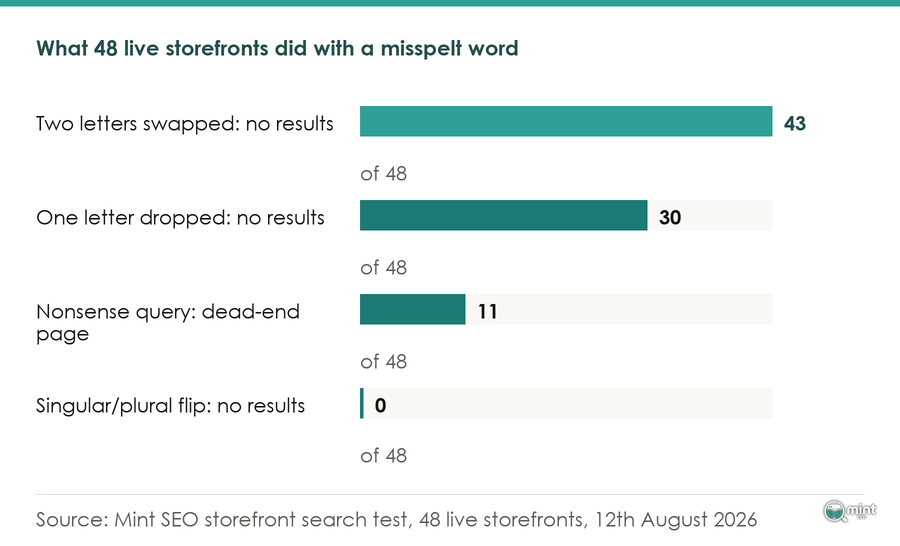
On Fred Aldous, 'guoache' and 'gouace' both still find the gouache.
Shopify forgives one wrong or swapped letter in a product's title, type, variant name or vendor once the first four letters are right.
It handles plurals too, so 'brush' and 'brushes' already match.
That rule promises nothing for a slip inside the first four letters, though Fred Aldous still caught 'guoache', so type four misspellings of your best seller into your own search box: one early in the word and three later. Only act on the ones that fail, and fix those in the product record, since boosting misspellings or plurals adds nothing Shopify doesn't already do.
On WooCommerce the standard search has no typo tolerance, which makes a search plugin with fuzzy matching worth paying for much sooner there.
Show A Next Step When A Search Finds Nothing
Fred Aldous doesn't sell kayaks, yet 'kayak' returns a single-use Kodak camera and a yakitori bar kit.
When nothing matches, Shopify loosens the query until something does, and the shopper meets two odd products where a page saying the shop doesn't stock kayaks would have been more use.
Write your no-results template so it says plainly that you don't carry the item, then shows your three busiest collections and the search box again. Search for something you'd never sell to see what yours does. Sold-out products already drop to the end of the results by default. Check that setting in Search & Discovery hasn't been changed to show them first.
Treat The Dropdown As A Separate Search
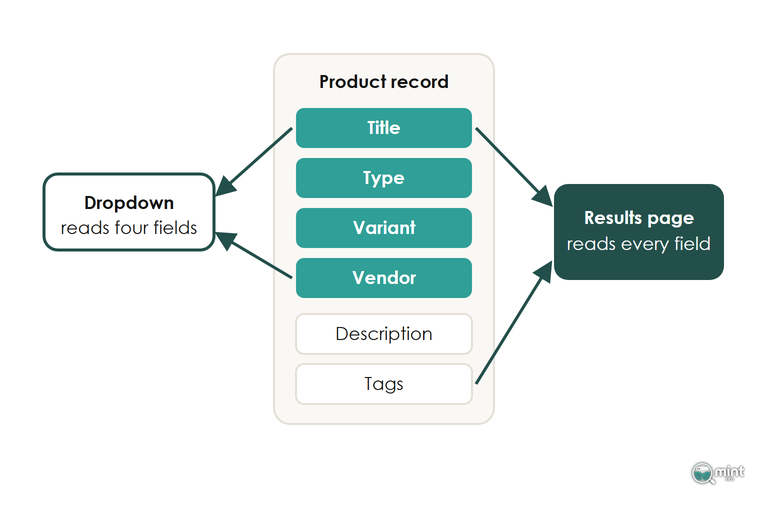
Predictive search, the list of suggestions that appears while a shopper types, runs on a lighter search than the results page. It reads four fields: the title, the product type, the variant title and the vendor.
It shows ten results at most and never uses Shopify's semantic matching. On Fred Aldous, 'ink pen' brings up three pen pots in the dropdown while the full search results page leads with ink pens.
The suggested search terms in that dropdown are built from the words in your catalogue and from what past customers typed. A word missing from your records never gets suggested.
Test your ten most common searches twice, once watching the dropdown and once after pressing enter.
Add A Search App Only After The Records Are Fixed
A search app is a second search engine bolted onto your theme. The day it goes live, the boosts you set in Search & Discovery and Shopify's four-letter typo rule stop counting, because the app's code answers every query instead.
Each app also adds scripts that slow the store, and I’d rather a store follows best practices for ecommerce site search by fixing its records and boosts before paying for another.
An app is worth its fee once those are fixed and the weekly report below still shows the same searches failing. Which Shopify apps are worth installing is a question I've covered in its own guide.
Read The Searches Nobody Clicked Every Week
Searches with no clicks, under Analytics and then Reports in your Shopify admin, is the report that shows which searches are still losing you sales.
Since Shopify's search started returning loose matches, a failed search rarely ends on an empty page. Fred Aldous's 'biro' returns 281 products and would never appear in Searches with no results. It shows up instead as a term people typed and then didn't click.
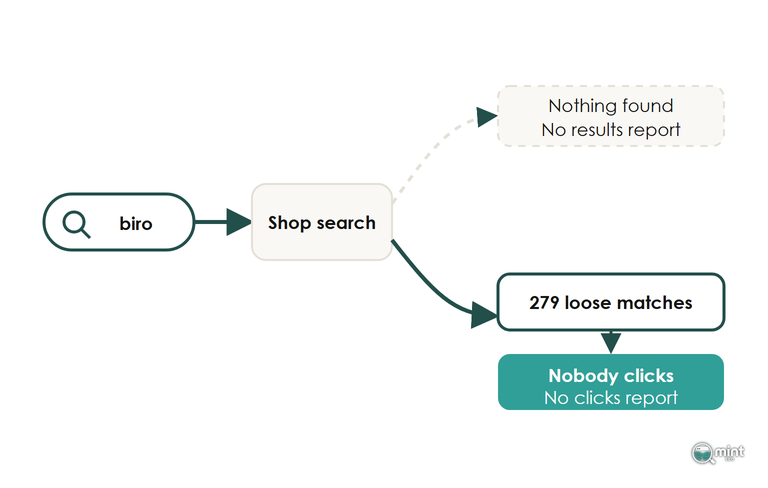
Read it every Monday beside Searches by search query, which shows how often each term is typed. Both reports run up to three days behind and leave out the dropdown, so judge each search fix a week after you make it and check the dropdown by hand.
On Oi Polloi, 'sneakers' finds 18 products against 59 for 'trainers', a difference you'd only spot by putting the two terms side by side.
A shopper who says sneakers sees under a third of the range, because search treats the two as unrelated words.
A term typed every week for something you stock across a range has earned a collection page of its own, the same test I’d apply to filter pages worth indexing.
Get Your Pages Checked Against Shoppers' Words
Words that fail in your search box usually fail in Google too, because a product record that never says 'biro' is unlikely to rank for it either. Our on-page SEO work writes those missing words into your product and collection pages.
Site search and Google rankings both read the same pages, which is why on-site search fixes belong in our ecommerce SEO services for shops fixing their product records.
To see which commercial searches you're missing from Google, get a free SEO audit of your store. The two-page PDF comes the same day. It lists the valuable keywords competitors win where you're not on page one, with the monthly demand behind each one. That tells you which missing words to add first.

About the author
John Butterworth
John Butterworth is the founder of Mint SEO, a Manchester ecommerce SEO agency he started in 2024. He has 11 years in SEO and digital marketing, previously running SEO departments for market-leading brands and several agencies. He specialises in Shopify and ecommerce SEO, and his work has ranked over 100 websites and driven more than 3 million organic visits. He speaks at industry events including the SEO Mastery Summit.
Connect on LinkedIn →