
Knowledge Hub
What Is Merchandising In Ecommerce (And Which Decisions Are Yours)
By John Butterworth · August 12, 2026
Ecommerce merchandising is the set of decisions about which products a shopper sees, in what order, and how each one is described. Every store has already made those decisions.
That makes what is merchandising in ecommerce a question about your own collection pages before it is a question about software.
I've spoken at the SEO Mastery Summit, and I run our SEO retainers myself. Collection pages are where our client work turns up this problem most often. Below are the four decisions and what they look like on 29 real storefronts we crawled. Most of them are settings you already pay for, and the same decisions govern what Google can reach on the page.
What Ecommerce Merchandising Is
A collection is not an unordered pile of products. It carries a sort order from the moment you make it, and Shopify's own collection documentation is blunt about the starting point: "Products are sorted by Most relevant by default when you create a new collection."
A store that has never touched that setting has still merchandised itself, using a rule nobody in the business chose.
Shopify treats that surface as the merchandising surface, calling collections one of your most important merchandising tools, helping customers discover products in your store. That is a fair description of where this work happens.
The Tended Collection Against The Untended Catalogue
We crawled 29 live storefronts on 12th August 2026 and read two pages on each. One was the collection their own navigation opens with, and the other was the automatic catalogue listing that every store has and almost nobody looks at. Those two pages came back very differently. On the tended collections, 13 of 331 front slots held a product with nothing buyable in it.
Its catalogue view was worse. The same crawl read each store's automatic listing as well, where 97 of 360 front slots held a product with nothing buyable in it. Same products, same platform, same day. Whether a person had been near the page is the only variable that changed, and that difference is the clearest definition of merchandising I can give you.
The Decisions Behind What A Shopper Sees First
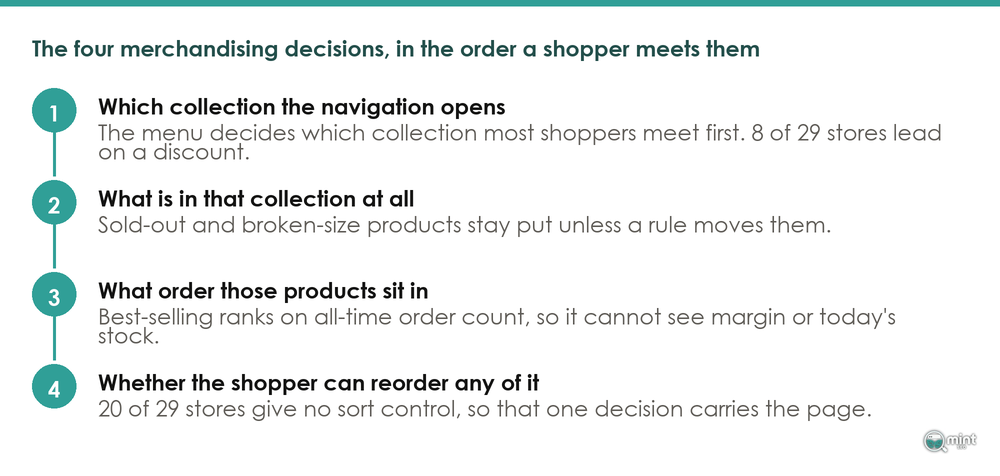
Four decisions govern what a shopper meets on a collection page. Every one of them has a default, and your platform chose it for you.
Our examples below are Shopify, because that is where our client work and our crawl sit. The four decisions exist on WooCommerce, BigCommerce and Magento too, under different names in different menus.
The Order Products Appear In
Shopify documents exactly what its best-selling option measures: "Sort by your best selling products based on the all-time number of orders that include the product." History, in other words, and history alone.
That matters most for anything you have just launched, because a new product has no history at all. Shopify's own note is that "If you haven't sold any products yet, then this option sorts your products from newest to oldest", so a launch starts at the bottom of anything sales-ranked and stays there.
A product stuck at the bottom sells less, which keeps it at the bottom, and Julia Wawrzynek has a name for that circuit. She leads marketing at the Shopify collections app SortWise. On eCommerce Fastlane in June she named the effect: "Do not sort by popularity alone, or you create a doom loop."
Her point is that a best seller stays on top purely because it is already on top, so the higher-margin hidden gems never get seen on page two. Position drives sales and sales drive position. Nothing new can break in.
Whether Sold-Out Products Stay In The Collection
Sold-out products do not remove themselves. Wawrzynek's view is that "Out-of-stock and broken-size items should fall to the bottom on their own" without hours of weekly dragging. Until this summer Shopify gave merchants no native setting that did it.
Stores worked round the limit instead. Shopify's own account is that "Merchants worked around this limitation by duplicating collections" or by editing themes and reaching for third-party apps. All three of those leave something behind that somebody then has to maintain.
Whether The Shopper Can Reorder It
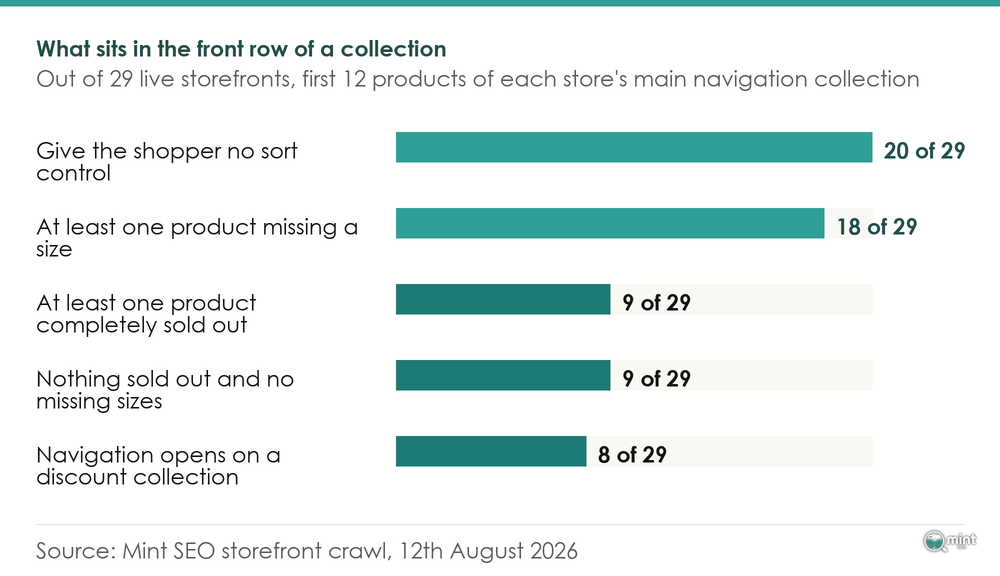
Twenty of the 29 storefronts gave the shopper no way to reorder the collection at all. One decision then carries the whole page for everybody who lands on it.
Everlane shows how separate these two decisions are. Everlane's womens new arrivals collection offered a sort control and still had eight of its first twelve products missing at least one size.
Which Collection Your Navigation Opens
Before any ordering decision applies, something has to choose which collection the menu leads with. Eight of the 29 storefronts in our sample pointed their first navigation link at a discount or markdown collection. Wawrzynek's framing is worth borrowing here: "Treat your collection page as prime real estate." On her reading the first two rows do the overwhelming majority of the work.
That makes the menu a real choice about what a first-time visitor learns to expect from you. Every other page your menu promotes works the same way, down to what to put on an about page.
How A Product Looks In The Grid
Visual merchandising online is not photography advice. It is the listing tile: how many images it carries, whether five colourways take five slots or one, and which attributes a shopper can read without clicking.
How Many Thumbnails, And How Many Slots Per Product
Baymard's 2025 product list and filtering benchmark scored 21,000-plus UX parameters across 170-plus sites. It found that 80% of sites do not provide three or more product thumbnails in product lists and search results, and that 42% of sites do not combine variations of a product into one list item.
That second number matters more than it looks. When one product takes five of the twelve slots in a row, a shopper meets eight products where the row could have shown twelve.
Baymard's separate research into product listing information reports that "50% of e-commerce sites in our benchmark failed to display adequate list item attributes, leading users to dismiss perfectly relevant products or even abandon a site."
The Front Row On 29 Live Storefronts
Here is what the crawl found. We took each store's primary navigation collection, pulled it in its own default order, and read variant-level availability on the first twelve products.
The Sizes Missing From The Front Row
Eighteen stores had at least one front-row product short of a size.
Nine had a completely clean front row: nothing sold out, every size available, across all twelve slots.
That split is what surprised me, because it puts the problem in a minority of stores. Across the 29 stores we crawled, the median number of front-row products missing at least one variant was two, against a mean of 3.4. It concentrates, then, so a handful of stores carry most of it.
What makes it persist is that nothing on a store surfaces it.
Sold-out badges and stock reports both work at product level, so a jumper available only in XS reads as in stock everywhere a merchant would look.
Being invisible in the admin lets it run to the extreme. The Birddogs khaki collection is well built, and every product in its front row was short of a size.
On a row like that, a shopper wanting a medium opens four products and finds their size in none of them. Paid traffic lands on that page and leaves, which is the mechanic underneath most attempts to reduce bounce rate on an ecommerce store.
What Merchandising Does To Your Collection Page In Google
Every storefront we measured opened its navigation on a collection page, and that is the page those stores will be trying to rank. Nothing in what is merchandising in ecommerce sounds like a search problem until you notice that overlap.
Reorder that page on Monday and you have changed what Googlebot reads on Tuesday. The merchandiser and the search work edit one surface, and nothing tells either that the other moved it.
Google Search Central publishes the guidance its own crawler follows. Its ecommerce site structure page is direct about the risk: "If category pages don't include direct links to all products in a category" then Googlebot might not find all of your products by crawling alone.
The same documentation explains the ranking side. "Google can use information such as the number of links it needs to follow to reach a page and the number of links to a page to infer the relative importance of a page" over the rest of your site, and position in a collection changes both of those.
Where you point authority therefore matters as much as where it lands, which is the argument behind our approach to pointing links at collection pages.
Product Sorting And Filter URLs In Search
There is a second consequence, and it runs the other way. Google's pagination guidance tells sites to "Avoid indexing URLs with filters or alternative sort orders."
In the audits I run on ecommerce stores, those two faults show up together more often than any other pair on a collection page. An order nobody has revisited since launch, and filter URLs the store is letting Google crawl unchecked.
Rendering sits underneath both questions, and it changes shape completely on a store that has moved to headless ecommerce and taken the storefront off the platform's own theme layer.
Merchandising A Collection With Your Platform's Own Settings
A practical answer to what is merchandising in ecommerce is that most of it is settings you already pay for. Shopify rebuilt collections on 16th July 2026, and that change is the specific fix for the front-row problem our crawl found.
Shopify's announcement puts it as one place where "A collection can now combine everything you need": automatic conditions, products you pick yourself and even other collections. Before that you picked one or the other.
Stock can be one of those conditions. Shopify's worked example runs "You can automatically include in-stock products under that price" and exclude pre-orders, letting the collection maintain itself as items sell out. A rule holds the body of the collection while a person holds the top of it.
That shape is what most merchandising decisions want, and it did not exist inside a single collection before this summer.
Manual Sorting And The 60-Product Page
Dragging products by hand is accurate on the day you do it.
The admin itself sets the practical ceiling: "For viewing a collection in your Shopify admin, the products are displayed in paginated lists of 60 products per page". Hand-sorting rarely gets past the first of those pages.
Change rate matters more than catalogue size. One merchant on Shopify's community boards described the problem in those terms: "I have in my store 20 thousand products, and every day plus or minus 1000 to be in stock or not."
Wawrzynek's rule of thumb is guardrails over complexity: "Set the guardrails, then stop micromanaging. A few clear rules beat a spider web of conditional logic that chokes the layout." Then measure it. Her instruction is to "Watch revenue per view, not just traffic", because a collection can send more views while earning less from each one.
Small catalogues need none of this. Graza runs one olive oil collection with a handful of products, no sort control and nothing sold out in the front row. At that size the order is legible at a glance.
A collection order is one of a set of things nobody re-opens once a store is live. We measured which of those checks stores fail most often in our ecommerce website checklist.
Working Out Which Collection Is Costing You Money
Every practical part of what is merchandising in ecommerce is doable in an afternoon. Knowing which of the four decisions is costing you money is the harder half. On a store with 60 collections, the order you fix them in decides whether the work pays back this quarter or next year.
Prioritising that is what our on-page SEO work covers, alongside titles, headings and internal structure on the same pages. It runs as one of the eight disciplines we work through against a revenue goal.
Quickest way to find out which of these is live on your store is to have somebody look at it with you. I do those calls myself, and thirty minutes is usually enough to name the collection that is leaking.
You can book a free consultation with me directly.

About the author
John Butterworth
John Butterworth is the founder of Mint SEO, a Manchester ecommerce SEO agency he started in 2024. He has 11 years in SEO and digital marketing, previously running SEO departments for market-leading brands and several agencies. He specialises in Shopify and ecommerce SEO, and his work has ranked over 100 websites and driven more than 3 million organic visits. He speaks at industry events including the SEO Mastery Summit.
Connect on LinkedIn →