
Knowledge Hub
Best Shopify Alternatives, Picked By The Reason You Want To Leave
By John Butterworth · October 12, 2026
The right platform after Shopify depends on the reason you want to leave. Among the best Shopify alternatives, WooCommerce suits a store that needs search traffic or wants to stop paying the platform a cut. It does need someone to keep it lean. BigCommerce is the closest hosted swap if you want the servers run for you. Squarespace and Wix suit a small catalogue that sells through social or word of mouth.
Whichever of these you pick, expect your URLs to change on launch day, because no other platform uses Shopify’s /products/ and /collections/ folders by default. So if flat search traffic is your reason, I’d test the Shopify store before moving it. The platform is rarely what stalled that traffic, and a migration adds a dip on top. Write down your reason before you compare prices, since it decides the shortlist.
WooCommerce Is The Shopify Alternative I Recommend For A Store That Needs Search Traffic
WooCommerce is the trade worth making if search traffic pays your bills. You pick your own URL pattern instead of Shopify's fixed /collections/ folder, edit the checkout and choose which scripts load on which page. Nobody takes a cut of your orders either. You pay in upkeep instead, which I cover below.
Count what you'd give up before you go. Shop Pay remembers your returning customers' card and address, Shopify patches and runs the checkout, and its app store has something for most jobs. Even the best Shopify alternative earns the move only if it fixes your reason for leaving by more than those are worth to you.
Price comes after both, because a saving on the monthly bill disappears in the first quarter your category pages slip.
Adobe Commerce sits in that table and nowhere else in my recommendations. It gives full control at enterprise scale, but each version only gets a few years of support before you're upgrading again, and that work needs a development team most Shopify stores don't have.
WooCommerce Hands You The Code And The Upkeep
Choose WooCommerce when you want to own every template on the store. It runs as a plugin on WordPress, on hosting you pick, and nobody takes a percentage of your orders.
You can change any template, any URL pattern and any piece of markup the theme outputs, which is what a store needs when its category and product pages earn the money.
WooCommerce stores get slow for the same reason. Each add-on loads its own scripts, cheap servers struggle on a busy catalogue, and nobody on the platform's side stops you adding a fifth slider.
Move to WooCommerce only if someone on your side will own the hosting, the plugin list and the page speed every month. If that person doesn't exist yet, budget for them before you budget for the migration. How WooCommerce compares with the rest on search is in my guide to how each platform handles SEO.
BigCommerce Is The Closest Hosted Swap, With Lower Sales Caps Since June 2026
BigCommerce works most like Shopify: it hosts the store, runs the updates and keeps the checkout working. If Shopify's app costs are your reason, or you want more built into a hosted platform, price BigCommerce first because its plans sit closest to Shopify's.
The catch is how it charges as you grow. Its plans now step up at lower sales levels, and orders taken through a payment provider outside its approved list carry a fee. I put numbers on both in the next section, against your own sales.
Squarespace And Wix Suit A Small Catalogue That Sells Through Other Channels
Squarespace and Wix are builders: you drag sections onto a page and the platform handles everything underneath. For a maker selling thirty products through Instagram and a weekend market stall, either is quick to launch and hard to break.
In my experience, though, drag-and-drop builders never really generate search traffic.
Wix promises merchants that "all Wix sites are backed by a solid infrastructure" for search, and the technical basics are there. The limit is the code you can't touch. When a builder's theme fixes the page structure, the work that moves an ecommerce store up the results has nowhere to go.
If Google is where your sales come from, rule both out. If it isn't, and you want something simpler and cheaper than Shopify, either will do the job.
Price Each Alternative Against A Year Of Your Shopify Invoice
List prices tell you very little, because the fees that decide your bill sit in plan caps and per-order charges.
Start from what you pay now. In your Shopify admin, go to Settings and then Billing, and export twelve months of charges. Add up the subscription, every app and any third-party transaction fees Shopify charged for taking payment through another provider. That total, set against the same year of sales, is the figure each alternative has to beat, so price every option on those twelve months, starting with BigCommerce's plans:
- 1. BigCommerce sets your plan by sales over the trailing twelve months, counted as gross order value minus 10%. Its UK pricing page shows the structure that took effect on 1st June 2026, set out in the table above. Past each cap the plan upgrades itself.
- 2. Squarespace's Basic plan is £16 a month and adds a 2% online store fee on every sale, as its pricing page shows. Upgrading removes it, so price the plan you'd end up on.
- 3. WooCommerce takes nothing per order. You pay for hosting that can carry your catalogue, the paid plugins you need and the hours of whoever keeps it updated. Price those hours honestly, because that line is usually the largest.
Run those sums for a store whose yearly sales sit above the Growth cap and the cheapest BigCommerce plan stops being an option, because the cap moves you up two tiers.
Leaving Shopify Moves Your URLs By Default, So Map Them Before Launch
None of the best Shopify alternatives will keep your old addresses by default. Shopify's folders are its own: /products/ for products, /collections/ for categories, /pages/ and /blogs/ for the rest.
WooCommerce defaults to /product/ and /product-category/. Wix uses its own /product-page/ folder. Custom bases in WooCommerce and custom URLs in BigCommerce can rebuild the old paths, but only if someone sets them up before launch. Otherwise every page Google has ranked moves on launch day, and my guide to moving a store to a new platform covers the records that travel separately.
If Stalled Traffic Is Your Reason, Strip The Shopify Store Instead
Stalled traffic is the one reason for leaving that WooCommerce can't answer. If organic visits have flattened on Shopify, the platform is rarely what stopped them, and moving adds a dip on top of whatever did. Start with the date the decline began: if it lines up with a theme update, a new app or a batch of templated product pages going live that week, you've found the cause without touching the platform.
In the theme code editor, search theme.liquid for script tags belonging to apps you uninstalled months ago, because removed apps often leave their snippets loading on every page. Clearing them costs nothing, and the sales a faster page wins back are worth more than the ranking lift. My notes on speeding up a Shopify store cover the rest.
Before deciding, also weigh what you would walk away from: on 9th October 2026 Shopify began sharing compare-at prices with AI shopping agents, so a jug marked down from £40 to £30 shows as a deal when an assistant recommends it. WooCommerce needs its own feed for that kind of agent visibility, which is one more job for whoever runs the store.
Exact-Page 301s And A Rebuilt Product Feed Keep The Dip To Weeks
Done properly, a move off Shopify costs a short dip that recovers in weeks.
Build the map as a spreadsheet with one row per old address and the exact page it becomes, so a product, its collection and its old blog post each land on their own replacement. On a WordPress host those rows become rules in the server config, which answer before any page loads. Google's guidance is plain: "we recommend that you use a permanent server-side redirect whenever possible".
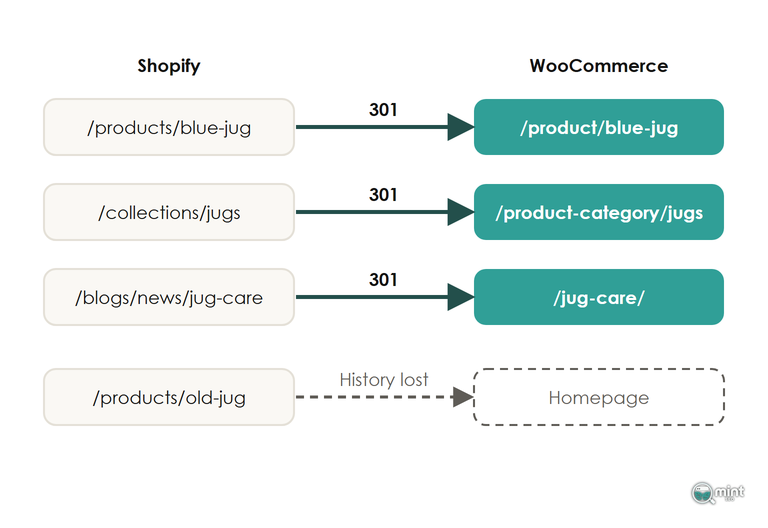
Retired products need the same care, so never point their URLs at the homepage to save time on the mapping. A product page sent to the homepage loses everything it had earned. When a dip drags on for months, a homepage redirect like that is the first thing to look for.
Product IDs change on the new platform too, so rebuild your Google Shopping feed before launch or your listings drop out while rankings settle. My migration SEO checklist gives a pass test for each of those steps.
Test Whether Your Store Should Move At All
If you've half decided to go already, the most useful thing you can do is test the reason before the contract is signed.
If you do move, our website builds put the new store on the platform that fits. Our technical SEO work covers the URL map, the redirects and the feed so the dip stays short. Both are part of our ecommerce SEO services for stores thinking of leaving Shopify, so the search side is planned before anything moves.
To test the reason first, get a free audit of your current store. Page one charts the last twelve months of organic traffic, so you can see whether it has really stalled, and how much of it is branded search. It comes back the same day as a two-page PDF, with no call and nothing to pay.

About the author
John Butterworth
John Butterworth is the founder of Mint SEO, a Manchester ecommerce SEO agency he started in 2024. He has 11 years in SEO and digital marketing, previously running SEO departments for market-leading brands and several agencies. He specialises in Shopify and ecommerce SEO, and his work has ranked over 100 websites and driven more than 3 million organic visits. He speaks at industry events including the SEO Mastery Summit.
Connect on LinkedIn →