
Knowledge Hub
Your Shopify Speed Score Is Lying To You. Here Is What To Fix Instead
By John Butterworth · August 12, 2026
Open your Shopify admin and look at the speed score. It is probably in the thirties with a red bar beside it.
Every guide answering how to speed up my Shopify store says the same thing about that number. Raise it.
Shopify disagrees with that advice. Writing on what makes a good Shopify speed score, it calls the storefront score a proxy and says real-world performance is what moves conversion.
That matters, because the platform has since replaced the single score with three Core Web Vitals measured on real visits. The number you are chasing has been retired by the company that issued it.
It can also be faked. A market exists that does exactly that, and the ten-second test for it is further down this page.
I'm John Butterworth. I've run this agency from Manchester for eleven years and driven 3M+ organic sessions across ecommerce accounts, most of them Shopify.
Speed is the question owners bring me most, and it nearly always turns up framed as a score. Before writing this I went and measured what Shopify stores are really shipping.
That pass is the same one that opens an ecommerce technical SEO engagement here. Below are the four changes worth your afternoon, in the order I would make them.
Which Of These Four Is Slowing Your Store, And Which To Do First
Start with what you control. The Shopify Help Centre is blunt about it: “Three elements most significantly affect Shopify store speed.”
Those three are your theme, your installed apps and any custom third-party code. Everything else is either downstream of them or already handled for you.
Split that middle item into apps you chose and platform work you can stop redoing, and you have four jobs. Their order matters more than the list itself.
Owners rarely get through all four before something else takes the afternoon, which makes the first job the one that has to move the most.
Send Every Image At The Size The Device Asked For
Here is exactly what the measurement was. On 12th August 2026 I crawled 111 ecommerce domains, of which 108 loaded and 62 were confirmed Shopify, loading each homepage cold on an emulated Pixel 7 and logging every file it requested.
That first job is nearly always an image. On 45 of the 62 stores, 73% of the sample, the Largest Contentful Paint element was an image, which is the kind of finding an ecommerce SEO site audit turns up first.
Three stores in four, in other words. That metric is whichever element finishes painting last in the visible part of the page, so on most storefronts Google is grading a product or banner photograph.
It is also the metric most sites fail. On mobile, 62% of sites achieve good Largest Contentful Paint, according to the 2025 Web Almanac.
Its two companions sit well above it. Interaction to Next Paint and Cumulative Layout Shift both clear their thresholds on the large majority of mobile pages, which is why the image is where the work goes.
Drop The Third-Party Scripts Nobody Is Reading
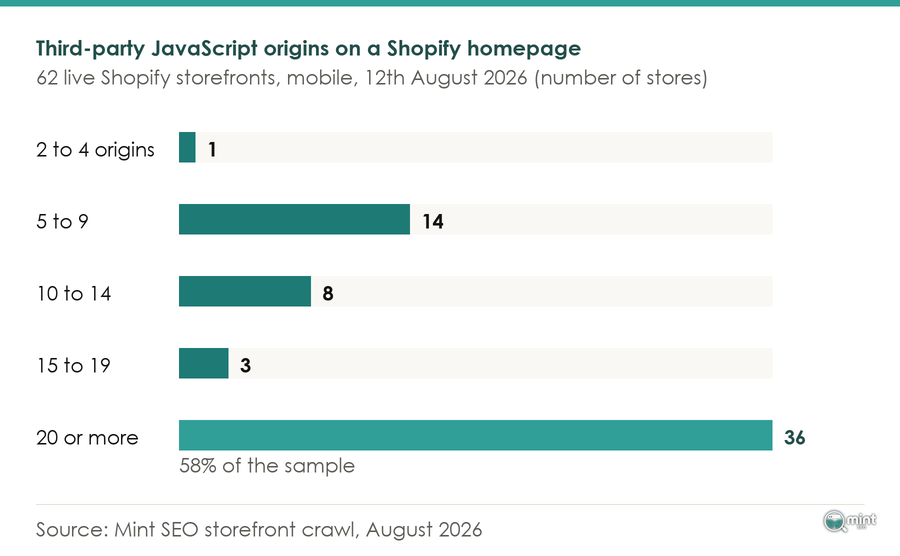
Next in line is everything your store calls that your store does not own. Across 62 live Shopify storefronts we crawled on 12th August 2026, the median homepage loaded JavaScript from 21 separate third-party origins.
Each one costs a fresh lookup, connection and download before that vendor's code can run. None of it sits inside Shopify's control, which is why the platform cannot fix it for you.
Move To A Theme Shopify Still Maintains
Underneath both sits the theme. Shopify tells merchants to move to a current theme, from the Horizon family or Online Store 2.0, because a theme decides how much code ships before a single app loads.
Theme work waits its turn because it is the most disruptive job on the list. Nobody swaps a theme on a Tuesday afternoon between orders.
Cancel The Work Shopify Already Does For You
Last comes subtraction, the only job on the list that finishes immediately. Shopify provides automatic performance enhancements already, so several tasks on every speed checklist you will read are done before you start.
Because the platform has done them, doing them again returns nothing. Striking them off is free, which is why subtraction earns a place on the list at all.
See Which Image Or Script Your Homepage Paints Last
Two checks tell you which of those four is yours. Run your homepage through PageSpeed Insights, then scroll to the Largest Contentful Paint element diagnostic, which names the exact element.
Working in that order is Shopify's own advice. Its troubleshooting sequence reads: “Verification: test across devices and connections and use external tools for confirmation”, then diagnosis, then resolution.
Read what it names, then act on it. An image sends you to the top of this list, while text sitting behind a font or a render-blocking script sends you to the third parties instead.
Count The Companies Your Homepage Calls
Your second check is a count. Open your browser's developer tools, load your homepage and count the distinct domains in the network tab.
Compare that against the crawl. The lightest store in our sample loaded third-party JavaScript from 2 origins, while the heaviest loaded 47, and both were shops selling comparable products at comparable prices.
A spread that wide is a choice every one of those shops made. That single finding changed how I brief this work.
None of it is free, so it helps to know the return. Deloitte and 55 measured 30 million sessions across 37 brands for Google, in a study called Milliseconds Make Millions.
Their headline finding was small and expensive. A 0.1 second improvement in mobile speed lifted retail conversions by 8.4%.
Retail consumers also spent 9.2% more, in the same research. An afternoon is cheap against numbers like those.
Ask Shopify's Image CDN For The Size The Phone Needs
Since the image usually decides the metric, start there. Compressing images before upload is the first instruction in almost every Shopify speed guide.
It is also largely redundant. Shopify runs automatic image optimisation through an image CDN on every store, converting to WebP and compressing as it goes.
Compression, then, is not where the loss is. The fault the crawl surfaced is a different one: Shopify's image CDN resizes a picture only when the theme asks it to, by putting a width in the image URL.
With no width, it sends the master file. A full-resolution product photograph then goes down to a phone on mobile data.
This turns out to be common. Of the 40 stores serving images from Shopify's image CDN, the median store asked for a size on fewer than a quarter of them.
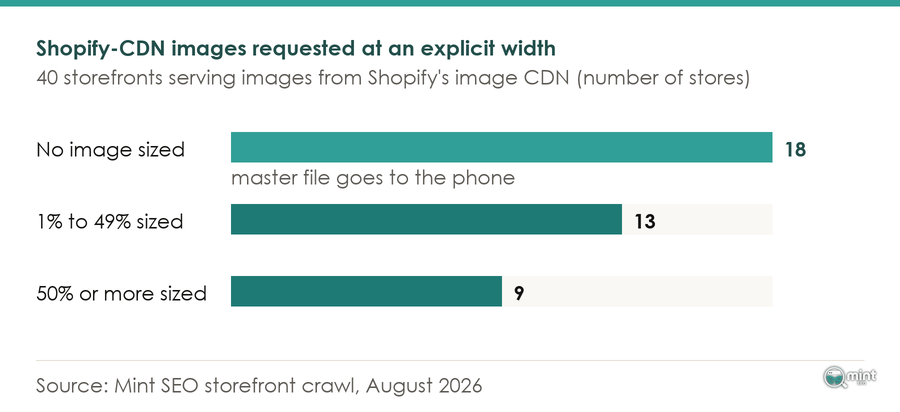
On 18 of those 40 stores, not a single image carried a width parameter. Every picture on those shops went out at whatever size it was uploaded.
Because that is the default behaviour, the pattern holds sample-wide. Across the 62 storefronts the median homepage requested 79% of its Shopify-hosted images without telling Shopify what size to send, which is the first thing an ecommerce SEO site audit looks at.
Because the width is set by the request, the fix lives in your theme. In an Online Store 2.0 theme the image tags are built in Liquid, and the image_url filter takes a width.
Give it a sensible set of widths and a matching sizes attribute. Your phone visitors then get a phone-sized file while the desktop still gets a sharp one.
If editing theme code is not for you, this is the change worth paying a developer an hour for. It is done once and holds for every image you upload afterwards.
Cut The Third-Party Scripts That Do Not Earn Their Load Time
With the images sized, the next weight is code you did not write. Shopify minifies your CSS and JavaScript for you, so what is left to you is third-party.
That category grows quietly. The median store carried 121 script tags and 2.7MB of declared JavaScript on its mobile homepage.
More than half, 36 of the 62, called 20 or more third-party origins. What makes this tractable is how short the audit turns out to be, because the same names keep coming back.
Google Tag Manager appeared on 51 of the 62 stores, and shop.app on 45. Between them they account for most of the tag weight before a marketing tool is added.
Behind those two, Klaviyo was the other constant. Its two script hosts turned up on 37 and 34 storefronts.
So work through your app list and ask one question of each. Is this earning more than it costs to load, on every page view, for every visitor.
An app installed for a campaign two years ago is answering that with a no. Its app embeds are still firing, and uninstalling it is a two-minute job nobody notices except your visitors.
Once the app list is done, tag managers deserve their own pass. Containers accumulate tags nobody has audited, each firing on templates with no use for them.
Shopify has been closing one classic hiding place for stray script. Its checkout upgrade documentation states that “As of August 28, 2025, the additional scripts section in the checkout settings is view-only”, with auto-upgrades from January 2026.
Put The Store On A Theme That Is Still Being Maintained
Once the apps are trimmed, what remains is the floor your theme sets. Theme choice is usually argued on taste, and it can be argued on numbers instead.
StoreInspect analysed 385,030 Shopify stores in March 2026 and ranked themes by pass rate. Broadcast has the highest Core Web Vitals pass rate at 92.4%, and every name near it is a theme you can buy today.
More useful is what that study found at the other end. It counted that 77,134 stores still run deprecated themes, scoring 42% lower than the modern ones, in the same 385,030-store analysis.
Which puts a lot of stores in the same position. If your theme has not had an update in years, you are fighting your own floor, and no amount of image work recovers that.
Shopify's own guidance is to adopt current themes such as the Horizon family or Online Store 2.0 options, where Dawn remains the reference build. It also says to limit theme sections and to test animations before enabling them.
That last instruction is the one owners skip. Animations get chosen in a demo store with six products, which tells you nothing about how they behave across your catalogue.
For the same reason, Shopify says to “Activate pagination for large product collections to control load volumes”. That one matters if your collection pages run infinite scroll.
What Shopify Already Does, So You Do Not Pay For It Twice
Shopify provides automatic performance enhancements on every store without being asked, and you are probably being quoted for some of them.
That list runs from Cloudflare CDN integration and HTTP/2 asset delivery through Gzip compression, a one-year browser cache for repeat visitors, and automatic CSS and JavaScript minification.
Read that against the last speed proposal you were sent. Most of it is already done.
Of everything on that list, lazy loading is the clearest case. The median store applied loading=lazy to 77% of its images, and it still sits on the checklist of every article ranking for this search, including guides to ecommerce web design.
Markup is not your problem either. The median homepage rendered 2,956 DOM nodes, which is unremarkable for a shop, so what is left to win is image sizing and third-party script.
There is a sharper reason to be careful here. In a post on fake performance experts and apps, Shopify's performance team wrote: “We found those practices in almost 15% of extensions that promised one-click optimizations.”
An app selling you work the platform already does is the mild end of that problem. The rest of it is the next section.
Get A Number You Can Trust Before And After
Everything above is unverifiable without a number you believe. Only 3 of the 62 storefronts took longer than 2.5 seconds to paint their largest element on our unthrottled test, which tells you how easily a measurement can flatter.
Anyone asking how to speed up my Shopify store needs a trustworthy number. Choosing which number to believe is what ranking guides treat as a formality.
Read The Field Data, Not The Lab Score
Shopify is direct about what its score is. Its enterprise guidance says: “Your Shopify speed score is a proxy for site performance”, borrowing Alfred Korzybski's line that the map is not the territory.
It goes further in the same piece. “In fact, Shopify speed scores are not directly correlated to actual store performance for your customers.”
Look at how the score is built and that follows. Your Shopify speed score is based on a weighted average of Lighthouse performance scores.
Three templates go into it: the homepage, the busiest product page and the busiest collection listing. All three are measured on a simulated device.
Which is lab data, and lab data answers a different question from the one you are asking. So Shopify replaced it.
The new Shopify Web Performance Dashboard replaces the single Shopify speed score with three Core Web Vitals scores, measured on real visits. Every store on a theme storefront has access to it.
Those metrics moved as well, which is why older guides mislead. Interaction to Next Paint officially became a Core Web Vital and replaced First Input Delay on 12th March 2024, with good set at 200 milliseconds or less at the 75th percentile.
Any article still tuning First Input Delay is optimising something Google retired more than two years ago. For where the bar sits now, the 2025 Web Almanac reports 48% for mobile websites and 56% for desktop websites achieve good Core Web Vitals.
Testing on your desktop therefore flatters you by eight points before you start. My own crawl makes the same point from the other side.
Only 3 of the 62 storefronts took longer than 2.5 seconds to paint their largest element, at a median of 946 milliseconds. That was an unthrottled connection in a lab, and it is not what a shopper on a train gets.
The Ten-Second Check That Your Score Has Not Been Faked
An industry has been built on faking that number, and Shopify published the manual for spotting it. Mateusz Krzeszowiak of Shopify's storefront performance team published the method in March 2024.
His team had uncovered apps and sellers cheating the performance metrics outright. The test they published takes ten seconds.
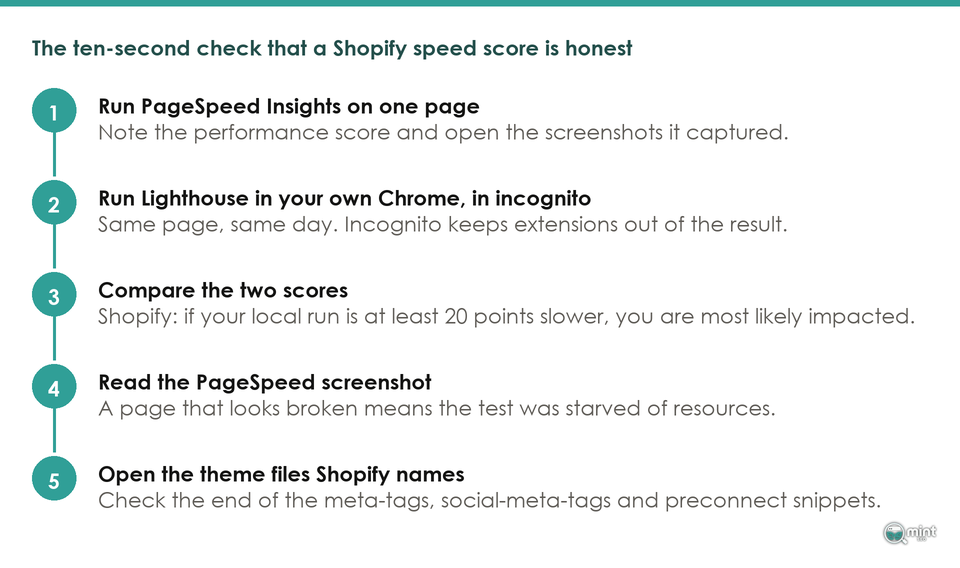
The order matters, because the second reading is the control and it has to be taken on the same page and the same day as the first.
- 1. Run PageSpeed Insights on one page of your store and note the performance score.
- 2. Open the same page in your own Chrome, in incognito, and run Lighthouse from DevTools.
- 3. Compare the two scores.
- 4. Open the screenshots PageSpeed Insights captured and look at what it photographed.
- 5. Open your theme editor and read the end of the meta-tags, social-meta-tags and preconnect snippets.
Shopify's instruction is plain: “Compare the scores of the two. If your local test is considerably (at least 20 points) slower, you're most likely impacted.” That gap is the tell.
Alongside that gap sits a second tell. “Run the PageSpeed Insights test against one of the pages on your store and check the screenshots”, because a cheat works by starving the testing tool of resources.
Starved, it photographs a page nobody would buy from. If yours looks broken there, something is intercepting the test.
Worst of all is the version aimed at the metric this article opened with. It adds a fullscreen transparent element to the HTML response, which hijacks Largest Contentful Paint from every other candidate on the page.
That one corrupts lab tests and real user measurement together. Shopify calls it the most harmful method by far.
If you want to look for it, Shopify names the files. Its advice is that “You can also inspect the theme files that were affected the most”.
Those files are the meta-tags snippet, the social-meta-tags snippet, the preconnect snippet and your theme layout file.
Open your theme editor and read the bottom of each one. Posting to r/shopify, one merchant described finding exactly that after paying for a gig.
They wrote: “It was all to include a massive transparent element over my page to fake a quick LCP score. And then he showed me ‘see, it’s fast on Google and speed GTmetrix’.”
I looked for that pattern in our own sample and it was absent. None of the 62 storefronts carried the fullscreen transparent overlay signature Shopify documented.
Six ran scripts checking the user agent for testing tools. On inspection all six were Shopify's own Web Pixels Manager or A/B-testing code excluding bots, which is legitimate.
That result is worth reporting plainly, because it says something useful about exposure. These were established brands with agencies behind them, and the pattern concentrates elsewhere.
When To Pay Someone To Speed Up Your Shopify Store, And How To Check They Did
Elsewhere means the stores that bought the cheap gig. The line between doing this yourself and buying it is reasonably clear.
Uninstalling apps, auditing a tag manager, switching themes and adding widths in the theme editor are owner jobs. Rewriting a theme's critical rendering path is not.
Past that line you are buying, and the market has a problem. The score-cheating Shopify documented is sold to merchants as optimisation work.
It warned that cheating the metrics is especially dangerous because it hides the underlying problem. You cannot fix an issue you do not know about, and that cost is larger than the fee.
A former seller-side insider posted the sales mechanics to r/shopify in August 2025. They listed the warning signs: “Gig promises 90+ PageSpeed score in 24 hours for dirt cheap. Seller shows test screenshots only, not real user results.”
Their third sign is the one to remember. “Your site feels the same after work, but the test score jumps magically.”
Brief the work against field data. Ask for the Core Web Vitals in your Web Performance dashboard to move over a stated period, and ask what will change to move them.
A provider who can only promise a score is promising the thing that gets faked. One who talks about your images, your apps and your theme is describing work you can verify.
Having briefed it that way, run the ten-second check yourself on delivery. Deloitte found the same 0.1 second improvement lifted travel conversion rates by 10.1% and lead generation form submissions by 21.6%.
Those returns only arrive if the work is real, so hold the provider to one last thing. Ask for the store's 75th-percentile Core Web Vitals before the work and after it, because Google grades you at that percentile.
That percentile matters because a median hides people. Half your visitors are slower than it, and the quarter behind the 75th are the ones abandoning, which is where an ecommerce conversion rate problem starts looking like a speed problem.
Get Mint SEO To Run Your Shopify Speed Work
If you would rather someone else ran the crawl and made the changes, that is what our technical SEO work covers for Shopify stores. Storefront performance sits inside it alongside crawling, indexation and site architecture.
It is not sold as a separate speed gig. A fast store nobody can find is still a quiet store.
We ran a 12-week seasonal Shopify SEO campaign for BedShelfie built on product and collection on-page optimisation, technical fixes and buyer-intent content. It produced 256% more sales from Google Search.
Orders are the point of the work. They are the only reason any of the numbers above matter.
So the first step costs nothing. Book a free 30-minute consultation and you get me rather than a sales rep, a look at where your store stands and the biggest quick wins.
If you would rather see the whole picture first, an ecommerce SEO site audit covers storefront performance alongside everything else deciding whether your collection pages rank.

About the author
John Butterworth
John Butterworth is the founder of Mint SEO, a Manchester ecommerce SEO agency he started in 2024. He has 11 years in SEO and digital marketing, previously running SEO departments for market-leading brands and several agencies. He specialises in Shopify and ecommerce SEO, and his work has ranked over 100 websites and driven more than 3 million organic visits. He speaks at industry events including the SEO Mastery Summit.
Connect on LinkedIn →