
Knowledge Hub
The Shopify Themes Worth Picking For SEO (And What The Theme Never Decides)
By John Butterworth · August 17, 2026
One figure, 83.2%, does most of the work of choosing the best Shopify theme for SEO before you open a demo. Shopify's data attaches it to the middle-ranked theme in its own store. I'm John Butterworth, Mint SEO's founder. Opening main-product.liquid to see what a theme is really emitting is a weekly job here, and 11+ years of it sits behind 3M+ organic sessions.
Doing that week after week changes what you look for. You came for a shortlist, and the names come first below, ranked on Shopify's own measurements.
After that comes the line between what a design decides and what it never touches. Then what the built-in structured data really contains on live stores, and three checks you can run this afternoon.
Start With The Themes Shopify's Own Data Says Are Fast
What We Ranked The Themes On
Shopify publishes the Core Web Vitals its themes deliver to real shoppers, on a page it refreshed on 11th August 2026. Six days before this article went live.
Two filters make those numbers usable. For a shop to be eligible to be counted for a theme, it has to fulfill the following conditions: Have at least 100 events (views) per day. Be an active shop. Use a custom domain.
These are trading shops with real traffic. Shopify also restricts the sample to stores running one of the three most recent versions of each design.
Of those two filters, the version rule matters most. It stops an author being judged on code they already fixed a year ago.
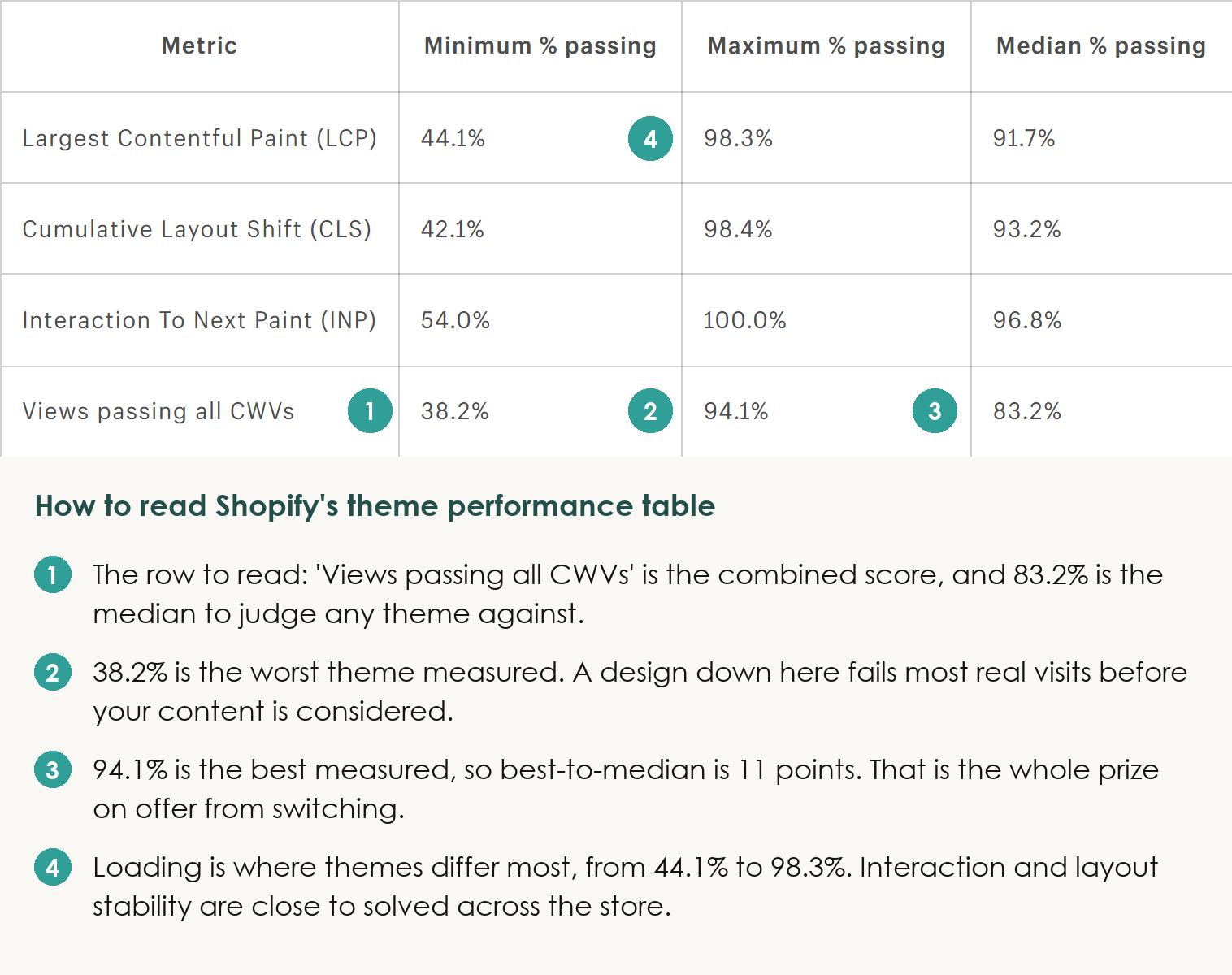
With that filtering in place, one number frames the whole decision. Shopify's data shows the median Shopify theme passes all three Core Web Vitals on 83.2% of views.
The Themes Worth Shortlisting
Five names make my shortlist of the best Shopify themes for SEO, and three of them cost nothing. On Shopify's figures, Bullet passes all Core Web Vitals on 94.1% of views, Taiga on 92.5% and Shapes on 92.3%. All three sit above anything the platform ships as a default.
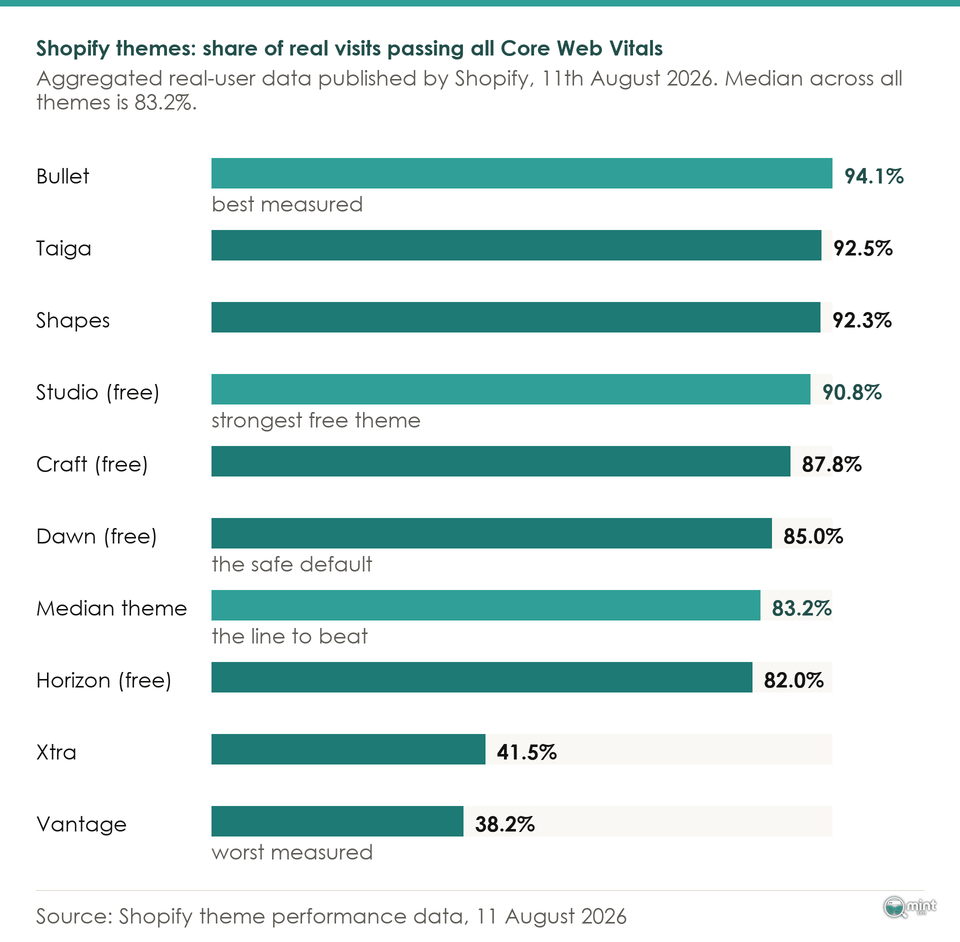
Inside that narrow band, two rows deserve saying out loud. Craft passes all Core Web Vitals on 87.8% of views and Studio on 90.8% in Shopify's data. Both free options outperform most of the paid ones above them.
Shopify's data also records that Dawn passes all Core Web Vitals on 85.0% of views, putting the platform default 1.8 points above the median, with Studio and Craft both ahead of it.
The Ones To Rule Out On Speed Alone
Two themes are worth avoiding outright. Shopify's data records Vantage passing all Core Web Vitals on 38.2% of views and Xtra on 41.5%. The floor sits a long way below the ceiling.
A theme down there is failing most of your visitors before your content gets a say, and no amount of image work on your side recovers it.
The speed screen is that short. Rule out the handful at the bottom, take anything comfortably above the median, and stop optimising the decision.
Why Two Stores On The Same Theme Rank Nothing Alike
I've taken on stores running identical themes whose organic performance had nothing in common. Swapping template rarely moves anything by itself.
The Part Your Theme Writes
Your theme is a set of Liquid templates. Every product page is rendered from one of them, so whatever a template gets right or wrong repeats across your whole catalogue at once. Three of those outputs matter for search.
Start with your image markup. Shopify's filters generate responsive markup for you, but the theme decides what it declares. The agency Insiteful put it like this in its own storefront audit write-up: 'The srcset attribute gets the attention, but sizes is where themes quietly lie to the browser.'
Get that wrong and the browser confidently downloads a file several times larger than the slot it fills. Their write-up on Shopify image handling sets out how to check yours.
Heading structure is the second output, and it fails the same way. A merchant posting as Moniox95 found Dawn giving their homepage and collection pages the wrong H1 structure entirely.
That is a template fault, so editing the template fixes every page of that type at once.
Because templates work that way, your crawl directives sit there too. Shopify's developer documentation states that you can use Liquid to add or remove directives from the robots.txt.liquid template.
The Floor The Theme Store Guarantees
Being sold in the Theme Store sounds like a quality signal. It's closer to a threshold. Shopify's developer documentation on performance states that to be accepted into the Shopify Theme Store, a theme must have a minimum average lighthouse performance score of 60.
Sixty is the bar there, measured across the home page, product page and collection page. It is a pass mark.
Underneath that pass mark sits a stricter number. The same guidance tells developers your minified JavaScript bundle size should be 16 KB or less, a bar plenty of paid designs clear only in spirit.
Which is why two options on one shelf can sit fifty points apart on real-user data.
What Your Catalogue And Links Decide
Once a design clears that floor, what separates two stores is the catalogue and the links pointing at it. Google's documentation on page experience is blunt about the order of things.
It says Search always seeks to show the most relevant content, even if the page experience is sub-par.
Google has since removed page experience from its published list of ranking systems while confirming it remains a signal, as Search Engine Land reported at the time. Speed still counts. It is a floor you clear once.
Across the Shopify stores we audit, the theme is almost never the first thing we change.
What Built In Schema Ships On A Live Store
Themes are sold on built-in structured data, and that claim is easy enough to test.
What We Found On 50 Live Storefronts
31 of the 50 storefronts we crawled emitted Product JSON-LD on their product page. Method, on 17th August 2026: 50 trading brands, each verified through its products endpoint, one product URL opened per brand, every ld+json block in the rendered DOM parsed. All 50 returned a readable page, so nothing dropped out.
Another 12 of the 50 emitted only ProductGroup markup and no Product block at all. ProductGroup is the variant-aware type, and on those twelve stores it stood in for the Product block most merchants assume is there.
Below those two groups the picture thins out further. Five produced nothing a product result could be built from, and two carried older microdata instead.
Which Fields Get Left Blank
Presence and completeness are different things. Of the 31 storefronts emitting Product JSON-LD, only 11 carried a GTIN or MPN, and ten carried an aggregateRating.
Brand and SKU appeared on 27 and 24 of those pages. The holes are specific: twenty-one product pages gave Google nothing to build a star rating from.
Google documents product snippets and merchant listings as two different experiences with different required properties, and the identifier decides which one you get.
Your theme can only publish an identifier you've already filled in, so closing that gap is catalogue work.
When Two Schema Blocks Are Worse Than One
A smaller group had the opposite problem. 5 of the 31 storefronts emitted more than one Product block on the same page, and in each of those five an SEO app was sitting on top of a theme already writing its own.
Choosing between those apps is a job in itself, which our guide to Shopify apps covers.
One merchant has documented it in detail. The handle EjazSmartforum, posting on Shopify's support forum, hit precisely this on the Symmetry theme.
Their app produced valid markup, the theme produced broken markup, and Symmetry exposed no switch to turn its own output off.
They ended up stripping those blocks with a script, which is a check worth running before you install an SEO app.
How To Check The Theme You Are Already On
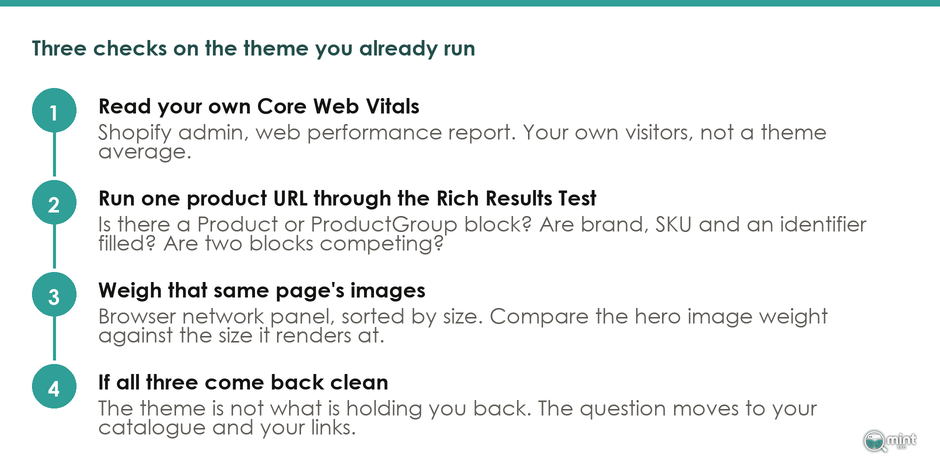
Ten minutes inside your own store will settle it. Run these three checks, in this order.
Read Your Own Core Web Vitals First
A theme average can't tell you what your shop does. Shopify says as much itself: real-user performance depends on the code and version you run, on your own customisations, and on the apps you've added.
Your Shopify admin already reports your own Core Web Vitals under its web performance report, measured on your own visitors. Read that before you read any theme table.
If your own figure sits near the median and your theme is mid-table, the template isn't what's holding you back.
Put One Product Page Through The Rich Results Test
Take one product URL and run it through Google's Rich Results Test. You're checking whether a Product or ProductGroup block appears at all, whether brand and SKU and an identifier are populated, and whether two blocks are competing.
One URL answers for your store what our crawl asked across 50. Where something is missing the fix usually sits in your product data, and our product page guide covers what to fill in.
Weigh One Product Page's Images
Open the same page with your browser's network panel and sort by size.
Insiteful, reporting on its own storefront audits, found images to be the heaviest asset class on almost every store it looked at. They were also the Largest Contentful Paint element on the vast majority of those pages.
That matches what we see on Shopify stores. If your hero image lands at three times the size it renders at, you've found real speed without touching your theme.
There's a longer walkthrough in our piece on Shopify store speed. Should all three checks come back clean while you're still not ranking, the question has moved onto the platform and the catalogue, which our comparison of ecommerce platforms for SEO picks up.
Where An SEO Partner Fits Into A Theme Decision
Those three checks tell you whether you already run the best Shopify theme for SEO or still need to change it.
They won't explain why a store on a slower template outranks you. That usually comes down to catalogue structure and the links pointing at your pages.
Our technical SEO service picks that up on a Shopify store. It covers the GTIN and rating fields your product template leaves blank and the duplicate ld+json an app has added.
All of it runs as one programme against a revenue target, and our order-of-work guide shows how we sequence it.
Run the checks before you go shopping. Book a free 30-minute call, bring what they turned up, and we'll read your store's numbers together.

About the author
John Butterworth
John Butterworth is the founder of Mint SEO, a Manchester ecommerce SEO agency he started in 2024. He has 11 years in SEO and digital marketing, previously running SEO departments for market-leading brands and several agencies. He specialises in Shopify and ecommerce SEO, and his work has ranked over 100 websites and driven more than 3 million organic visits. He speaks at industry events including the SEO Mastery Summit.
Connect on LinkedIn →