
Knowledge Hub
Your Theme Already Did Most Of The Product Page Checklist. Here Is What It Left You
By John Butterworth · August 14, 2026
You have read the list. Write unique descriptions, compress the images, add schema. Then you open your store, look at nine hundred products, and it stops being advice.
Knowing how to optimise an ecommerce product page for SEO is not the hard part, because doing it nine hundred times is.
I am John Butterworth and I run Mint SEO from Manchester. Product pages have taken up more of my 11+ years than any other template, mostly because the work on them is so easy to get wrong at scale.
That is what sent me to the data, so I read the markup on a batch of live storefronts and counted what was in each one.
Ninety-five per cent of them already emitted product structured data. Nobody had installed anything, because their theme had done it for them.
What follows is the six fields that carry a product page. After those comes the copy job underneath them, then the properties your markup leaves blank and the advice that expired this year.
The Six Product Page Fields To Change First
Most of how to optimise an ecommerce product page for SEO comes down to six fields. Each one has a test you can apply to tell whether the job is finished.
These six are where my product-page audits start, and the order below is the order I work in. Eleven years of doing this inside a Shopify admin taught me which of them moves a listing and in what order to spend the afternoon.
The Title And The Words Google Shows
Your product title reaches further than any other field on the page. Google's merchant listing reference requires only three properties, and name is one of them.
That one property is filled from the product title, then reused for the H1 and the search listing. One edit lands in three places at once.
Write it as the phrase a shopper types when they already know what they want. Brand, model, then whichever attribute separates this one from the next.
Shopify also appends your store name to the meta title by default, which eats characters before the useful part gets its turn.
Pass condition for this field: the title reads as a product, with the distinguishing attribute surviving inside sixty characters.
The Search Listing Underneath It
I expected this second field to be the empty one. It was already done. In my crawl, 50 of 56 stores (89%) had set a custom search-engine listing description, with only a handful leaving the theme to fall back on the product copy. That is the checklist's most-repeated instruction already done on nine stores in ten.
Given that, check yours once. If it reads like a sentence a person wrote, leave it and move on. Scheduling a catalogue-wide rewrite of a field nine stores in ten have handled is how a fortnight disappears with nothing to show for it.
The Images And What Their Alt Text Says
Image work usually gets judged by eye, which is why it never finishes. Google publishes numbers instead of opinions.
Its merchant listing image guidance asks for crawlable, indexable images of at least 50,000 pixels when you multiply width by height. Three aspect ratios are recommended alongside that floor: 16×9, 4×3 and 1×1. Beyond those numbers, Google added guidance in March 2026 on signalling a preferred image, which starts to matter on a page carrying eight near-identical shots of one jumper.
Alt text belongs to this field too, but it is a separate job. I will come back to it, because on Shopify it lives somewhere most people do not expect.
The Reviews You Are Allowed To Mark Up
How you collected the reviews decides eligibility here, and no amount of markup changes that.
Google's review snippet guidelines are blunt about it, in their own words: Don't include fake or undisclosed incentivized reviews on your page or in your structured data markup.
Two examples come with that rule. Reviews not based on genuine experience of the product, and reviews written in exchange for money or vouchers or free products without prominent disclosure.
Plenty of stores run a discount-for-a-review flow. If yours does, either the disclosure is visible or those ratings stay out of your markup.
Those same guidelines also rule out importing a rating that a different site collected. A marketplace score is not yours to mark up. The same document sets a quality bar, in Google's words: We recommend only accepting ratings that are accompanied by a review comment and author's name.
One more thing is worth knowing before you chase a warning, because Google documents it as expected.
You only need to provide one of review, aggregateRating, or offers. The product snippets section of the Rich Results Test may report a warning when you provide offers without an aggregateRating.
The Route A Shopper Takes To The Page
Your audit tool has probably flagged a second URL for every product, the one carrying a collection in its path.
The duplicates on that list resolve themselves, because each collection route carries a canonical back to the product page. A Partner on the merchant forum said exactly that to a store owner who came asking.
That leaves the real job. Treat the route as a linking decision. Which collection pages point here, how many clicks this page sits from the homepage, and whether anything besides a collection links to it at all.
What Happens When The Product Sells Out
Deleting the page is the reflex, and it is usually wrong.
Merchant listings require a genuine Offer, and availability sits inside that offer, so a sold-out product can stay indexed and honestly described.
Your choice between Offer and AggregateOffer also decides whether the page can ever show a price drop. Only the first of those two is eligible for it.
That is the reason to keep the page up. State the availability accurately, then decide separately whether to point the shopper at a replacement.
Write The Product Copy The Manufacturer Did Not Give You
Every other change here is a field you fill. This one is writing, and it is the only part of a product page a rival selling the identical item cannot lift from the same source you did.
Say What The Specification Cannot
That is testable, so I tested it. All thirteen pages ranking for "how to optimise an ecommerce product page for SEO" went into one embedding model and were scored against each other. The thirteen came back at 0.83 against each other, and the furthest-apart pair still sat at 0.62. Read that as thirteen versions of one page.
Product pages do exactly this to each other. Publish the manufacturer's paragraph and you hand Google a page it has already seen, which leaves domain strength to decide the rest.
Write to the decision the shopper is stuck on, past the specification sheet they can already read. Which of the three sizes runs small, what it will not fit, and what the returns process looks like when you get it wrong.
That material sits with you and nowhere else. Doing it across a whole catalogue has its own method, which I have written up in how to write product copy that sells.
Answer The Question That Stops The Order
One shopper question stops the order on almost every product, whether that is sizing or compatibility or what happens when the thing breaks. Underneath the specification sits an objection, and the instinct is to build a frequently-asked-questions block for it. Just 3 of 56 live Shopify product pages carried an FAQ block.
Merchants have voted against the separate block without being asked to, and the search feature it was built for has gone. That is the next section.
Put the answer where the doubt appears. If sizing stops the order, the sizing answer belongs beside the size selector.
What Your Theme Already Emits, And The Five Properties It Leaves Blank
Here is where the crawl changed my own advice. Your markup is not missing, but what sits inside it is thin.
The Properties Your Products Leave Empty
You can repeat this yourself. Every figure below comes from one product page per storefront across 56 live Shopify stores, which I crawled on 14th August 2026 and kept only where a product page rendered.
Here is the count from my crawl. 53 of 56 live Shopify product pages (95%) emitted Product JSON-LD without any schema app being involved.
Among the stores I crawled, brand was present in 52 of 56 (93%) and a description in 48 of 56 (86%), but a sku, gtin or mpn in only 31 of 56 (55%) and an aggregateRating in only 25 of 56 (45%). The fields that identify the product are the ones left empty.
Of the stores I crawled, only 10 of 56 product pages (18%) declared priceValidUntil or a priceSpecification, which means the field a merchant listing leans on hardest is the one almost nobody fills.
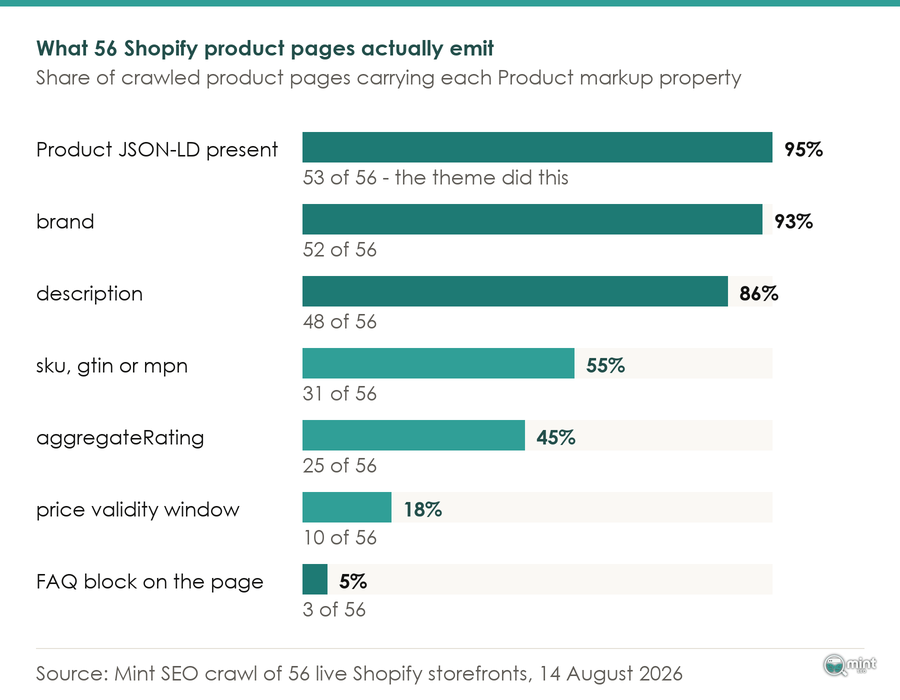
Read those numbers as a work order. Generating the markup is done and populating it is not.
3 of 56 live Shopify product pages carried no Product JSON-LD at all. Check once that you are not one of them, then never again.
That one is about to matter more, because Google documented a sale-duration section in July 2026 covering validFrom, validThrough and priceValidUntil, and fewer than one store in five was declaring it that same month.
One store shows the filled version. Alo Yoga is one of ten stores in the crawl whose product markup declares how long the price is valid. The price on it carries an end date.
That is an ordinary storefront on an ordinary theme, and the field is available to any store that decides to fill it.
Variants, And Why Google Groups Them
Sizes and colours on separate URLs need grouping, or Google has no reason to read them as one product.
Variants raise that same question one level up, and Google's product variant reference sets out how.
ProductGroup carries variesBy, hasVariant and productGroupID. That grouping makes variant information eligible to appear in merchant listings.
There is one detail worth knowing before you start: the group itself has no canonical URL, because no single page represents it. Each variant page declares what it holds and points at its siblings.
If none of this sounds like your store yet, the wider store audit covers the same ground at site level.
The Product Page Advice That Stopped Working This Year
Some product-page tactics are not merely dated. They aim at features Google has since withdrawn.
What Replaced The FAQ Block
Google's documentation changelog records the FAQ rich result no longer appearing in Search from 7th May 2026, and on 17th June the documentation for it came down. A feature that is gone from Search cannot bring you a click.
If your product page carries an FAQ block that was added for that rich result, its reason has gone.
So keep the answers and drop the block, folding them into the copy where the shopper meets the doubt.
Google was clear about the wider pattern when it announced the change. Writing on Search Central, John Mueller put a date on it in Google's words: Starting in January 2026, we'll remove support for the structured data types in Search Console and its API.
Asked afterwards whether schema was still worth using at all, Mueller answered that markup types come and go while a precious few are worth holding on to. He named the title and meta robots tags as two of them.
The Files Google Told Us It Ignores
You may have been told to add an llms.txt file. It changes nothing on a product page, and Google said so in June 2026, in its own words that these files will not negatively or positively impact your visibility or rankings.
Shopify ships an llms.txt template type, so you may well have one already. Keeping it for other systems is fine, but counting it as ranking work is not.
That same month produced a Google guide on optimising for generative AI features. Part of its length goes on mythbusting common AEO and GEO claims, restating that ordinary practice still drives visibility in those features.
Spend the hour on your empty markup properties instead.
Fix It Once In The Theme, Or Once Per Product
The last part of how to optimise an ecommerce product page for SEO is not a field at all. It is a question about where your hours go, and it changes shape again at enterprise catalogue size.
Every change on a product page is either a template job or a product job, and no checklist asks which is which at the size of catalogue you are running.
All of it comes down to three moves, in this order:
1) Fix what the template owns, so that one edit reaches every product page.
2) Add the identifying properties your template leaves blank, because listings lean on them.
3) Pick your per-product hours by impressions, because that is where a rewrite pays.
The Fields A Template Owns
The theme architecture reference sets this out. The product template renders the product page, which holds its media and content as well as the form a customer uses to pick a variant and add it to the cart.
One template, every product page. Change it once and the change lands across the catalogue.
That is also why my crawl found markup already present on 95 per cent of the stores I crawled. Nobody had added it item by item, because it arrived with the theme.
Merchants discover that rule the hard way. One on the Shopify Merchants Community described editing meta descriptions one product at a time, then watching his change replace every other listing in that collection.
Your theme repays understanding for other reasons too, which is what Shopify speed work usually turns up.
The Fields Only The Product Owns
Alt text is the clearest field no template can fill for you, and it catches people out because it looks centralised.
A Partner on the Shopify Merchants Community put the mechanism plainly. Text added in the Content and Files area does not follow the photo onto a product, and each product image needs its own alt text.
Shopify stores alt text against the product image, one level down from the image file. A second Partner in the same thread named the catalogue as the reason it becomes painful.
Bulk apps sold to fix this mostly copy the product title into the alt attribute. That satisfies a counter while telling a screen reader what it already had.
Choosing The Products That Earn The Hours
You finish with two lists. Your template list gets done this week in full, and your product list needs choosing.
The honest criterion is impressions without clicks. Open Google Search Console, filter to your product URLs, then sort by impressions where the click-through rate sits near zero.
Those pages carry proven demand and a failing page, which is the one combination where a rewrite has a known payoff. A product with no impressions has a discovery problem instead, and rewriting its description will not touch that.
Then leave it alone long enough to mean something. Google updated its canonicalisation troubleshooting guidance in July 2026 to set expectations on how long a change takes to be re-evaluated.
Judging a product page in its first fortnight tells you about crawl timing, which is not the thing you set out to measure. Google also published guidance in June 2026 on evaluating what third-party SEO tools recommend, which repays reading if your work list comes from whatever an audit crawl painted red.
Get A Second Opinion On Which Product Pages To Work On
By now you know which fields to change. Choosing which products to change first is what people ask me about most.
That choice is where people stall. Mint SEO is a Manchester-based specialist Shopify and ecommerce SEO agency, and on this particular job the half hour goes on your catalogue. Which 40 of your 900 products carry the impressions to justify a hand-written description. Which of the 5 empty properties is worth a bulk edit, and which of your fixes belongs in the theme instead.
That is the call I make on retainers every week, and the first conversation costs nothing.
Book a free 30-minute consultation and bring your product URLs. You will leave with a shortlist of the ones worth the hours.
That is how to optimise an ecommerce product page for SEO once the catalogue is real. Fix the template once, fill what it leaves blank, and spend the rest of your time where the impressions already arrive.

About the author
John Butterworth
John Butterworth is the founder of Mint SEO, a Manchester ecommerce SEO agency he started in 2024. He has 11 years in SEO and digital marketing, previously running SEO departments for market-leading brands and several agencies. He specialises in Shopify and ecommerce SEO, and his work has ranked over 100 websites and driven more than 3 million organic visits. He speaks at industry events including the SEO Mastery Summit.
Connect on LinkedIn →