Knowledge Hub
Ecommerce Internal Linking That Gets Product Pages Ranking
By John Butterworth · October 11, 2026
On a store, the pages that already earn clicks and backlinks should pass links to the category and product pages you want to rank. That is the heart of ecommerce internal linking: deciding which pages send links and which receive them. Google reads the pages a store links to most as the ones that matter most.
Two more rules follow from that. Every product needs a route down from the menu, and every link needs anchor text that names where it goes.
On Shopify the theme decides most product links, so some fixes sit in the theme code. The fault I find most is blog posts with no link to the collections and products they cover. Start by adding those links from your busiest posts.
Internal Links Should Run From Pages That Earn Traffic To Pages That Earn Revenue
An internal linking plan for a store comes down to four changes:
- Write down your senders, the pages already earning organic traffic and links.
- Pick your receivers, the categories and products behind your best margins.
- Add internal links that run from each sender to the receiver it supports.
- Write each of those anchors so it names the receiver.
For the senders, use the landing pages with the most organic sessions in GA4 and the pages holding the most referring domains in Ahrefs. For the receivers, favour any ranking between positions 11 and 20 for a term people buy on.
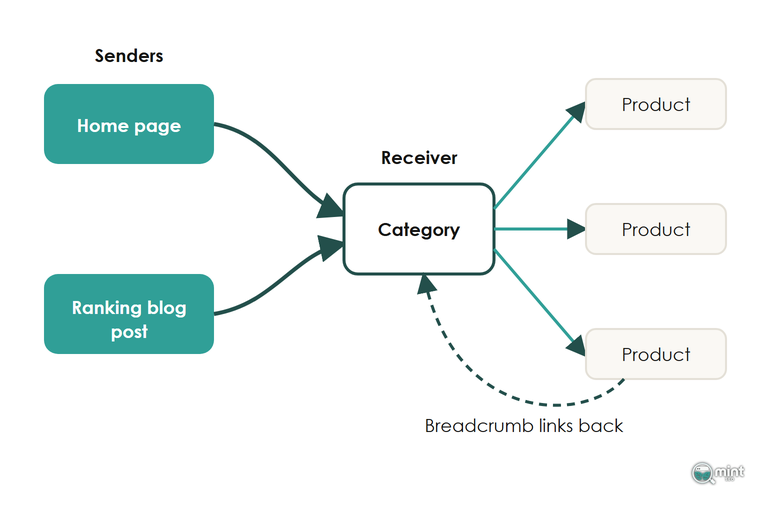
That direction matters because Google judges how much a store values a page partly by how many of its own internal links point there and how many clicks it takes to reach it. A best seller linked only from its collection grid is therefore being described to Google as an ordinary product.
On a boot store, that means the walking boots collection gets internal links from the home page and from the ranking guide to breaking in leather boots. The size guide links there too, with each anchor naming walking boots. Expect most of the gains from this to show up around the next core update.
Once the links arrive, the category still has to deserve its ranking, which is what a category page needs to rank covers.
Blog Posts Should Link Down To Categories First
A blog post exists to rank a commercial page, so its first link goes to the category it supports.
So a guide to choosing walking boots links to the walking boots collection before any single boot.
I'd build the category pages before the posts for the same reason, deciding which terms earn a collection when choosing keywords for a store. A post written first has nothing to point at, and its links end up on whichever product happened to be live that week.
Product Descriptions Carry One To Three Links
A description has room for one to three contextual links, and each should help the buying decision: a collection the shopper might prefer, or the sizing guide they need first. Six links in a row under the copy read as a list, and shoppers skip lists.
Because of that, write each link into a sentence the shopper reads anyway. "Pairs with our merino base layers" sends them to the base layers collection inside a point the copy is already making.
Related Products Link Substitutes And Add-Ons Automatically
Shopify's Search & Discovery app writes related products for every item on its own. It also lets you pick complementary products, meaning the add-ons people buy with an item. Both blocks are real links, so keep them on your product template.
Even so, they aren't dependable on their own. Shopify's help page on product recommendations says “complementary products must have stock above 0 to display”, so an add-on drops out of every block the day it sells out.
For that reason, give each important product at least one link from copy you control. A product reached only through other products' recommendations loses those links each time stock runs low.
Internal Links Should Put Every Product Within Three Clicks Of Home
On an ecommerce store, internal linking sets click depth, the number of links a shopper or Googlebot follows from the home page to reach a product. The menu links to every category and each category to its sub-categories. Each sub-category then links to all of its products, so nothing sits more than three clicks from the home page.
Two things break that internal link route. A product reachable only through the search box has no internal link at all, because Googlebot doesn't type searches. Menus and product cards built on JavaScript click events give Google nothing to follow either, so check every one is an ordinary HTML link with an href.
Filter links are the one place where linking everything goes wrong, and which filter pages deserve to be indexed sets out the ones that should keep an indexable URL.
Breadcrumbs Carry Each Product Back Up To Its Category
A breadcrumb trail gives every product a link back up to its collection. On a 400-product range, that puts 400 links on the category you most want ranking.
Since 23rd January 2025 Google hasn't shown breadcrumbs in mobile results, and its announcement put it down to the trail being cut off on smaller screens. Desktop results still show them.
Keep breadcrumbs on every product page regardless, because the link back up was always the part doing the SEO work.
Shopify's Collection Grid Links The Wrong Product URL
Open one of your collection pages and hover over a product. If the link reads /collections/walking-boots/products/trail-boot, with the collection sitting in front of the product handle, your theme is linking to a duplicate of that page.
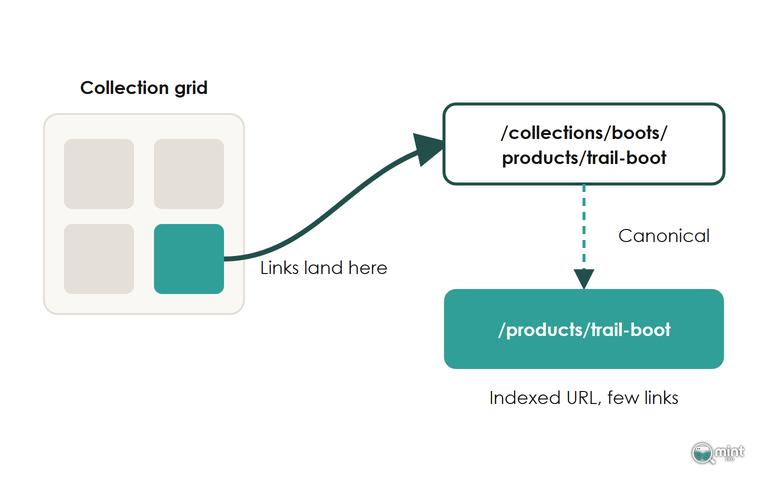
Those links come from a Liquid setting, and Shopify's own Liquid reference tells developers they “should consider the SEO implications of using the within filter”. Your canonical tag names /products/trail-boot while every grid links the longer version. As a result, the URL you want indexed gets almost no internal links and audit tools report your products with one incoming link. Google sometimes picks a canonical of its own as well.
Fix it in the theme. Back the theme up first and open the code editor. Search the collection and product card snippets for "within: collection", then remove the filter so each card links to the plain product URL.
A redirect can't do this job. Shopify only runs a URL redirect once the old address stops loading, and a collection-scoped product URL keeps loading. Filtered collection views are the hardest part to clean up, so check them again after the change.
Name The Destination In The Anchor, And Vary The Wording
Internal anchor text is the clickable wording on links between your own pages, and on a store the theme writes most of it: the menu label, the product card title and the breadcrumb name. Each one should name the page it points to.
An anchor such as waterproof walking boots tells Google and the shopper what sits behind the link, while shop now tells them nothing.
Exact-match anchors still work on internal links, and I'd aim for a mix weighted towards longer variations.
In a study of 23 million internal links, pages carrying one or more exact-match anchors drew five or more times the traffic of pages with none, and more anchor variety went with more search traffic. Its authors describe the data as mostly correlation, so treat it as a direction.
In practice that means one or two exact-match anchors to a category and the rest written the way each sentence wants to say it, such as boots for wet Lake District walks.
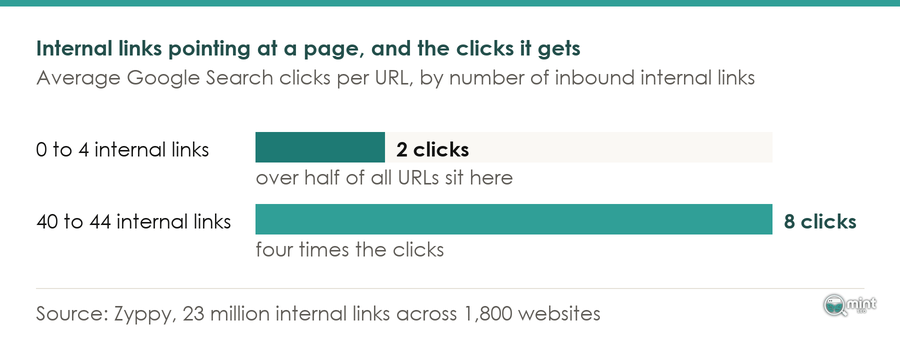
A menu link counts as one anchor however many pages repeat it, because every copy carries the same label. In the same study, clicks rose as the internal links pointing at a page climbed to around 40 to 44, then fell beyond 45 to 50, a count usually reached through sitewide menu links.
Repoint Links When A Product Is Retired Or Its URL Moves
Internal linking needs upkeep on any ecommerce store, because retiring a product leaves every link to it pointing at a page that has gone. That page stops loading, so this is where a Shopify URL redirect does work for your internal links.
Say the boot store discontinues its trail boot. If GA4 still shows it landing organic sessions or Ahrefs shows backlinks to it, redirect it to the walking boots collection or to the boot replacing it. A product that is only out of stock for a few weeks keeps its page and its internal links.
After the redirect, repoint the internal links. Edit the menu items, descriptions and blog posts that named the trail boot so each one goes straight to the final URL, with no hop through the redirect.
After a round of retirements, check for products the changes left with no internal link. Crawl the store in Screaming Frog and compare the crawl with the product URLs in a store's XML sitemap. Any product listed in the sitemap that the crawl never reached is an orphan.
Map Which Pages Should Link Where
A map of your senders and receivers starts from two things: your GA4 landing page report and a crawl of the store. Put the pages that earn traffic in one column and the pages that earn revenue in the other. Then draw the links between them.
Where the fix sits in the theme, our technical SEO work covers Shopify-specific theme fixes such as the collection link change above. The internal links themselves are part of our on-page SEO work. Both sit within the wider work we do as an SEO agency for ecommerce stores with deep category trees.
To see which commercial searches your category and product pages are missing, get a free SEO audit of your store. The two-page PDF comes the same day. It lists the valuable keywords competitors win where you're not on page one, with the monthly demand behind each one. Those searches tell you which pages your links should point at.

About the author
John Butterworth
John Butterworth is the founder of Mint SEO, a Manchester ecommerce SEO agency he started in 2024. He has 11 years in SEO and digital marketing, previously running SEO departments for market-leading brands and several agencies. He specialises in Shopify and ecommerce SEO, and his work has ranked over 100 websites and driven more than 3 million organic visits. He speaks at industry events including the SEO Mastery Summit.
Connect on LinkedIn →