Knowledge Hub
Your Ecommerce Sitemap Already Exists (So Here Is What To Check And Change)
By John Butterworth · October 5, 2026
Shopify and WordPress already write an ecommerce sitemap for every store built on them. It's an XML file listing your product URLs, collections and content pages, so Google can find every one of them without relying on links alone.
That leaves you a short list of jobs. Find the file and register it once in Search Console. Keep the wrong URLs out of it, then read its indexing report whenever products go missing from Google.
Submitting the file rarely changes much by itself. One crawl problem I've found on stores is links put on the page with JavaScript rather than written in the standard HTML link format Google prefers. A sitemap lists those pages but leaves the links broken, so check how your menus and product grids link before you lean on an ecommerce sitemap.
Finding And Registering The Sitemap Your Platform Writes
An XML sitemap helps Google discover your pages and tells it which address you prefer for each one. Inclusion is no promise of indexing and carries no ranking weight; treat the file as a delivery note telling Googlebot which product and collection addresses exist.
Shopify Serves It At /sitemap.xml And WordPress At /wp-sitemap.xml
Type /sitemap.xml after your domain on a Shopify store, or /wp-sitemap.xml on a WooCommerce store, and you're looking at the file Google reads. On WordPress, an SEO plugin such as Yoast may have swapped in its own index at a different address, so check that before assuming yours is missing. Open this file first, before you touch anything else.
In that file you want to see an index pointing at separate child files for products, collections, pages and blog posts. Each of those files is rebuilt as your catalogue changes.
For a real example, open the index of Represent, the clothing brand founded in Manchester. Shopify has written a note at the top of it: "can not be edited manually, but is kept up to date in real time". Alongside the usual child files, that index now lists a small sitemap_agentic_discovery.xml file, which points AI shopping agents at the store's agents.md page.
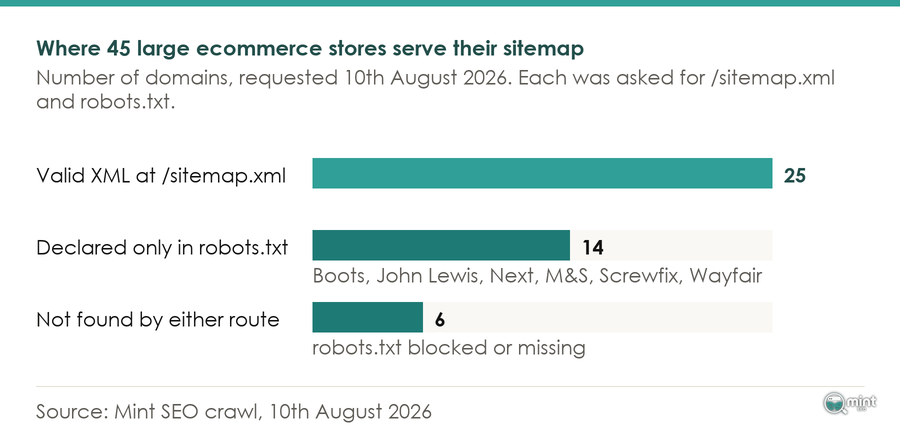
When neither address loads, read robots.txt. Every Sitemap line in that file names a sitemap the store serves.
Submitting It To Search Console Once
Once a sitemap is registered, resubmitting it adds nothing unless you've fixed an error Google reported, so register the index once under Sitemaps in Search Console and once in Bing Webmaster Tools. That single submission is what buys you the reporting, since Search Console only reports on sitemaps submitted there.
After that, leave it alone: Google keeps re-reading a registered sitemap on its own schedule and remembers what it has already read. Plugins that still ping Google are wasting the request, because Google no longer accepts sitemap pings at all. Robots.txt and Search Console are the routes in now.
That same re-reading explains the 'Couldn't fetch' status many stores see in the first few days: Google is still trying, and it retries for several days before giving up. Check that the file loads in a browser, then wait. Two causes are real faults: a Shopify store still in password-protected private mode, and a WordPress site left on the setting that discourages search engines.
Only URLs You Want Ranking Belong In The Sitemap
A URL earns its place in an ecommerce sitemap only when you would want that exact address ranking in Google. In practice that means the canonical version of the page, returning a 200 status, with no noindex tag on it.
Keeping Duplicate, Redirected And Noindexed URLs Out Of The File
Every entry in the file is a vote for that URL as the version Google should show. A variant URL, a redirect or a page tagged noindex votes against the page's own signals, and Google has to settle the argument for you.
Canonicalise duplicate product and variant URLs to one address and list that address in the file. Duplicate content carries no penalty, but two URLs for one page split its signals between them.
Filter pages need a judgement call, and Search Console settles it. If a colour or size filter on a collection already earns impressions for searches like 'black linen trousers', it deserves an indexable page and a place in the sitemap. Leave out any filter URL with no searches behind it, and see my piece on filter pages for how to pick between them.
Change What Goes In Through Product Status, Never The XML
Represent's note about manual edits holds for every Shopify store, because the file is regenerated from your product, page and post records. Those records hold the three switches that change what the sitemap lists.
- Draft or archived status takes a product off the storefront and out of the file.
- Since October 2025 Shopify has offered an Unlisted product status, which keeps a product live at its URL while removing it from search, collections and the sitemap.
- The seo.hidden metafield set to 1 hides a page, blog post or product from the sitemap and from search engines, and the Bulk Editor sets it across many products at once.
Choose between them by what the page is for. Unlisted suits a wholesale-only product that customers reach by a direct link, while a thank-you page or a gated landing page is better hidden with seo.hidden. On WordPress the same control sits in the SEO plugin, which drops any page or post type you mark noindex from its sitemap.
Keep Out Of Stock Products Listed And Retire Discontinued Ones
A product that is coming back stays live, keeps loading normally and stays in the sitemap. Its page still answers searches, and pulling it means earning the ranking again when the stock lands.
That logic stops applying once a product is discontinued for good. Check first whether its page drives traffic or holds backlinks, and if it does, permanently redirect it to the closest product or collection. If it does neither, let it go.
Either way the old URL leaves the sitemap, because a sitemap entry asks Google to index a live page and a redirect or a removed page is no longer one.
Setting Lastmod And The Other Optional Tags In A Store Sitemap
Inside the sitemap, each product or collection entry can carry optional tags next to its address. Google ignores two of them outright, and Bing's July 2025 sitemap guidance says Bing ignores the same two.
Lastmod is the date tag on each sitemap entry, and Google reads it only when your dates hold up across the whole site. Asked on 16th July 2026 whether a site with bug-corrupted lastmod dates would do better with none, Gary Illyes of the Google Search team replied on Bluesky that it was 'probably better off without the lastmods'.
I treat that as a reference point, not proof: a week or two after editing a product, check its last crawl date in URL Inspection.
Then check what your platform writes into your sitemap. On WordPress, if a sitemap plugin stamps today's date on every product whenever the file regenerates, switch lastmod off in its settings.
On a Shopify store the platform sets every lastmod date itself, with no setting that removes the tag. Your job there is keeping edits real: a change to the product copy or its structured data deserves a new date, while a footer tweak doesn't.
Product images need no separate file on Shopify. Represent's first product sitemap carried 938 image entries across its 939 URLs on 5th October 2026.
Read Indexing One Child Sitemap At A Time To Find What Google Declined
When products listed in your sitemap are missing from Google, the Page indexing report in Search Console shows why, read one child sitemap at a time. A sitemap is only a hint to Google. Any URL the file lists that is missing from the index is a page Google has declined or has not reached yet.
Past 2,000 URLs, Give Each Page Type A File Of Its Own
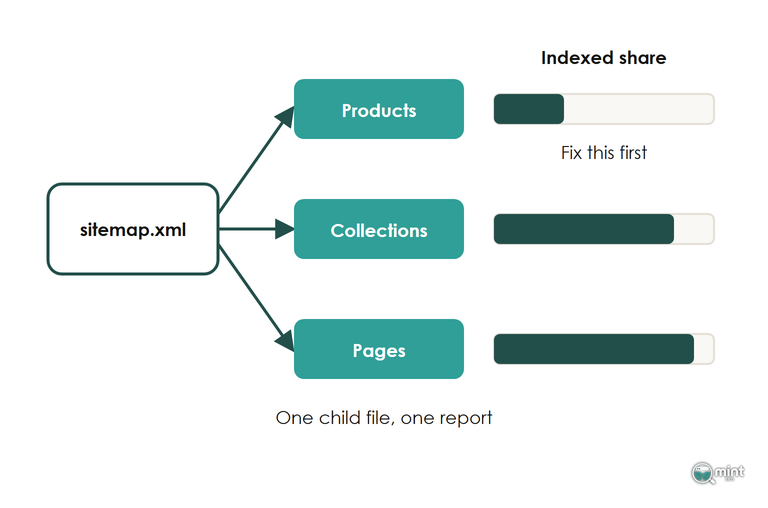
Inside the Page indexing report sits a filter that limits it to the URLs of one submitted sitemap. Run it on the products file, then the collections file, then pages. Start with whichever segment has the lowest indexed share.
Below 2,000 URLs none of this splitting matters, and crawl budget isn't worth a thought.
Above that size, every page type deserves a file of its own so each one reports separately. Shopify already gives each content type its own child file, and one registered index covers every child however many there are.
Two big UK retailers split further still: in its robots.txt Myprotein declares a separate compressed sitemap index for its listings, departments and blog as well as its catalogue. On 5th October 2026 boohoo's first catalogue file held exactly 50,000 URLs, which is Google's ceiling for a single file. Its range carries on in further numbered files.
Splitting an ecommerce sitemap gives you segments to read, and Google indexes no more of them because of it.
On a very large catalogue, Search Console can read one child sitemap and leave the product files unread for a long time. What gets those products read comes next.
Discovered Products Need Links, Crawled Ones Need A Better Page
Filter the report by your products file and look at the two not-indexed states, because they need opposite fixes.
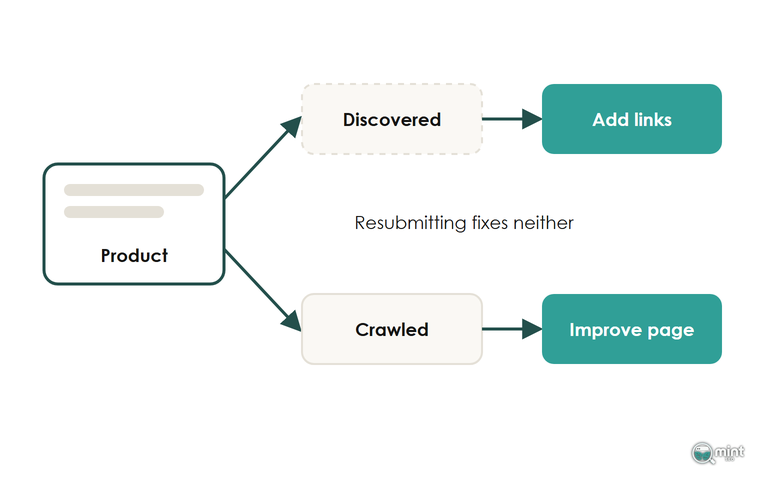
Discovered, currently not indexed means Google has the URL from your sitemap and hasn't fetched it yet. The product needs links from pages Google already crawls often, such as your main collections and your bestsellers.
Look at where each Discovered product sits. When the only route to it is the sitemap entry and page four of a collection, add it to that collection's first screen and to the related-products block on its bestselling sibling. That's internal linking done as deliberate sculpting, and it keeps the product within three clicks of the home page.
More links rarely fix the second state, crawled but not indexed, because Google fetched the page and passed on it. That page has to give Google a reason to index it. Write copy of its own to replace the manufacturer's description, and give it a clear difference from its sibling variants.
Timing matters as much as the links, because indexing takes weeks. With BedShelfie, a Shopify store selling bedside shelves, we started in Q2 so its key product page was indexed and linked well before its busiest quarter, and its sales from Google Search grew 256% in that quarter, year on year.
None of this touches your Shopping listings, which run on a separate system. The product feed supplies Shopping listings while the sitemap serves organic crawling. A Merchant Centre suspension is a separate problem from a sitemap showing 0 discovered URLs.
Bring Your Indexing Report To A Technical Specialist
Reading the indexing report in Search Console is quick. Deciding what to fix first takes longer, whether that’s internal links, product copy or the technical SEO behind the pages.
Crawl and indexing fixes are what our technical SEO service covers, from the child sitemaps down to the links that point at each product. That work sits alongside the rest of our ecommerce SEO services for stores with large catalogues.
To see where the store stands first, get a free SEO audit of your store. It charts your last twelve months of organic traffic and lists your top keywords with their positions. You get it the same day as a two-page PDF, and there’s no call or cost involved.

About the author
John Butterworth
John Butterworth is the founder of Mint SEO, a Manchester ecommerce SEO agency he started in 2024. He has 11 years in SEO and digital marketing, previously running SEO departments for market-leading brands and several agencies. He specialises in Shopify and ecommerce SEO, and his work has ranked over 100 websites and driven more than 3 million organic visits. He speaks at industry events including the SEO Mastery Summit.
Connect on LinkedIn →