Knowledge Hub
Local SEO For Ecommerce: Which Stores It Pays And What To Set Up
By John Butterworth · October 5, 2026
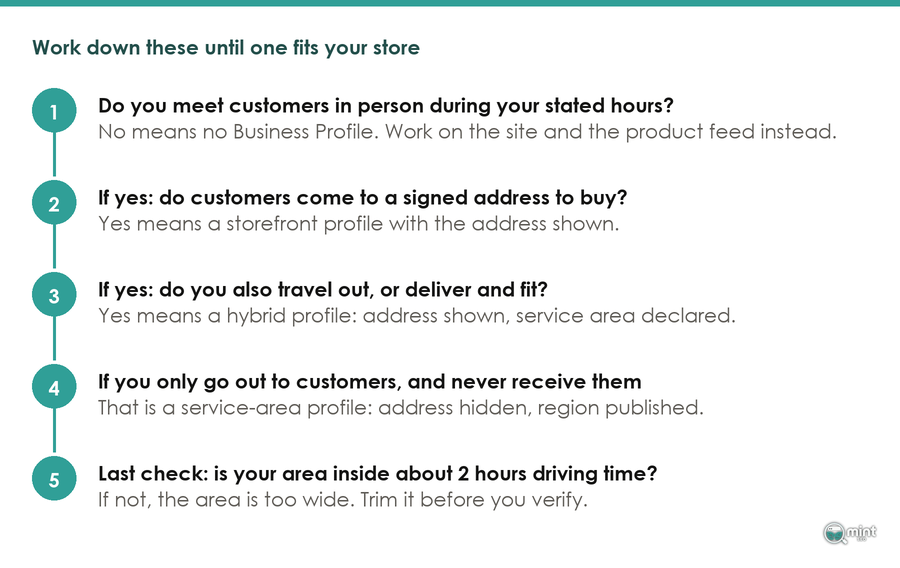
Only a store that meets customers in person can appear in Google’s map results. So local SEO for ecommerce is worth the effort with a signed shop or showroom, a collection counter or deliveries made by your own drivers. A store whose orders all leave by courier should spend those hours on category pages.
Stores that qualify need a Business Profile for each branch people visit, with shelf stock flowing into Google’s free local listings. Each shop then needs a page of its own, recent reviews and links from its own town.
Before any of that, I’d check the sign on the building. A collection unit with no permanent signage counts as a service-area business, so it can’t show its address on the map. Settle which case your store falls into before you build a single page.
Local Search Only Pays A Store With A Counter, A Showroom Or Its Own Vans
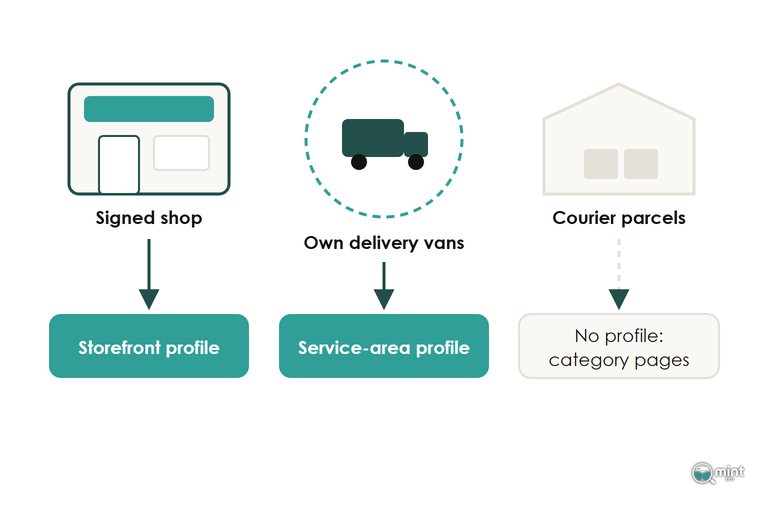
Local SEO for an online store works through the part of Google filtered by where the searcher is standing: the map pack, Business Profiles and free local product listings. Google sorts every store into one of three cases by where it meets customers, and that case decides what local search can do for you.
A Signed Shop Or Showroom Qualifies As A Storefront
A shop or showroom that customers walk into during set hours qualifies for a storefront Business Profile, and for that store local SEO pays. I only recommend local SEO with a physical location or service area, and a signed shop is the clearest case of the first.
A storefront needs a sign on the building, and owners often underestimate it. A unit where people collect orders but which carries no permanent signage is treated as a service-area business and can't show its address on the map.
A storefront can also list the products on its shelves on its profile.
Delivering With Your Own Drivers Makes A Hybrid Or Service-Area Store
A business that delivers to customers itself but doesn't serve them at its own address is what Google calls a service-area business.
A shop that also delivers locally is a hybrid business, with both an address customers visit and a service area its staff deliver to.
A showroom, collection point, trade counter or genuine service area each qualifies a shop that otherwise trades online.
The delivery has to be yours, though. A courier collecting parcels from your unit is a carrier visiting you, and Google's service-area definition doesn't cover it.
A service area is set as named towns or postcodes close enough to drive to, so a nationwide delivery promise can never qualify. Shopify's own local delivery setting is built around a radius from the shop for the same reason.
A Warehouse That Only Posts Parcels Should Spend The Hours On Category Pages
Every order leaving your unit in a courier's van puts you on Google's list of online-only businesses, and those don't get a Business Profile.
Those owners are better off skipping local SEO and spending the hours on ecommerce category pages instead.
Two settings are worth checking on the way out. Merchant Centre's local add-ons should be switched off, and Shopify's location list shouldn't hold an address you never meant to advertise.
Shopify asks for a location at setup, and owners often leave it in place long after the shop has gone online-only.
Set Up The Business Profile Around The Branch Customers Visit
For an ecommerce business with a shop, local SEO starts with the Business Profile. Google decides local results on relevance, popularity and how far each business is from the searcher. Where your branch stands is fixed, which leaves the category, the hours and the branch details for you to set up.
Pick The Primary Category For What The Shop Sells
Your primary category tells Google what the branch is, so it should name what customers come in to buy: the furniture store category for a sofa showroom and the clothing store one for a fashion shop. Opening hours, the branch's own phone number and its attributes complete that relevance half of the profile.
There's no way to pay Google for a better map position.
A local package promising one is selling something Google says it doesn't offer. Judge any provider on the category, hours and reviews it will manage for you.
A Mailbox Or An Unsigned Unit Gets The Profile Suspended
A P.O. box, a rented mailbox or a virtual office that nobody staffs isn't an address customers can visit. Google refuses a profile built on one, and when verification catches it the suspension can reach the Google account behind the listing.
Listing an unsigned unit as a storefront breaks the same rules, because a unit without permanent signage isn't eligible as one.
Age-restricted stock makes that suspension risk higher still. A business selling alcohol or other age-limited products only qualifies with a storefront, so a delivery-only wine merchant can't fall back on a service area.
Get Your In-Store Stock Into Google's Free Local Listings
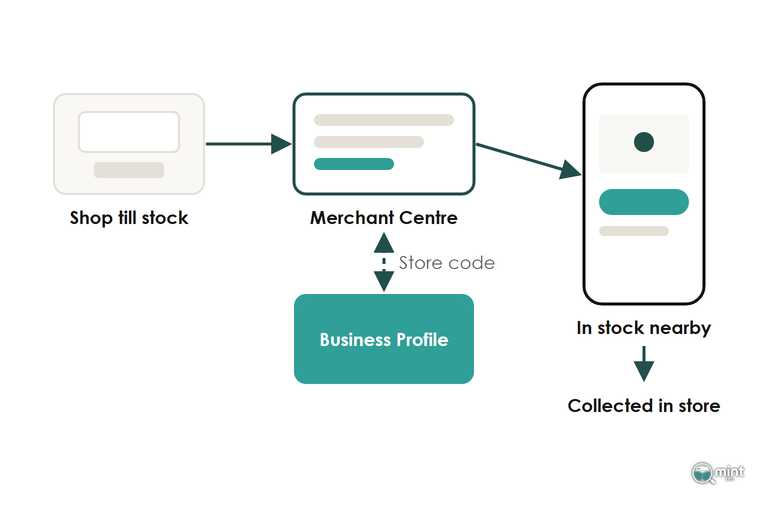
For an ecommerce shop with stock, local SEO sells products through one surface a service business never gets: free local listings. They show the items on your shelves to people searching nearby on Search, Maps and the Shopping tab, so a local shopper knows you have the product before setting off.
An online store with a shop gets them at no cost, as long as the branch is somewhere a shopper can walk in and buy the item.
Link Merchant Centre To The Business Profile By Store Code
Free local listings match each item to a branch through a store code that Merchant Centre shares with your Business Profile. Without a verified local profile there's nothing to match the stock to, so set the profile up first.
UK shops with a compatible till system and manufacturer barcodes can add in-store products through the Local Inventory app, which replaced Pointy. Own-brand stock with home-made barcodes can't be matched that way. It needs a local product feed carrying the store codes.
Switch On Shopify Pickup At The Location That Holds The Stock
Local pickup lets a shopper who found you in a free local listing order online and collect from your shop. Every branch that holds stock needs pickup switched on in Shopify before its products can be offered for collection. You'll find it under Settings, then Shipping and delivery. The location has to be one that fulfils online orders.
Products that can be collected the same day or the next can carry a pickup today label in the free local listing. By default Shopify pickup appears only when the whole basket is in stock at that branch. Set up store transfers if your stock is split across sites, and show pickup availability on the product page itself, where the shopper decides.
A shop using Shopify POS can also find a local feed appearing in Merchant Centre that it never set up, with a few dozen products and no descriptions. That feed comes through the Business Profile link in the Google & YouTube app, which is where you switch it off.
Declare Your Pickup Charge Under Google's September 2026 Rule
Google now shows the cost of collecting in the local listing itself. Since 30th September 2026 a UK shop that charges for click and collect, or sets a minimum order for it, has to state that charge in its product data. Google set the date in its pickup cost announcement of 28th April 2026. Free collection with no minimum is unaffected.
In September 2026 Google also folded its free local listings rules into its Shopping policy, so one rulebook now covers your online and local product listings.
You set the charge once per product, and it can't differ from branch to branch. Put the same charge on the product page too, because a collection fee a shopper discovers at checkout loses more orders than it earns.
An item priced differently in the shop and online now needs two separate product records in Merchant Centre. Check those before adding the pickup cost.
Give Each Shop A Page Of Its Own And Skip Towns You Only Ship To
Every shop customers can walk into needs a page of its own. An area page is worth writing only where your own drivers deliver, because a set of near-identical city pages is what Google treats as doorways.
Mark Up Each Store Page As The Specific Kind Of Shop
Give each shop a store page of its own with its address, opening hours and a map. Three online-first brands show the pattern. On Represent's London shop page one URL carries the address, opening hours and coordinates, with the cafe inside marked up as a separate place.
That markup works for any branch with a department on its own hours or phone number, which lets a click-and-collect desk be described separately from the shop floor.
Furniture brand Loaf gives each showroom a URL under /showrooms/ with the furniture store type, while Vuori marks up each branch as a clothing shop.
All three give each place its own URL, which lets every branch's Business Profile point its website link at the right page. Mark yours up with the most specific LocalBusiness type that fits and keep that markup off your product templates, so Google reads the same address and hours in the markup as on the profile.
Write An Area Page Only For A Town On Your Delivery Round
Write each area page from what your drivers do there: the postcodes they cover, the latest order time for same-day delivery and which branch the van leaves from. If you can't fill those three lines for a town, that town doesn't get a page.
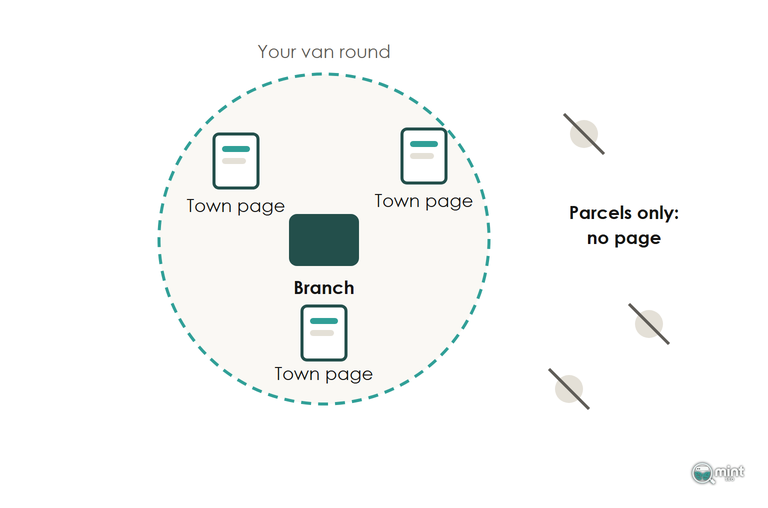
We built area pages this way for Hidden Garden Flowers, a Los Angeles florist. Each page listed the towns in its delivery zone beside the same-day delivery details, in at least 600 words of copy.
Recent Reviews And Local Links Decide Which Shop Shows First
Once relevance is set, popularity decides which nearby branch appears first. Google counts the reviews a business has and the websites linking to it, and both can keep growing long after setup.
Ask For Reviews Every Week Rather Than In A Yearly Push
Reviews feed rankings as well as sales, so collecting them is SEO work.
A branch with forty reviews from last spring looks stale next to one with eight from this month. In BrightLocal's 2026 consumer survey, "74% only care about reviews written in the last three months", and use of AI tools for local recommendations rose to 45%.
Ask for a review at the moment a customer collects an order at the counter, and reply to each within a day in your own words. AI assistants that recommend local shops read those same reviews.
Give Google and Apple Maps the same name, address and hours for the shop. Copy them exactly into any directory you appear in. An assistant comparing those listings should find one business. The post on social proof covers putting the reviews to work on product pages.
Earn Links From The Town Your Shop Trades In
Local links for a shop come from its own high street and suppliers. Ask the brands you stock to list your branch on their where-to-buy page, and send the local paper the branch page link when the shop opens, moves or sponsors a local event. Each of those links adds to the popularity side of local ranking. Where else a store's links come from is set out in the post on off-page SEO.
Check Your Store's Local Setup
Whether local SEO pays comes down to how your store trades. A shop with a counter or its own vans has local work worth doing, while a store that only ships parcels does better putting those hours into its category pages.
That category and product page work is the core of what Mint SEO does as an ecommerce SEO agency for stores that ship nationwide.
The free audit gives you the search numbers to decide with. Page one charts twelve months of organic traffic and lists the searches bringing you the most visits. Page two shows commercial keywords your competitors win where you're not on page one, with the monthly demand behind each.
It's a two-page PDF sent the same day, and it needs only four answers from you. Get a free SEO audit of your store before you spend another hour on local listings.

About the author
John Butterworth
John Butterworth is the founder of Mint SEO, a Manchester ecommerce SEO agency he started in 2024. He has 11 years in SEO and digital marketing, previously running SEO departments for market-leading brands and several agencies. He specialises in Shopify and ecommerce SEO, and his work has ranked over 100 websites and driven more than 3 million organic visits. He speaks at industry events including the SEO Mastery Summit.
Connect on LinkedIn →