
Knowledge Hub
Enterprise Ecommerce SEO: Running A Large Store Through Its Templates
By John Butterworth · October 4, 2026
On a store with tens of thousands of products, SEO problems rarely sit on a single page. At that size enterprise ecommerce SEO is template work: the category template behind every collection, the filters that write a new URL with each tick, and the theme release nobody checked against robots.txt.
The most damaging crawl faults I find are duplicate URLs with no canonical tag and links added with JavaScript instead of a plain href Google can follow. Long-running A/B tests on copy and H1s are another, because they keep changing the signals Google reads.
Large stores usually have the developers to fix all of this. What they need is the order. Start with crawl, then the category templates that earn the money, then links and the release process that protects them.
Enterprise Ecommerce SEO Moves The Work From The Page To The Template
Nobody edits pages one at a time on an enterprise ecommerce site. A catalogue of 40,000 products comes out of a dozen or so templates and one product database, so a title rule written once rewrites thousands of title tags overnight.
At this size the SEO work happens in three places, and I'd take them in this order:
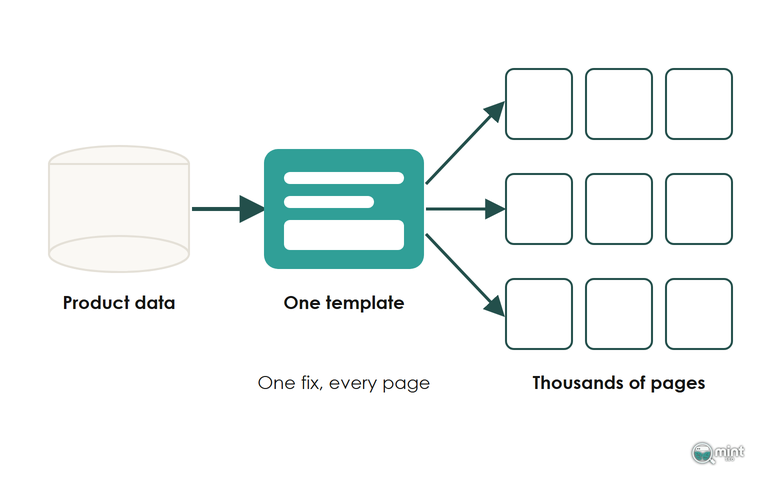
- 1. Fix the crawl rules first, so Googlebot spends its visits on pages that sell.
- 2. Rewrite the category template next, so one rule corrects thousands of pages.
- 3. Put an SEO sign-off on every release before it ships.
Those levers depend on your ecommerce platform. On Shopify Plus the /products/ and /collections/ prefixes are fixed and only the handle after them is yours to change. By contrast, developers on Adobe Commerce get direct control over URL rewrites and meta data. With that control, one bad deploy can rewrite thousands of URLs.
Whichever platform you run, I start with technical and on-page foundations. Links pointing at a category page are worth little until Google can reach and read it. The link work comes after that.
From there, lead with the quick wins (usually one robots.txt rule or one broken template) and be honest with your board that the bigger gains have no fixed date. On most large stores they land after the next core update.
Keep An Enterprise Store's Crawl Budget On The URLs That Sell
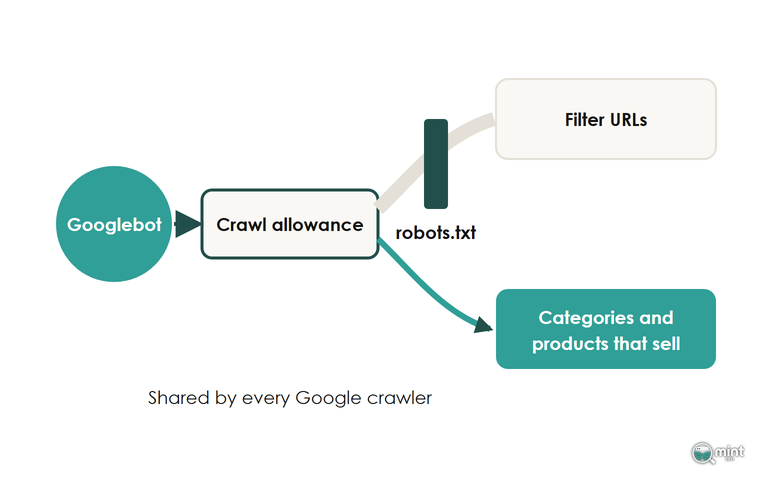
Googlebot will not fetch every URL a 40,000-product store can generate. The first job in enterprise ecommerce SEO is deciding which of those URLs get its visits: the categories and products that take orders, ahead of the filter and parameter pages that don't.
Where those visits go decides whether a new season's range is indexed days after launch or weeks after it.
I'd start worrying about how Googlebot spends its visits at roughly 2,000 URLs, so a 40,000-product catalogue is far past the line. Google pitches its own guidance at million-page sites, a figure it calls a rough estimate.
Below a million pages the guide still matters. Its July 2026 revision spells out how the allowance moves: every site starts on the same conservative crawl allowance, raised only while demand is there and the server stays healthy.
All of Google's crawlers share that allowance, so the Shopping crawler checking your merchant feed's product pages draws on the pool Googlebot uses for your categories. On most large stores, filters drain the biggest share: on Google's podcast in February 2026, Gary Illyes put faceted navigation at "close to 50% of the total reports that we got" about crawling problems.
Group A Month Of Server Logs By URL Pattern
Pull 30 days of server logs and keep only requests from verified Googlebot addresses. Group them by URL pattern: products, categories, filtered results and parameters such as add-to-cart.
With the groups in place, set each pattern's share of Googlebot's requests beside its share of organic revenue. On a healthy enterprise store the two columns roughly agree.
When filtered URLs take a large slice of the requests and earn next to nothing, the waste is measured and your development team has a number to act on.
That same split works the other way round, showing revenue categories Google has stopped visiting. A workable cut-off is the one Botify applies to uncrawled pages: 30 days without a request from Googlebot.
Block The Filter Combinations Nobody Searches
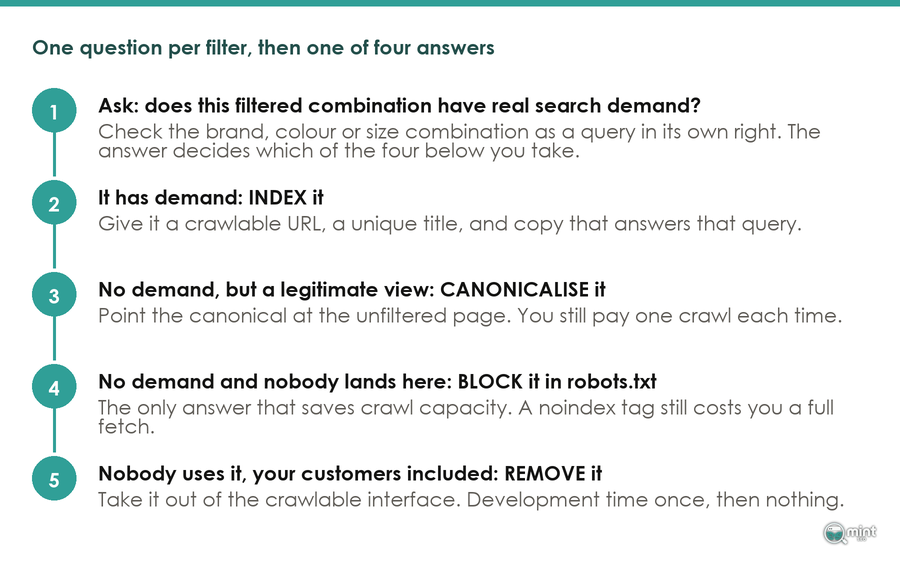
Once the waste is measured, make the call filter by filter in a spreadsheet. List each filter value with its monthly searches, and keep crawlable only the single filters with real demand, such as a brand on a big category.
Everything without that demand goes in robots.txt.
A noindex tag saves no crawl, because Google requests the page before it drops it.
Platform defaults do some of this for you. A Shopify Plus store on an untouched robots file keeps Googlebot off its re-sorted grids and plus-joined tag pages. Your spreadsheet then needs a verdict on single filters only.
That default only helps if you're still on it. The Gymshark UK robots.txt is a 129-line custom file with no rule for URLs pairing two of the newer filter parameters, so open your own file and compare it with a fresh theme's.
Shopify stores multiply URLs another way too, through collection-aware product links. A product grid built with Liquid's within: collection filter sends Googlebot to /collections/shirts/products/oxford-shirt as well as the plain shirt URL.
Dropping that filter from your grid snippets points every internal link at the /products/ address. Our faceted navigation guide covers the filter decisions in more depth.
Give The Revenue Templates The Hours Before Products And The Blog
No in-house team can hand-write 40,000 pages, so in enterprise ecommerce SEO the hours go where the revenue is and template rules carry the rest of the catalogue. An enterprise SEO team that tries to touch every page spends months on URLs that earn nothing.
Head terms come before the long tail, since long-tail pages need a strong page above them to link up to. Across an enterprise catalogue, that puts the category templates ahead of individual products and the blog, because one of those templates serves every category page on the store at once.
Score Every URL On The Revenue A Higher Ranking Would Bring
Join three exports in one sheet: search demand by URL, current Google position, and revenue by landing page from your analytics. Add the revenue each URL could earn a few places higher, and sort by that column.
On a big catalogue I'd expect the top few hundred rows to hold most of the opportunity.
Those rows get a writer's hours, and the thousands of URLs below them get sound template rules and nothing more. That split lets a small writing team keep pace with a catalogue that adds pages every week.
Write Titles, Copy And Product Schema Into The Template Once
Below the priority list, everything is written once as a rule inside the template. Title patterns pull from product attributes, and a block of copy under the grid draws on the listing's own data.
Product structured data comes from those same fields, so correcting the rule corrects every URL it serves. Thorough Product markup across a large catalogue is a genuine ranking advantage, whereas FAQ schema is one Google has deprecated for most sites.
Feed the templates and your shopping feed from one product data source. Google Shopping and AI shopping assistants read the same titles, prices and stock levels your pages show. When the page and the product feed disagree on price or stock, Google can pull the product from Shopping. For the layout of each priority page, our guide to category page copy has the detail.
Send The Authority You Earn To The Categories That Sell
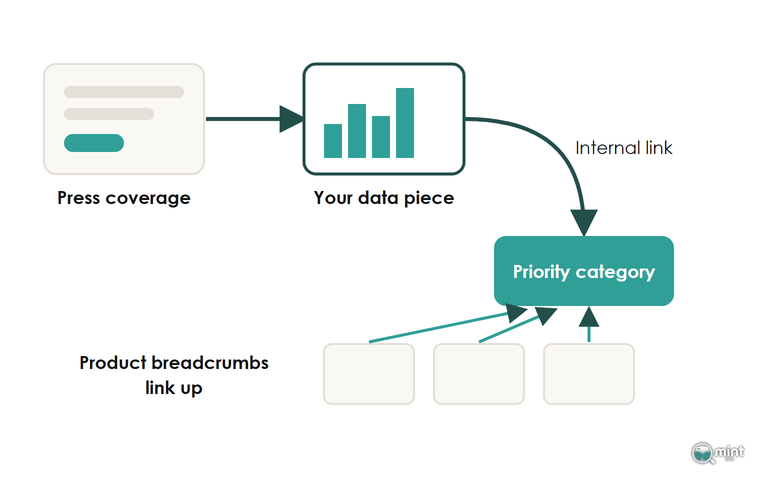
An enterprise ecommerce SEO programme has an authority problem that small stores don't. Press coverage links to data and stories. A large retailer's earned links therefore tend to land on those pages rather than on the category pages that carry its revenue.
At enterprise scale the job is earning authority on pages worth citing, then moving it deliberately across tens of thousands of URLs in a large ecommerce catalogue. That second step runs through internal links from your strongest pages, with every priority category kept within three clicks of the home page.
Build menus and filters with plain HTML links as well, since a link that only appears after a JavaScript click passes nothing.
Earn Links With Data A Small Store Cannot Build
A large enterprise retailer sits on sales data a journalist would quote. Two formats work well when you pitch for press coverage:
- A data piece from your own sales. What sold out first in a heatwave, or how size demand differs by region, written up with your buyers' commentary.
- A tool shoppers come back to. A size calculator or a fit finder built from your returns data, which earns links from guides and forums for years.
For an enterprise store, either asset should sit on the subject of one of your biggest categories, so the links it earns land one click from a page you want ranking. A piece about outdoor jackets belongs next to the outdoor jackets category, linked from its first paragraph.
Give Every Product One Primary Collection In Its Breadcrumb
Shopify has no primary collection. A product listed in five collections gets a breadcrumb through whichever one the theme happens to pick.
Across tens of thousands of products, that scatters the most repeated internal link on the store. Add a collection-reference metafield called something like primary_collection, fill it per product, and render the breadcrumb from it.
On a site this size you can watch the change in the logs. A JetOctopus test on a large website measured Googlebot reaching 40% of a set of URLs before a new linking scheme and 70% after it.
Our guide to internal linking for online stores covers anchors and placement.
Put An SEO Check Into Every Theme Release And Migration
Releases are where a big store most often loses its SEO gains. At a large retailer the merchandising, development and marketing teams all ship changes to the same category and product templates, often in the same week.
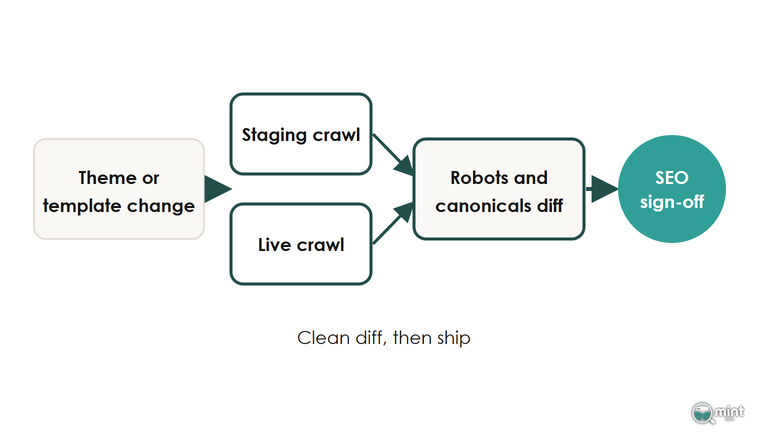
Enterprise SEO gains only survive that pace when one named owner signs off every template change that touches indexable URLs or canonical tags.
That owner also reports upwards. Put non-brand organic revenue by template group in front of the board, so finance can see which part of a large catalogue the enterprise SEO budget is moving. Keep branded search on a separate line, using a regex that matches your brand name and its misspellings.
If the non-brand line falls, start with the date and list what changed on the site that day before you go near an update tracker.
Re-Check Robots.txt After Every Theme Upload
A theme uploaded through the Shopify admin doesn't bring its robots.txt.liquid with it, so a routine release can reopen every filter URL you had closed.
That makes robots.txt the first file on the release check, with the canonical tags straight after it. Once both match between staging and live, compare the links rendered in menus and breadcrumbs against the HTML Googlebot receives.
Headless storefronts add server-side rendering to that list. A headless build works for a store with a development team to maintain it and fails for one without.
Map Every URL Before A Migration And Expect A Short Dip
A replatform on a large catalogue costs a dip of a few weeks when every old URL is mapped to its new one and redirected in a single hop. Our migration checklist has the full sequence.
Get The Templates Checked Before The Next Release Ships
On a large catalogue the costliest SEO faults tend to sit between teams, where no single team owns them. Our consulting work gives your developers and merchandisers one set of priorities, from crawl rules to the release checklist. That advice comes from an SEO agency for large Shopify catalogues and their teams, and it is written for the people who will ship the fixes.
Before you commit developer time to any of the fixes above, get a free SEO audit of the store. Page one charts twelve months of organic traffic and shows how much of it rides on branded search. Page two lists commercial keywords competitors win where you are not on page one, and checks loading and stability scores against Google's thresholds. It comes back the same day as a two-page PDF.

About the author
John Butterworth
John Butterworth is the founder of Mint SEO, a Manchester ecommerce SEO agency he started in 2024. He has 11 years in SEO and digital marketing, previously running SEO departments for market-leading brands and several agencies. He specialises in Shopify and ecommerce SEO, and his work has ranked over 100 websites and driven more than 3 million organic visits. He speaks at industry events including the SEO Mastery Summit.
Connect on LinkedIn →