
Knowledge Hub
Your Store Is Already Sending Google A Product Feed. Here Is What It Left Blank
By John Butterworth · August 16, 2026
Your store is probably sending an ecommerce product feed to Google right now, and nobody told you. Connect the Google & YouTube channel to a Shopify store and the whole catalogue goes across on its own.
I am John Butterworth and I run Mint SEO from Manchester. Feed and Shopping visibility is one of the eight disciplines we run for stores.
In eleven years of ecommerce SEO I have opened a lot of accounts belonging to people who swore they had never set one up. The file was there. It was updating nightly and nobody had looked at it since the day it switched on.
This guide to the ecommerce product feed therefore skips the build. It covers the fields your platform could not fill, what happens to an item while they stay empty, and how to tell whether any of it warrants paying someone.
What A Product Feed Is, And Who Is Already Building Yours
An ecommerce product feed is your catalogue rewritten to one channel's specification. Everything else follows from that idea.
A feed is your catalogue, rewritten to one channel's spec
Take a single item. In your admin it is a navy wool jumper in size medium, four in stock, with three photographs and a paragraph of copy.
In the feed that jumper becomes a row. Its name goes in title and its price goes in price. Your stock count of four becomes the words "in stock" in the availability field.
Only one of your three photographs makes it into image_link, and whatever ties the medium to the large goes in item_group_id.
Your admin stored that jumper so you could manage it. A feed states it so a stranger's computer can sort it.
That translation is the whole of what a feed does, and it explains why one catalogue produces several. Your jumper goes out three times over, because Google, Meta and a marketplace each publish their own list of what a row must contain.
Asking what belongs in your feed therefore has no single answer until you say which channel is asking.
On Shopify the sync happens the moment you connect the channel
No build step exists on a hosted platform. Shopify's own documentation for the Google & YouTube channel states it without qualification.
Connecting the channel syncs every product published to your online store, with no confirmation step and no file to configure.
Nothing is generated by hand and nothing is uploaded.
Shopify also sets expectations for what follows. New items are reviewed within three to five business days of that first sync.
A catalogue showing nothing in Shopping on the first afternoon has not failed. It is queued.
One further line on that page goes unread by most merchants. Some product data needs to be added from the channel to complete the sync, Shopify adds, and it does not say which.
The automatic part works and stops short. Shopify tells you so in writing.
Which is why "how do I create a product feed" is usually the wrong question
Almost everyone arriving at this topic asks how to build the file. On a hosted platform that job is done, so your effort belongs where the ranking pages rarely point.
It belongs in the fields the sync could not fill, because that data was never in your admin to begin with. Nobody can export a barcode you never entered.
That is a different job to building a feed. It sits closer to an audit of your own catalogue data, and it decides whether your items show up in free listings at all, which is where the unpaid Shopping revenue lives.
The crawl and markup work underneath all of this lives in our guide to the technical side of an ecommerce store.
The Fields Your Platform Leaves Blank
Identifier fields decide whether an item can appear. Your platform cannot fill them for you, and on live stores they are usually the ones left empty.
The attributes Google requires, and the limits on each
Arguments about what belongs in a feed are settled by Google's product data specification for Merchant Center, which lists every attribute with a syntax limit for each. Its definition of the first requirement class reads: "Required: Submit this attribute. If you don't, your product won't be able to serve in ads and free listings."
A third class on that same page makes generic checklists misleading: "It depends: You may or may not need to submit this attribute depending on the product or the countries in which your products show."
A missing required attribute does not weaken a listing. It removes it.
Which is why the conditional class matters more than the required one. Whether you need a barcode comes down to whether the thing you sell has one, and sizing applies only to the categories where size is a real attribute.
Any article handing you a flat list of required fields has skipped the class covering most real catalogues.
These limits are specific enough to check against your own catalogue this afternoon.
What 70 live Shopify stores actually publish
We measured it. On 15th August 2026 we sampled 70 live Shopify storefronts, taken from published lists of trading shops, and you can repeat the method below.
We opened the first item on each store and read the Product structured data that page publishes. 45 of the 70 returned readable markup, and those 45 are the sample reported here.
30 of those 45 publish no product identifier at all: no GTIN, no MPN, nothing in the fields Google reads.
That is two thirds of the sample. These are trading shops, several of them well known, and the field Google leans on hardest sits empty on most.
The breakdown inside that number is the useful part. Across the same 45 stores, 8 publish no brand and 10 publish no SKU.
Identifier fields are the ones failing here. Titles, prices and images were populated nearly everywhere, because a theme will not let you publish without them.
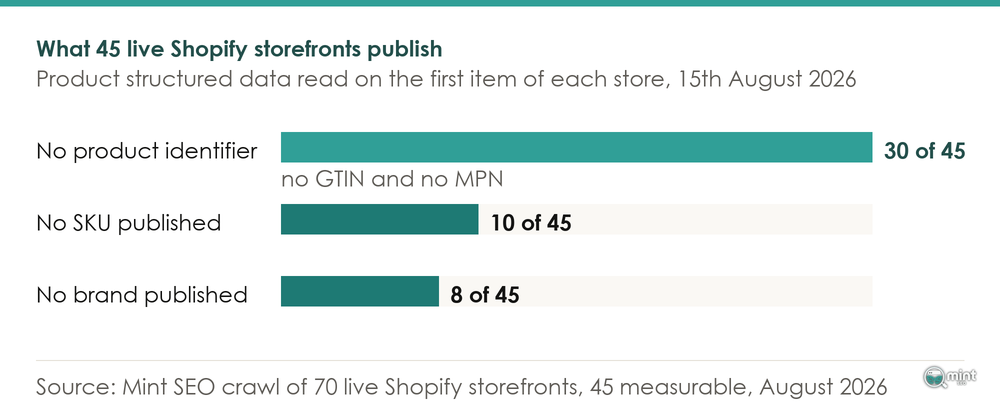
One note on what this measures. We read what each storefront publishes on its own item page, which is a different file to the feed sitting in Merchant Center.
It is, though, the data Google crawls that feed against. So a blank here is a blank where it gets checked.
Why the identifier fields are the ones that end up empty
Nothing in a Shopify product form insists on a barcode. You can add an item, price it, publish it and sell it without ever opening the field.
That form is built around what a shopkeeper needs. A shopkeeper does not need a global trade item number to put something on a shelf.
Google's requirements were written for a different job: telling two listings of the same object apart across thousands of retailers. An identifier is how that gets done.
It therefore carries weight in a specification that nothing in your admin reflects.
Two systems built for different purposes meet in one file, and the merchant stands in between them.
Why Google Rejects A Product, And What Gets It Back
Google judges your feed against your own item page and rejects whatever disagrees. Once you know that, most disapprovals stop being mysterious and start being findable.
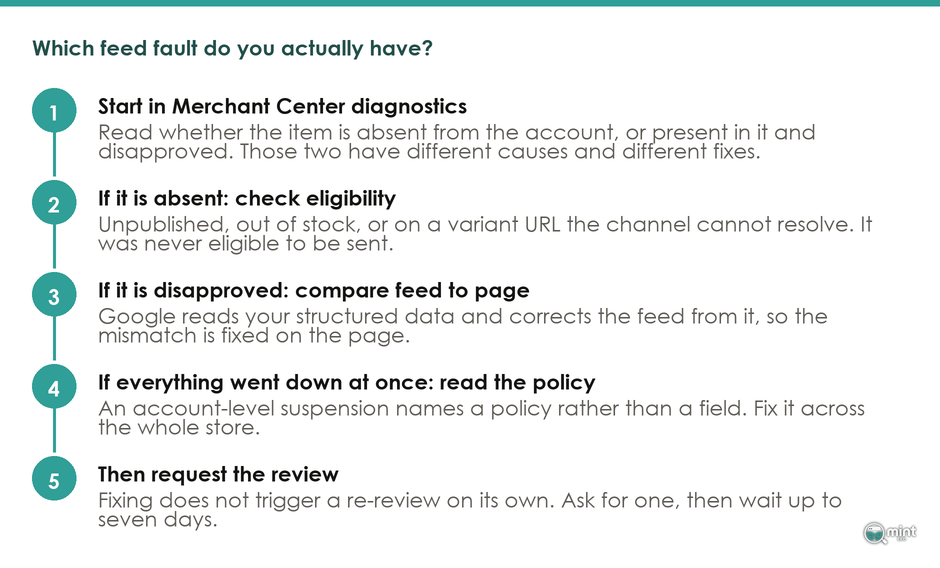
Google reads your product page and corrects the feed from it
The direction of travel surprises people. Merchant Center does not take the file you send at face value.
Google's documentation for automatic item updates describes the mechanism plainly. It reads the structured data markup on your website using its data extractors and pulls product data straight from your HTML.
Google frames the purpose as keeping your data accurate by using your landing page to update it. Your landing page is the reference against which your feed gets checked.
Switching those automations off therefore makes matters worse. Google states the consequence directly. If you turn off automatic item updates, the product will be subject to item-level disapprovals.
A mismatch that Google would have corrected on your behalf becomes a rejection instead.
Your markup carries an obligation on top of that. Google's separate guidance is blunt about it: structured data must match the values that are shown to the customer.
Providing incorrect data on your product landing pages, that guidance adds, is a violation of its structured data guidelines.
A theme or an app writing a stale price into your markup creates a policy problem.
Google reads your wording back against your attributes as well. Using terms like new, used, or refurbished in the title or description lets Google cross-check what you wrote against what you declared.
The Difference Between A Missing Product And A Disapproved One
Merchants routinely describe these as one fault. A 2026 thread in the Shopify Community opens with a merchant posting under the handle Jack013, reporting that his items are either not showing in Merchant Center or getting disapproved.
Two separate situations, described as one problem. My inbox gets the same question in the same shape.
A contributor to that thread, posting as JaumeG, separates them and lists what causes each. Improper publishing, zero inventory settings and variant URL issues sit on one side.
Missing GTINs and promotional overlays on images sit on the other, alongside price mismatches, oversized titles and unreachable policy pages.
Read that list against the two failures and it splits cleanly. Items absent from Merchant Center were never eligible to be sent, being unpublished or out of stock or on a URL the channel could not resolve.
Items present but disapproved were sent and then judged. Check which one you have before changing anything, because the two fixes share almost nothing.
A third case looks like the first two and is neither. When an account is suspended, everything goes down at once.
In a Shopify Community thread from 2022 a merchant posting as daniel02hern described exactly that. Every item was disapproved overnight, no field was named, and the message said only that the account was suspended for misrepresentation.
His frustration was that Google would not tell him directly what needed fixing. Answering him was Emmanuel Flossie, a Google Ads Diamond Product Expert who specialises in Google Shopping.
Flossie's advice was that a misrepresentation suspension means fixing the trust issue and pretty much every other policy alongside it.
An account-level suspension names a policy, so you fix it at the level of the whole store.
Fixing it does not restart the review, you have to ask
This step costs people weeks. Google's page on fixing data quality disapprovals says it in five words: fixing issues doesn't automatically trigger a re-review.
You correct your data and nothing happens, because nothing has been asked to happen.
When you do request one, Google sets expectations on the same page. Review requests can take up to seven days.
A merchant who fixes a feed on Monday and checks on Tuesday has learned nothing yet. Make your corrections, request the review, then leave it alone for a week.
Feed Maintenance And The Dates The Spec Changes On
Your ecommerce product feed needs a maintenance schedule, because the specification it has to satisfy keeps changing on published dates.
What actually needs re-checking, and how often
Most of a feed looks after itself. Prices and stock move automatically because the sync carries them, and items you are not touching stay right.
What drift there is comes from decisions people make. Somebody adds a promotional overlay to an image for a sale, rewrites a title for a campaign, or duplicates an item and leaves it on its own URL.
The honest cadence is not a weekly ritual. Open Merchant Center after anything that changes how items are presented: a sale, a photography refresh, a theme update or a bulk edit.
Once a quarter otherwise, to catch the specification changes below. Between those, the diagnostics page tells you when something has broken without being asked.
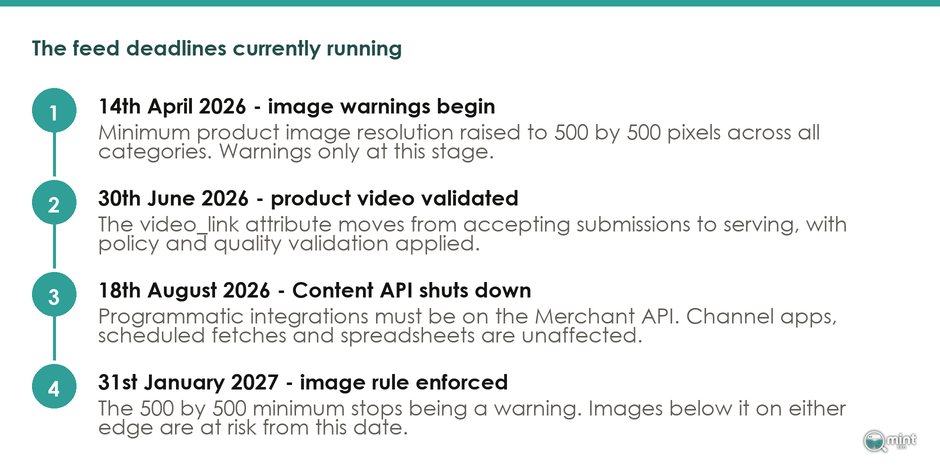
The image rule that is currently only a warning
Google raised its minimum image resolution in the 2026 product data specification update, and the timetable is worth diarising. That minimum is now 500 by 500 pixels across all categories. Warnings began on 14th April 2026 and enforcement starts on 31st January 2027.
Today that is a warning. A store with small images is still serving, and what it holds is a deadline.
Checking takes a minute and needs no tool. Open an item page, right-click the main image and open it in its own tab, then read the dimensions in the URL or the image properties.
Your theme displays a resized copy, so check the original under Content and then Files instead of the rendered page. An original measuring under 500 on either edge is the one carrying the deadline.
That 2026 update added three attributes worth knowing about even if you never use them. handling_cutoff_time sets a daily deadline for processing online orders and minimum_order_value specifies the minimum spend required to purchase and ship an order.
A third attribute, video_link, accepts product video URLs. Submissions opened in April 2026, with serving plus policy and quality validation beginning on 30th June 2026.
The Content API Shutdown On 18th August 2026
Google is retiring the Content API for Shopping. The Merchant API replaces the Content API for Shopping as the primary interface for programmatic access, its announcement says, with the old one available until 18th August 2026 and shut down after that.
That date falls this month, which sounds alarming and for most readers is not.
It affects programmatic integrations, meaning custom code talking to Merchant Center directly. If your items get there through the Google & YouTube channel, a scheduled fetch or a spreadsheet, nothing on your side changes.
If a developer built you something custom two years ago and has not been in touch, that is the conversation to have this week.
OpenAI's Product Feed Specification
OpenAI publishes its own product feed specification, and because its field limits match Google's, one clean catalogue satisfies both.
What ChatGPT Asks A Merchant For
For as long as most of us have worked in ecommerce, the feed spec has meant Google's. OpenAI's product feed specification is the second one worth satisfying, and it sets out what ChatGPT wants from a merchant.
Eight of its required fields are ones you already recognise:
- item_id and title
- description and url
- brand and image_url
- availability and price
Two more are new. The eligibility flags is_eligible_search and is_eligible_checkout tell OpenAI what each item may be used for.
Set that list beside Google's and only the eligibility flags are genuinely new. Everything else is data you already owe Google.
Anyone weighing up where else a catalogue should appear will find our piece on multi-channel ecommerce useful alongside this. We have also written on answer engines and what changes when a machine does the choosing.
The limits are the same numbers Google uses
The character limits came as a surprise on first reading. OpenAI's limits run title: Max 150 chars; avoid all-caps. description: Max 5,000 chars; plain text only. brand: Max 70 chars.
Those are the three numbers in Google's specification, for the same three fields.
File formats hold the same shape too. OpenAI takes a UTF-8, tab-delimited .txt or .tsv file, or a comma-delimited .csv, which is the plain delimited text a Shopping feed has always been.
What that means for a store with one catalogue
A merchant looking at a second channel reasonably assumes a second body of work. These two specifications say otherwise.
A title that fits Google fits OpenAI, and the same goes for a brand value. The catalogue you clean up for Shopping is the catalogue an AI shopping agent reads.
Where the specs part company is in what they reward. Required fields ensure correct display of price and availability. Recommended attributes improve ranking, relevance and user trust, OpenAI adds.
Getting listed and getting chosen are separate problems. Optional fields are where the second one is won, which is worth knowing before anybody sells you a separate project for it.
When A Feed Tool Is Worth Paying For
Feed software earns its subscription somewhere past a few thousand SKUs and a third sales channel. Below that, the native sync and an afternoon cover the same ground.
What the native channel already does
Everything above was done from a Shopify admin, a Merchant Center diagnostics page and a text editor. Your sync is free, the specification is published, and diagnostics tell you which items are failing and why.
For a store with a few hundred items going to one or two channels, that is the whole job.
Where the wider ranking picture matters more than the feed itself, our comparison of the best ecommerce SEO platform is the better starting point.
When The Native Channel Runs Out
Feed tools become worth their subscription once the work stops being a one-off tidy-up. Picture thousands of SKUs, several channels wanting different category taxonomies, and supplier data in a shape nobody chose.
Rules that rewrite titles channel by channel are a data-transformation problem, and a native channel app does not solve it.
It helps to see the scale the specialists work at. FeedArmy's own record of the grade puts it plainly: Emmanuel is the only Platinum Product Expert specialising in Google Shopping, and he handles over 3.3 million US dollars of yearly advertising expenditure across his client base.
At that scale the tooling pays for itself several times over. Below it, the same money does more good spent on filling in the fields.
For that job, our guide to optimising an ecommerce product page covers where the data belongs on the page itself.
Getting Your Merchant Center Feed Looked At Properly
If you would rather somebody else opened the diagnostics page, that is the work we do.
Merchant Center optimisation, meaning product feed and Shopping visibility, is one of the eight disciplines we run at Mint SEO under a single job: more revenue from organic search.
It sits alongside the technical SEO work and the on-page SEO work, because an item that cannot serve in free listings is a ranking problem wearing a different hat.
And an ecommerce product feed is rarely the only thing costing a store visibility, or the last thing we find.
I run retainer projects personally, so you would be speaking to me rather than an account manager.
So book your free consultation at mintseo.co.uk/free-consultation. We will go through your account together and tell you what is wrong with it.

About the author
John Butterworth
John Butterworth is the founder of Mint SEO, a Manchester ecommerce SEO agency he started in 2024. He has 11 years in SEO and digital marketing, previously running SEO departments for market-leading brands and several agencies. He specialises in Shopify and ecommerce SEO, and his work has ranked over 100 websites and driven more than 3 million organic visits. He speaks at industry events including the SEO Mastery Summit.
Connect on LinkedIn →