
Knowledge Hub
How To Sell On More Channels Without Giving Away Your Own Store
By John Butterworth · September 28, 2026
Sales on your Shopify store have levelled off, and selling on Amazon as well looks like the obvious next step. That step into multi channel ecommerce comes with a fair worry: every marketplace takes a cut of each order and keeps the buyer's details. A big marketplace can also outrank your own site for your own brand name.
I'm John Butterworth, and I work on the search side of Shopify stores from Manchester. This guide covers which channel to add next and what it charges, how to run every channel from one catalogue without overselling, and how to keep your own page ranking once Amazon hosts a copy of it.
Put Your Own Store At The Centre, Not Amazon
Selling the same products in more than one place at once is what multi channel ecommerce means.
Those places can include your own store, the big marketplaces, social shops and Google's shopping results. Whether it works depends on which place holds the master product record and the customer list. That place should be your own store, because it's the one channel you own outright.
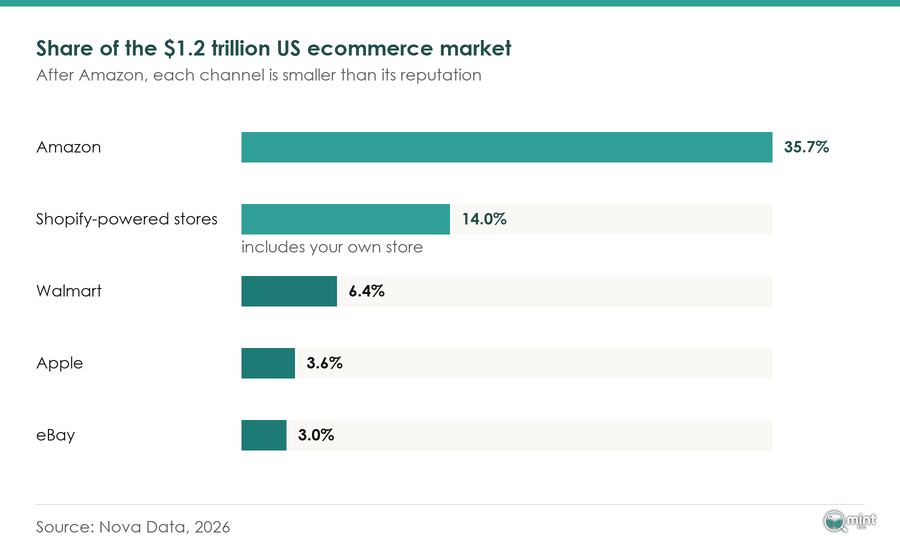
Amazon would like that central role for itself. In September 2026 it announced tools for running eBay and Walmart shops from inside Seller Central, including edits that flow from one listing out to the others.
Because one edit in Seller Central would rewrite your listings everywhere, I'd keep the hub in Shopify. Hand the product record to a marketplace and its owner decides how your products are described on every channel. Treat the marketplaces as extra places to sell, fed from the catalogue you control.
Omnichannel is the step after this one. Multichannel ecommerce means you're present in several places, while omnichannel joins them into one customer journey.
A shopper who browsed on your site and bought in your shop is then recognised as the same person. For most stores the first set-up has to work before the second is worth attempting.
More Channels Only Pay Off When Revenue Moves Off Your Biggest One
Selling in more places gets you two things: marketplace buyers who'd never have typed your store's name, and an income that no longer rests on one platform's rules.
In multi channel ecommerce the second benefit only shows up when revenue moves, and for most sellers it doesn't. Marketplace Pulse found that 71% of sellers whose main channel is Amazon, and who are live on at least one other marketplace, still make at least three-quarters of their marketplace sales on Amazon. Being on several channels isn't the same as being spread across them.
Pricing ties you in as well, because Amazon has long been able to suppress a product that's priced lower elsewhere. A cheaper price on your own site can therefore hurt your Amazon sales, so Amazon ends up setting your prices everywhere.
That's why I judge a new channel on revenue share. Record every channel's share of revenue and margin each month, next to the store numbers worth tracking each month.
A new channel is working when your biggest one's share falls because of it and its margin covers the extra work.
Add Channels One At A Time, Priced On What Each Takes From A Sale
Choose the next channel on two things: where your category already sells, and what the channel takes from each order. Every marketplace charges per order and keeps the customer. Google's free listings do neither. They sit first on my list for most Shopify stores.
Put each fee line against the product's margin before you list anything. Include the cost of fulfilling and returning marketplace orders too.
Payouts rarely match orders once fees, tax and refunds are netted off, so work out the margin your Shopify admin does not show first.
With those numbers in hand, add one channel at a time. Each new channel's cost and revenue then stays visible on its own before the next one goes live.
Amazon, eBay And Etsy Bring Shoppers Who Are Already Searching, For A Cut Of Every Sale
A marketplace owns the search the shopper started with, so it charges on every order it hands you. On Amazon UK, the Individual plan charges £0.75 for every item that sells, while the Professional plan is a flat £25 a month plus VAT whatever your volume, according to Amazon's seller pricing. Referral fees then sit on top, mostly between 8% and 15%.
Low-priced fashion is cheaper to sell there than that range suggests. Amazon has cut its referral fees on cheaper clothing and accessories across its European stores, which changes the sums for a store selling a lot of budget fashion.
eBay is growing again on the back of collectors and second-hand fashion. That makes it the natural second channel for a store selling collectables or second-hand stock.
It moves its rates as well. eBay told UK sellers it would be changing the per-order part of its Final Value Fee on orders over £10 from 12th February 2026. A flat fee on every order takes a bigger share of the margin on a cheap item, so recheck the rate card before each peak season.
Etsy adds a further cut on orders that its Offsite Ads bring in. Referral and transaction rates on all three vary by category and price band, so use the figure for your own category. On a low-margin product, the top rate can decide whether a marketplace sale makes you any money at all.
TikTok Shop Sells To People Who Were Not Looking For You
TikTok Shop finds buyers through videos, and its UK seller fee guide puts the Commission Fee rate at 9%. The bigger cost there is the content you need to feed it.
Discovery runs on videos, so a shop without videos or creators is shown to almost nobody.
The platform has kept growing fast, and in my view the audience is there for any shop that can put regular videos in front of it.
Sales there pool in a small group of badged sellers, who move many times the volume of a new shop.
A common worry is that selling on TikTok will take traffic from the store's own site. The bigger risk is a shop that sells nothing because nobody is filming for it.
Open one when someone is ready to make the videos. Connect it through Shopify's TikTok sales channel, which keeps its inventory and orders on the same catalogue.
Google's Free Listings Cost Nothing And Send Shoppers To Your Own Product Page
Google's free product listings charge nothing per sale and send the buyer to your own store. They are built from your product data, which Shopify's Google & YouTube channel sends to Google for you.
Your products can then turn up at no cost in Search, the Shopping tab, Images and Gemini, which Google lists as the places free listings appear. Because each one links to your own product page, the customer stays with you.
Eligibility isn't guaranteed, though. A feed with wrong prices or missing identifiers gets products disapproved, so check what your product feed is telling Google before you open anything that charges. Connect the channel, opt in to free listings and fix every disapproved product first.
Manage Every Channel's Listings, Stock And Orders From One Shopify Catalogue
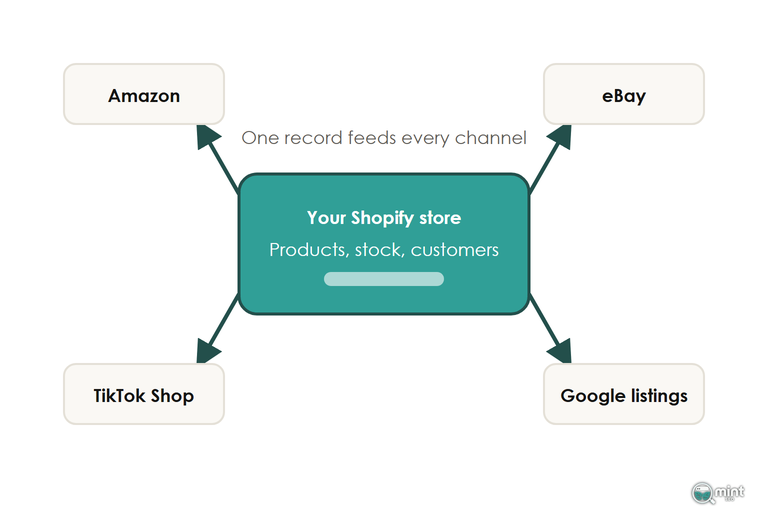
Keep the prices and the stock count in Shopify, and connect every other channel to it through a single connector. For the big marketplaces that's Shopify's own connector app, while social shops and Google each have a sales channel inside the admin.
Marketplace sales then come back into your Shopify order list, so order management happens in one place. If you'd rather not ship them yourself, Amazon's Multi-Channel Fulfilment can send orders from other channels out of its warehouses in unbranded packaging.
Run one connector per marketplace and no more. Two apps writing to the same catalogue overwrite each other's changes, and the listings drift.
Stock forecasting is a separate job from syncing, so buy it as a second tool if you need it.
A Sync That Polls Every 15 Minutes Leaves A Window To Sell The Same Unit Twice
Many stock-sync apps check for changes on a timer, every few minutes or every quarter of an hour depending on the plan. Between two checks, the other channels don't know a unit has sold. If your last unit sells on Amazon at 2:01, your own store keeps offering it until the next check.
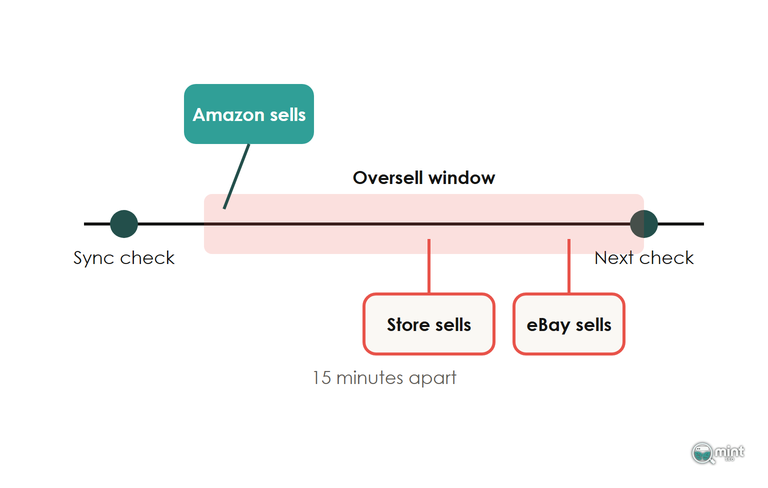
During a flash sale that window is where overselling happens. Each order you can't fill becomes a cancellation, and a cancellation counts against your seller metrics.
Even an instant update takes time to land. Shopify's own connector, Marketplace Connect, publishes a change immediately, yet the marketplace typically takes between 5 and 60 minutes to process it. It offers a Quantity Buffer setting for fast-selling stock.
Ask every sync tool whether it updates the moment a sale happens or checks on a schedule, and how often it checks on your plan. Ask too whether it re-counts the whole catalogue on a schedule.
Then set a buffer, so below a threshold the marketplaces show the item as out of stock and your own store sells the last few units.
One Bad Mapping Rule Rewrites Every Listing On A Channel
A connector translates your Shopify fields into each marketplace's attributes using mapping rules. Each rule applies to every listing on that channel at once, so one wrong formula changes the whole catalogue there in a single sync.
A formula that multiplies a dimension by ten sends every product to eBay with the wrong size. eBay then works out the wrong shipping cost for the buyer, and a best-seller can stop selling overnight.
Each marketplace names size, colour and material differently, so mapping can't be skipped. Test any new rule on one product and check the live listing field by field before it reaches the rest of the catalogue. Repeat that check after the connector updates, and keep a note of what each rule does.
Give Your Own Product Page A Reason To Rank Above Your Amazon Listing
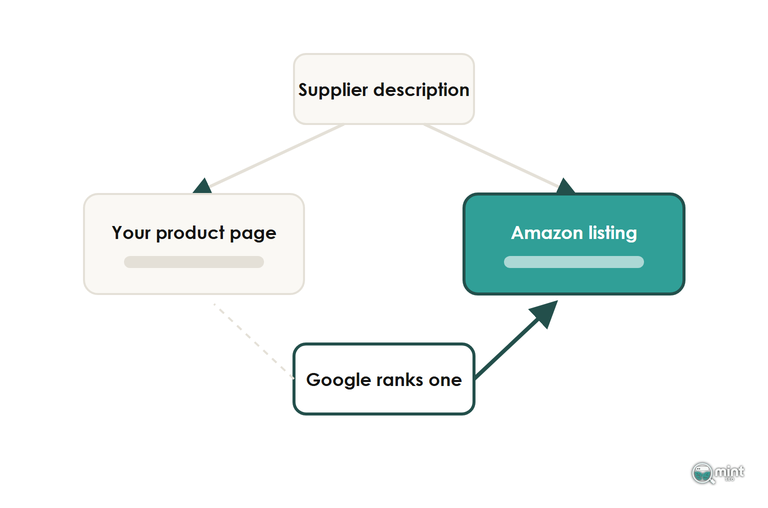
Selling the same products on Amazon as well as on your own site puts a copy of each one on two domains, and that's the part of multi channel ecommerce that reaches your own search rankings. Use one supplier description across every sales channel and Google sees near-identical pages about one product.
It'll usually rank one of them, and that tends to be the stronger marketplace domain, which is Amazon's. There's no penalty involved. Google is choosing which channel's copy to show, and a brand name in the marketplace title helps Amazon win searches that include your brand.
Google has also grown harder on copy that adds nothing. After its March 2024 core update, Google said searchers would see '45% less low-quality, unoriginal content' in results. A supplier description pasted onto your site and three listings is unoriginal in every one of those places.
For syndicated news, Google's usual advice is for the partner publisher to keep its copy out of the index. No marketplace will do that for your listing, so your own store has to earn the ranking in organic search.
Write fresh copy for each product on your own site, and add the structured data your theme leaves out so Google can show price, delivery and stock. Doing that before you list on a new channel means the copy Google finds first is yours.
Get Your Own Store Found Before You Pay For Another Channel
Get our SEO audit on your own store before you list anywhere else. Our SEO audit measures the eight pillars most important to SEO success, and we then analyse the results and turn them into an ordered list of fixes, starting with the product pages you're about to list on other channels.
Those fixes become the brief for our ecommerce SEO services retainers if you want us to do the work.

About the author
John Butterworth
John Butterworth is the founder of Mint SEO, a Manchester ecommerce SEO agency he started in 2024. He has 11 years in SEO and digital marketing, previously running SEO departments for market-leading brands and several agencies. He specialises in Shopify and ecommerce SEO, and his work has ranked over 100 websites and driven more than 3 million organic visits. He speaks at industry events including the SEO Mastery Summit.
Connect on LinkedIn →