
Knowledge Hub
What A CRM Does For Your Store (When You Need One And How To Pick It)
By John Butterworth · September 28, 2026
A Shopify store selling to consumers already holds most of what a CRM would give it. Shopify keeps each buyer’s orders and marketing consent, and your email platform adds what they browse. For most of these stores, a separate ecommerce CRM would be one more subscription doing the same job.
A second system earns its fee in two cases. One is a service team answering customers all day, who need a helpdesk joined to the orders. The other is sales that start as quotes or conversations before anyone places an order.
Whichever way you go, I’d check that each customer record holds the source of their first order before you connect anything. Some CRM syncs swap it for a generic offline source, and without it you can’t see what shoppers from Google go on to spend.
Every Order Feeds A Customer Profile That Decides The Next Message
An ecommerce CRM gives each shopper one profile, and every order, product view and email click lands on it.
On Shopify that CRM profile holds the order history and whether the customer agreed to marketing. Connect an email platform such as Klaviyo and the same customer record adds the products each person viewed and what they did with your emails.
Profiles like these become useful to a CRM once they are grouped. A CRM segment is a saved rule, so its members change as their orders change. Think of customers who have bought twice, customers with no order in 60 days, or people who viewed a product and never bought it. Nobody has to rebuild the list each week.
Once a segment like that exists, the CRM can trigger the next step. In Shopify Flow, a customer joining a segment can start a workflow, which is how a win-back discount reaches someone on the day their 60 quiet days run out.
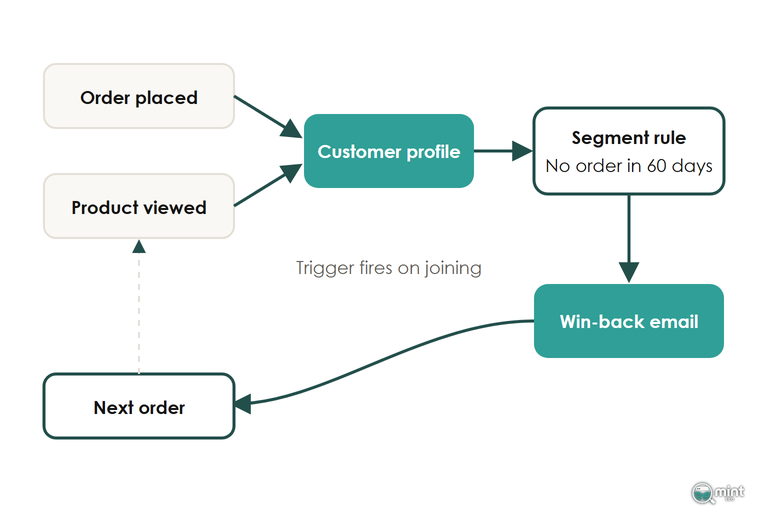
Judge that loop on second orders: how many first-time buyers come back within their usual time between orders. Our customer retention guide covers what to send them. A CRM built for a sales team tracks deal stages, meetings and pipeline value instead, which a consumer store rarely needs.
Shopify And Your Email Platform Already Run The CRM For Most Stores
For a store selling to consumers, that loop already exists. Shopify holds the orders and consent, while the email platform holds the browsing and sends the messages.
The email platforms now say so themselves. At K:BOS in Boston this month, Klaviyo presented itself as an autonomous B2C CRM. An analyst note from Info-Tech Research Group on K:BOS 2026 reads the launches as a marketing and service loop built on one customer profile.
Wholesale No Longer Needs A Second System
Trade accounts were the classic reason to buy a sales CRM, because below Shopify Plus there was nowhere to keep a company, its prices and its payment terms.
Since 2nd April 2026 that record has existed below Plus. Shopify's B2B changelog lists company profiles, up to three catalogues, volume pricing and payment terms on Basic, Grow and Advanced, at no extra cost. Unlimited catalogues and deposits stay on Plus.
A wholesale side on its own is now a Shopify set-up job, with trade buyers kept on the same customer record as retail ones. Check any sales CRM you add later, because some Shopify syncs only carry those company records across on Plus. Getting those trade pages found is a separate job, covered in our notes on B2B ecommerce SEO.
A Service Team Needs A Helpdesk Joined To Orders
When people on your team answer customers all day, what they need is the order history sitting inside the conversation. That is a helpdesk's job.
With Gorgias's Shopify actions an agent can refund, duplicate or edit an order from the ticket sidebar before or after it ships. Editing stops at orders placed more than 60 days ago or in a different currency.
Email platforms are moving towards the same helpdesk job, and Klaviyo's customer agent now answers order questions from the email side. Info-Tech's advice to existing Klaviyo users was to keep an established service platform wherever the service work is deep, and I'd give the same advice to any store with a busy inbox.
Quotes And Follow-Ups Before The First Order Need A Sales Pipeline
A sales CRM is worth its cost when a sale starts as a conversation: a trade account being won, or a quote for a fitted kitchen. Those deals need stages, reminders and someone who owns them.
Connecting one to the store has limits worth knowing. On HubSpot's Shopify data sync, orders copy across one way and can't be edited in HubSpot. Shopify metafields don't sync at all.
A ring size or a repair note kept in a customer metafield therefore stays in Shopify. Decide which system holds each detail before you connect them.
Compare CRMs On How The Bill Grows With Your List
Put every ecommerce CRM on your shortlist through two tests. One is whether its Shopify connection writes tags and profile fields back or only reads your orders, and the other is the unit its bill is counted in.
Billing is where the cost of a CRM moves as the store grows. Since 18th February 2025, Klaviyo's billing rules have required customers "to be on an email plan that matches or exceeds their active profile count". An active profile is anyone the account can email.
Beyond the billing units in that table, AI features are billed by use. Klaviyo charges for its Composer assistant by the capacity each task consumes, so a report scheduled every morning is billed every morning.
Some of those September features were still previews at K:BOS, including SQL access to the customer data, so ask for a demo on your own customer data and a written list of what is live on your plan today. Buying on the launch video is how a store ends up paying for features it can't use yet.
Clean The Customer Record Before It Goes Into Any CRM
Whichever CRM ends up holding the customer record, its connector copies your Shopify customer list into the CRM as it stands, duplicates and dead contacts included.
That costs money. In Validity's State of CRM Data Management in 2026, 62% of organisations said they had lost revenue directly to poor CRM data, and almost a third of teams lose six or more hours every week to cleaning it up.
One Shopper With Two Emails Becomes Two Customers
Shopify identifies a customer by email address, and CRM connectors match contacts on email too, without merging duplicate records for you. An order placed without an email reaches the CRM with no contact attached. A shopper who bought once from a work address and once from a personal one becomes two CRM contacts, each holding half the order history.
Merge those duplicates in Shopify before any CRM sync runs. Select the two profiles under Customers and choose Merge customers. Their orders and addresses then combine into one profile.
Check two things before you confirm the merge and connect the CRM. A merge can't be undone, and if either profile was subscribed to email or SMS marketing, the merged profile is subscribed.
Suppress Contacts Who Have Never Opened, Visited Or Bought
A checkout email can land on your CRM's contact list without the customer ever agreeing to marketing. Under active-profile billing it is still a CRM contact you pay for.
Before a CRM move, build a segment of contacts who have received several emails and never opened one, never visited the site and never ordered. Send them one last win-back email, then suppress whoever stays silent. If you are moving from another email platform, disconnect the old one first, or your whole list gets a second double opt-in email.
Don't rush the suppression, though. On Klaviyo a suppressed profile stays suppressed even if that person starts a checkout or buys again, so a customer cut too early can't be emailed until they resubscribe.
Keep The Source Of Each First Order On The Customer
Open any order in Shopify and its conversion summary names the site or campaign that sent the buyer, plus their landing page.
A sync into another CRM doesn't always carry it across. Contacts that a sales CRM creates from its Shopify sync can end up with a generic offline source in place of the campaign that found them. Copy the first order's source onto the customer before you connect anything, and it survives whatever the CRM records.
In Shopify Flow, a workflow on the Order created trigger can wait a day for the journey data to fill in, then read the first visit's source and add it to the customer as a tag.
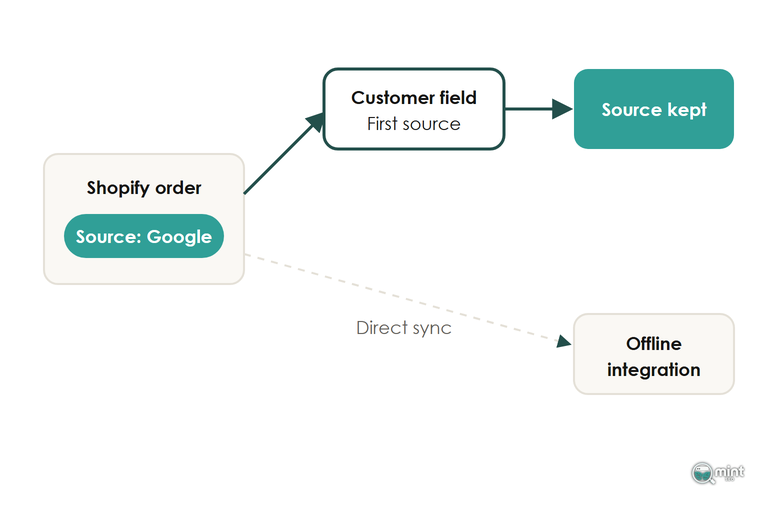
With the source on every CRM record, you can compare channels on what their customers spend over a year of orders.
If your tracking needs fixing before any of this, start with ecommerce conversion tracking. How each channel's visitors convert in the first place is covered in our guide to ecommerce conversion rate.
Find Out What Your Search Customers Are Worth
Once the source sits on every customer, you can see what shoppers who arrive from Google search go on to spend after their first order. That figure is the one to judge SEO on, because rankings only matter for the revenue they bring.
Winning more of those customers is what Mint SEO does as an SEO agency for ecommerce stores that sell to consumers. Most of that work goes into ranking for the searches that bring in first orders, which a competitor may hold today.
A free audit shows where your store stands on those searches. It's sent the same day as a two-page PDF. Alongside your traffic chart and branded share, it lists commercial keywords your competitors win where you're not on page one, with the monthly demand behind each.
Those unbranded searches are where new first orders come from. Answer four questions, with no call and nothing to pay, and get a free SEO audit of your store.

About the author
John Butterworth
John Butterworth is the founder of Mint SEO, a Manchester ecommerce SEO agency he started in 2024. He has 11 years in SEO and digital marketing, previously running SEO departments for market-leading brands and several agencies. He specialises in Shopify and ecommerce SEO, and his work has ranked over 100 websites and driven more than 3 million organic visits. He speaks at industry events including the SEO Mastery Summit.
Connect on LinkedIn →