
Knowledge Hub
Ecommerce Conversion Tracking That Counts Every Sale Once
By John Butterworth · October 8, 2026
A Shopify store's sales figures only help when every channel counts the same orders. Sound ecommerce conversion tracking sends one purchase event for each order placed through your online checkout. That event carries the order number, value and currency, and each platform records it once.
The tracking error I've found most often on Shopify stores is the plainest one. There's no purchase event at all, so GA4 never records a sale. Every report of which channel brought a sale rests on that one event, so it's worth checking on your own store before anything else.
There's a quick test. Put last week's order total from the Shopify admin beside the purchases GA4 logged over the same seven days. If GA4 falls well short, set up the purchase event once in Customer Events before you trust any revenue figure.
Send Each Shopify Order To GA4, Google Ads And Meta Once, From Customer Events
Purchase, Begin Checkout And Add To Cart Carry The Order Number
Three events cover ecommerce conversion tracking for most stores: add_to_cart, begin_checkout and purchase. Read side by side in a funnel report, they show the step where shoppers drop out before they pay, and the purchase is the one every ad platform bids against.
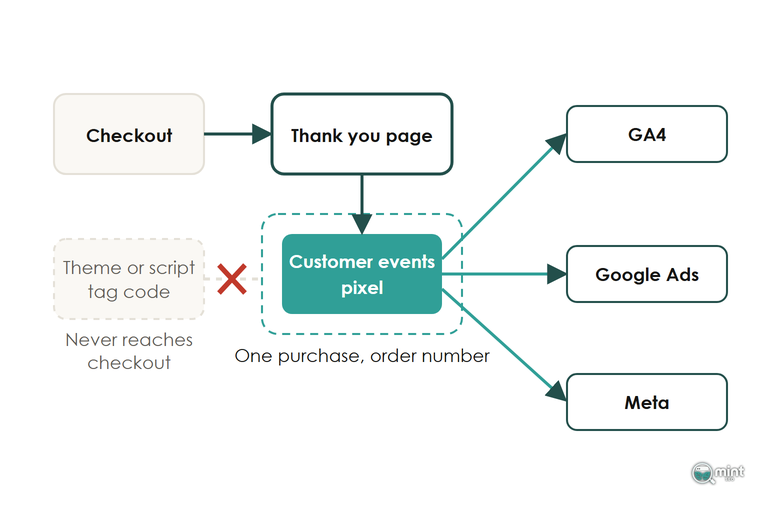
Hang it on Shopify's checkout_completed event, which fires once for each checkout. It normally fires on the Thank you page, but a store running a post-purchase upsell sees it fire on the first upsell offer page instead. A tag waiting for the Thank you page URL misses every order that saw an upsell.
Send the order number as the transaction_id, with the order value and currency beside it. GA4 uses that ID to discard a purchase it has already recorded, so a shopper reloading the confirmation page doesn't become a second sale. Never let the field go out blank, because GA4 reads every purchase with an empty ID as one and the same purchase, which would leave you without a conversion rate you can trust.
Thank You Page Scripts Belong In A Customer Events Pixel Now
Inside Customer events you choose between two kinds of pixel, and all of your conversion tracking should live in one of them. An app pixel comes with a marketing app such as Google & YouTube, while a custom pixel is JavaScript you paste in yourself. Both run in a sandbox that hands them the checkout data and nothing else, so a tag that reads your theme's dataLayer or page elements comes back empty.
A snippet in theme.liquid never reaches checkout at all, whoever put it there.
The Order status page has already lost its script tags, and since 1st October 2026 no app can create or update a script tag on any store. Storefront ones follow on 1st March 2027, so any purchase tracking still sitting in an old Additional scripts box has stopped sending purchases without showing a single error.
The tell is a GA4 property that still receives add_to_cart and view_item events but no purchases.
If that's what your property shows, move the code into a custom pixel. Paste in the tag's JavaScript and strip out any HTML, because the sandbox only runs JavaScript.
Subscribe it to checkout_completed, then place a test order and watch the purchase come through in GA4 DebugView.
One Route Per Platform Stops The Same Sale Landing Twice
Pick one route into each platform and remove the rest. For Google, choose either the Google & YouTube app or Tag Manager running inside a custom pixel, because running both sends two copies of every purchase.
A second GA4 measurement ID left behind by an old app or a previous developer doubles the count in the same way.
Open Tag Assistant on a test order and check that one ID fires one purchase.
In Google Ads, set the purchase conversion action to count every conversion, so a customer who buys twice after one click shows as two sales. Keep a single purchase action as primary, and remember that each app you add for this job is one more script on the page. Of the Shopify apps worth keeping, each does something your theme or a single pixel can't.
Recover Conversions That Consent Banners And Ad Blockers Hide With Server-Side Tagging
Even flawless ecommerce conversion tracking in the browser misses purchases, and part of that loss can be won back. Shoppers decline cookies, and browsers keep narrowing what a tracking script can read.
Safari made that shortfall bigger in June 2025, when its advanced fingerprinting protection became the default in every browsing mode. Ad blockers sit on top, with nearly three in ten internet users blocking ads at least some of the time in Q2 2025 survey data.
Advanced Consent Mode Keeps A Declined Purchase In The Model
Run Google's consent mode in its advanced form. Basic mode blocks Google's tags until the shopper agrees, so a declined purchase disappears from your reports. Advanced mode loads the tags in a denied state and sends cookieless signals that Google uses to model the sales it couldn't observe.
Check the timing on your own store next. If the cookie banner reports the shopper's choice after the purchase tag has already fired, the tag runs as denied even for people who clicked accept. Tracked purchases then fall overnight in every platform at once.
A Customer events pixel already follows the visitor's privacy choice. So connect your banner to the customer privacy settings in the Shopify admin, because a banner loaded from inside a tag manager can report its answer too late.
Place a test order, accept cookies, and confirm in Tag Assistant that consent reads granted when the purchase fires.
Server-Side Tagging Sends Google And Meta A Second Copy When The Browser Tag Is Blocked
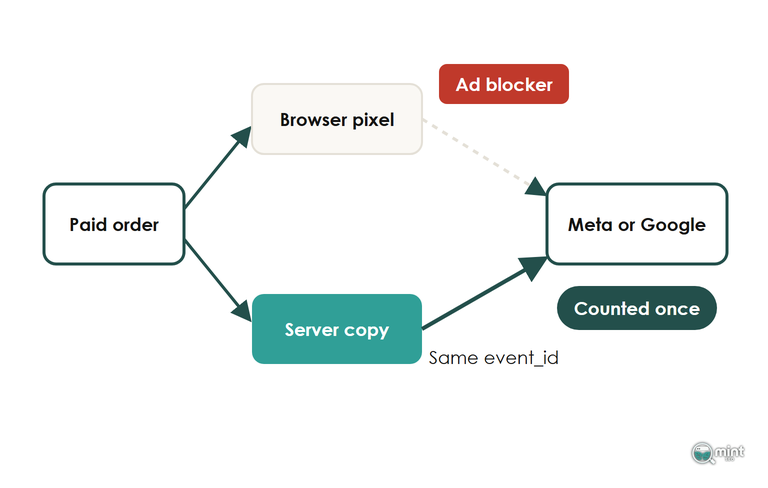
Add a server-side copy of each purchase. A server-side tag sends the purchase from a server, out of reach of ad blockers and browser limits. On the Google side, pair it with enhanced conversions, which attach hashed customer details such as the email address so Google can match the sale to an ad click. Meta's server route is its Conversions API.
That server copy is the same purchase travelling by a second path, so the platform has to be told the two belong together. Meta says advertisers must set up a deduplication method whenever its browser pixel and its server connection both send the same event. Give both copies the same event_id and event name, and it keeps one of them.
Treat any uplift a platform promises from this as its own estimate. Whether the server copy is working shows in your own order book: count how many Shopify orders turn up in each platform before the change and after it.
Reconcile A Day Of Shopify Orders Against Tracked Purchases In GA4 And Google Ads
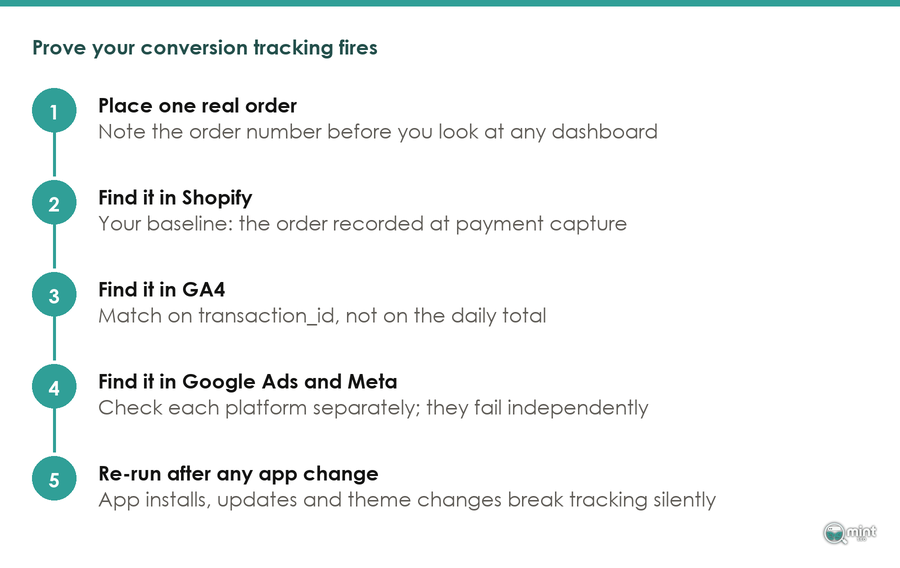
Prove your conversion tracking against your own orders before you trust a single conversion figure in Google Ads, the same check that opens a CRO audit. Export one day of orders from Shopify, taking a day from last week so GA4 has finished processing it, then look up each order number as a transaction ID in the GA4 purchase report and again in Google Ads.
POS, Draft And Subscription Orders Never Fire A Purchase Event
Strip out every order that didn't pass through the online store checkout before you count the missing orders. Point-of-sale sales, draft orders marked as paid in the admin and subscription renewals never load a checkout page. Orders imported from a marketplace don't either, so there is no purchase event to find for any of them.
The Source column in the order export tells you which is which.
Check which number your event sends as well. The order number customers see sits in the Name column of the export, while a custom pixel built on the checkout's order ID sends the long number from the Id column. Compare the wrong column and nothing matches at all, so a perfectly healthy setup appears to have lost every sale.
Unmatched Orders That Cluster By Region, Payment Or Date Point To A Fault
Sort the orders that didn't match before you change anything, because each cause leaves a different pattern. A small shortfall spread evenly across countries, devices and days is the normal loss to declined cookies and ad blockers, while a shortfall that bunches up is a fault you can fix.
When the missing orders start on a particular day, find that date first and then list what changed on the store that day. One change worth adding to that list came in September 2026, when Google Analytics began letting you allowlist the hostnames permitted to send data.
An include filter drops any event that comes in without a hostname. A filter that leaves out a domain your store or checkout sends events from will cut purchases from the day it goes live.
Revenue Only Lines Up Once The Orders Match
Compare revenue only after the order counts agree. GA4 records whatever value your event sends, which may or may not include shipping and tax. It never hears about a refund or an edited order unless you send that too.
A store selling in several currencies also sees GA4 convert each sale into one reporting currency at a rate that won't match its payment provider's.
Take the revenue figure for any report from Shopify, which records refunds, edits and your store currency as they happen. Use GA4 and the ad platforms to see which channel brought each sale, and keep the ecommerce metrics worth reporting anchored to the order book.
Tracking That Counts Every Sale Once Makes Search Revenue Visible
Most of the setup above lives in three places. Customer events holds the pixels and your consent settings decide what fires. Each ad platform then has its own conversion settings. Check all three against your Shopify orders each month and the figures stay honest.
Search work only shows up as revenue once the tracking can be trusted. GA4 tracking is one of the topics SEO consulting covers. Once it holds, that is the point where the work of an SEO agency focused on ecommerce stores can be judged in orders and revenue.
With each purchase counted once, the next question is how much of that revenue search brings in. Get a free SEO audit of your store to see that side. It charts your last twelve months of organic traffic and lists your top keywords by position. It also shows how much you rely on branded search. I send it the same day as a two-page PDF, with no call and nothing to pay.

About the author
John Butterworth
John Butterworth is the founder of Mint SEO, a Manchester ecommerce SEO agency he started in 2024. He has 11 years in SEO and digital marketing, previously running SEO departments for market-leading brands and several agencies. He specialises in Shopify and ecommerce SEO, and his work has ranked over 100 websites and driven more than 3 million organic visits. He speaks at industry events including the SEO Mastery Summit.
Connect on LinkedIn →