
Knowledge Hub
Set Up Conversion Tracking Your Store Can Trust
By John Butterworth · August 13, 2026
Open four tabs on a Monday morning and your store tells you four different things about the same week. Shopify shows one order count and GA4 shows a lower one.
Google Ads and Meta each claim conversions of their own. Added together they often exceed what the shop took.
One merchant put the size of it plainly in the Shopify Community, reporting that each week was so different that about 10 to 20% of orders were missing, and that the sales figures did not match either.
This rule comes before any of the setup. Treat Shopify as authoritative for orders and revenue, because it records the transaction itself; every other system infers the sale from a browser event that may never have fired.
GA4 answers questions about behaviour and channel attribution. Each ad platform answers for its own campaigns and nothing else.
Those four numbers will never match, and chasing a match is the wrong job. Getting the gap small enough, and explainable enough, that you can spend money against it is the right one.
On the audits I run, my first move is never a rankings report. I open the Shopify admin and GA4 side by side and reconcile one week across both.
It takes minutes, and it decides whether everything measured afterwards means anything. Often enough those two disagree by a fifth, and nobody in the business had noticed.
Below are the events worth firing and where Shopify runs them now. After that: stopping each ad platform counting an order twice, proving the whole thing works, and reading the gap that remains.
The Purchase Event, And The Three Others Worth Firing
Ecommerce conversion tracking comes down to a small set of events. One of them carries almost everything.
What A Correct Purchase Event Must Contain
Your purchase event fires on the order confirmation page and it is the primary conversion event.
The GA4 implementation guidance published by CorePPC is specific about the payload. It must include transaction_id, value, currency and an items array.
Three of those are obvious. The fourth gets dropped most often and matters most.
That transaction ID is the only field your GA4 purchase event and your Shopify order record share. Without it there is nothing to join the two systems on.
You can still compare totals and argue about them. What you can't do is take a single order number, find that order in GA4, and prove it arrived.
Check that field before you touch anything else.
Collected Is Not Counted: Marking Key Events
Even with the parameters right, GA4 will collect an event and report nothing from it. Collection and conversion counting are separate systems.
Bridging them is a manual toggle, and the setup guide from Ingest Labs reduces it to one instruction. Go to Admin > Events in your GA4 property, find the events you want to mark as conversions and toggle the Mark as key event switch.
If a store shows an event streaming into the real-time report but records zero conversions, this is nearly always why. Nothing in the interface warns you the toggle was never flipped.
The Four Events Shopify Started Sending In August 2026
Shopify's native GA4 event coverage changed this month, which is worth knowing before you hunt for events you think are missing.
As the trade publication PPC Land reported it, starting August 17, 2026 the Google & YouTube app began sending four new ecommerce events to Google Analytics. Those events are view_item_list, remove_from_cart, view_cart and add_shipping_info. Between them they cover collection views, cart removals, cart views and the shipping step.
Edward Upton, who founded the Shopify analytics app Littledata, published Google's merchant notification and drew out the part that matters. Only purchase events travel server-side. The four new events remain browser-based.
So your funnel gets a better shape while its accuracy stays where it was. Every ad blocker already suppressing client-side events will suppress these too.
Judge accuracy on the purchase event, as before.
Where Shopify Runs Your Tracking Now
If your tracking was built more than a couple of years ago, part of it has stopped running and nobody told you.
What The Checkout Sunset Removed
Shopify announced the deprecation of checkout.liquid in February 2023, then removed it in two stages. The migration guide from Elevar records both dates. checkout.liquid was sunset for the Information, Shipping, and Payment checkout steps on August 13, 2024, and for the Thank You and Order Status pages on August 28, 2025.
That file was where custom tracking scripts lived. Once those steps stopped rendering from it, the scripts stopped executing.
No error appeared anywhere, and there was no failed deploy to investigate. Events never fired again.
A store that never migrated has been under-reporting checkout ever since, on dashboards that looked plausible throughout. Weigh that when you are choosing what to build on.
Reading Your Own Customer Events List
Its replacement is worth knowing by name, because one admin screen answers most tracking questions.
As the engineering agency Making Science describes it, customer events sits within Shopify's admin console and lets you deploy custom scripts or pixels within an iframe throughout the website, subscribing to specific user events.
Because every pixel has to be registered there to run at all, that screen doubles as a complete inventory of your tracking.
The Web Pixels API is now the only supported route into checkout, so anything firing there legitimately has to appear as a customer event.
That list is complete by construction. It doesn't depend on anyone having documented the stack.
Open it and count what is running. A second purchase pixel nobody remembers installing is the ordinary explanation for a store whose revenue reads high.
Why A Correct Setup Still Cannot Read Checkout Cookies
One failure here resists configuration entirely, and knowing about it will stop you hunting.
The clearest account of it comes from Simo Ahava, co-founder of the analytics training company Simmer and among the most cited independent authorities on tag management. Writing on his own blog in October 2024, he documented the constraint plainly: "requests sent from the checkout page to a web server will not carry any cookies".
He rules out the obvious workaround too. "If you try to set cookies in the server response, it will not work either." The checkout sandbox makes a setup that looks same-site behave as cross-site.
In practice the first-party cookies ad platforms use to recognise a click never reach a server container from checkout. Treat unattributed checkout conversions as a platform constraint to design around.
Getting Each Ad Platform To Count An Order Once
Ad platforms keep their own conversion records, on their own servers, under their own rules. When one disagrees violently with Shopify, a single named setting is usually responsible.
Google Ads: Consent Mode v2 Comes First
For a UK or EEA store this comes first, because without it there is nothing to count. As the certified consent platform CookieHub sets it out: Since March 2024, Google Ads has required advertisers to implement Consent Mode v2 for conversion tracking and remarketing in the European Economic Area and the United Kingdom.
Four consent parameters carry that signal: ad_storage, analytics_storage, ad_user_data and ad_personalization.
Get it wrong and you lose conversion modelling for that traffic. Real sales happen and never get credited, so the campaign reads worse than it performed. Confirm all four parameters are being sent before you conclude a campaign is failing.
Meta: The event_id That Stops Every Sale Counting Twice
Meta treats a purchase from your pixel and a purchase from the Conversions API as two sales unless you tell it otherwise.
What it needs is the same event name and the same event_id, the exact same string emitted by browser and server. The implementation vendor Analyzify sets out the window. When both match and the two events arrive within 48 hours of each other, Meta keeps the first one it received and drops the duplicate.
Generate that ID from the Shopify order number, then send the identical string from both sides.
None of this is a reporting nicety. Meta warns against duplicate events because they degrade algorithm performance.
The cost of that lands on your media budget. A system believing every conversion happened twice bids on that belief, and you end up teaching the platform to buy the wrong traffic.
Excluding Shopify's Own Purchase Event From Google Ads
Google has no equivalent shared identifier. Run Shopify's native Google integration alongside your own Google Ads conversion tag and both report the same checkout. The totals add together.
Worse, the two can fail in opposite directions at once. The native integration can miss revenue events on some orders while duplicating others. Net variance then looks tolerable when both numbers are wrong.
Pick one conversion source per platform and switch the other off.
Prove Your Tracking Fires Before You Trust The Numbers
Guidance on this subject tends to stop at installation. Confirming that it worked is the step almost nobody documents.
That gap costs stores the most, because an unverified setup looks exactly like a working one.
Trace One Real Order End To End
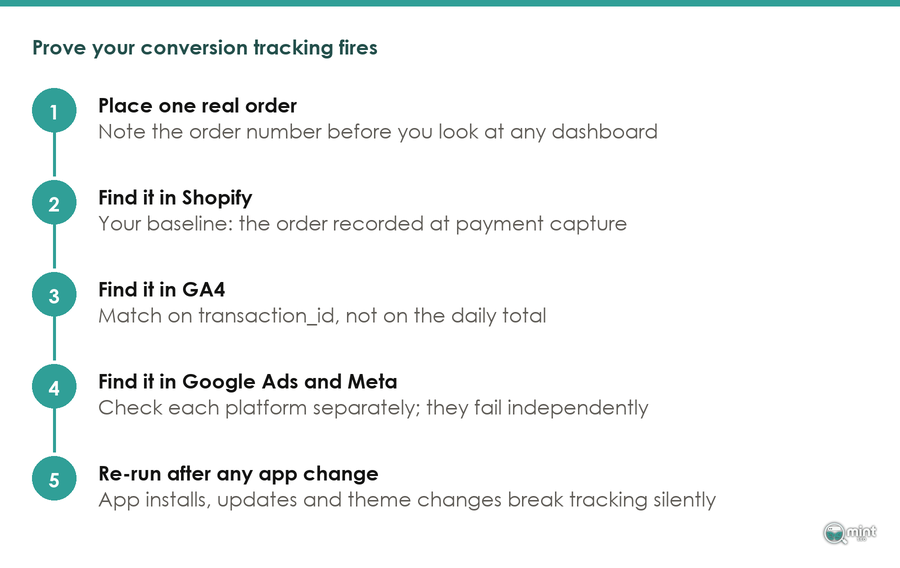
Place a real order. Write down the order number. Find that specific order in Shopify, in GA4, in Google Ads and in Meta.
It takes about twenty minutes and it's the only check that proves anything. Each platform fails independently and silently. Confirming a number in the first dashboard tells you nothing about the other three.
The Shopify analytics specialist Littledata puts the scale of it at 88% of Shopify stores holding inaccurate data in Google Analytics on default tracking. That makes "probably fine" a poor assumption to build a budget on.
Watch It Fire In GA4 DebugView And Meta Test Events
Reports aggregate and delay, so a missing conversion in a report has half a dozen possible causes. Watching an event arrive live has one.
Run a test transaction with DebugView open and Meta's Test Events tool running.
An event that appears there and vanishes from the report later is a processing problem. An event that never appears is a firing problem. Separating those two saves a day spent in the wrong system.
That same live view is how you confirm a server-side migration took. Order data sent directly to GA4 via a server bypasses ad blockers and reaches over 98% tracking accuracy, according to Analyzify's server-side documentation, but only once the server container is wired up correctly.
Re-Verify After Every App Change
Tracking does not stay fixed, and routine maintenance is what breaks it. One merchant posted in the Shopify Community last week that after reinstalling the Google & YouTube App, purchase tracking stopped working.
No error. No notification anywhere in the admin, and a store that had stopped counting.
Silence like that is also how duplicates survive. Another merchant running GA4 through GTM found the purchase event was "occasionally firing in duplicate", which is precisely why a casual glance never catches it.
That intermittency is why the check has to be routine. Add one after any app install, update or theme change.
Do it before a peak trading period as well, since a silent break in November costs the one month of data you cannot re-run. Every one of the Black Friday jobs worth doing assumes you can see what happened.
Which Number Wins When Your Dashboards Disagree
Your tracking is correct now and the four dashboards still disagree. Almost no guidance tells you which of them to report from.
What Each Platform Is Counting
They can't agree, because they aren't counting the same object.
WeltPixel builds and instruments Shopify stores for a living. Its teardown of why the revenue numbers never match puts the cause in one line.
Shopify counts orders at payment capture while GA4 counts sessions where a purchase event fired.
A captured order whose browser event was blocked exists in one system and not the other by design.
Report revenue and order counts from Shopify.
The attribution platform Ruler Analytics reaches the same conclusion: if there is a discrepancy on order counts, Shopify is almost certainly closer to the truth and should be your reporting baseline.
Use GA4 for what it does better, which is telling you how people behaved and which channel introduced them. That distinction matters most when you start measuring retention, where the question spans months instead of one week.
The Gaps That Cancel Out And The Gaps That Compound
Some discrepancies fix themselves and some accumulate. Telling them apart saves you chasing the wrong one.
That split is well documented. A Shopify and GA4 reconciliation guide gives the clearest worked example of the harmless kind.
An order placed at 11:45 PM ET on January 15 is already January 16 in UTC, so Shopify counts it on one day and GA4 counts it on the next. That same sale lands in two different reporting days and nothing about the setup is broken. Widen the reporting window and the difference disappears on its own.
A Shopify-specific rule makes this more common than people expect. As the measurement agency AdPage documents it: In Shopify, sessions begin when no active session is present and end after 30 minutes of inactivity or at midnight UTC. GA4 ends a session on inactivity alone, so a late-night visitor becomes two Shopify sessions and one GA4 session.
Compare a full month before investigating a daily gap. A difference that disappears at month level was never a fault. Anything holding at month level is a blocked event or a missing tag, and that one earns your afternoon.
The Attribution Model You Are Probably Not Using
Check which model is producing your numbers, because it may not be the one in your settings.
Data-driven attribution carries a volume threshold, and the analytics publisher Growth Method spells it out. It requires your property to have at least 400 conversions for the action and 20,000 total conversions across all actions within the lookback window. Below that, GA4 falls back to last-click and doesn't tell you.
Plenty of stores sit under that threshold, reading last-click numbers while believing they are reading something cleverer.
That matters more than it sounds. Per the configuration guidance at GA4 Helper, the GA4 defaults are 30 days for new users and 90 days for conversions, while your ad platforms apply their own shorter windows. Two systems crediting one sale over different periods will never agree on channel mix.
Because of that, knowing which model you are on stops you moving budget on an artefact. Apply the same care when you read the results of any test you run.
The Checkout Routes That Quietly Drop Your Conversions
A final slice of orders reaches no dashboard at all, and no reporting rule recovers it. These orders go missing because of how the customer chose to pay.
Shop Pay And The Cross-Domain Break
Server-side tracking work published by WeltPixel names the mechanism, and it is a change of domain rather than a tagging fault.
When a buyer uses Shop Pay, the checkout lives on a different domain (pay.shopify.com). Browser pixels fire on your storefront domain, then lose the session across that redirect.
Your order still happens and Shopify still records it. What disappears is the acquisition context, so the sale lands with no channel attached.
Accelerated checkout is good for conversion rate and bad for attribution. Both are true at once. Judge how many of those orders there were from the Shopify order record, never from the ad platform.
Subscriptions And Other Non-Standard Checkouts
Subscription revenue needs measuring on its own. Keep that stream out of your headline figure.
Subscription apps such as Recharge replace the checkout your tags were built against, and the measured cost of that is severe. Examining ten such stores for its 2021 study of Shopify order tracking, Littledata found the percentage of orders tracked, excluding recurring orders, ranged from a pathetic 9% up to a disappointing 70%.
Standard checkouts averaged 88% in the same work, so a subscription brand can be losing a third of its orders while the site-wide figure still looks respectable.
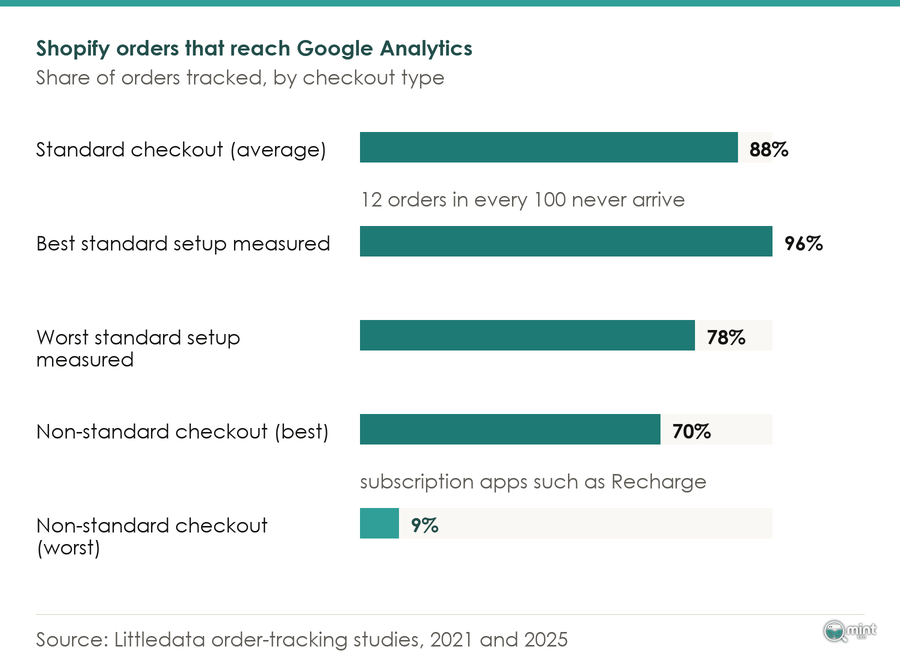
Events end up firing against a page or a domain your setup does not cover, and the shortfall scales with how much revenue runs that way.
A site-wide accuracy figure therefore tells a subscription brand almost nothing useful.
Work Out How Many Orders You Cannot Track
You can put a number on this before opening a single dashboard, which turns an unexplained gap into an expected one.
Those causes are well understood. As one Shopify GA4 implementation guide puts it, ad blockers, tracking-prevention features in Safari and Firefox, and declined consent all remove sessions from GA4 that Shopify still records as orders.
Add the accelerated and off-site payment routes above, and each removes a predictable class of order.
Split your Shopify orders by payment method once. Add up the routes that leave your domain. That figure is your tolerance: how far your platforms may disagree before anything is wrong.
Knowing it is worth more than any dashboard. It separates a Monday spent investigating from a Monday spent working on the funnel itself.
Getting Your Conversion Tracking Audited By A Specialist
Broken tracking almost never announces itself. It tints every downstream number slightly optimistic, because a dashboard with a plausible figure in it looks exactly like a correct one.
Start an audit on rankings, for a store whose purchase event is misfiring, and you produce a plan nobody can measure against anything. Our SEO audit therefore begins with what the store is recording.
We establish which events fire and which fire twice, what stopped at the checkout sunset, and which dashboard has earned the right to be the one you report from. You get the tolerance figure back as well, worked out on your own payment mix.
Settle that first and every campaign after it gets reported as fact. Leave it unsettled and a real win reads as a modest one, because the under-counting never shows up as an error.
It is also the cheapest work we do. Reconciling a week takes an afternoon, and a conversion rate you cannot trust misleads every decision you make for the next three months.
Book an audit and we will tell you what your tracking is recording, in plain terms, before another quarter of budget is committed to numbers nobody has checked.

About the author
John Butterworth
John Butterworth is the founder of Mint SEO, a Manchester ecommerce SEO agency he started in 2024. He has 11 years in SEO and digital marketing, previously running SEO departments for market-leading brands and several agencies. He specialises in Shopify and ecommerce SEO, and his work has ranked over 100 websites and driven more than 3 million organic visits. He speaks at industry events including the SEO Mastery Summit.
Connect on LinkedIn →