
Knowledge Hub
How To Get Traffic To Your Shopify Store: Choosing The Two Channels Worth Your Time
By John Butterworth · August 15, 2026
The question I am asked most often is how to get traffic to your Shopify store. I answer it by opening one report, which takes about forty seconds. Analytics, then Reports, then Sessions by referrer.
My name is John Butterworth and I run Mint SEO, a Shopify and ecommerce SEO agency in Manchester. That report ends most of the argument about what to try next.
It either shows a channel doing something small we can grow, or it shows almost nothing arriving from anywhere.
Either way the report is what decides the next move. I have spent eleven years watching owners answer a quiet store by adding channels. Picking two and running them properly beats that every time.
This article gives you the rule for picking your two. It gives you the session number your revenue goal requires. Then it walks the setup inside your own Shopify admin, channel by channel.
How To Choose Your Two Channels
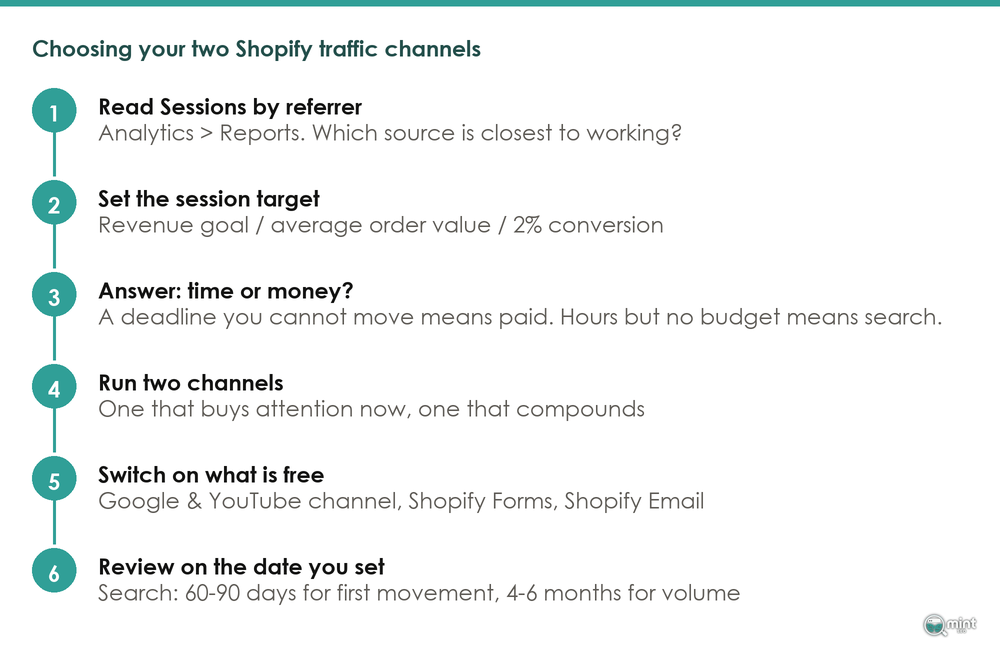
Run two channels. One buys attention now, one compounds. Which two you pick comes down to a question you can answer today.
Time Or Money: The Question That Picks For You
Aron Murch of 2H Media, a Shopify Partner agency, answered a new-store traffic question in Shopify's community forum. He reduced the whole thing to time against money, and noted that money is usually faster.
That is the decision, and it is not a compromise. Paid channels turn budget into visitors within days, then stop the day the budget stops.
Search, email and content marketing work the other way. They turn weeks of unpaid work into visitors who keep coming after the work is done.
So a deadline you cannot move is a money problem, and paid is your fast channel. More hours than budget is a time problem, and search is your compounding channel.
Almost every store I audit has chosen neither. It is doing a little of six things instead.
Spreading across six channels feels safe for a reason, and I hear that reason in the same words each time.
One merchant on Shopify's community forum wrote in May this year that he had spent a lot of money developing his store, and was starting to question whether it was the right choice.
When a store is quiet, adding a channel feels like progress. It is the one move that reliably is not. I have written separately on how many sales channels a store needs.
What 61 Storefronts Are Wired For
Here is what I did, so you can repeat it. On 15th August 2026 I took 70 Shopify storefronts named as examples across published ecommerce marketing round-ups, loaded each homepage, and recorded which marketing scripts and tags it requested. Sixty-one confirmed as live Shopify stores.
Across 61 live Shopify storefronts the marketing field itself names as examples, the median store runs 5 marketing channels, and the mean is 4.9.
The spread matters as much as the middle. Channel counts across the 61 storefronts ran from 0 to 11, and 16 stores were wired for three channels or fewer, so a handful of minimal outliers are not what is dragging the median down to five.
Sit with that for a second if you are carrying a list of a dozen tactics you feel behind on. Advice on how to get traffic to your Shopify store rarely mentions how few channels a working store runs.
The brands you measure yourself against run about five things, and they have staff to run them.
Order tells you more than count. In my crawl of those 61 stores, the Shop app appeared on 89% and a Google tag on 82%, which makes search infrastructure the closest thing to a universal install.
After those two the ranking drops away. In my crawl Klaviyo reached 74% and a reviews app 61%, while Meta's pixel reached 52%, so barely half carry the tag most channel advice treats as a given.
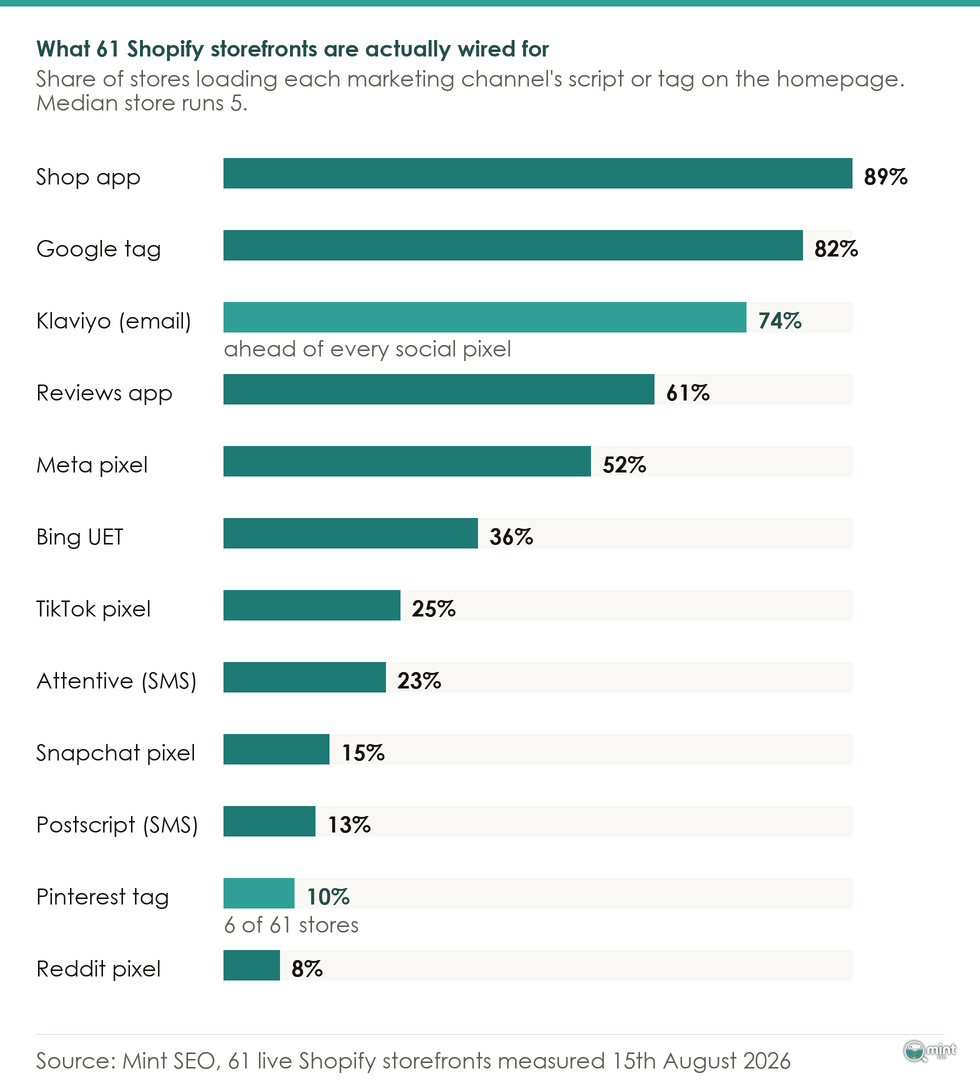
Read that as a ranking of commitment, and as a shortlist for how to get traffic to your Shopify store without spreading yourself thin. Social pixels are a minority position here, held by stores with budget to test.
The Session Number Your Revenue Goal Requires
"More traffic" has no finish line, so every channel looks as good as every other. Three numbers you already have will give it one.
Start with your monthly revenue goal and divide it by your average order value. Dividing that figure again by your conversion rate gives you the sessions.
DTC Pages rebuilt its benchmark from the Shopify Analytics of 21 stores, and its Q2 2026 figures put the median store at 2.07%. Say you want £5,000 a month at a £45 average order value, which is 111 orders needing roughly 5,600 sessions at that rate.
That is your number, and it is neither 500 nor 50,000. Every channel below can now be judged on whether it could plausibly produce it.
Adjust for price point before you set the target, because it moves the conversion rate hard. In the same DTC Pages dataset, stores selling products under $60 ran a median of 2.42% while stores above $200 ran a median of 0.79%.
A considered purchase converts about a third as often, so a high-ticket store needs roughly three times the sessions to land the same number of orders.
It also needs fewer orders to reach the same revenue. Run both halves of that before you set a target, because guessing gets it wrong in both directions.
Your own rate will not sit still either. My piece on what a good ecommerce conversion rate is covers why it keeps moving.
With the target set, open Sessions by referrer under Analytics then Reports. Shopify's help documentation defines a referrer as the specific source by which a visitor arrived at your online store. Examples: Instagram, Google, or Facebook.
One detail changes how you read it. A session ends after 30 minutes of no activity, and at midnight UTC, so a shopper who browses over two evenings is two sessions, not one visitor.
In the audits I run, that report is nearly always open on the wrong question. Owners look at the total sessions figure and stop there, when the useful column is the one naming each source.
Some are also reading numbers their setup never recorded properly, which I cover in setting up conversion tracking you can trust.
Total sessions tell you that you have a problem. Sessions by referrer tells you which channel is closest to working, and that is usually the one to grow first.
Organic Search: The Channel That Compounds
Say search is one of your two. The first move is a connection you already own, and keywords come later.
Connect The Google & YouTube Channel
Install the Google & YouTube channel from your Sales channels list. Shopify's own documentation puts it plainly: the Google & YouTube channel automatically syncs your products and relevant information about your Shopify store with Google.
For eligible stores, those synced products can then appear in Google Shopping's free listings at no cost.
Before you start you need a Google account and, if you sell physical goods, shipping and returns settings already filled in. The sequence itself is short.
- 1. Add the Google & YouTube channel from Sales channels in your Shopify admin.
- 2. Connect your Google account when it prompts you.
- 3. Connect an existing Google Shopping account, or let Shopify create one.
- 4. Confirm the shipping and returns settings it reads across from your store.
- 5. Let the catalogue sync, which usually takes a few days.
- 6. Open the channel's diagnostics and clear every product-level error it lists.
Errors at step 6 are usually a missing GTIN, a shipping rule that does not cover the product's region, or a price that disagrees with the one on the page. When the diagnostics are clean and products show as approved, the channel is doing its job.
Stores I audit almost never have this connected, and it is usually the quickest win available.
That is because the product data Google wants is already structured inside Shopify. What used to be a feed project is now an authorisation, and most of the elapsed time is waiting for the sync.
How Long Search Takes To Show Results
Search is the slowest honest answer to how to get traffic to your Shopify store, so set your review date before you start. Early weeks look identical whether the work is right or wrong.
On the practitioner timelines, blog content targeting long-tail keywords can begin ranking in 60 to 90 days, while initial indexing happens within one to two weeks.
Most new Shopify stores start seeing meaningful organic traffic after four to six months. Competitive head terms run to a year or more.
Search earns that wait because of what turns up at the end of it. Breaking Shopify conversion down by traffic source, Launchtip's 2026 analysis found that organic search traffic converts at roughly 3.6% on average.
Paid social sits between 0.8% and 1.2% in the same analysis. That is roughly three times the conversion rate on traffic you are not renting, and it is the whole case for building the channel while you pay for the other one.
I have run that trade on Shopify stores that arrived heavily dependent on paid traffic. The pattern repeats: product and collection pages that rank pull in shoppers the ad account had been buying twice.
Email: The Only Channel You Own
Every other channel here rents you an audience. Email is the one you keep, and both halves of it are already free inside your admin.
Capture The List With Shopify Forms
Shopify Forms is free and lets you add a lead capture form to your store, through pop-ups, overlays or in-line forms. It collects anything from an email address to a phone number to a custom metafield.
The form is not the hard part. Your offer is. Decide what a first-time visitor gets for an address, and decide where the form fires.
A discount on a first order is the obvious answer, and it works. On stores where margin is tight I would rather trade something that costs nothing to give.
Early access to a drop works. So does a sizing guide that removes the reason people leave to think about it, or a restock alert on the product they were looking at.
Send On Shopify Email's Free Allowance
Shopify Email is free to install on all plans and sends 10,000 emails a month for free, as Sequenzy's breakdown of the pricing sets out, with further sends at $1 per 1,000. Abandoned checkout automations stay free and sit outside that monthly limit.
Read that allowance against your own list. A store with a traffic problem has a list in the hundreds, so ten thousand sends a month is not a tier you will outgrow this year.
Cost, then, is not why the channel is idle. Shopify's Summer 2026 Edition also added native A/B testing for subject lines, send times and content variations, sending the winner to the rest of the audience automatically.
My own crawl backs the priority. Klaviyo appears on 45 of the 61 storefronts I crawled, or 74%, ahead of every social pixel. When these stores commit to a second channel after search, they commit to email.
Paid Ads: The Fastest Traffic, And Its 2026 Price
I sell organic search for a living and I still tell owners to run ads when their situation calls for it. Saying otherwise would be arguing my own book.
When Paid Is Genuinely The Right Call
Paid is right when you have a deadline you cannot move: a launch date, a season, or stock you have already paid for.
In those cases you are buying time, and time is for sale.
The same logic rules it out elsewhere. Paid is wrong when your only deadline is impatience.
A store that switches on ads because four months feels too long will spend four months of budget in six weeks, and still have no compounding channel at the end.
What A Month Of Paid Traffic Actually Costs
Do the same sum for paid that you did for search. Take the sessions your revenue target needs, find your category's cost per click, and multiply. You are committing to that figure monthly, for as long as you want the traffic to keep coming.
Where owners get caught is the rate they use. Most of the ad budgets I am shown were sized against what clicks cost two years ago.
They were routinely too small by the time we ran the numbers again, so price it at today's rate before you commit.
There is a second thing to weigh. Ranking has stopped meaning the same thing as being visited, so a search plan now needs its second channel beside it, and I cover that split in where AEO now sits beside search.
The Cheaper Version: Paying On Results With Shopify Collabs
There is a route to distribution without an ad budget. Shopify Collabs is free on all Shopify plans with no platform fee on top of the commission you agree with a creator.
Your only cost is a 2.9% processing fee on each automatic commission payment, charged when the payout runs, so nothing leaves your account while the campaign is still going out. On a $100 sale at 10% commission that works out at 29 cents to pay the creator.
That inverts the risk. An advert costs the same whether it sells anything or not, while a commission costs you nothing until it does.
Collabs is slower and needs real outreach. A store that cannot fund a test budget can still buy distribution this way.
One check before you build a plan around any platform. Only 6 of the 61 stores carry a Pinterest tag, which is ten per cent of them. Look at whether stores in your category are on a channel before you commit a quarter to it.
Content: 84% Started A Blog, About Half Still Post
Content is the most recommended traffic tactic there is, and the one most often abandoned. Quoting the blogs that worked would tell you very little, so I measured the whole sample.
What 57 Shopify Blogs Look Like
On 15th August 2026 I read the blog sitemap of all 57 storefronts in that sample where it was readable. For each I counted the articles and took the date of the most recent post.
Of 57 storefronts where the blog sitemap could be read, 48 have a blog with at least one article. In the crawl I ran that is 84% of them, so starting one is close to universal.
Having a blog is therefore not the difference between those stores and yours.
Of the 47 blogs with a readable last-post date, 25 had posted in the previous 90 days and 33 within the year. Nine had been silent for more than two years, which is long enough that the archive is no longer being maintained at all.
The abandoned ones are not small brands that ran out of road. Eight of the 48 blogs hold five articles or fewer, which is what a channel looks like when someone starts it and then drops it.
What surprised me was which brands those eight were. Kylie Cosmetics has one post, dated 2023, Liquid Death has one from November 2018, and Gymshark's blog sitemap stops at November 2020. The whole distribution is below.
The Cadence Test Before You Publish Anything
Surviving blogs are not modest. Across the 48 stores with one, the median is 83 articles. Kith carries 2,505 and had posted on the day I measured it.
Beardbrand carries 551 blog articles with a last post dated 14th August 2026, on a Shopify Theme Store theme anyone could buy. Realistic outcomes here are a publishing operation or a stub, with very little in between.
That split has a cause. Search rewards an archive, so value only lands once enough articles exist to cover enough of what people search for.
That threshold is the whole risk. A blog dropped at five posts has paid the entire cost of the channel and collected none of the return.
Before publishing anything, name the cadence you will hold when the month gets busy. One useful article a fortnight, held for a year, beats eight in the first month and silence after.
My worked examples of ecommerce content show what that looks like on real stores. If you cannot name a cadence you believe in, those hours belong in the channel that pays out sooner.
That is a legitimate answer. Nine stores in my sample run no blog at all. They include Bombas, Fashion Nova and Huel's UK store, and all nine sell in volume through other channels.
Agentic Surfaces: The Channel That Did Not Exist Last Year
Every answer to how to get traffic to your Shopify store above ends with somebody landing on your storefront. On this one the shopper never lands on your site and the order still comes through, so I am treating it separately.
Why This Channel Will Not Show Up In Your Reports
An agent shopping on someone's behalf reads your catalogue, sets it against other stores, and places the order without a browser ever opening your storefront. The open standard that makes that possible has been in place since January.
For your reporting that has one sharp edge. A sale completed by an agent produces no session at all, so the Sessions by referrer report cannot show you this channel working or failing.
Orders are the only place it appears. Inside AI Mode most searches never produce a click to anyone. An owner measuring only sessions will therefore conclude this channel does nothing.
The Setting, And What Your Product Data Has To Look Like
Enabling it is a setting. Shopify merchants enable agentic storefronts from the admin without custom development.
In your own admin the toggle sits under Settings, then Sales channels, then Agentic storefronts. Switching it on takes a moment.
Activation started across stores in late March 2026 under the Winter '26 Edition and has not finished, so the first thing to check is whether the setting has reached your admin at all. If it has not, the product-data work below is what you do in the meantime, and it is the same work that pays off once the setting reaches you.
Once it is on, Shopify structures and syndicates your product data to each connected AI surface, and you toggle which of them to sell through.
The same release shows how seriously the platform takes distribution. Shopify Audiences now exports custom audiences straight out to the major ad platforms, plumbing a merchant used to pay an agency to wire up.
The practical consequence for you is straightforward. Titles, attributes and descriptions become the entry requirement, in place of an ad budget.
This is one channel where a small range starts level with a large one. It is also the same product-data work that feeds Google Shopping, so if you did the first section properly, much of it is already done.
Get A Second Opinion On Your Two-Channel Choice
Run the arithmetic on your own store and you may still be stuck between two channels.
That usually happens because the answer depends on things a general article cannot see: your margin, your range and your deadline. It also depends on what Sessions by referrer is already showing you.
That is the conversation I have on a free 30-minute consultation, and you speak to me directly. We look at where your store ranks now, the quick wins open to you, and a rough 90-day direction.
Mint SEO runs organic growth as eight disciplines against one job, more revenue from organic search. Two of those disciplines are the Google Shopping and agentic work above.
Book your free consultation and bring the numbers from your own admin. Half an hour is enough to answer how to get traffic to your Shopify store in your case specifically.

About the author
John Butterworth
John Butterworth is the founder of Mint SEO, a Manchester ecommerce SEO agency he started in 2024. He has 11 years in SEO and digital marketing, previously running SEO departments for market-leading brands and several agencies. He specialises in Shopify and ecommerce SEO, and his work has ranked over 100 websites and driven more than 3 million organic visits. He speaks at industry events including the SEO Mastery Summit.
Connect on LinkedIn →