
Knowledge Hub
The Order To Work In When Your Store’s Bounce Rate Is Bad
By John Butterworth · August 12, 2026
You have a bounce rate you do not like. Sixty per cent, or eighty, or on a bad week a flat hundred with an average session duration of zero seconds.
Search how to reduce bounce rate ecommerce and the answer is always the same list. Compress your images, tidy your navigation and add some trust badges.
That list is not wrong. It is in the wrong order, and every attempt to reduce bounce rate that starts there begins one step too late.
A bounce is now a visit where nobody engaged, and Google counts a session as engaged if it lasts longer than 10 seconds, fires a key event or reaches a second page. So the question that matters is what happens in the ten seconds after a visitor lands on your shop.
I am John Butterworth. I have run an ecommerce SEO agency from Manchester for eleven years, and a bad bounce rate is one of the two numbers owners email me about.
My order of work is short. Prove the number is measuring real people, find the entry page it points at, then fix what a first-time visitor meets on that page.
Before writing this I loaded 111 live ecommerce storefronts on a phone to see what that arrival looks like. Most of them interrupt you before you can read a word, and some of them do it before the shop itself has finished loading.
Six changes come first below, because that is what you came for. Everything after them explains why they sit in that order, and how to reduce bounce rate ecommerce owners can verify for themselves.
The Six Changes That Cut Bounces, In Order
Six changes cover almost every bounce an ecommerce store can genuinely recover. They are ordered by what a visitor meets first. The cheapest fixes are at the top.
Work down the list and stop when you run out of week. In most audits the first two changes carry the whole ecommerce bounce rate problem on their own.
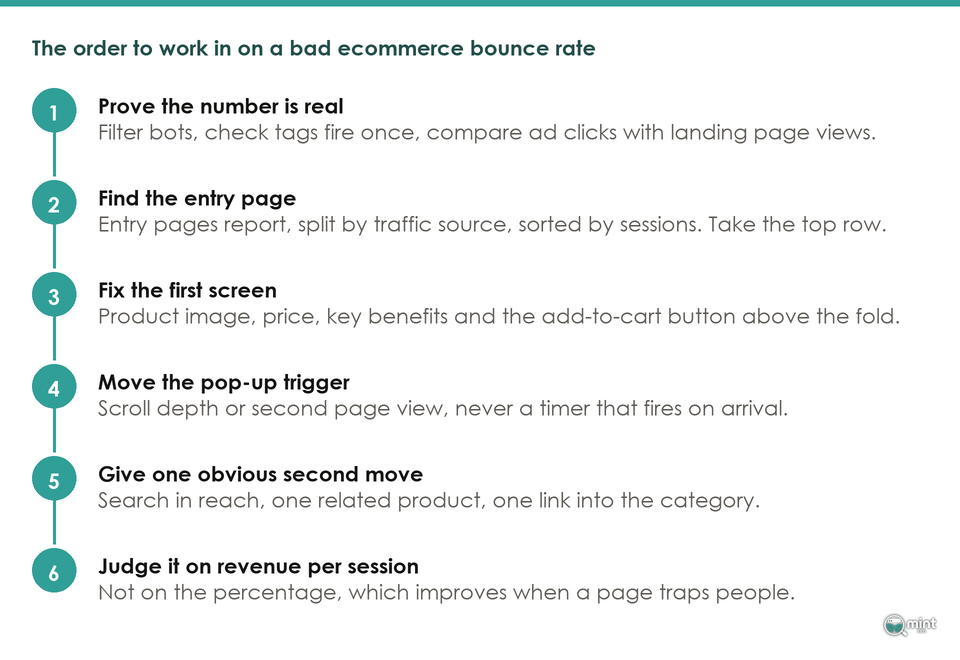
- 1. Put the product, the price and one action in the first screen of the page they land on.
- 2. Move the pop-up trigger from a timer to a scroll or a second page view.
- 3. Rebuild the entry page taking most of your traffic, which is rarely the homepage.
- 4. Change the offer where it cannot ship, or stop advertising into that country.
- 5. Add one obvious second move, and put site search within reach on a phone.
1. Make The First Screen Answer The Advert Or Search Result
Every arrival carries a promise. An advert promised a product and a search result promised an answer. Your first screen either keeps that promise or breaks it.
A merchant posting on Shopify's community forum as VDP described the symptom last June. “We have a 60%-70% bounce rate and most of our visits last for less than a few seconds”, he wrote, with paid traffic going straight to product pages. Every reviewer who answered went straight to the first screen. Nobody mentioned the metric.
One reviewer there, posting as oscprofessional, gave the instruction in a line. He wanted to “Make sure product images, price, key benefits” visible above the fold without a scroll. The add-to-cart button belongs up there as well.
Do that yourself now. Open your own product page on a phone and look at what sits above the scroll, and if the price is missing that is your edit. Our guide to writing a call to action covers the button that goes beside it.
2. Hold The Pop-Up Until The Visitor Has Done Something
Your discount pop-up is the most expensive thing most shops run, and almost nobody times it. It fires on a delay that was set once and never looked at again.
Google has been blunt about that pattern since 2016. Its Search Central announcement named “Showing a popup that covers the main content” on arrival as an interstitial that makes a page harder to use.
That post also set a date. “To improve the mobile search experience, after January 10, 2017” pages hiding their content from a mobile searcher could rank lower. That is nearly a decade of notice.
Keep the offer and move the trigger. A scroll depth or a second page view means the visitor has shown an interest before you ask for an email address.
3. Find The One Entry Page Taking Most Of Your Traffic
Open the entry-pages report and split it by traffic source. A store-wide bounce rate averages your best page with your worst. It can never tell you what to do next.
On the ecommerce catalogues I audit, the worst entry page is almost never the homepage. It is a product page that an advert or a search result sent somebody to directly, with no category page in between to set expectations.
Sort it by sessions and take the top row. That one page is your week's work, which is where an ecommerce CRO audit starts as well.
4. Check The Offer Ships Where The Advert Runs
Sometimes the page is fine and the offer is not. One country can perform well while another collapses on the same page and the same advert.
A merchant on Shopify's forum posting as Tobias11 hit that when identical ad sets moved from the United States into the EU. GiorgiaGSC, the Shopify Partner who replied, suggested “I'd recommend displaying an exit-intent survey popup to your visitors from EU” and asking them outright why they were leaving.
Her list of likely causes was short. Currency, shipping cost, delivery time and a missing payment method. A redesign fixes none of those.
5. Give The Visitor One Obvious Second Move
Two of the three ways a session counts as engaged need the visitor to do something. A page with no obvious second move produces a single-page session by design.
Across the 108 storefronts I loaded, a search box was visible above the fold on 38 of them. The other seventy asked a phone user to scroll before they could look for the thing they arrived wanting.
Give them one clear next step and put site search within reach. One related product, one size guide or one link into the category it belongs to is how a good ecommerce landing page carries somebody onward.
6. Judge The Change On Revenue Per Session, Not On The Percentage
Here is the trap at the end of all six. A bounce rate improves when a store gets worse, because a page that traps people scores beautifully and sells nothing.
The number I care about in an audit is revenue per session, because a store can cut its bounce rate by loading a slower page that traps people and still sell less. One points at the page. The other says whether the edit worked.
Set your expectations with that in mind, because leaving is the default at every stage of a shop. Baymard Institute puts the average documented cart abandonment rate at 70.22% across fifty separate studies. Nobody is chasing zero, and our guide to a healthy ecommerce conversion rate sets out the realistic targets.
Check Your Bounce Rate Is Measuring Real People
Now the step that comes before all six of those. A surprising share of alarming bounce rates have nothing to do with shoppers.
The first thing I ask for in an audit is not the store. It is read-only access to the analytics property, because a good share of the time the number that prompted the call is not measuring the people the owner thinks it is.
What Google Analytics 4 Calls A Bounce Now
That metric changed and kept its name. Google Analytics 4 defines bounce rate as “The percentage of sessions that were not engaged”, which makes it the inverse of engagement rate rather than a count of single-page visits.
An engaged session, in Google's own wording, is “A session that meets any of the following criteria: Lasts longer than 10 seconds, has a key event” or two or more page views. Miss all three and it is a bounce, even where somebody read your whole homepage for nine seconds and left happy.
Benchmark tables are close to useless for that reason. Most of the figures still circulating were measured under the old definition, where a bounce simply meant one page.
Why Your Shopify Number And Your Analytics Number Disagree
Shopify reports its own bounce rate, in its own behaviour reports, on its own session definition. Its documentation also notes that “Historical data for sessions-based metrics go back only to October 1, 2022”, which is a different history from your Analytics property.
Beyond the history, collection differs as well. Google records engagement time only while a page is in focus, and the amount of time “is sent in an engagement_time_msec parameter and added to the next collected event”, so a visitor who leaves before a second event fires can land in your report as zero.
Two honest reports on one store will therefore disagree. Pick one as your working number and stop reconciling them.
Exit Rate Is Answering A Different Question
These two get used interchangeably and they measure different things. A guide for store owners at Hyperspeed draws the line cleanly: “Bounce rate measures the percentage of single page session visits where users leave after the landing page with no user interaction.”
Exit rate counts every session that ended on a page instead. The difference is the denominator, because bounce rate looks only at sessions that started there.
Read the pair together on your worst page. A high bounce rate beside a normal exit rate means a bad doorway, and the reverse usually means a dead end further down the ecommerce funnel.
Ruling Out Bots, Crawlers And Clicks That Never Arrived
Extreme numbers almost always come from here. Where a bounce rate sits near a hundred with sessions of zero seconds, start in the traffic and leave the store alone.
A merchant on Shopify's community forum posting as MrKOYO described it exactly: “For 3 days now, our shopify store has been under attack by bots” visiting random pages and leaving at once. “Each session lasts 0 seconds”, which is a request that opens one page and fires no second event.
It is neither rare nor historic. In a thread opened in December 2025 a Shopify Plus merchant posting as Jamie_Grove reported that “Roughly 50% of all sessions over recent days are bot traffic originating from China. Not sporadic. Not spikes.”
Friendlier traffic distorts things just as badly. Merchants have spent three years on one Shopify thread asking about visits from Council Bluffs in Iowa. A Shopify representative told gingervee those visits come from a data centre.
Those sessions leave a fingerprint. MarionG, another merchant in that thread, spotted hers because “The bot generates preview links of my different themes”. Sort your landing pages by sessions and look for URLs no customer could have found.
Timing gives the third tell, and it is the easiest to spot. A merchant posting as BillH reported in his own thread that “from June 21st to the 23rd both metrics changed entirely” with no theme update or redesign behind it. Nothing on a shop changes by itself, so look at who is arriving instead.
Your ad platform hides a fourth version of the same fault. Compare its link clicks against the landing page views your analytics reports recorded, and where the first is far larger people left before the page loaded.
What Your Bounce Rate Means Once The Bots Are Filtered
Filter the bots, confirm your tags fire once, then look again. Whatever you do to lower your bounce rate from here is aimed at a real page and real people, which is all this number was ever meant to support.
It is also not a ranking signal, whatever you have read. Speaking in June 2022, John Mueller of Google said “I think there's a bit of misconception here that we're looking at things like the analytics bounce rate” for ranking. Gary Illyes had said the same seven years earlier.
That has a practical edge. KieranR, a Shopify Partner answering on the same community forum thread, noted that “CF is able to stop bots reaching data collection in these web analytics JS” while Google ignores the data for ranking. Cleaning your traffic fixes your report and leaves your positions where they were.
That leaves a commercial question and nothing else. A shop with real traffic and a bad bounce rate is losing orders, and orders are what an ecommerce CRO programme is for.
What We Found On 108 Storefronts In The First Ten Seconds
Those six changes sit in that order because of what a first visit really looks like. On 12th August 2026 I measured it across 111 live ecommerce storefronts.
How The 111 Storefronts Were Loaded
The instrument matters here, so here it is. Each of those 111 storefronts got a first-time phone visitor with an empty cookie jar on 12th August 2026, and a stopwatch that read the screen every 250 milliseconds for twelve seconds. Anything covering an eighth of the display or more was logged with its arrival time, its coverage and its own words.
Two limits come with that. The connection was not throttled, so the paint times the last finding leans on are a best case, and every count below is out of the 108 storefronts that came back.
Seventy-Two Stores In A Hundred Interrupt Before The Shop Appears
Of 108 storefronts that loaded, 78 put a cookie banner, an email capture or a country switcher in front of a first-time visitor before they had touched anything. The median time to the first interruption was 1.83 seconds.
That timing is the finding. 77 of the 108 storefronts put their first interruption inside the ten-second window Google Analytics 4 uses to decide whether a session was engaged.
Most of them were far quicker than that. 66 of the 108 storefronts interrupted the visitor inside the first three seconds, before anybody could have read a product name.
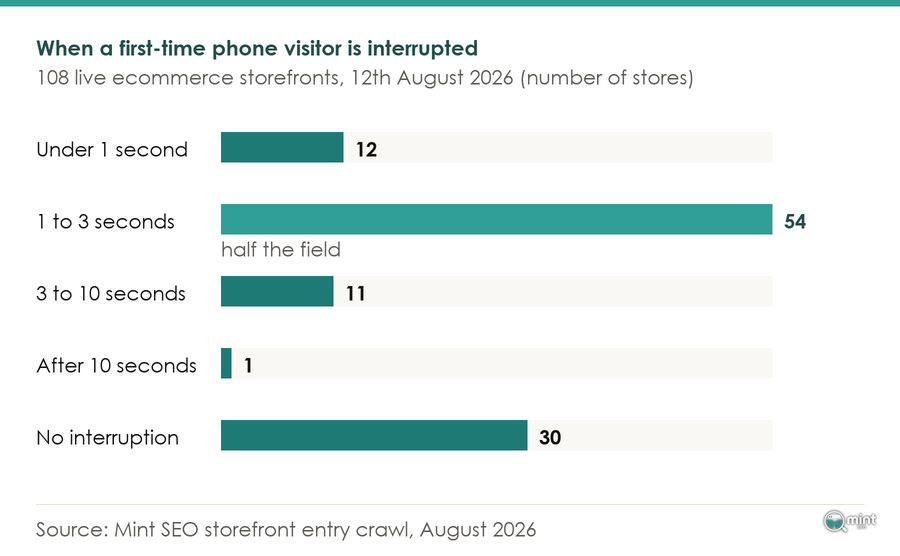
Nor are these modest banners. 38 storefronts showed something covering at least half the phone screen.
Some of them ran a queue. 19 storefronts stacked two or more separate interruptions on the same first visit, so the visitor dismisses one thing and meets another.
Whoever set the email capture chose the worst possible moment. Pura Vida Bracelets waited 10.21 seconds before dropping one over the page, and Baukjen went at 8.25.
Taylor Stitch fired at 7.13 seconds. Across the sample, 14 of the 15 storefronts running an email capture landed it inside the engagement window.
None of that will surprise anyone who watches people use the web. Anna Kaley of Nielsen Norman Group reported from a usability study that “While attempting to complete a task, a participant tossed his phone across the table after encountering multiple popups, consecutively.”
Cookie Banners, Email Capture And Geo Switchers
That breakdown surprised me. Cookie consent accounted for 72 of the interruptions recorded, email capture for 15 and country or currency switchers for 10.
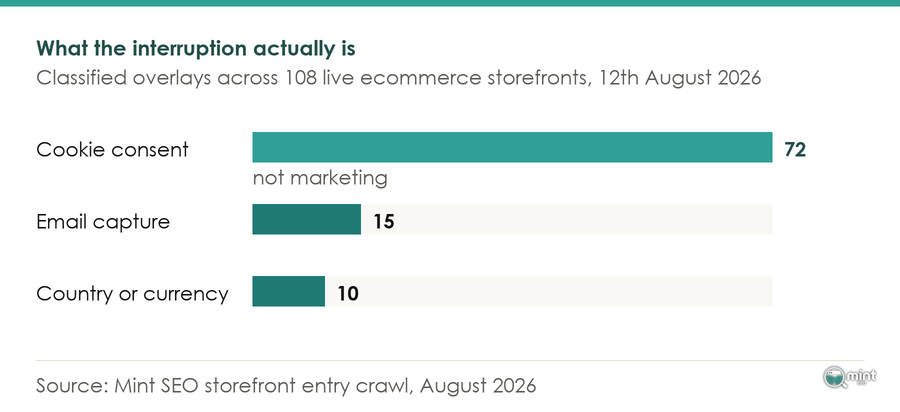
Most of what stands between a visitor and a shop is compliance and merchandising furniture. Three different people install it for three different reasons, and nobody owns the arrival they add up to.
Three storefronts show the range of that. Tiptree shows a cookie notice within one second and then a full-screen discount capture at 2.75 seconds, so a first-time visitor dismisses two overlays before reaching the shop.
Good intentions do the same damage, which the second storefront shows. Represent covers the whole phone screen on arrival with a shipping-location confirmation before any product is visible.
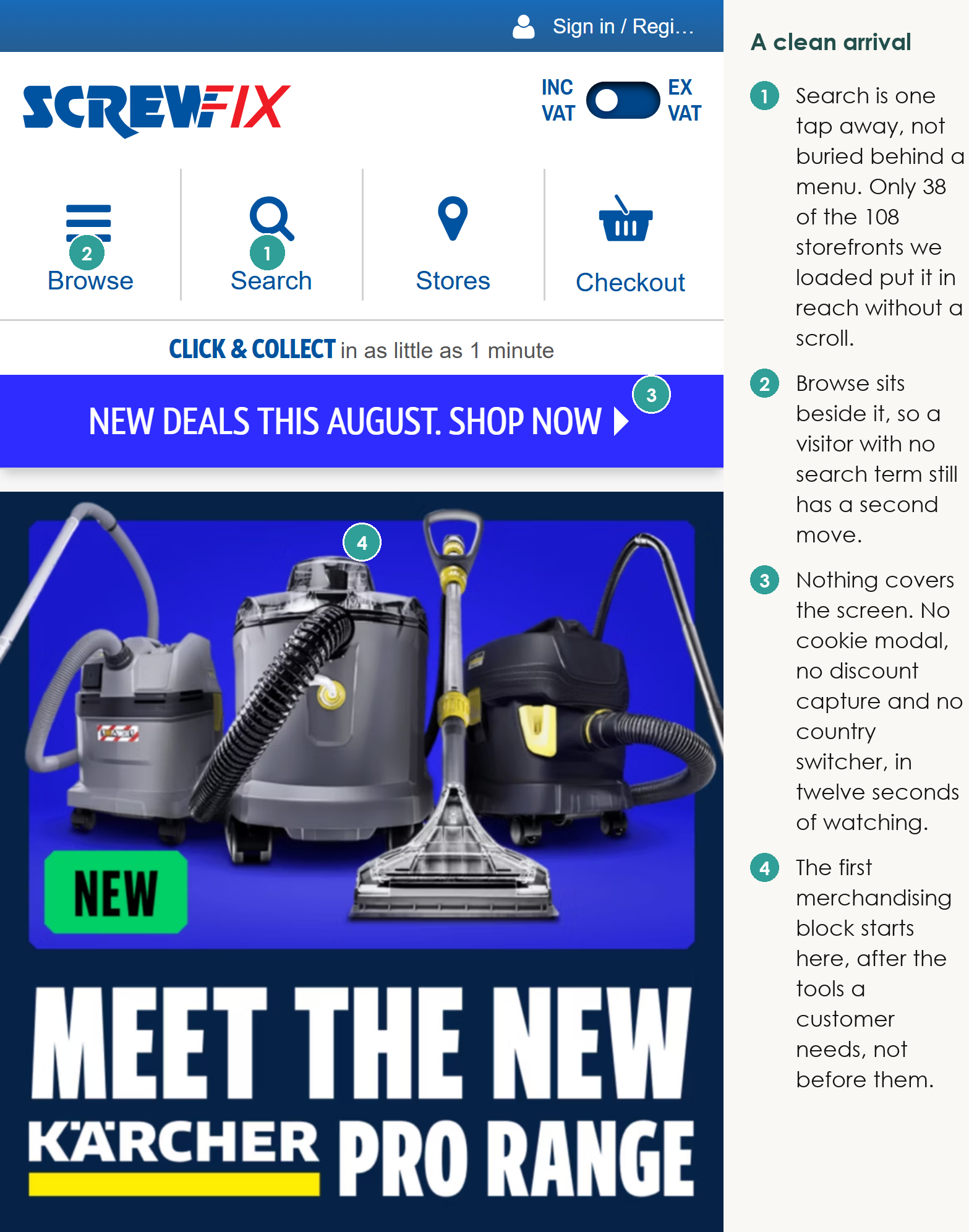
Then there is the opposite. Screwfix loads its phone homepage with the search field, the account and basket controls and the first category row all visible, and showed no overlay of any kind in the first twelve seconds.
It has company. 23 of the 108 storefronts, including Argos, Screwfix, Decathlon, Next, Boots and Sonos, showed no qualifying interruption at all, so a clean arrival is available to anybody who wants one.
The Speed Advice The Field Leads With, Tested
Every page ranking for this query leads with page speed. I expected the crawl to back that up, and what it showed instead was a timing race the ranking pages never run.
On seven storefronts the interruption appeared before the page's own largest image had finished painting. The visitor met the overlay before they met the shop, and no amount of image compression fixes that.
Test your own before you spend a fortnight on it. Where your field data puts the main content on screen inside two and a half seconds, the six changes above are where your orders are.
Our guide to ecommerce UX covers the rest of the visit, once the arrival is out of the way.
Get Someone To Look At Your Store With You
Most of this diagnosis compares two reports you already have and have never put side by side. Entry pages by traffic source, and what a phone shows on those pages.
That is what a free 30-minute consultation with me covers. It is a live read of your analytics and your entry pages, straight answers, and a short list of what to change first.
Mint SEO has been at this for eleven years and took one homeware client to +9,392% organic traffic in a year. We are quick at spotting which of the six changes is yours.
Book your free consultation and bring the store. Half an hour usually settles whether you have a measurement problem or a shop problem.
And if you take one thing from the crawl, take this. The thing standing between a visitor and your shop is usually something the shop put there itself.
Most storefronts are quick enough already. What they are not is quiet enough to let somebody buy something.

About the author
John Butterworth
John Butterworth is the founder of Mint SEO, a Manchester ecommerce SEO agency he started in 2024. He has 11 years in SEO and digital marketing, previously running SEO departments for market-leading brands and several agencies. He specialises in Shopify and ecommerce SEO, and his work has ranked over 100 websites and driven more than 3 million organic visits. He speaks at industry events including the SEO Mastery Summit.
Connect on LinkedIn →