
Knowledge Hub
Find The Step Where Your Store Loses The Sale And Fix It First
By John Butterworth · September 24, 2026
Before any CRO change, pull up the Conversion rate breakdown in Shopify Analytics. As I practise it, ecommerce CRO is finding the step where shoppers give up and fixing that step first.
If your store gets a few hundred visitors a day and hardly any orders, random CRO changes cost you weeks, and you won't know which change made the difference or be able to repeat it. If you'd rather hand the digging over, book a free consultation and I'll go through your funnel with you.
I'm John Butterworth. The Google traffic Mint SEO builds for Shopify stores lands on the very pages where those stores lose orders. The Conversion rate breakdown is where my CRO advice starts.
Where Ecommerce CRO Starts On A Shopify Store
On any store, ecommerce CRO starts with finding the step that loses the sale, because every CRO fix belongs to one step and fixing the wrong one changes little. Picking a CRO tactic first and hoping it lands on your leak is how stores spend months on button colours while the real loss sits in the cart.
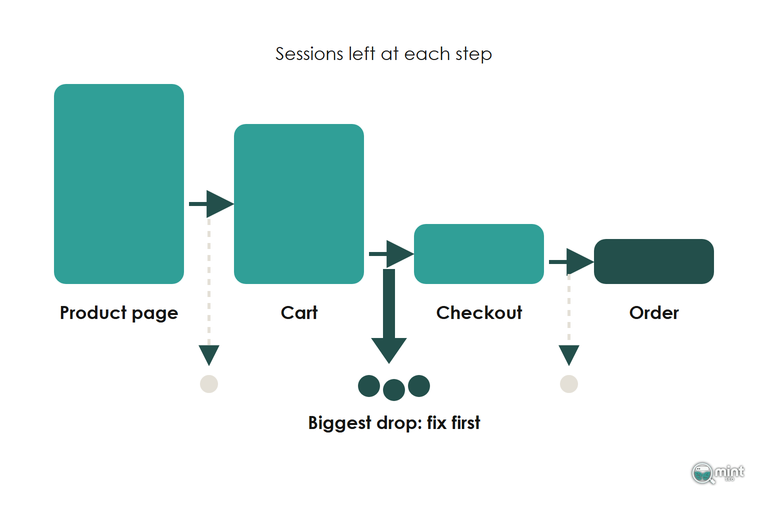
Open Shopify Analytics, go to Reports and load the Conversion rate breakdown before any CRO change. It splits the journey into the steps where the sale can be lost: added to cart, reached checkout and completed checkout. On another platform, a GA4 funnel exploration gives your CRO work the same starting point.
Work out the percentage lost between each pair of steps and point your first CRO fix at the biggest drop. Each step fails for different reasons, so each drop points your CRO work somewhere different.
If the biggest drop is between the product page and the cart, check the traffic source report before any CRO work on the page. Then watch session recordings of shoppers who left at that step in a tool such as Microsoft Clarity. Our guide to the ecommerce funnel covers reading each step in depth. For benchmarks, see our ecommerce conversion rate guide.
CRO Fixes In The Order Shoppers Meet Them
These are the CRO fixes I reach for most on Shopify stores. They run in the order a shopper meets them: site search, the product page, the checkout and the reason to buy today. Your first piece of ecommerce CRO work is the fix at the step your report showed losing the most sessions, because a CRO fix further down the path only converts the shoppers the earlier steps let through.
Site Search Should Return The Products People Buy
Site search is the first CRO fix to check, because shoppers who use it have already decided what they want and they're worth far more than their share of traffic. In its March 2025 study of 609 million searches across 113 retail sites, Constructor found searchers made up 24% of ecommerce visitors yet drove 44% of total site revenue.
That same research from Constructor also found that 42% of shoppers get results that are technically relevant to their query but not things they'd want to buy. Showing black shoe polish to someone looking for black work shoes matches the words and loses the sale.
Shopify already records the evidence in its Searches with no results report, which lists every query that found nothing. Take the top twenty and add the words your customers use as synonyms in the Search & Discovery app. Put those words into the product titles where they belong. Boost the product you'd hand a customer in person to the top of its results. Our guide to site search for online stores covers the setup in more detail.
Delivery Cost, Dates And Reviews Belong Beside The Price
Anyone buying on Market Street, the main shopping street in Manchester city centre, sees the price and carries the thing home that afternoon. Online, the shopper has to find out what delivery costs and when it will arrive. If that answer sits on a policy page two clicks away, they leave to look for it somewhere else.
Shoppers and retailers disagree sharply on delivery cost. In April 2026, Retail Economics and GFS reported that shoppers put £3.50 as the upper limit for standard delivery, and that '£36bn worth of non-food online baskets are still abandoned at checkout for delivery-related reasons'.
That same research from Retail Economics and GFS also found that 77% of retailers charge more than that limit. A shopper who sees the delivery cost on the product page decides before the cart, and a store that shows it keeps the ones who were always going to pay it.
The fix is to put four things beside the price on your product template: the delivery cost, an estimated delivery date, the returns window and the star rating with its review count. A delivery estimate and a returns line are small edits to a Shopify theme. They answer the two questions shoppers otherwise leave the page to look up.
Reviews do their heaviest lifting in the first handful, so chase reviews for products that have none before adding more to the ones that have plenty. A store-wide rating shown beside a new product helps it sell before it has reviews of its own. Reviews also add unique text to the product page, which helps it rank as well as convert.
Show Every Charge Up Front And Let Buyers Pay In One Tap
Drip pricing, where a mandatory fee first appears at checkout, is now a legal problem in the UK as well as a lost order. It cost the AA £4.2 million in April 2026, when the Competition and Markets Authority fined it for leaving a mandatory £3 booking fee out of the upfront price.
That fine matters beyond the law, because the AA's customers only saw the fee after they had chosen their lessons, picked times and typed in their details. That's the worst moment for a surprise on any store, because the shopper has done the work and the new number makes them feel tricked.
Build every mandatory charge, such as a handling or packaging fee, into the first price the shopper sees. Delivery charges sit under their own rules, and the conversion case for showing them on the product page is identical.
Once the price is settled, cut the effort left. In Shopify's checkout settings, make customer accounts optional so guest checkout is the default. Switch on the express wallets your customers use, such as Shop Pay and Apple Pay, so a returning buyer pays without typing an address. A checkout with no express option is one of the most common reasons I see phone shoppers abandon. Our breakdown of the ecommerce checkout process goes field by field.
A Deadline Shoppers Can Believe Gives Them A Reason To Buy Today
Offered the same terms next week, a shopper usually waits. Give them a reason to buy today, such as a sale that ends when you say it ends or a delivery cut-off before Christmas. Urgency is a separate decision from discounting, because a next-day delivery cut-off or a limited batch creates a deadline without touching your margin.
That deadline now has to be true. In its account of the Emma Sleep case, Lewis Silkin records the site showing 'High Demand! During the last 24 hours this product has been viewed 6,458 times' on a mattress, when only seven units sold that day.
Under the settlement terms the law firm sets out, a countdown only counts as genuine if a substantially similar promotion stays away for 28 days after the timer ends. For Black Friday sales the period is 21 days. Base demand messages on units sold, set deadlines you will keep, and let a lapsed offer stay lapsed for at least four weeks. Our guide to urgency and scarcity marketing has more ways to do this well.
Judge Each Ecommerce CRO Change On Revenue Per Visitor
Revenue per visitor is the number to judge ecommerce CRO on, and the one I report CRO results in. It's conversion rate multiplied by average order value, so a CRO change that sells more of your cheaper products can lift conversion rate while revenue per visitor falls. Judged on conversion rate, that CRO change looks like a win.
Raising your free delivery threshold, a common CRO test, works the other way round: order value climbs while fewer people check out. Before any CRO change goes live, note revenue per visitor for the four full weeks before it, so every CRO result has a baseline to beat.
Shopify's September Session Change Moves Your CRO Numbers
Shopify's September change matters for ecommerce CRO because it moves the rates you judge every CRO change on. A shopper who jumps straight to checkout from a cart link now counts as a session, and sessions now run past midnight UTC.
Shopify made those changes between 21st and 23rd September 2026. Its help centre article on the update adds that 'Identified bot sessions are filtered out of session-related reports by default', and names add-to-cart rate and reached checkout rate among the numbers that can move.
If the add-to-cart step in your breakdown report moved around the update, check orders and revenue across those dates before you credit or blame a CRO change you made. Use data from after the update as the new CRO baseline for every rate, revenue per visitor included, because it is divided by the same session count.
Only Run A CRO Test Big Enough To Show Up In Revenue
In ecommerce CRO, test the big changes and use data to make every other decision. Experimentation specialist Ronny Kohavi, a former vice president and technical fellow at Airbnb who worked at Microsoft and Amazon before that, put the median organisation at roughly 10% of experiments moving the metric they were designed to improve. At that success rate, he adds, around one in five 'successful' tests is a false positive.
Because most tests lose, spend them on changes large enough to move revenue per visitor. A new checkout layout, a change to the free delivery threshold or a rebuilt product template is worth testing, while a new button colour rarely moves revenue enough to measure. Decide the success measure before the test starts, and make it revenue per visitor.
If your store doesn't have the traffic for a test to reach a result, you can still make data-led decisions. Make one change at a time and compare revenue per visitor over whole weeks before and after it. Leave out weeks with a sale running, and check that orders moved the same way. Our guide to A/B testing for online stores covers the setup when you do have the traffic.
On-Page SEO That Makes Search Traffic Convert
The pages that bring you search traffic are the same pages that have to sell, so we work on them for both jobs at once. We judge our own search work on the sales it brings, as our about page sets out.
Our On-Page SEO service covers titles, meta descriptions, heading structure and internal linking. It also covers collection and product page content matched to what the searcher wanted. Its internal linking takes a reader from a guide to the collection that sells.
If your biggest drop sits on the collection and product pages Google sends shoppers to, book a free consultation and we'll go through those pages together.

About the author
John Butterworth
John Butterworth is the founder of Mint SEO, a Manchester ecommerce SEO agency he started in 2024. He has 11 years in SEO and digital marketing, previously running SEO departments for market-leading brands and several agencies. He specialises in Shopify and ecommerce SEO, and his work has ranked over 100 websites and driven more than 3 million organic visits. He speaks at industry events including the SEO Mastery Summit.
Connect on LinkedIn →