
Knowledge Hub
SEO Strategy For Online Stores That Puts Revenue Pages First
By John Butterworth · September 24, 2026
You've written a few blog posts, tidied some product titles and maybe paid for links, and organic traffic still hasn't moved. An ecommerce SEO strategy fixes that by deciding the order of the work.
Google has to be able to reach and read your collection and product pages before anything else counts. Those pages then have to become the best answer for the searches that buy, and blog content and external links come last. Each step pays best once the one before it is done.
I'm John Butterworth, and after 11 years in SEO I run this order on every Shopify store I take on at Mint SEO. Below you'll find the reason for each step, a way to pick your first pages from your own Google Search Console data, and the measure that shows the work is paying. If you'd prefer to hand the legwork over, we can work out the order for your store and give you the plan.
For the basics of how search works for an online shop, start with our guide to ecommerce SEO.
Fix What Google Can Reach, Then The Pages That Sell, Then Content And Links
I plan every ecommerce SEO project around these three steps, taken in this order.
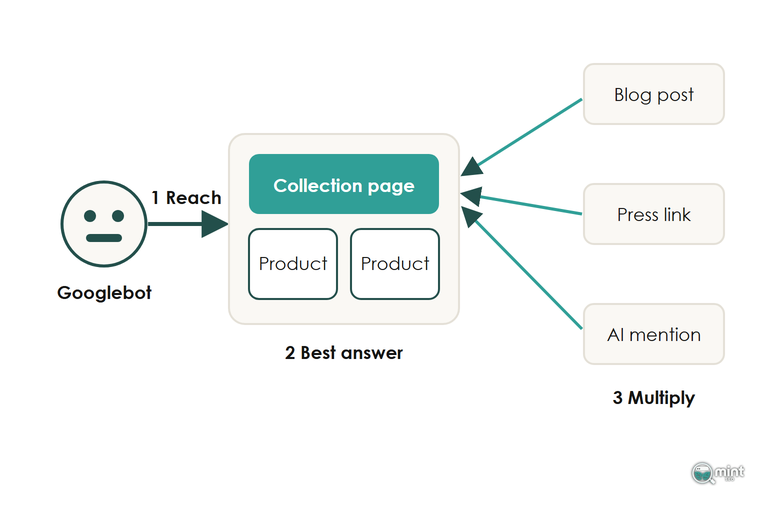
Google Has To Reach And Read Every Collection Before Anything Else Pays
Step one of an ecommerce SEO strategy is making sure Google can reach the collection and product pages that earn your revenue. Check three things on each: that Google can crawl it, render it and keep it in the index.
Open the Page indexing report in Search Console and filter to your /collections/ and /products/ URLs, then use the URL Inspection live test to see whether the product grid renders. A revenue page listed under 'Crawled, currently not indexed' is one Google has chosen to leave out, so its copy earns nothing in search.
On a Shopify store the usual causes are duplicate product URLs created by collection paths and filter or tag pages with no search demand of their own.
Crawl budget only bites above roughly 2,000 URLs, and filter and tag URLs count towards that total. Below that size you don't need to worry about it. Our guide to crawling and indexing fixes for an online store goes through each fix.
On client stores I finish this clean-up before a single new page is built. New pages inherit whatever the site already sends Google. Fixing that first means each new page launches on an indexable URL with nothing blocking it.
Collection And Product Page Work Comes Before The Blog
Once Google can read the store, the work moves to the pages that sell. Collections come first because broad buying searches such as 'linen dresses' or 'oak dining tables' land on category pages. Jill Kocher Brown's analysis with seoClarity across about 30 leading retailers, written up for Practical Ecommerce, found category pages ranked for 19% more keywords than product pages, and those category keywords drove 413% more traffic.
With that much demand sitting on collections, a blog waits. A buying guide that links to a collection stuck on page three sends its readers and its relevance to a page nobody sees from search. Blog posts pay their way by feeding the commercial pages and by catching comparison searches such as '[competitor] alternative', and both work better once those pages are in shape.
Content, Links And Mentions Multiply A Page That Already Ranks
Content and external links come third because they amplify whatever page they point at. Internal links are the exception to this order: links from your strongest pages to the collections you want to rank cost nothing, so they belong with the page work in step two.
The best external links come from PR campaigns that win press coverage, because those links are high-authority and trustworthy and they send referral traffic. Our guide to earning links to an online store covers how to get them.
This step now includes being mentioned where AI assistants look. Run your category searches in ChatGPT, Gemini and AI Overviews and note which pages the answers cite. Those are usually forum threads and 'best of' roundups, so that's where to work on earning a mention for your store. Check them one by one, because they often cite different pages for the same search.
Adobe's figures for the last holiday season, reported by Digital Commerce 360, showed shoppers arriving from generative AI tools were converting 31% more than visitors from other sources. That makes a mention on a cited roundup worth chasing for the sales it sends, and it pays most when the collection it points to already ranks.
Choose Where To Compete From Your Own Search Console Data
Give Every Buying Search One Page To Land On
Before you pick pages from Search Console, list the buying keywords for what you sell and write one URL beside each. Broad keywords go to a collection, while the specific model or variant goes to its product page. Anything that doesn't have a suitable page yet belongs on a separate list of pages to build. Our guide to finding the right keywords for a store shows how to build the list.
Treat the volumes in Ahrefs or Semrush as a rough guide, and check them against real impressions in Search Console before you commit a page to a keyword.
The finished map shows two things you can act on straight away. Keywords with no page are the pages to build next. Keywords claimed by two pages are cannibalisation, where your own pages split the ranking signals, so pick one page to own each keyword and link or redirect the other page to it.
Start With Each Commercial Page Already Sitting On Page Two
Quick wins sit on page two, because a collection or product page that Google already ranks in positions 11 to 20 has shown it's relevant to the keyword. Better titles, fuller copy and internal links from stronger pages will usually move it further than a new page could.
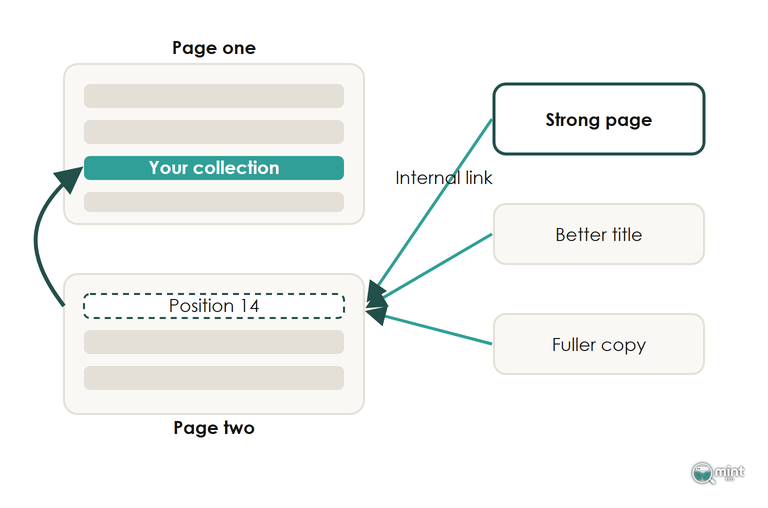
Building the shortlist of ranking pages takes four steps:
- 1. Open Search Console and filter its performance report to your /collections/ and /products/ URLs.
- 2. Keep the pages with queries ranking between positions 11 and 20 that already earn impressions.
- 3. Weight that list by revenue, so a page-two collection carrying a third of your sales comes before a page-two product that sells twice a year.
- 4. Run a full site crawl and count the internal links pointing at each page on the list.
On audits I record the shortlist in four columns:
Make Each Collection And Product Page The Best Answer For Its Search
This is step two in full, and on most stores I audit it takes the bulk of the hours. The collection template is where I start. For the collection page on its own, including how much copy to write and where it should sit, our guide to category page SEO goes further.
Fix The Template Once And Every Collection Improves
Check what your collection template outputs as the H1 and page title before you touch any single page. In the same Practical Ecommerce piece, Kocher Brown gives the example of a fashion site whose template put the words Search Results in front of every category name. Removing that prefix from the template fixed the heading on every category page at once.
Generic template labels cause the same trouble on Shopify themes. A collection heading that reads Trending Now or Shop All tells Google nothing about whether the page sells birthday flowers or wedding bouquets. Swap it for the name people search for.
Put A Short Intro Above The Grid And Useful Copy Below It
A collection page needs two pieces of text. Above the product grid goes a short intro of two or three lines that says what the page offers. Below the grid goes useful copy that builds relevance, such as how to choose between the products and what the sizes mean. An empty collection gives Google product names and nothing else to rank.
Where that intro sits in the code matters as much as what it says. A mistake I find on audit after audit is cart drawers and app widgets loaded above all the page content. They push the intro down and leave Google to wade through code before it reaches anything that says what the page is about, so load the intro ahead of those scripts.
A Product Page Wins The Searches A Collection Cannot
Product pages take the specific searches: the model number, the size or the exact colour. They win those searches only when the copy on them is yours. Supplier descriptions appear word for word on every retailer that stocks the product, so they don't give Google any reason to prefer your page. Rewrite them, starting with your best sellers.
Pasting a supplier description into an AI tool recreates the same problem one step along, since every store asking the same model gets near-identical copy. AI can speed the work up when someone who knows the product edits the result, adding the sizing, materials and uses a supplier sheet leaves out. Product text also feeds AI shopping assistants through your product feed, so a clear and accurate description helps there as well.
Product Grids Above The Blue Links Run On Merchant Center Data
On shopping searches the first thing a buyer sees is often a grid of products above any ranking page. Kevin Indig tracked more than 4,000 ecommerce keywords for Growth Memo and reported in March 2026 that "Ranking #1 means less when 96% of SERPs show product grids above the blue links." That grid draws mainly on the product data a store sends to Google.
Clicks are moving away from the blue links too. Aleyda Solis's analysis of Similarweb data for the top 5,000 US headphone searches found classic organic click share fell from 73% to 50% in the year to January 2026. Paid listings took much of the difference, and free product listings put your products in the shopping grid without paying for each click.
So set up a Google merchant account, connect your store and submit your product feed for free listings. Fix the feed errors on your best sellers first. Titles should match how people search, and prices, stock and images must be accurate. A clean feed helps decide whether a product appears in that grid at all.
Judge The Strategy On Non-Brand Organic Revenue
Organic revenue is the measure, and rankings are the vehicle that gets you there, which is why a report built around positions tells you very little about whether the work is paying. The number that shows an ecommerce SEO strategy working is revenue from people who found you through non-branded searches. Split that out first, and expect the step changes to arrive with Google's core updates.
Branded Traffic Is Demand You Already Had
Someone who types your store's name into Google already knows you. Branded clicks rise with ads, email and word of mouth whatever your SEO does. A report that blends them with everything else can show growth that SEO had no part in.
Search Console's Performance report now has a branded queries filter that separates the two automatically, where stores used to build their own list of brand terms to do it. Filter to non-branded queries, then report the revenue from the landing pages those clicks reach in Shopify Analytics or GA4 as the headline.
Our work with Hidden Garden, a Los Angeles florist, shows why the split matters. When we started, 68% of the site's organic traffic came from people searching for the Hidden Garden name. By January 2026 its reliance on branded search had fallen to 0.7%, and the new traffic came from people searching for a florist who didn't already know the name.
Rankings Move With Core Updates, Not On A Schedule
Any promised month is a guess, because timing depends on your industry and how many competitors you face. Across client stores, most sites see their traffic step up at the next core update, when Google reassesses the whole site. Fixes made between updates often show little change until that update lands.
So set expectations with whoever signs off the budget before the work starts. On 10th September 2026 Search Engine Watch noted that the most recent rollout had ended on 2nd June and that Google had given no start date for the next one.
That wait showed up at Hidden Garden too, and its traffic followed the same pattern. The first months looked flat while Google crawled the fixes and indexed the new pages. About seven months in the line started climbing and kept going. Judge the work from one core update to the next.
Where An SEO Audit Fits Into This Sequence
Before an audit I ask for Search Console access, your analytics and permission to crawl the site. From those three we build your ecommerce SEO strategy and decide which fix comes first, so you get the order without doing the digging yourself.
We assess eight areas, from technical health and keyword rankings to content and backlinks. Everything we find becomes a prioritised order of work in plain English, with the reason behind each step. The audit also checks the experience and expertise your pages show Google, along with the authority and trust signals behind them.
Ranking more than 100 websites has taught me to agree the sequence before anyone touches a template. The aim is revenue from a channel you own rather than rent. If you want that sequence built from your store's own numbers, get your SEO audit.

About the author
John Butterworth
John Butterworth is the founder of Mint SEO, a Manchester ecommerce SEO agency he started in 2024. He has 11 years in SEO and digital marketing, previously running SEO departments for market-leading brands and several agencies. He specialises in Shopify and ecommerce SEO, and his work has ranked over 100 websites and driven more than 3 million organic visits. He speaks at industry events including the SEO Mastery Summit.
Connect on LinkedIn →