
Knowledge Hub
How To Audit Your Online Store’s SEO And Know What To Fix First
By John Butterworth · September 29, 2026
A health score and four hundred warnings from a site audit tool are where an ecommerce SEO site audit starts. Read a crawl of your store, Google Search Console and your sales by landing page against the same URLs. You finish with three to five fixes ranked by the money on the pages they touch.
My name's John Butterworth. I founded Mint SEO in Manchester, and the method below is how I audit a Shopify store before any fix gets booked, as part of our ecommerce SEO services. If you'd rather skip the hard work, ask for a free audit of your store and start from what it shows.
Read Your Crawl, Search Console And Sales Against Each URL
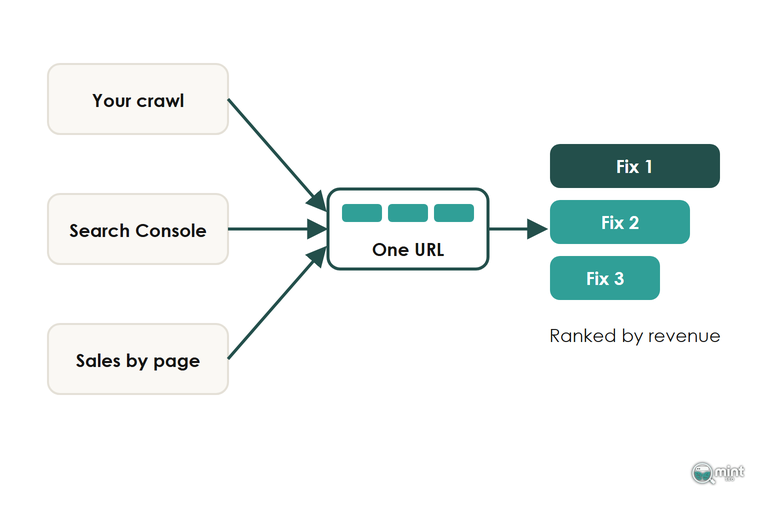
A crawl tells you what your store serves: every URL, the status code it returns, where its canonical tag points and whether Google may index it. Search Console tells you what Google did with those pages, which ones it keeps in its index and which searches they appear for. Your analytics tell you what each page earns from organic search.
Each view misleads on its own: a crawl lists faults on pages nobody visits, and Search Console shows a product dropping out of the index without its sales figures.
Your sales figures can't tell you that a well-earning collection has a duplicate Google prefers. Joined on the URL, the three answer the question an ecommerce SEO site audit exists for: which fault is costing you money.
A tool's health score counts how many of its own checks your store passes. It rises when you hide checks you don't care about, as Semrush's knowledge base explains, so it can climb without anything on your store changing.
Run The Technical SEO Audit From A Crawl And Search Console
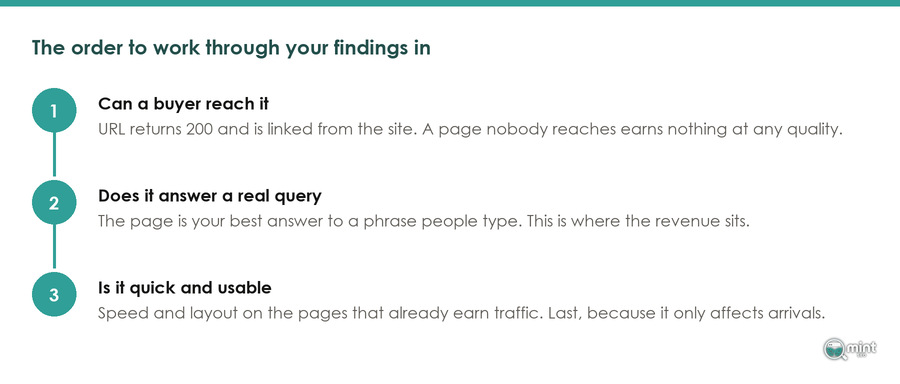
This pass decides whether Google can reach, keep and read the pages that sell. Run it in this order, because each check relies on the one before it.
For more on which of these flags cost a store money, see which technical flags cost a store sales; what follows is the audit version.
Give Your Crawler A Shopify Signature Before You Start
On 7th May 2026 Shopify brought in stricter rate limits for bots that don't sign their requests, and a desktop crawler counts as a bot. Point Screaming Frog or Sitebulb at a store with a few thousand products and the product URLs fail first. They come back as 429 "too many requests" responses.
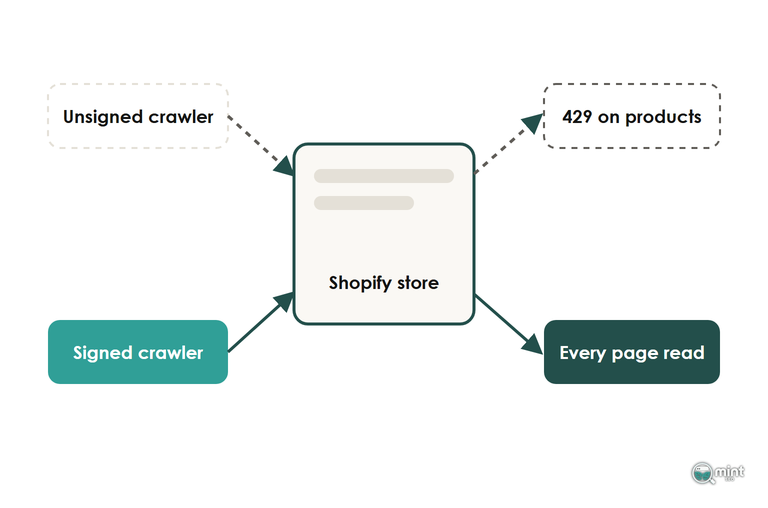
An audit built on that crawl reports healthy product pages as broken, which is how a store ends up paying to fix pages that were fine.
A signature from your admin clears those 429 responses, and it's the first thing I set up before crawling any Shopify store we work on. Go to Online Store and open Preferences, where the Crawler access section lets you create a Web Bot Auth signature, then paste its header values into your crawler's custom HTTP header settings.
Signatures expire and can't be renewed, so each audit starts with a fresh one. The crawl will still stop at the cart, because a signature doesn't open your checkout.
Search Console Shows Which Crawled Pages Google Kept
Export every indexable URL from your crawl, then export the reasons pages aren't indexed from Search Console. Match the two lists by URL, and a collection page your crawl calls healthy and Google has left out becomes one of the first real findings of the audit. Check each of those pages appears in your sitemap as well.
Google caps the examples in Search Console's page indexing report at 1,000 URLs per reason, so on a larger catalogue you check the rest through the URL Inspection API in batches. The export is a sample, so on a big catalogue it can't show you every product Google has dropped.
Store size also decides whether crawl budget, meaning how often Google fetches your pages, belongs in the findings at all. It only does above roughly 2,000 URLs; below that, a missing page is about the page itself.
On the Shopify stores we audit, the usual reason is a duplicate Google chose instead. Many themes link each item through its collection path, and recommendation blocks add tracking parameters to those links, so Google meets one product at several addresses.
Duplicate URLs split the links between copies and let Google choose which one to show, though they carry no penalty. Pointing your internal links at the /products/ URL fixes it.
Judge Speed On Real Visitors, Not A Lighthouse Score
Google judges speed on Core Web Vitals collected from real Chrome users, and Search Console's Core Web Vitals report groups your URLs by template using that field data. A Lighthouse score is one simulated load on one machine, and chasing it to 100 tells you nothing about the shoppers on your product pages.
Read the report by template. A template only counts as good when three in four real visits to it meet the threshold. One poor rating on the product template therefore means one theme fix covers every product at once. In an audit I log speed against the template that carries the sales, and speeding up a Shopify store usually starts with the apps loading on every page.
Give Every Collection And Product Page One Keyword To Rank For
The on-page checks of the audit start in Search Console. Filter the Performance report to one money keyword and open the Pages tab. Two of your URLs taking impressions for the same search is keyword cannibalisation, and the audit logs it as a finding.
Google then shows one of the two and splits the clicks and the links between them, so each pair goes on the fix list. Work down the collections and products that earn or should earn organic traffic, and give each one keyword no other URL on the store targets. Our guide to finding the keyword each page should target covers the mapping if you haven't done it before.
Sorted by word count, a Shopify crawl export puts the thin money pages at the bottom, and that's where I find the most failures in an audit. Our guide to product page SEO covers what those pages need.
Fix First What Touches The Pages That Take Your Sales
Put every finding that survives the checks into one list, tag it with the template or pages it affects, and weight it by the organic revenue those pages earn. In Google Analytics, the landing page report filtered to organic search gives you revenue by entry page.
With that revenue beside each finding, a canonical fault on the product template outranks a hundred missing alt tags on blog images. Your product pages take the sales, and blog images take none.
Before you weight anything, strike out the warnings that come from Shopify itself.
Most Warnings On A Shopify Store Are The Platform, Not A Fault
A generic audit tool scores a Shopify page against rules written for hand-built websites. Shopify's theme scripts, its locked checkout and the tags it writes for you all show up as faults you can't fix and don't need to.
Anything on a money page that stops it being found, kept in the index or loaded quickly stays on your list.
Split What You Can Fix From What Needs A Developer
I sort the ranked list into two columns for every client. You can change title tags and meta descriptions in the Shopify admin this week. Collection copy, product descriptions and alt text live there too, along with URL redirects.
Theme code needs a developer: how product cards link, for example, or where the canonical tag points. So does any edit to robots.txt.liquid, a file Shopify support won't help with and where a wrong line can take a store out of search.
Take the top three to five items across both columns and book them. Judge the result in Search Console on the exact pages you changed, and expect traffic gains to land around the next core update rather than on a fixed date.
Leave The Backlink Review Until Last
Links multiply the value of pages that already work, so the backlink review belongs at the end of the list. Compare your referring domains with the stores outranking you for your best keywords, and note what they have that you don't for when the page fixes are done.
That review should almost never finish with a disavow file, whatever a tool's "toxic" score says about individual links, because those scores aren't evidence of harm.
Disavow only after a manual action in Search Console, or when you can show a negative SEO attack on the store.
Get Your Store's Findings Sent To You The Same Day
Running the crawl, the export and the revenue match takes a day the first time. If you'd rather start from findings than from a blank crawl, we'll do the first pass for you. Give us your store's address and a two-page PDF comes back the same day. It's free, and there's no call to book.
It's the same first pass this article describes, done from our side and set out on two pages. You get a year of your organic traffic with the keywords behind it and the branded share. You also get the commercial searches your competitors win that you're missing, and your Core Web Vitals against Google's thresholds.
If you want that starting picture today, get a free SEO audit of your store and you'll know which of your pages to check first.

About the author
John Butterworth
John Butterworth is the founder of Mint SEO, a Manchester ecommerce SEO agency he started in 2024. He has 11 years in SEO and digital marketing, previously running SEO departments for market-leading brands and several agencies. He specialises in Shopify and ecommerce SEO, and his work has ranked over 100 websites and driven more than 3 million organic visits. He speaks at industry events including the SEO Mastery Summit.
Connect on LinkedIn →