
Knowledge Hub
What Your Store’s Search Does When A Shopper Spells It Wrong
By John Butterworth · August 12, 2026
Your search box works. Type a product name in yourself and the right thing comes back, which is why it has never made a list of things to fix.
That is exactly why I went looking. I ran a test on a batch of live storefronts that I would like you to repeat on your own store before you finish this page.
First I searched a word lifted straight from each shop's own product titles, so the product was certain to be there. Every shop found it. Then I swapped two adjacent letters in that same word, the way anyone typing at speed does.
**Nearly nine in ten came back with nothing at all.**
My name is John Butterworth and I run Mint SEO in Manchester. Most weeks I am inside somebody else's store looking for places where a shopper's intent goes in and no order comes out. Site search is the one I find broken most often and worried about least, because it only fails for people who are not in the room.
Site search here means the box on your own store and the pages behind it. It is not your position in Google.
A small share of your traffic does a large share of the work. Shoppers who use search make up roughly 24% of visitors yet generate about 44% of total revenue, according to Constructor's "Beyond Relevance" study of 609 million searches across 113 retail sites.
Against that, independent testing puts the other half of the problem plainly. Usability research in Baymard Institute's 2026 Search UX benchmark found that 56% of sites fail to adequately support users' search needs.
What follows is the five things worth fixing, ordered by how often my measurements say they break, and how to find out which ones your store fails.
Which Site Search Best Practices To Implement First
Every list of site search practices you will read is ordered by its author's preference. This one is ordered by a measurement: the share of those 48 live storefronts that failed each thing when I tested them on 12th August 2026. That is the ranking criterion, and it is the reason to trust this order over anyone's opinion.
Make A Transposed Letter Still Find The Product
A misspelling is the most expensive thing a shopper can do to your search. It is also the most ordinary.
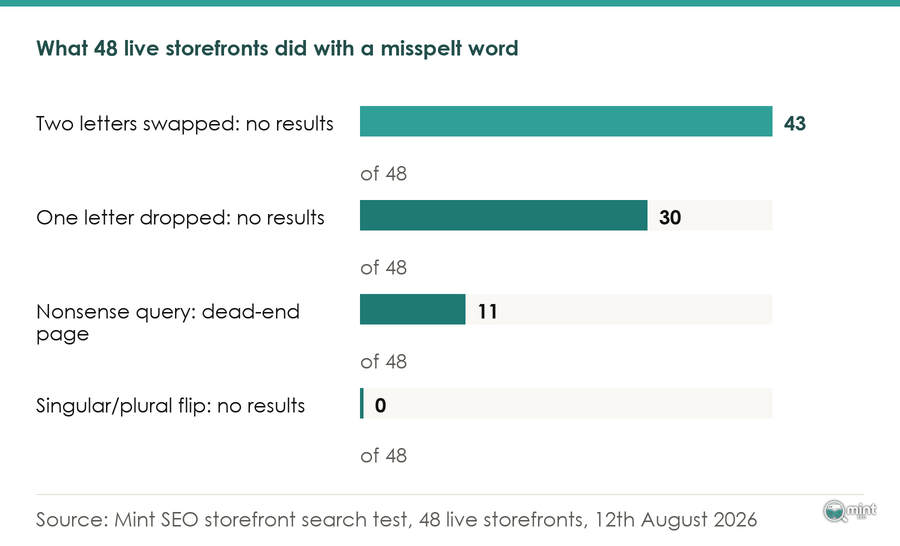
Across 48 live storefronts tested on 12th August 2026, every one returned products for a word taken from its own product titles, but 43 of the 48 returned nothing at all when a single pair of letters in that same word was transposed.
Nothing about the catalogue changed between those two searches. Only the spelling did.
Misspelling is no edge case either. Algolia's best-practice guidance, reported in Digital Applied's 2026 on-site search playbook, finds that 20-30% of ecommerce search queries contain a misspelling or alternate phrasing, once you count reworded searches alongside outright typos.
If a fifth of your searches arrive misspelt and your store answers with a blank page, your highest-intent traffic is being turned away at the door.
Give An Empty Result Somewhere To Go
Eleven of the 48 stores answered a nonsense query with a page carrying no product links at all. No bestseller, no category, no recent search.
A shopper landing there has one available action, which is to leave. This one is a theme edit rather than a purchase, and it is the cheapest win on the list.
Check The Dropdown Separately From The Results Page
Suggestions appearing as a shopper types and the page they reach by pressing enter do not run the same matching. Testing one of them tells you half the truth.
I go into the mechanism further down, because it was the finding that surprised me most.
Write Product Records In The Words Shoppers Type
Your search index is built from your product titles, descriptions and tags. A word appearing in none of them cannot be matched at any price.
Getting this right is the same job as building a keyword map your store can rank, pointed at your own search box.
Leave Plurals Alone
Thirty of the 48 stores returned nothing for both typo forms, and not one of the 48 failed the singular-to-plural flip.
Every article in this field worries about plurals. Platforms have quietly solved it, so spend the morning on misspellings instead.
What Site Search Optimisation Actually Is, And What It Is Not
Draw the boundary before you change anything, because these two systems get conflated and the mistake is expensive in one direction.
Site search optimisation is work on surfaces inside your own store: the box, the dropdown beneath it and the results page.
It also covers the empty page behind a failed query and the report recording every one of them.
Your store's search index and Google's index never speak to each other. Which is why the URLs your search generates belong outside Google's index.
That separation has a practical consequence for crawling. Summarising Google's own office-hours guidance, Lumar reports that internal search result pages should be blocked from crawling because it could overload the site's server and they tend to be low quality.
The agency Inflow reaches the same conclusion from the other side, advising that internal search results pages should generally be noindexed as they are typically lower quality.
Measure this work in orders and in recovered searches. Go looking for it in your rankings and you will find nothing, conclude it did not work, and stop.
Testing The Journey On Your Own Store
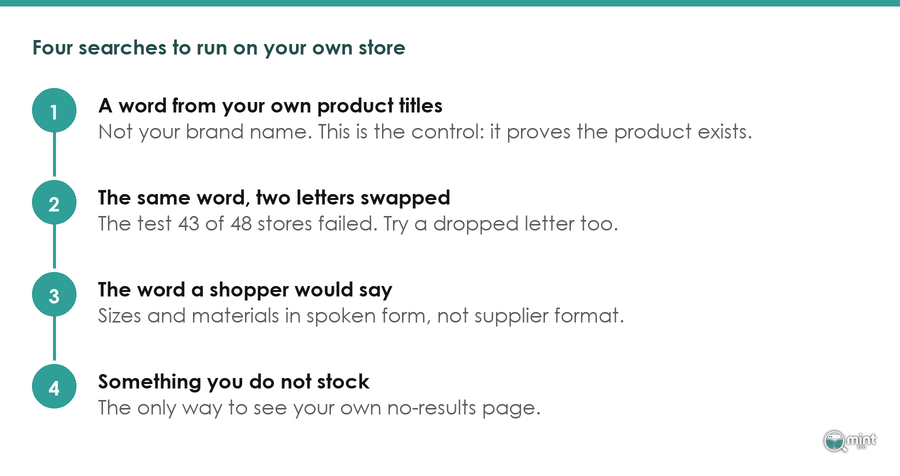
No page in this field will tell you to do this next bit. Open your own store and run four searches. It takes about ten minutes and installs nothing.
Here they are in the order I run them.
The Word From Your Own Product Titles
Take a word appearing in several of your product titles that is not your brand name, and search it. This is your control, and it makes the other three tests mean something: it proves the product is there to be found.
Should this one fail, stop. You have a visibility or routing problem rather than a matching problem, and the remaining tests would measure the wrong thing.
The Same Word With Two Letters Swapped
Swap two adjacent letters in that same word and search again. This is the test that caught 43 of my 48.
Try dropping a letter as well, because the two are not equally fatal. Dropping a single letter from the middle of the word was less fatal than transposing two: 30 of the 48 stores returned nothing, and 17 still found the product.
Run both on a phone as well as a desktop, because the desktop check is the one most likely to let you off.
The Word A Shopper Would Use Instead
Search the way a customer talks, in the words they would say out loud. Measurements are the common trap: a shopper types a size in plain speech, while the catalogue stores it in whatever format the supplier sent.
Try your own product in three or four spoken forms and see which ones survive. Your vocabulary and theirs can diverge for years without anyone noticing, because nobody reports a search that failed.
How much this costs you depends on what you sell. Zipchat's 2026 guide puts typical zero-results rates by sector at Fashion 14 to 22%, beauty and skincare 10 to 16% and home goods 10 to 18%, with fashion highest because its synonym space is the widest.
A Query You Definitely Do Not Stock
Search for something you know you do not sell, then look hard at the page that comes back. This is your only way to see your no-results page, because every other test succeeds and never reaches it.
Where Your Store Already Logs The Failures
Your store has been keeping this list for you. Shopify's behaviour reports include a breakdown of the search terms customers used that returned no results, and it sits in your admin waiting to be read.
Read it before changing anything. It beats any benchmark, because it is your customers and your catalogue. One caveat from Shopify's own documentation: the report carries a delay of up to 72 hours, so a change made today cannot be judged tomorrow.
Analytics gives you the same data once you switch it on. Confirming the setup, Julius Fedorovicius of Analytics Mania notes the Google recommended event name for on-site search tracking is `view_search_results`.
Reporting around it is thin, though. The search consultancy OpenSource Connections points out that "there are no dashboards or reports specifically related to on-site search available in the GA4 user interface".
Once you have the list, sort it. A June 2026 guide from Zipchat offers a four-way split of what a no-results report contains: a product you carry but have not tagged, a product you carry that search cannot find, a product you do not carry, and a misspelling.
Three of those four you fix yourself. The fourth is a buying signal, and it may be the most valuable line in the report.
You will want to know whether your own rate is ordinary or bad, and there is a published range to measure it against. A benchmark round-up from Hello Retail's 2026 search statistics puts the industry-average zero-results rate at 10-15%, with a best-practice target under 5%. Treat the first figure as the bar you are probably at today and the second as the one worth working towards.
The Suggestions Box Is A Different Search
This finding caught me out, and it changed which surface I test first.
Here is exactly what I did, so you can weigh it. On 12th August 2026 I took a seed list of 108 live storefronts and kept the 48 exposing a public product feed and predictive-search endpoint. For each store I read the first 50 products in its own catalogue. From those I chose the most frequent non-brand word in the product titles.
I queried that store's own predictive search four times. One query was the word itself as a control. The others were the same word with two adjacent letters transposed, a version with a middle letter dropped and a singular-plural flip.
A gibberish query returned nothing on every store tested, which is how I know a result above zero means a real match.
Repeating the misspelling against each store's full results page reversed the picture. On the 29 stores whose full search results page could be read for both queries, 25 returned products for the misspelt word that their own dropdown had returned nothing for.
The product was findable throughout. A shopper was told otherwise while they were still typing.
There is a documented reason for the split. Shopify's guidance on modifying search with the Search & Discovery app states that "semantic search capability doesn't apply to predictive search".
A layer expanding queries into related words runs on the results page. The box under the shopper's cursor never sees it.
That difference produces a shopper who never presses enter. They type, see an empty dropdown and conclude the shop has none, and the results page that would have saved the sale never loads.
It is not a hard limit either. Four of the 48 stores did resolve the transposition in the dropdown, and I checked that this was a real result: re-querying each of those four with a nonsense string sharing the same opening letters returned nothing every time.
Muc-Off is one of them, returning ten products for "protcetion" while returning none for "protqzxw". One caveat on my own numbers, because it matters: I could read the results page on 29 of the 48. Others rate-limited or blocked the request, so I have left them out of the count.
How Your Catalogue Words Decide What Matches
Almost every search failure you can fix yourself is a mismatch between words in your product record and words a shopper types. Here is where the work is, and most of it is free.
The Blockers That Hide A Product From Search Entirely
Before any matching happens, a handful of settings can take a product out of search altogether.
A January 2026 diagnostic checklist from the Shopify agency Webgarh lists the usual suspects: products hidden by the seo.hidden flag, Search & Discovery settings such as out-of-stock handling, and theme or search routing problems. A mismatch between customer terms and product content sits on the same list.
Clear those first. Doing that also tells you whether you have a search problem or a theme problem.
The isolation step, set out in the same checklist, is to test on a duplicated theme. If search starts working, the issue is theme-level.
Ten minutes with a duplicated theme saves you a month of adding synonyms to a problem that was never about words.
The Limits Of A Synonym Group
A synonym group maps the shopper's word onto yours. Shopify's Search & Discovery documentation describes them as a way to ensure different words with the same meaning return the same results, and they are free on the platform you already pay for.
They are also not a universal fix. A merchant posting as Grizwald on the Shopify Community reported a case where products named by model year would not surface for the short form: "although the product is displayed/returned if the visitor searches for '1980' the product isn't displayed/returned on my search results" when a visitor types the two-digit form.
In that case adding a synonym left the query failing. Enabling search by tag in the theme settings fixed it. Where a synonym leaves a failing query untouched, stop adding synonyms and go and look at the theme.
Writing Product Records In Shopper Vocabulary
Your titles, descriptions and tags are the index. That is the whole mechanism, and it explains why a catalogue written in trade language produces a search working only for people who already know the trade.
It is the same discipline that decides how much copy a category page needs, applied to the product record instead.
There is a second reason to do this now. In its February 2026 review of the Shopify search landscape, the agency Nimstrata argues that stores with rich, well-structured product data will be "agent-ready", while stores with thin descriptions and basic keyword search will not.
Product data fixing your search box is what decides whether an AI shopping agent can read your catalogue. Which makes this a rare job that pays twice.
The Moment It Returns Nothing
Some searches will always return nothing, because sometimes you do not sell the thing. What your store puts on that page decides whether the session ends there.
A shopper does not read an empty page as a failure of your search. Moderated testing in Baymard's search research found participants "were quick to conclude that a site didn't carry the product if it failed to show up when they entered a specific model name or number".
They blame your stock, and they are gone before you could say otherwise.
The job splits in two here. Everything above this section reduces how often a failure happens. This section decides what one costs when it happens anyway.
You can do the second half this afternoon without touching your search engine. Put bestsellers on that page. Offer the nearest category, which is where your filters and faceted navigation do real work.
Give the shopper a way to ask a human, too. A dead end at the moment of highest intent is the single most recoverable stage in the buying journey.
Passenger Clothing is worth looking at, because both halves fail together there. Searching "fleece" on their store returns products, while searching "flecee" returns nothing on the dropdown and on the full results page. The page a shopper lands on carries no product links to click.
When A Search App Is Worth The Money
Now the question you came with. A search app earns its monthly fee once the free work is done and has fallen short.
Weigh the fee against what is left failing after the free work. Two of the five things in my table are yours to fix with a theme edit and some writing, and one needs nothing at all.
That leaves the misspelling, which is the one an engine is genuinely for.
On the market itself, Nimstrata reports that pricing is accessible ($20 to $400/month) across the Shopify-native apps, which are built for the platform and set up quickly.
What software buys you is the occasion query, where a shopper types the event they are dressing for and the words on your products never mention it. Someone searching "christmas party shoes" wants red pumps from a store selling no product using the words christmas or party.
No amount of tagging catches that class of query, and it is not a small class.
Orders arriving through AI-mediated search rose fifteenfold on Shopify between January 2025 and Nimstrata's February 2026 review.
Do the free work, re-run the four tests, then price an app against the failures that survive all of it. The same order of operations applies when you are working out which store fixes come first.
Getting Someone To Look At Your Store's Search With You
Store owners who come to us for this have usually read a list like the one above and cannot tell which line applies to them.
So we run your catalogue through the same four queries, which tells us which of your failures is a data problem and which is a theme problem.
A search review with us starts from your own no-results report. Your failed queries are specific to your catalogue in a way an industry average can never be.
The free 30-minute consultation is a call with me. Bring your no-results report and the four test results.
We will go through what is worth fixing first and what your platform already covers, and I will tell you which failures are worth paying an engine to solve.
Book your free consultation and we will take it from there.

About the author
John Butterworth
John Butterworth is the founder of Mint SEO, a Manchester ecommerce SEO agency he started in 2024. He has 11 years in SEO and digital marketing, previously running SEO departments for market-leading brands and several agencies. He specialises in Shopify and ecommerce SEO, and his work has ranked over 100 websites and driven more than 3 million organic visits. He speaks at industry events including the SEO Mastery Summit.
Connect on LinkedIn →