
Knowledge Hub
What You Can Change In Your Checkout (And What Shopify Decides)
By John Butterworth · August 14, 2026
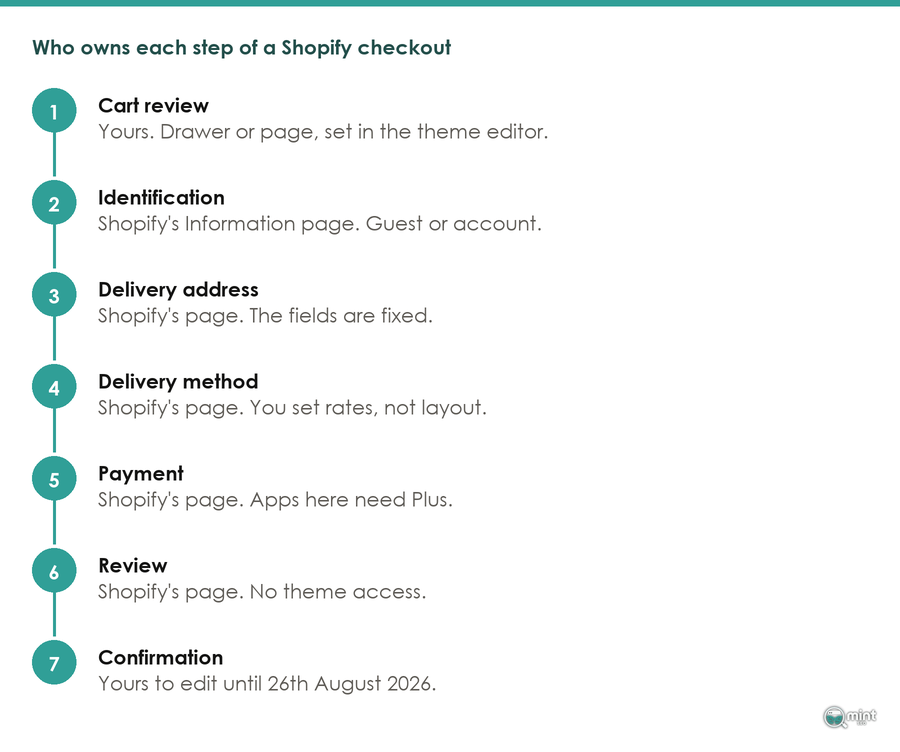
Seven steps stand between add to cart and a paid order, and on a hosted platform only the first and the last of them are yours to change. Name those two before you plan a week of work on the other five of the ecommerce checkout process.
Everything here is checked against Shopify's own documentation on what a theme may touch, and against what live storefronts are doing today.
What A Checkout Process Is Made Of, And Which Parts Are Yours
The Seven Steps, In The Order A Shopper Meets Them
I am John Butterworth. I am the founder here and I run our ecommerce retainers myself. In the audits I run, the checkout is where owners most often plan work they are not allowed to do. That reading comes from 11+ years in SEO and more than 3M organic sessions across the stores I have worked on.
A checkout is a sequence, and every hosted store runs the same one. Here it is, step by step:
- 1. Cart review. The shopper checks what is in the basket and the subtotal.
- 2. Identification. They continue as a guest or sign into an account.
- 3. Delivery address. They give you somewhere to send it.
- 4. Delivery method. They pick a speed and a price.
- 5. Payment. They hand over a card or a wallet.
- 6. Review. They see the full total before committing.
- 7. Confirmation. The order lands, and the thank-you page loads.
Arithmetic fixes that order. Delivery cannot be priced before there is an address to price it to, and nothing can be charged before delivery has been priced. Reorder those two and the totals stop adding up.
What varies is where the boundary falls. Every one of the 56 storefronts we crawled on 14th August 2026 served its checkout from Shopify's own domain.
So the cart at the start and the thank-you page at the end belong to your site. Shopify serves the five in between, across its Information, Shipping and Payment pages.
Where Shopify's Control Over Your Checkout Starts
Identification, delivery and payment are served from a locked environment:
- Information. No theme file reaches it.
- Shipping. Nothing you write in Liquid renders on it.
- Payment. Even apps are restricted here.
Shopify's own reference is blunt: checkout.liquid is now unsupported for the Information, Shipping, and Payment checkout steps. Which rules out the whole category of advice that starts with editing your checkout template.
Apps do not get you round it either. Shopify's help documentation reserves 'Eligible apps that customize the information, shipping, and payments pages' for Plus.
Every other plan gets the checkout and accounts editor, which moves branding, colours and a small set of fields.
Behind all of that is payment security. Shopify's support team put it plainly on its own merchants community: the checkout is a secured page whose code is not made available.
Merchants find this out the hard way. One posted on that community asking whether a customisation screen failing to load was a plan limit or a fault.
He had watched tutorials that did not match what he was seeing. The accepted answer was that Shopify is strict here, and editing the checkout layout needs Plus.
The Deadline On What You Can Still Edit
Thank-you and order-status are the two pages you can still change, and each carries a date:
- Script tags on both pages. Script tags were sunset on those pages on a staged timetable, and for non-Plus stores that sunset falls on 26th August 2026. Twelve days from now.
- Discount and shipping logic. Legacy Shopify Scripts stopped running on 30th June 2026, moving to Shopify Functions as part of the Summer '26 Everywhere Edition.
If a discount rule or a tracking snippet on your order status page was written as a script, it is either dead already or about to be.
Check that before you read any further. It takes two minutes in your admin, and it is the only urgent item on this page. Everything after it can wait a week without costing you an order.
The Decisions You Make Before Checkout Even Loads
What 56 Live Storefronts Do With The Buy Button
Once the middle of your ecommerce checkout process is off the table, the real decisions move one screen earlier. Two of them sit on the product page and the cart.
Sample and date: 56 Shopify storefronts, 14th August 2026. Small enough for you to check, large enough that no single store decides a proportion.
- Frame. A domain list frozen before the first fetch, so nothing was chosen after the fact.
- Unit. One product page per storefront, never several from one catalogue.
- Logged. Whether the dynamic checkout button was rendered, and whether the cart was a drawer or a page.
In our crawl not one of the 56 failed to load, so the yield was 100%. No figure below is drawn from whichever pages happened to answer.
Buy it now is the button shoppers see, and its theme setting is called the dynamic checkout button.
It was rendered on 14 of the 56 product pages. Switch it on and a shopper reaches the payment sheet with no cart page and no drawer in between.
Three quarters of the stores in our crawl have that route switched off, and I doubt many of them decided to. It is a theme setting, and themes ship with a default already chosen.
If people buy a single item from your catalogue, that default is working against you. Turning it on is one checkbox in the product section of your theme settings, and a fortnight is long enough to see whether it moves anything.
Frank And Oak renders both the dynamic checkout button and a cart drawer, with the full express payment set beside them. Somebody who wants one shirt can go from product page to payment sheet without ever loading a cart.
Gymshark's UK storefront runs a cart drawer and offers Apple Pay and PayPal on the product page. It holds the one-tap button back.
The Cart Drawer Decision, And What It Costs You
Forty-two of the 56 storefronts used a cart drawer or slide-out, with a full cart page on the other 14. A drawer slides over the product page, shows the basket and a subtotal, then sends the shopper onward.
Cart pages had room for things a drawer does not: delivery estimates, a threshold message, a note about returns. All three answer the question a shopper is holding at that moment, which is what the delivered price comes to.
Take that room away and the next screen your shopper sees is the one you cannot edit.
Of the 14 storefronts showing the dynamic checkout button, 11 also ran a drawer alongside it, which tells you the two settings get made together in one sitting.
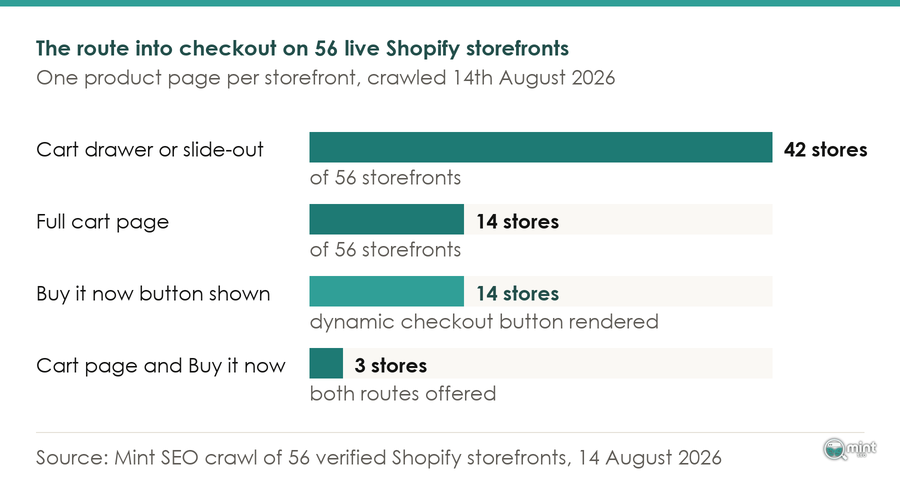
That pairing leaves the opposite combination close to extinct. Only 3 of the 56 storefronts we crawled combined a full cart page with the dynamic checkout button, so almost nobody covers both routes at once.
The Delivery Price, And Where It Should Appear
This is what the drawer decision costs you. Delivery cost is what shoppers name most often when asked why they left, and a drawer hands that conversation to a checkout page you cannot write on.
A free-delivery threshold answers that on a screen you own. According to EasyApps, compiling free-shipping data across Shopify stores in 2026, stores running a progress bar in the cart see an average order value lift of 17 to 30%.
Why it works is not mysterious. A number stops being a surprise and becomes a target a shopper can reach on purpose.
Set your threshold against your own order distribution, because a round figure is a guess dressed up as a policy. According to Matt Putra, who runs fractional CFO work for ecommerce brands at Eightx, the useful band sits 15 to 25% above current average order value.
Run a drawer and the threshold message belongs inside it, along with the delivery estimate. That drawer is the last screen you fully control, so it is the last chance to answer the delivery question in your own words.
The Checkout Settings You Can Still Change
Guest Checkout, And When To Ask For The Account
Customer accounts is the one setting here that every plan controls, and it is the one most often set wrong. Making an account compulsory before payment is a quick way to lose orders: 63% of online shoppers say they will abandon if they cannot check out as a guest.
Abandoning accounts is not the fix. Moving the question after the order is, and you set that in Shopify's customer accounts screen under Settings.
By then your shopper has already handed over an email, an address and a payment method. The thank-you page can offer to save all of it with one click.
You keep the retention data without paying for it in lost orders. That is also one of the few things you can still put on the thank-you page, which matters given what happens to that page on 26th August.
Which Payment Set Your Market Already Uses
An accelerated checkout does something nothing else on this list can. It removes the form altogether. In practice you are choosing between three groups:
- Card entry. The default, and the slowest path through a form you cannot shorten.
- Wallets. Shop Pay, Apple Pay and PayPal, each carrying a stored address and card.
- Deferred credit. Klarna, Clearpay and the rest, now covered by the rules below.
Shopify describes Shop Pay on its own product page as reducing checkout to one click, four times faster than checking out as a guest. Both the address and the card are already stored.
That beats any field you could delete, because you cannot delete the fields anyway.
Turn on whichever wallets your buyers already hold, and show them on the cart as well as in the checkout. Across the 56 storefronts we looked at, PayPal and Shop Pay were the two most commonly exposed on the product page.
The Checkout Your Overseas Buyers See
Payment habits are not the same everywhere. One payment set will not serve a store selling internationally.
Worldpay's Global Payments Report surveyed 63,000+ consumers across 42 markets about how they pay. Its 2026 edition puts digital wallets at 56% of global ecommerce transaction value, which makes the wallet the main path and the card form the alternative.
Underneath that global figure the spread is wide. Worldpay puts United States wallet share at 40% of ecommerce value, sixteen points below that global average.
Shopify Markets exists to handle exactly that, letting you present a different payment set per country. Open a new market, change only the shipping rates, and buyers in that country are still being shown your domestic payment mix.
Work through these three in the order they are written. Guest checkout touches every shopper you have, wallets touch most of them, and the market-specific set touches only your overseas share.
For most stores I audit, that overseas share is smaller than the owner expects.
Where Shoppers Leave, And How To Find Your Own Drop-Off
What Shoppers Say When They Are Asked Why They Left
Shoppers say the price changed on them. Bizrate Insights, whose retail panels ask buyers what stopped them, puts 42% at abandoning frequently or very often over a tax or a handling fee arriving at the last step. That arrival time is set by your rates, not by the page it lands on.
Read that against the section above and the order of work explains itself. The most common exit in an ecommerce checkout process is caused by a screen your shopper saw before the checkout loaded.
Next after that comes the account demand, a setting you control in the admin.
Neither of those two is fixed by redesigning a page you cannot edit. Both are fixed one screen earlier. That is the order this article follows.
Reading Your Own Checkout Funnel In Analytics
Published reasons tell you what usually happens. Your own funnel tells you what is happening to you, and that report is already sitting in your analytics.
Google's checkout journey report in GA4 reads four ecommerce events and puts an abandonment rate under each step. Google's guidance on a large drop off between Add shipping and Add payment is to look at the shipping step, at high delivery costs or at a forced login.
One caveat before you trust the number. That funnel is closed, so it counts only shoppers who fired begincheckout.
Open the report and count the rows before you read them. A homeware client of ours had none at all, which turned a suspected checkout problem into a tagging job.
Which is why conversion tracking you can trust comes before any of this.
With those events firing, buyer mix is the next thing to weigh. Carty Labs publishes Shopify checkout benchmarks from merchant test data, and its 2026 comparison finds multi-step checkout wins more often than one-page for first-time buyers and mobile traffic.
One-page comes out ahead for returning desktop customers on low-value repeat purchases. Your own mix decides which pattern you should expect, and where your store loses the sale sets out how to read the rest of that journey.
What The FCA Now Requires At A UK Checkout
There is a compliance item in your checkout that was not there a month ago. The FCA started regulating Deferred Payment Credit, its formal name for buy now pay later, on 15th July 2026.
Regulation lands on the lender. Affordability checks before approval, support for customers who fall behind and access to the Financial Ombudsman Service are all now their obligation.
It still reaches your checkout. Lewis Silkin, writing for businesses that offer the option, notes that lenders must flow down mandatory customer-facing information which merchants have to surface in their ecommerce journeys.
Offer Klarna or Clearpay and the wording your provider sends you has to appear in a checkout you cannot edit. It is an app and settings job.
Worth checking your provider has sent you that wording at all. It comes by email to whichever address the account was opened with, which is rarely the one anyone reads.
Get Your Checkout Reviewed By Someone Who Runs Stores
You can finish this page knowing where your checkout loses people and still not know which exit is worth your week. Deciding that is what the call is for.
Mint SEO runs ecommerce SEO out of Manchester and works with stores globally. Over eleven years of it, and I take the calls myself.
Book a free 30-minute consultation and we look at your funnel together. I will find the step doing the damage and tell you straight whether it is worth your time.
Sometimes that answer is that your checkout is fine and the problem sits further up the ecommerce funnel. You will hear that too, with no pitch deck and no jargon.
Either way, bring your analytics to the call. Half an hour is enough to know which job in your ecommerce checkout process comes first.
Usually the stage that is losing you orders shows up inside the first ten minutes of it.

About the author
John Butterworth
John Butterworth is the founder of Mint SEO, a Manchester ecommerce SEO agency he started in 2024. He has 11 years in SEO and digital marketing, previously running SEO departments for market-leading brands and several agencies. He specialises in Shopify and ecommerce SEO, and his work has ranked over 100 websites and driven more than 3 million organic visits. He speaks at industry events including the SEO Mastery Summit.
Connect on LinkedIn →