
Knowledge Hub
Which Pages On Your Store Deserve An Internal Link
By John Butterworth · August 15, 2026
Your crawl flags a product page as having no incoming internal links. You open the collection page and there it is, linked, sitting in the grid.
That contradiction sits at the heart of ecommerce internal linking, and both readings turn out to be right.
That orphan-page flag is the single most common thing merchants bring me.
I'm John Butterworth, and internal linking is one of the eight disciplines I run at Mint SEO.
On Shopify catalogues the cause of that flag is almost always the same one. You stop misreading it after you have opened a few dozen product card templates.
One thing worth separating out first. Everything here concerns links between your own pages, whereas links pointing at your store from elsewhere are a separate job, covered in where to point your links.
So, here is what this covers. Which pages are worth linking to and where those links come from. Why a crawler calls your products orphans, what the link should say, and how to tell whether it worked.
How To Decide Which Pages Get Your Internal Links
Good ecommerce internal linking starts from the pages that already earn something. Not the pages with the fewest links, and not the ones you wish were selling, but the ones with demand already sitting at a rank that could move.
That ordering matters because the raw opportunity is far bigger than any week you have available. Zyppy's analysis of 23 million internal links across 1,800 websites found that 53% of URLs had three or fewer internal links pointing to them. Over half the web is barely linked internally.
Sort your crawl by inbound links and start at the bottom, and you will spend a fortnight lifting pages nobody was ever going to search for.
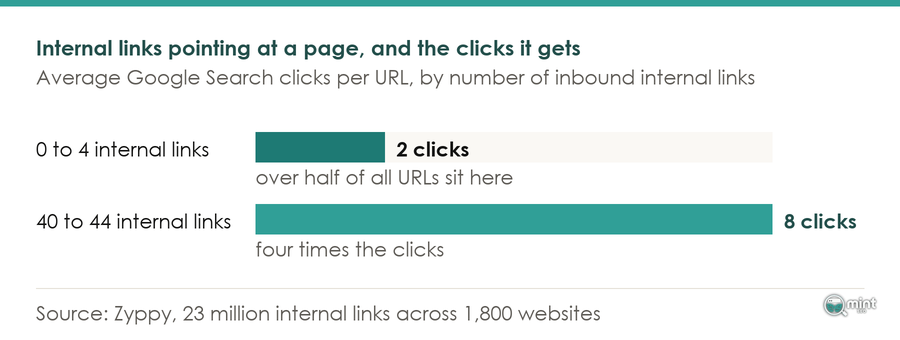
That same dataset also tells you where the return stops, which matters as much as knowing it exists. In that 23-million-link study, URLs with 0-4 internal links received an average of 2 clicks from Google Search, while URLs with 40-44 internal links received 4 times that many. Past roughly forty-five the relationship reverses.
Treat twenty or so as a floor to clear. Getting a neglected collection page from three inbound links to twenty is the work; getting it to sixty buys you almost nothing.
The Four Surfaces Your Store Already Links From
Almost every internal link on your store was emitted by a template. Nobody sat and wrote them, and that single fact changes what the job is.
Four of those templates do the bulk of it. Your navigation links the same collections from every page and your breadcrumbs link each product back up to its parent.
The collection grid then links every product it lists, and the related-products module links sideways between them.
Body copy is the only surface where a person picks both the destination and the words, and on most stores it accounts for a fraction of the total.
Changing a template therefore propagates across your whole catalogue, while a link you add by hand affects one page. When somebody tells you to go and add internal links, they usually mean the second thing.
Breadcrumbs are the clearest example, because they do this at scale without anyone maintaining them.
Karyna Barbaziuk of the site-crawling platform Sitebulb covered Google's decision to stop showing breadcrumbs on mobile results. She argued the job is unchanged, because desktop search still displays them and the schema still works.
Her point about maintenance is the one that matters on a growing catalogue. Breadcrumbs create internal links automatically. Every time you add a new page, it gets connected to its parent categories.
Read practically, that means every product you add from now on connects itself to its parent collection. A template you are unlikely to think about is doing the most consistent work on the store.
Filters and sort options generate a fifth kind of link that behaves differently enough to need its own rules, which we set out in every filter needs one of four answers.
Which Page To Send The Links To
Your collection pages are usually where this pays. They carry commercial intent and hold real keyword coverage, yet on most stores nothing links to them except the navigation.
Pushing links down into them from the level above is the move that shows up in the data. seoClarity documented a multi-category retail client that added algorithmic links from level one pages to deeper subcategory pages.
Those deeper pages took a 24% increase to organic traffic. Note which ones moved. Not the top-level categories doing the linking, but the pages underneath that nothing else pointed at.
That is the shape to copy, with links flowing down the hierarchy from pages that already have authority to the pages a level below them.
seoClarity records a second case with a sharper edge. A new category page added to the navigation with internal links caused Google to replace an internal search results page with the new category page in its index within weeks.
Once those collection pages are linked, what they contain starts to matter, and we went through that in how much copy a category page needs.
Why Your Audit Says Your Products Are Orphans
Now to the disagreement between your crawler and your eyes, because on a Shopify store there is a good chance you are both entirely correct.
Shopify creates more than one URL for every product. The canonical one is /products/the-product.
There is also a collection-scoped version, /collections/the-collection/products/the-product. It exists so breadcrumbs and back-to-collection links know where the shopper came from.
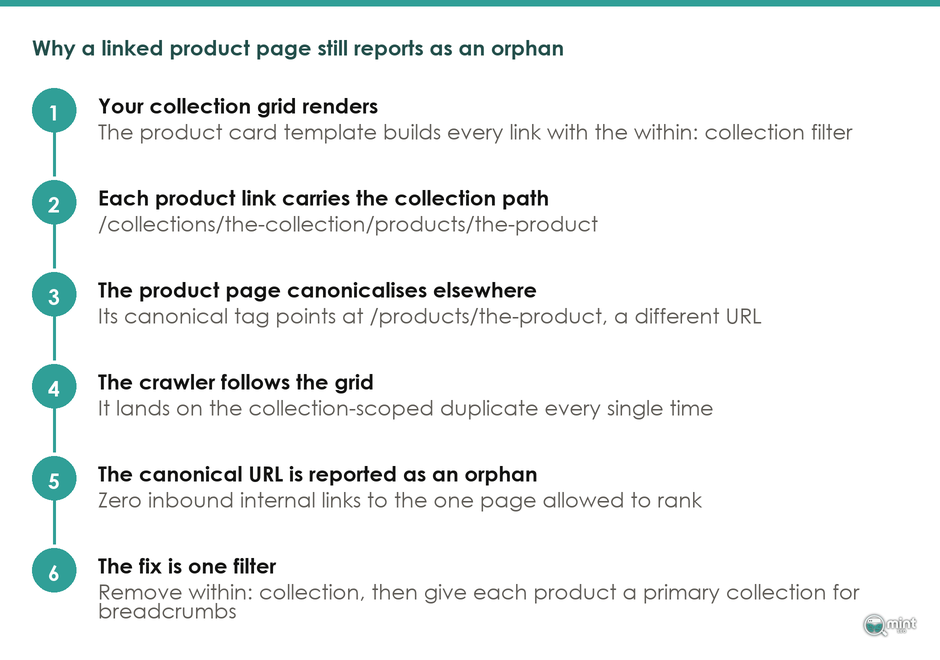
Those two URLs are the whole problem. Your product page canonicalises to the first, while your collection grid links the second on a great many themes.
The crawlers know, and they document it. Ahrefs has a help page devoted to this exact flag, written because enough of its own users hit it and assume their store is broken.
This way of linking products in Shopify websites often results in the direct product URL having no incoming internal links or backlinks.
Only the duplicates carry the links, and the duplicates are not the pages you asked Google to rank.
It is not an Ahrefs quirk either. As The SEO Works documents, Semrush surfaces the same problem under Site Audit > Issues > Orphaned pages, built from sitemap and Google Analytics URLs with no inbound internal links.
Your crawler then follows that grid, lands on the duplicate every single time, and correctly reports zero inbound links to the page you have told Google to rank. Nothing is broken and nothing is lying to you.
Which Product URL Your Collection Grid Links
Your grid links the collection-scoped URL. Merchants have reported the consequences on Shopify's own community forum for years, on Dawn and Prestige and Electro alike.
One of them posts there as BeautifulDesign, who opened a thread reporting that every product page on the store was flagged as an orphan page with no incoming internal links.
The useful part came when they opened the theme. In product-item.liquid there was no anchor wrapped around the product title at all.
From there the thread turned into a hunt through markup, and the resolution was a markup change too. Adding the href inside the h2 title cleared the flags.
What is striking is that the thread never really stopped. Amy200101 turned up three years after the first post with thirty-seven orphan flags and no way to clear them.
Reading it back, the pattern is that plenty of merchants diagnose the problem correctly and still cannot act on it, because nobody has told them which file to open.
One Filter On Your Product Card Template
The filter to remove is within: collection. Jeff McRitchie of StatBid, who wrote the fix up in March 2026, puts the reason plainly. When the same product can be accessed through several different URLs, internal link signals become fragmented across multiple paths instead of reinforcing a single authoritative page.
Fixing it takes about five minutes, and the whole change lives in one file. In your theme, open the product card section, which depending on what you are running is often card-product.liquid or product-item.liquid.
Find where the product link is built. If it reads product.url | within: collection, that filter appends the collection path.
Drop it, and every grid link on the store resolves to the canonical product URL instead.
There is one consequence to plan for first. Removing the collection context means breadcrumbs no longer know which collection the shopper came through, so each product needs a primary collection assigned.
Shipping the URL change without it leaves you with a clean link graph and breadcrumbs that contradict each other, which is a poor trade.
Anchor Text On A Catalogue Is A Template Decision
The words inside a link are the only part of it that tells Google what the destination is about, and on a store a template usually picks those words for you. That makes this a smaller and far more specific job than it first looks.
Exact Match Beats Variety On A Catalogue
Getting one link right per destination is what matters. In Zyppy's dataset, pages containing at least one exact match anchor received at least five times more traffic than pages without.
An exact match anchor is the precise phrase the destination is trying to rank for, and your product grid will not hand you one. It anchors on the product title, which is a name and very rarely a search phrase.
That anchor has to come from body copy, a hand-built collection link, or a blog post.
There is a wrinkle here, from the same source that produced the advice everyone repeats. Cyrus Shepard runs Zyppy and has published SEO experiments for over a decade, and the 23-million-link analysis above is his. His position has been that we should be increasing our anchor text variations, with the raw number of links mattering less.
In a February 2026 update to the Zyppy study, Shepard added that new data suggests some sites with very high anchor-text diversity may now be suffering for it. On a catalogue that is a warning about bulk internal-linking apps, which sell exactly that: hundreds of generated anchor variations.
That is a change of direction from the person whose dataset the original advice came from. Get your one exact-match anchor in place, keep the rest natural, and stop there.
Image Only Links Say Nothing
Go and look at your product tile, then check whether the title is a link or whether only the photograph is.
In the same Zyppy analysis, empty anchor text, which is over 6% of internal links, showed no statistical impact on clicks. On a catalogue that empty share is concentrated in exactly this pattern.
An image-only link still works in the sense that matters least. The page gets discovered and equity moves, but the description is missing, so Google knows a page is there and nothing about what is on it.
Zyppy's study turned up one genuinely odd result on anchors. Naked URL anchors, which are under 1% of all internal links, correlated with nearly 50% more traffic. The tidiest-looking anchor is not automatically the strongest one.
Wrapping the product title in the anchor as well as the image costs one template change and gives every product in your catalogue a text anchor it did not previously have.
How To Tell Whether A Link You Added Did Anything
Six weeks after the template change ships, the ecommerce internal linking work tends to get abandoned, because nobody has checked whether it moved anything.
Do not judge it on your store's overall traffic, because far too much else moves at once. Judge it on the destination page and the query you were trying to lift. Then leave it alone for a month.
Which Search Console Report To Read
There is a trap sitting in the obvious metric. Average position in Google Search Console is calculated across every query a page ranks for, and SEOTesting's reference on the metric spells out where that goes wrong.
Do the job well and the page starts ranking for a wider set of queries, which SEOTesting notes will usually pull the post-change average below where it sat before.
That is worth reading twice, because it is the opposite of what anyone would assume. A page that improves picks up a tail of new queries at position thirty, and those drag its average backwards.
Plenty of people have looked at that falling line and concluded internal linking does nothing.
Filter to the query before you judge it. Open Search Console and go to the destination page. Filter to the one phrase you built the anchor around, then compare the four weeks after against the four weeks before.
SEOTesting's guidance on running tests to significance suggests four to six weeks as a minimum window, and picking one primary metric to judge on.
Look at the impression count on that phrase before you read anything into the line. At a dozen impressions a week the figure swings about on its own, and another month of waiting is the correct answer.
If you would rather run this as a controlled test, the split-testing method and the traffic it needs are in your traffic decides which tests you can run.
Where An SEO Partner Fits Into This
An ecommerce internal linking crawl hands you every finding at the same weight. You end up with six hundred orphan flags, a click-depth report and a list of thin anchors in one spreadsheet.
Nothing in it tells you which three of those would pay for the work.
We went through that ranking problem in more depth in which site audit findings cost you sales, and it is the judgement a tool cannot make, because it needs a view on what each page could earn if it moved.
Producing that order is most of what an SEO audit is for. On a linking job it means marking which orphan flags are canonical duplicates and which collections are worth lifting.
That ordering is also where the job usually widens. Nine times out of ten the grid fix is not the only thing in the way, and linking ends up one strand of a broader on-page SEO engagement.
If your crawl has handed you a list you cannot prioritise, book a free 30-minute consultation and I will go through it with you and tell you which parts are worth your developer's time.

About the author
John Butterworth
John Butterworth is the founder of Mint SEO, a Manchester ecommerce SEO agency he started in 2024. He has 11 years in SEO and digital marketing, previously running SEO departments for market-leading brands and several agencies. He specialises in Shopify and ecommerce SEO, and his work has ranked over 100 websites and driven more than 3 million organic visits. He speaks at industry events including the SEO Mastery Summit.
Connect on LinkedIn →