
Knowledge Hub
Ecommerce AB Testing Pays Off When The Change Is Big Enough To See
By John Butterworth · October 8, 2026
Ecommerce A/B testing only pays when the change you test is big enough for your traffic to show a difference. A test sends half your visitors to the page you have and half to a changed version, then counts the orders from each half. A small tweak on a quiet store can run for months and still prove nothing.
So settle two numbers before anyone builds a variant: monthly sessions on the template you want to test, and its conversion rate. Keep the test short as well. One of the bigger problems I find on stores is a prolonged test on copy and H1s, because it confuses the signals Google reads from the page.
When those numbers say months, ship the change and compare the four weeks after it with the four weeks before. That only holds if your search traffic stayed level across both windows. A free SEO audit charts twelve months of your organic visits, so a dip or a seasonal swing shows up before you trust the result.
Test The Biggest Change On The Template Most Shoppers Reach
Your first ecommerce A/B test belongs on the product page template. Unless you've set up alternate templates, every product on a Shopify store renders through the default product template. A single test version therefore reaches every product page at once and collects visitors faster than a test on one landing page. Put the boldest version you'd be willing to ship into it.
New Templates, Offers And Shorter Checkouts Change What Shoppers Decide
A split test earns its traffic when the test version changes what a shopper is offered or asked to do. Three kinds of change do that on a store.
- A new product page template: the order of information and how much delivery and returns detail sits above the fold.
- A different offer: a delivery promise with a date, a bundle or a new free-delivery threshold.
- A removed checkout step: fewer fields or an express payment button shown earlier.
Before you plan the third kind, check what Shopify lets you change in checkout, because some of it is fixed by the platform.
Ordinary ideas usually fail to move anything, which is why the bold ones get the traffic. Kohavi's 2012 keynote on online experiments put the share of ideas that don't improve the metric they target at 60-90%, depending on the domain. If most ideas lose anyway, the shortlist should start with the radical ones.
Keep a discount test and an urgency test apart, because a price cut and a countdown move shoppers for different reasons and a variant that changes both can't tell you which one did the work.
Button Colours And Logo Swaps Rarely Change A Decision
A new button colour, a reworded call to action or a fresh logo leaves the shopper's decision where it was. They still see the same product at the same price with the same delivery terms.
A brand restyle has a second problem. Customers switch between phone and laptop or clear their cookies, so the same person can meet both versions in one week and the two groups stop being separate. Judge a reskin on design grounds, or test it as a whole new theme against the current one with nothing else changed inside it.
Work Out Whether Your Traffic Can Detect The Change Before Building It
Whether your store has the traffic for ecommerce A/B testing at all is a sum you do before anyone opens the theme editor. It needs your conversion rate, the smallest lift you'd act on and your monthly sessions on the template you want to test. If you're unsure what a normal rate is for your sector, start with what a normal conversion rate looks like.
The rule of thumb for visitors per version is 16 × p × (1 − p) divided by the square of the change you want to detect. It assumes the confidence and power settings most testing tools use by default. Here p is your conversion rate as a decimal, with the change in the same units.
For a store where 2 visitors in every 100 buy, my sums say that detecting a move to 2.2 buyers per 100 needs about 78,400 visitors in each version. Halve the change you're looking for and the visitors you need go up four times, which the chart below shows for bigger changes.
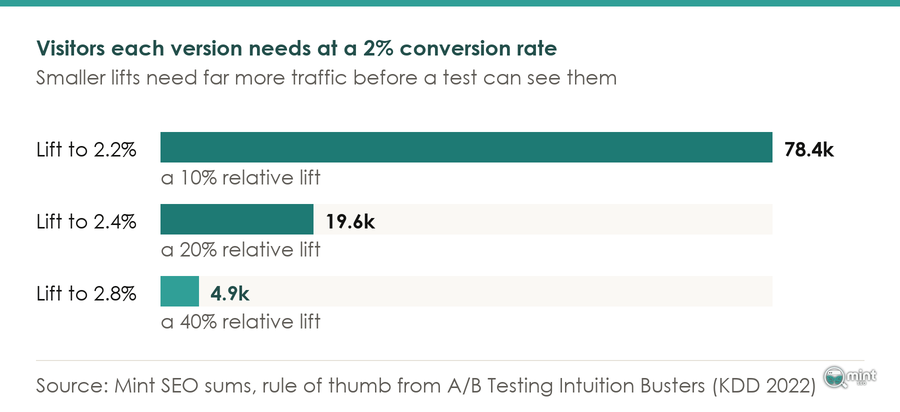
A Test Needs Thousands Of Shoppers In Each Version
The experimentation leads behind A/B Testing Intuition Busters put the floor at thousands of active users and preferably tens of thousands. Their paper also takes apart a published "winning" test that ran on about 80 users per variant.
Choose the smallest lift worth acting on, and if that sample needs more than three months of traffic on the template, a live test is the wrong tool for that idea.
Set The Length Before Launch And Cover Two Full Weekends
Fix the end date from the sample size before the test starts. Run at least two full weekends, because a shopper browsing on a Tuesday lunch break and one buying on a Sunday evening respond to the same page differently. The end date Shopify fills in for you, months ahead, should play no part in the decision.
Below That Line, Make The Change On Evidence Instead
If your traffic can't detect the change, ship it on evidence and watch the numbers. Shopify's own researchers describe live A/B testing as something that "diverts traffic, takes weeks to reach significance" and built simulated shoppers to screen ideas before any real visitor sees them.
For a smaller store the evidence is cheaper than that. Session recordings show where people stall, and a one-question survey on the product page tells you what stopped them. A preference test with a handful of matched customers rules out a weak design before it goes live.
Ship the change, then put the four weeks after it next to the four weeks before in Shopify's sessions and orders reports. Keep sales and ad pushes out of both windows. That's still a data-led decision, made without a formal test.
Run The Test In Shopify Rollouts, Or An App Where Rollouts Stops
Shopify stores can now run an A/B test without installing an app. Since June 2026 Rollouts has supported A/B tests on whole themes and checkout setups.
You'll find it under Markets in the admin. The setup first asks you to choose a launch, a temporary event or an experiment, and only the experiment compares two versions.
Set Up A Rollouts Experiment On The Grow Plan For A Theme, Checkout Or Discount
Create a rollout and set its type to Experiment, which is Shopify's name for an A/B test, then add the change you want to test. It might be an edit to your main theme or a whole replacement. A new checkout setup and a discount work the same way. Shopify shows the current version to a control group and your change to the other group, split evenly unless you change it.
You need the Grow plan or higher. When the experiment starts Shopify copies your published theme, so you can keep editing the live store without touching the test. Two experiments on the same theme get separate groups of visitors.
Of the experiments you can run there, a discount test is the one I'd point an owner to first. You can test a discount against the offers your store already runs, so you can see whether a deeper price cut wins more orders than it costs in margin.
Liquid Edits And Headless Stores Still Need A Testing App
Rollouts can't change Liquid templates, and it doesn't work on vintage themes or on the checkout of a headless or custom storefront. If the change you want to split test lives in template code, or your store runs headless, you still need an A/B testing app.
Some apps test image sets by duplicating a product and splitting traffic between the original and the copy, which leaves a second live page sitting in front of Google. Give it a canonical tag pointing at the original, then delete it when the test ends. Tests that split pages to measure search clicks are a different job, covered in our guide to SEO split tests.
Keep The Testing Script From Slowing The Page Under Test
A browser-side testing app has two ways to show a variant, and both cost the page you're testing. It either hides the page until the variant loads, which pushes back Largest Contentful Paint, or it swaps content after the page appears and moves the layout.
That first cost can be large. In DebugBear's test of an anti-flicker snippet, one homepage's Largest Contentful Paint fell from 6 seconds to 2.7 seconds once the hiding was switched off. A slower variant can lose because of the tool, and you'd read it as the idea failing.
Speed matters here mainly because slow pages lose sales. Pick the testing method that adds the least script and remove that script the day the test ends. We apply the same discipline when speeding up a Shopify store, where every script on the page has to justify the load time it adds.
Call The A/B Test Winner On Revenue Per Visitor, Not The Rate That Moved
The riskiest point in A/B testing on an ecommerce store is the finish line. A test version that drops the free-delivery threshold sends more shoppers to checkout with smaller baskets, so its conversion rate climbs while the store takes less money. Divide each version's sales by the shoppers who saw it, which is revenue per visitor, and name the winner on that.
Rollouts Reports Rates, So Check Revenue Before Applying A Winner
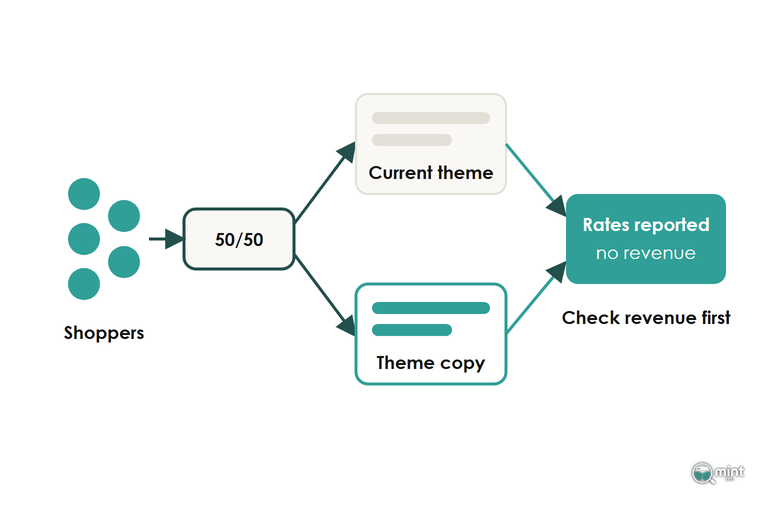
A Rollouts A/B test reports rates for each version of the page. Revenue isn't among them, and neither is the revenue a discount brought in, yet on an ecommerce offer test that's the number you need most.
A test version that wins because it cut the price can still lose money once margin is counted. A discount code in the split test can also leak to shoppers in the control group. For any A/B test that touches price or basket size, get revenue per visitor for the control and the variant before you apply anything. Applying the winning version makes the change permanent.
Stopping Early Or Editing Mid-Test Manufactures A Winner
Ending a product page A/B test on the morning the variant pulls ahead of the control hands you a winner that's not real. Evan Miller worked out that ten looks at a running experiment turn a 1% significance level into 5%, and a Bayesian dashboard doesn't change that.
Editing either version of the page mid-test does the same damage, so freeze both until the end date.
When the test ends, check the shoppers split between control and variant as planned: a sample ratio mismatch checker tells you whether a lopsided split is too big to be chance.
Re-Test Old Winners When The Season Or Traffic Mix Shifts
A winning test version is proven only for the shoppers who saw it. A version that won on July traffic was measured on July intent, and Black Friday buyers behave nothing like summer browsers.
Log the date, season and traffic mix of every winner. Re-run the A/B test on a high-impact winner after a quarter or two, and sooner if a channel's share of sessions moves sharply or your mobile and desktop split changes.
Your Next Test
Every test plan above starts from traffic, and organic search is the part of it Mint SEO works on. A store that keeps its testing in-house can still hand the search side to an SEO agency for Shopify stores with their own testing plans.
To see what you are working with first, request a free audit of your store. It comes back the same day as a two-page PDF. Page one charts twelve months of organic traffic and shows how much of it is branded search. Those are the visitors any test on your landing pages would be drawing from. It takes four questions, with no call and nothing to pay.

About the author
John Butterworth
John Butterworth is the founder of Mint SEO, a Manchester ecommerce SEO agency he started in 2024. He has 11 years in SEO and digital marketing, previously running SEO departments for market-leading brands and several agencies. He specialises in Shopify and ecommerce SEO, and his work has ranked over 100 websites and driven more than 3 million organic visits. He speaks at industry events including the SEO Mastery Summit.
Connect on LinkedIn →