
Knowledge Hub
SEO Pagination That Keeps Every Product Within Google’s Reach
By John Butterworth · September 24, 2026
On a store, SEO pagination comes down to three settings that keep every product within Google's reach. Give each collection page its own ?page= address, link to the next page with an ordinary link and leave each page's canonical pointing at itself. The two fixes audit tools and forums most often suggest, a canonical to page one and a noindex on page two, can cut Google off from the products further down.
You've probably met one of them already. An audit tool flags /collections/boots?page=2 as duplicate content, or a forum reply hands you a line of Liquid to noindex every paginated page, and both look like tidying up.
I'm John Butterworth, and I've spent 11 years in SEO. In a technical audit, the collection template is one of the first things I open, because it decides how much of a catalogue Google can reach. If you'd rather skip the checking, book an SEO audit and we'll do it for you.
Link Each Collection Page To The Next With Its Own URL
Pagination splits a collection into numbered pages, and each paginated page needs its own ?page= URL and a crawlable link to the next page in the sequence. A collection with 180 products at 24 a page paginates into eight pages, and Google reaches pages two to eight only by following those pagination links.
Shopify generates a sitemap that lists every product, so discovery alone isn't the issue. The links along that path show Google where each product sits in the store and which collection it belongs to, and collections are your strongest commercial pages, which is where category page SEO starts.
Give Every Page Its Own ?page= Address
Google crawls and indexes by URL, and it treats /collections/boots?page=2 as a page in its own right. Shopify's paginate tag builds exactly that address by default, so a standard theme already gets this right.
Problems start when a theme or app changes the page by script without changing the URL, or puts the page number after a hash, as in #page=2. Google drops everything after the # when it compares addresses. To Google the whole collection is then one page.
Products from page two onwards then have no link from the collection, so unless another page links to them they reach Google only through the sitemap. Open page two in a browser and watch the address bar: if the address doesn't change when you move to page two, Google has no separate page two to crawl.
Link Forward With An Anchor Tag, Not A Button
Googlebot collects URLs from the href attribute of ordinary links. It doesn't click buttons or fire the scripts a click would trigger, so a "Next" control built as a button leads nowhere for a crawler.
View the source of page two and search for ?page=3. You're looking for an ordinary anchor tag whose href is /collections/boots?page=3.
Confirm A Page-Three Product Is Indexed
Your address bar and page source prove Google can reach page three, and Google's own reporting shows whether your SEO pagination is getting what it found there indexed. Run Google's URL Inspection tool on a product that only appears on page three or later of a large collection and check it is indexed, with the collection listed as a referring page.
Then inspect the ?page=3 URL itself. If the Google-selected canonical differs from the canonical you declared, Google is folding that page into another one, and the next section explains why that happens.
A Canonical Or Noindex Pointing At Page One Breaks Your Pagination
Each paginated page after page one needs a canonical tag pointing at its own ?page= URL. On Shopify that is the theme's default output for /collections/boots?page=2, and in SEO pagination audits I most often find an edit or app pointing every paginated page's canonical at page one, or a noindex added to the ?page= URLs.
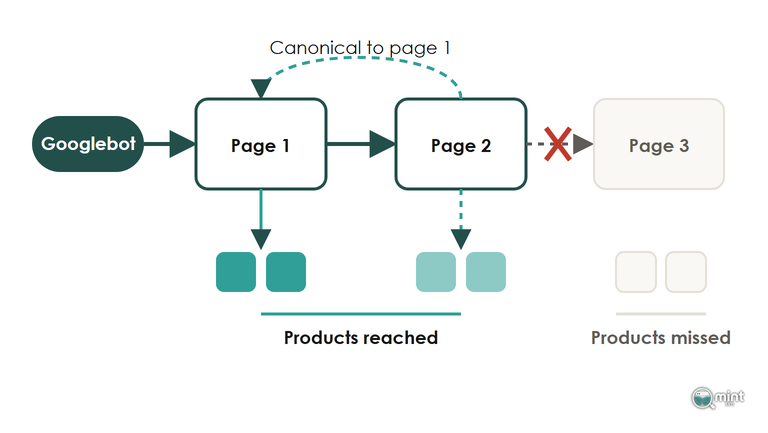
A Canonical To Page One Discourages Google From Crawling Page Two
A canonical tag asks Google to treat a page as a copy of another URL. Point page two's canonical at page one and you're asking Google to fold a page of different products into the first page. Google then has less reason to crawl page two and follow its links to products.
In the audits I run, the products that only appear deep in a collection are the ones missing from the index when this canonical is in place.
Seeing large retailers canonicalise page two to page one proves nothing either, because a canonical is only a hint. When pages two onwards differ from page one Google may ignore it, which leaves you carrying the crawl risk without the tidy index you were after.
Check your theme.liquid and any SEO app settings for a canonical built from the collection's root URL. Shopify's own canonical output already handles the page parameter, so if someone has overridden it to force page one, put the default back.
A Noindex On Page Two Ends Up Cutting Its Links
A noindex on page two looks safer than a canonical, because Google still follows the links on a noindexed page at first. Over time that fades. Once Google has seen a noindex on a page for long enough it drops the page and visits it less. A noindex, follow can then end up working like a noindex, nofollow.
Noindex is also the wrong way to pick one canonical version of a page on your own site: it drops the page from search entirely, where a canonical simply names the version you prefer.
Look in theme.liquid for a line that adds a noindex robots tag when the collection URL carries a page number, and delete it.
Leave Repeated Titles And Prev-Next Tags In Place
Audit tools flag page two for sharing page one's meta description, and sometimes its title. Most Shopify themes already add the page number to the title, so rewriting either for every page of every collection is time better spent on product pages, and there's no duplicate content penalty to fear from the overlap.
Many Shopify themes also still print rel="next" and rel="prev" in the page head. Google stopped using both years ago and reads the pagination from the ordinary links instead, while other search engines may still read them, so leave them where they are.
Keep Paginated Pages Underneath Infinite Scroll
Infinite scroll does not replace pagination for SEO. The paginated ?page= URLs and the links between them still have to be in the HTML, because they are how Google reaches the products past page one, and removing them to tidy a scrolling collection breaks the pagination Google depends on.
Products Added By Script Can Stay Hidden From Googlebot And AI Crawlers
Googlebot renders the page it lands on, and it doesn't scroll down it the way a shopper does or press "load more". Some lazy-loaded content can still render, but products that only arrive after a scroll event are the ones I'd expect to go missing.
Most AI search crawlers, meanwhile, see even less than Googlebot. In an analysis of AI crawler traffic across its network, Vercel found that "none of the major AI crawlers currently render JavaScript", and that covers the crawlers behind ChatGPT and Claude. For them the paginated URLs are the only way to see the rest of a collection.
A quick check covers both: load the collection with JavaScript switched off in your browser. If you can still reach page three and its products through ordinary links, crawlers can too.
Load More Works When It Points At The Next ?page= URL
Most load-more buttons on Shopify are a thin layer over ordinary pagination. Click one and the script fetches /collections/boots?page=2 in the background, the same address a crawler would follow, then slots that page's product cards in under the ones already on screen.
That dependency runs deep: in most themes the script reads the next-page link to know what to fetch. When owners strip the pagination links out to "clean up" a scrolling collection, the script has nothing to fetch, and the collection can end up loading the first set of products again instead of new ones.
For shoppers, load more tends to be the better choice. Baymard Institute tested the three patterns on leading ecommerce sites, and its co-founder Christian Holst wrote up the findings in Smashing Magazine, reporting that "Load more" buttons combined with lazy-loading proved "to be a superior implementation".
In the same testing, endless scrolling kept pushing the footer and its delivery and returns links out of reach.
Whichever you choose, use the theme's own setting before reaching for an app, since every app adds script weight to the collection template.
Shorten Your Pagination Instead Of Hiding It
On a twelve-page collection, the numbered bar usually shows page one, the last page and the two pages either side of the one you're on. Googlebot therefore reaches page six only through a chain of earlier pages, several links away from page one. The SEO pagination fix for products that sit that deep is fewer pages between page one and those products, with page two left visible.
Page numbers are rarely what floods a store with URLs. Filter combinations usually are, and our faceted navigation guide covers which filtered collection pages deserve indexing and which to keep out of the crawl.
Raise The Number Of Products Per Collection Page
Go back to the 180-product collection. At 24 products a page it runs to eight pages, and the products on the middle pages sit several links from page one, while at 60 a page the same collection fits on three.
Shopify's developer changelog confirms that "The maximum Liquid page size has been increased from 50 to 250".
In practice many theme editors cap the products-per-page slider lower than that, so going past the slider is a small edit to the collection template's paginate tag.
There's a ceiling on the Google side too, because Googlebot only reads an HTML file up to a size limit. A page carrying hundreds of product cards, a mega menu and inline scripts can lose its last products and its link to page three.
Raise the page size in steps, keep the product cards lean and trim the template the way our page speed on Shopify guide sets out to keep the HTML of page one small.
Split A Long Collection Into Subcollections
A collection that still runs past about a dozen pages at a sensible page size is usually carrying more than one group of products. Split it into subcollections by type or use, and link each one from the parent collection and the menu, so every product sits a few pages from a page that is itself one click from your homepage. I aim to keep important pages within three clicks of the homepage.
Very large stores run into a second limit. That changelog also notes that Liquid pagination stops at the 25,000th item in a list, so on a /collections/all page or a catch-all collection with tens of thousands of SKUs, anything listed after the 25,000th item has no page at all.
For a list that size Shopify recommends filtering before you paginate, and splitting a catch-all collection into subcollections by type or brand is exactly that kind of filter.
Point Internal Links At Products Buried Deep In A Collection
Pagination gives Google one route to a product, and a second route from pages that already hold authority carries more weight than a link on page nine of a collection. Link products stuck deep in a collection from your best-selling product pages and your buying guides, with descriptive anchor text.
A short line in the collection's own introduction can carry one or two of those links as well. This is deliberate internal linking aimed at the products you want found.
Get The Route To Every Product Checked In A Technical Audit
Pagination is one of the checks in our technical SEO work. We look at how Google moves from each collection to its products and which products it isn't reaching, then fix the template, the canonicals and the internal links together.
Crawlability, rankings and page speed only matter because they lead to sales, so I judge that work on whether the products Google couldn't reach start bringing in orders.
If you want to see where your own collections stand, get your SEO audit and we'll go through your collection templates for you. If you'd rather talk it through first, book a free 30-minute consultation with me.

About the author
John Butterworth
John Butterworth is the founder of Mint SEO, a Manchester ecommerce SEO agency he started in 2024. He has 11 years in SEO and digital marketing, previously running SEO departments for market-leading brands and several agencies. He specialises in Shopify and ecommerce SEO, and his work has ranked over 100 websites and driven more than 3 million organic visits. He speaks at industry events including the SEO Mastery Summit.
Connect on LinkedIn →