
Knowledge Hub
SEO For Ecommerce Category Pages: How To Make Each One Rank
By John Butterworth · September 28, 2026
This is the SEO ecommerce category pages need before they rank for a range search. Each one should be the one page on your store built for that search, with the shopper's words in its title, H1 and URL.
A short intro saying what the range is has to load before the theme's cart and app code. Buying detail goes under the product grid, and your strongest pages link in.
I'm John Butterworth, and when a Shopify store asks me why its organic traffic has stalled, its collection pages are where I start. I run a Shopify SEO agency in Manchester.
A Category Page Wins The Broad Searches A Product Page Cannot
A category page lists a range of products under one name. Someone searching 'oak dining tables' wants to compare, and a single product page only shows them one table.
Your category page shows the whole range. For a shopper who is still comparing, Google tends to rank the page showing the whole range.
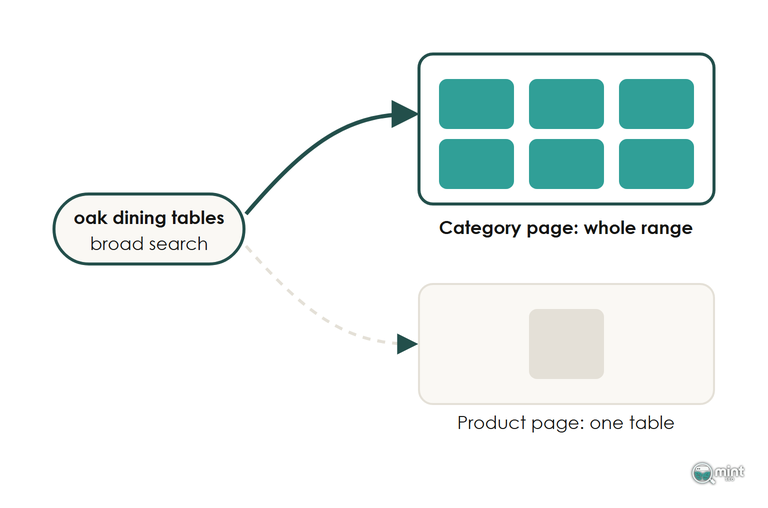
That makes ecommerce category pages the part of your store carrying its highest-demand commercial searches. Each one needs a single job: one range name, with the title, copy and links all pointing at it.
Google now puts its own shopping listings, fed from your product feed, above the organic results on plenty of broad searches for a range. The organic result underneath has to be the page that answers the range search best, which on a store is the collection.
Build One Category Page For Each Search Shoppers Make
The SEO ecommerce category pages rely on starts with naming each collection after the words shoppers type, whatever your warehouse or supplier calls the stock.
Head Terms Go To Your Top-Level Categories First
Build the top-level collections first, one for each broad range name such as 'oak dining tables' or 'linen dresses'. Parents come first. A subcategory page needs a parent category page that already ranks to link up to.
We map every commercial term to a single URL before anything is rewritten, and our guide to finding the words shoppers use for each range shows how to choose the range name each category page targets.
If a blog post already ranks for a range name, turn the post towards the question it answers and link it to the category page. Once the post points at it, the collection becomes the page Google picks for the category term.
Subcategories Catch Longer Searches For A Narrower Range
Add a subcategory when shoppers search the narrower range by name. 'Extending oak dining tables' earns its own page once people type it.
A subcategory can be built without new products. Tag the extending tables, point an automated collection at that tag, and the page fills itself as stock changes. A table sitting in both the parent and the subcategory causes no conflict, since each page answers a different search.
A subcategory that has run out of products shouldn't sit in the index. Add a noindex tag while it's empty, and return a 404 if you retire it for good.
A Filter Earns Its Own Page When Shoppers Search That Combination
A colour, size or brand filter becomes its own collection only where people search that pairing, like 'white oak dining tables'. Give it a proper title, H1 and intro, the same as any category page.
Because only those pairings have demand, every other filter combination stays out of the index.
A shopper who sorts by price or ticks a size box creates a new address for the same oak dining range, and that address should name the collection as its canonical. Our guide to which filter pages Google should index covers the filter settings. Page two onwards has its own rules, set out in our guide to pagination that keeps every product within reach.
Put The Shopper's Words In The Title, H1 And URL Handle
Category page SEO starts with the fields Google reads before any of the copy, and each one should carry the range name a shopper types when looking for that category. On a Shopify collection for oak dining tables, that means a page title such as 'Oak Dining Tables: Solid And Veneered Oak', an H1 reading 'Oak Dining Tables' and the handle /collections/oak-dining-tables.
Open one collection in your browser and count the H1 tags your theme prints. Some themes wrap the logo in an H1 as well, and two H1s blur the signal that your title tag and the collection name printed on the page are both trying to send about the range. That's a theme fix, and a theme that prints clean collection templates avoids it.
Add breadcrumb markup, with a trail that follows how shoppers browse the store instead of the folders in the URL handle. Leave FAQ markup off, because Google no longer shows FAQ rich results in search.
Split Category Copy Into A Short Intro And Buying Detail Under The Grid
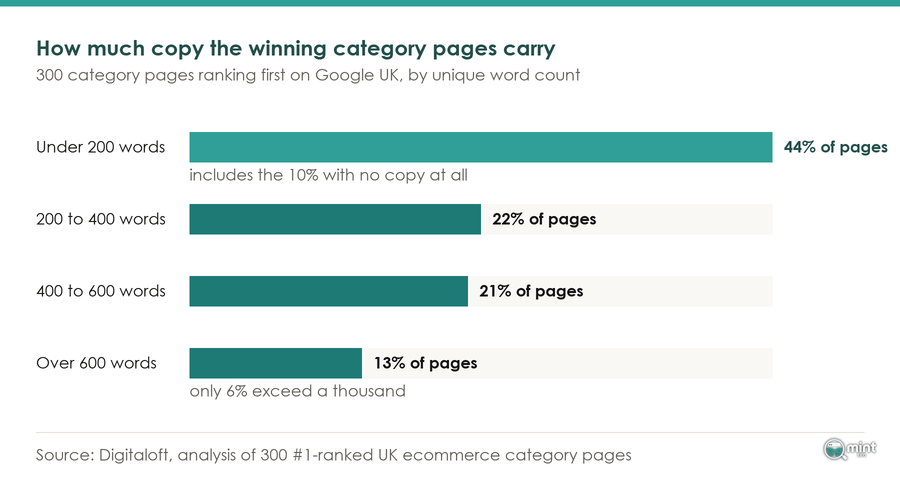
Keep The Intro Above The Grid To Two Or Three Sentences
The intro says what's in the range, who it suits and the one thing that decides between the products. For an oak dining range, that means naming solid and veneered oak and the four-to-ten seat sizes. It can also point anyone with a small room at the narrow tables.
Anything longer works against you, because a long block above the grid pushes the products down the screen. It also makes the page read like an article to someone who came to buy.
Cutting a long description down to a few useful sentences doesn't usually cost a category page its rankings.
Use the range name once or twice in the intro. Repeated through every line, it makes the page look written for Google, and Google trusts it less for that search intent.
Buying Detail And A Short FAQ Go Under The Grid
Relevance gets built below the products. Put sizing, materials and the differences between product types there, written for the shopper who has scrolled past the grid because they are close to choosing.
A short FAQ comes next. Answer the questions customers ask about this range in a sentence each, such as how many people a 180cm dining table seats.
A full buying guide belongs on its own page, linked from the category.
Copy That Would Fit Your Next Collection Needs Rewriting
Paste each sentence onto your next collection and read it there. If it still reads true, it says nothing about this range, so rewrite it until it would be wrong anywhere else.
The sentences that pass usually state the boundary of the range: which products belong in it, and where a shopper wanting something else should go. Pointing outdoor buyers at the garden range tells Google and the shopper what this page covers.
That paste test also catches AI-written copy. A prompt run across two hundred collections gives you two hundred versions of one paragraph. Use AI to draft if it saves time, then have someone who knows the products edit every collection description.
Load The Intro Before The Cart Drawer And App Scripts
On Shopify, theme.liquid wraps every collection, and whatever the drawer or an app adds there lands in the HTML ahead of the template's own H1 and intro. For ecommerce category pages that ordering is where SEO most often breaks, because the H1 and intro are the words telling Google which range the page sells.
It's the first thing I check on a Shopify category page audit, and on a store running a slide-out cart and a couple of review or pop-up apps the category name often sits hundreds of lines down.
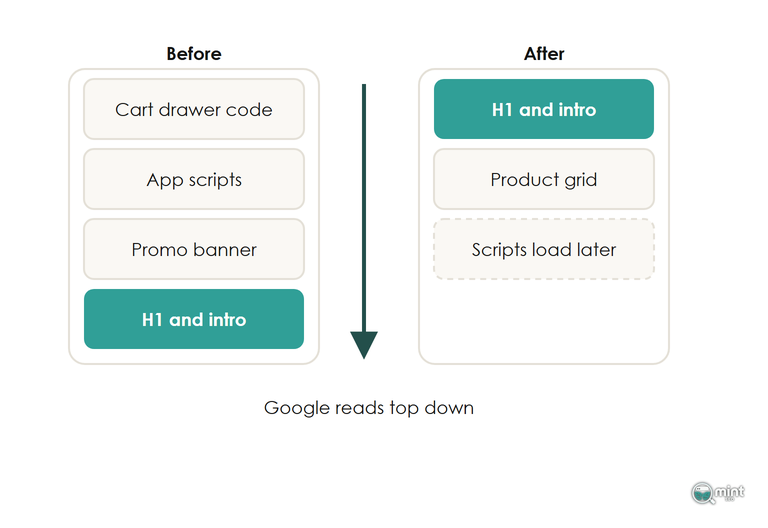
Render the H1 and intro in the collection template's Liquid, and have the cart drawer load its contents when a shopper opens it.
To check a category page, open the collection, view the page source and search for the first words of your intro. If hundreds of lines of script sit above it, move them below the product grid or load them later. URL Inspection in Search Console shows the crawled HTML Google received for that collection.
Once the code order is right, check where the category copy itself lives. Put the intro in the collection's own description field, which your template prints as part of the category page. A text block added through an app can look identical in the browser and still reach Google late.
Link To Each Category From The Menu And From Content Google Already Rates
Google judges how much a category matters from the internal links pointing at it and how few clicks it sits from your home page. Nesting a URL three folders deep tells it nothing.
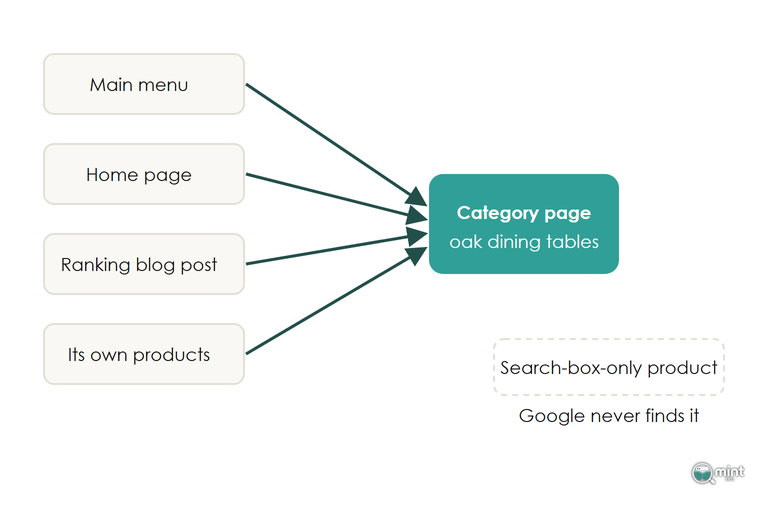
Put each important category in the main menu, and link it from its own products through breadcrumbs.
Link it from the home page as well if it's one of your top-earning ranges.
A blog post that already brings in visitors is the cheapest source of internal authority you have. Link from it to the collection with the range name, or a longer phrase around it, as the anchor text. Our guide to internal linking across a store covers the full method.
When a product page outranks its own collection for the range name, link the product up to the collection.
Products you can only reach through the site search box don't get found by Google. Every product needs a link from at least one collection.
Start With The Ecommerce Category Page Closest To Page One In Search Console
Head terms decide which ecommerce category pages to create. Existing collections need a different test: how close each category page already sits to page one for its own range name.
Filter the Performance report to addresses containing /collections/ and read each collection's range names in the Queries tab. A category page holding 5 to 20 for its range name, with impressions every week, gets its intro and links fixed first.
Set the branded queries filter to non-branded before judging a collection: those rows show it reaching shoppers new to your store.
Four weeks after a rewrite, set the date range to compare with the four weeks before it. Impressions and average position react first on a category page, and clicks catch up later.
When the Queries tab shows the same search landing low on both a collection and a product inside it, the two pages are splitting that search and one of them needs to own the term.
Traffic gains tend to land after Google's next core update, so judge the change over months. Search Console keeps 16 months of data, and exporting your collection rows now keeps a year-on-year comparison possible.
Get A Free Audit Before You Rewrite Your Collection Copy
Choosing which collections to work on first is the slowest part of this, and our free SEO audit hands you that list. It shows the commercial searches your competitors win on page one and you don't, with the monthly demand behind each.
If you'd rather hand the work over, our on-page SEO service rewrites your titles, H1s and collection copy around one keyword per page. That's how the collections you rely on bring in more revenue from organic search.
Get a free SEO audit of your store and start with the collections closest to page one.

About the author
John Butterworth
John Butterworth is the founder of Mint SEO, a Manchester ecommerce SEO agency he started in 2024. He has 11 years in SEO and digital marketing, previously running SEO departments for market-leading brands and several agencies. He specialises in Shopify and ecommerce SEO, and his work has ranked over 100 websites and driven more than 3 million organic visits. He speaks at industry events including the SEO Mastery Summit.
Connect on LinkedIn →