
Knowledge Hub
What Changes When Your Store Gets Too Big To Fix Page By Page
By John Butterworth · August 12, 2026
Your catalogue has outgrown the way you work on it. Everything enterprise ecommerce SEO asks of you changes at this size. You can still open a product page and improve it, but you have forty thousand of them.
And the ones you get round to are rarely the ones losing you money.
The work moves up a level. You stop editing pages and start editing the rules that generate them.
Google is unusually specific about when this starts to matter. Its crawl budget guidance names "Large sites (1 million+ unique pages) with content that changes moderately often (once a week)" and "Medium or larger sites (10,000+ unique pages) with very rapidly changing content (daily)".
Those are two published numbers, checkable against your own store this afternoon.
I am John Butterworth, founder of Mint SEO. The reason I keep testing crawl responses by hand is simple. On the filtered storefronts my team runs, Mint SEO has generated £1.23M in revenue from SEO, a 256% increase, and 47,910 organic clicks, up 312%, out of template rules and robots.txt lines rather than new pages.
I got the order of this wrong for years before it clicked, so the sections below run in the order I would work them on your store.
That order runs templates first and filters second. Links come third, then the serving cost most teams have never checked. The qualifying test sits at the end because you can run it yourself in ten minutes.
The Work Moves From Pages To Templates
Past a few thousand URLs there is no such thing as editing a page. There is only editing the rule that generates a few thousand pages.
On Shopify that rule is Liquid. On a large Shopify catalogue, product and collection schema is generated programmatically in Liquid templates, and robots.txt is edited through robots.txt.liquid.
Change the template and you have changed every page it touches. That is a very good day or a very bad one, and it is why the schema question below is a template question too.
Structured data is the clearest case of it. Google's merchant listing requirements call for name, image and offers carrying a price above zero and an ISO-4217 currency. Nobody hand-writes that across 40,000 SKUs.
It is a template obligation or it does not happen.
The Shopify Constraint You Cannot Template Your Way Out Of
On Shopify the URL debate is over before it starts. The catalogue path is fixed by the platform, so enterprise advice that opens on restructuring is unspendable at 40,000 SKUs.
That is not a small omission. It removes the lever most enterprise programmes reach for first, and it pushes the real work somewhere else.
The contrast with Adobe Commerce is stark. Adobe Commerce exposes direct control over URL structure, meta generation rules and faceted navigation indexation.
Which fixes are available gets decided by your platform before you start. On Shopify the architecture work moves into navigation, collection design and internal linking. You spend effort where the platform lets you spend it.
Which Categories Earn Hand-Written Copy
Templates get you to competent everywhere, which is worth a lot at this size, but they will never on their own get you to excellent on the handful of pages that carry your margin.
On a catalogue this size you cannot afford excellent everywhere, so I pick. Categories carrying real demand and margin get written by a person, and the rest run on the template.
We have written up how much copy a category page needs and which of a store's categories deserve it.
My test for that is blunt. Name the search demand a category is chasing and it earns hand-written copy. Fail that and it stays on the template.
Every Filter Needs One Of Four Answers
Filters are where large catalogues generate most of their URLs. Every colour, size and sort order can spawn its own address.
Six filters with five options each is 15,625 addressable combinations, before a sort order or a page-two parameter is added.
Your SKU count tells you nothing about that bill. The figure that governs it is how many URLs the storefront will emit, and most stores have never measured it.
Index, Canonicalise, Block Or Remove
Four outcomes exist and no fifth. Which one you pick decides whether that filter earns traffic or spends capacity for nothing, and we work through the choice in our guide to faceted navigation.
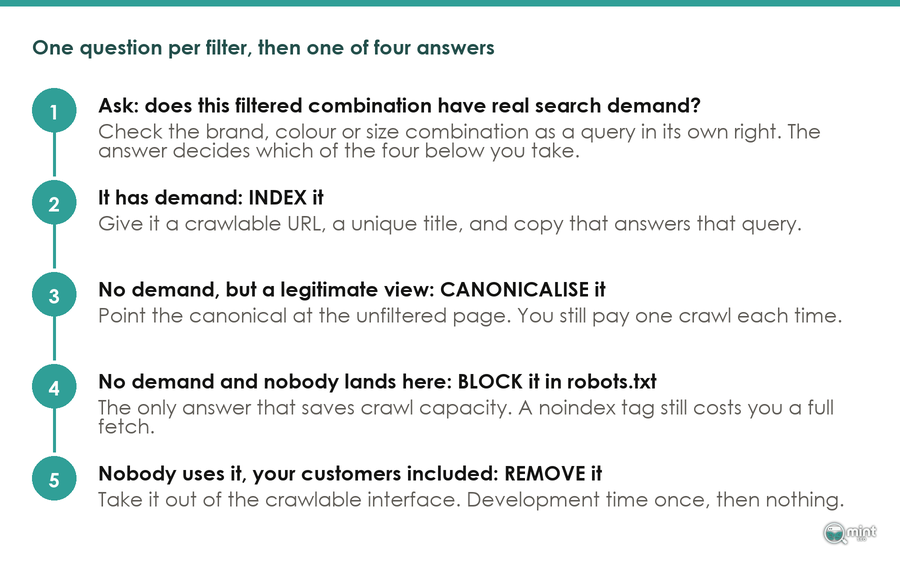
That decision gets taken filter by filter on demand. No blanket rule covers the store, and the cheapest of the four answers is the one that stops the request happening at all.
Of the 15,625 combinations above, only a handful carry the demand Google says makes a filtered page worth indexing, and the rest are crawler traffic you are paying for.
Why noindex Is The Answer That Costs You Most
noindex feels like the safe middle option. It is the expensive one.
Google still requests the page before it drops it, so on half a million filter URLs you have bought half a million fetches and no index entries.
That is a machine for spending crawl capacity on pages you have already rejected. Block them and the request never happens.
Point Your Internal Links At The Pages That Make Money
Once you have decided which URLs may exist, you decide which of them get found. On a large catalogue your internal links settle that almost entirely.
Global Navigation Is Not An Internal Linking Strategy
A mega menu links to everything, which is the same as prioritising nothing. Sidebar and footer widgets are worse. They push crawl equity sitewide toward whatever they happen to contain.
A 90 day crawl log audit posted to r/TechSEO ran into exactly that, and the reply that matters went straight to the cause. "The problem wasn't the crawling," u/threedogdad replied, "the problem was you were sending all of your authority to useless pages."
That is the right way round. Crawl frequency is the symptom, and where your links point is the cause.
What Changed When One Team Added 340 Contextual Links
The fix in that audit was unglamorous. They removed 60+ low value tag and archive pages. They stripped the sidebar links feeding them and added 340 contextual links from blog content into category pages.
Sixty days after those changes the numbers moved. Category page crawl frequency went from roughly 3 weeks to roughly 4 days.
Those pages then moved from page 2 to page 1 across 8 of 12 target terms inside 3 months. That is one site, and the author was careful not to claim causation from a single before-and-after. It is a data point about where the links pointed.
It matches what the platform vendors publish. In a JetOctopus large-site case study, only 40% of a test set of pages were crawled by Googlebot, rising to 70% after a revised internal linking scheme.
seoClarity documented a retail brand that increased internal links to underperforming product pages after expanding its navigation. Those pages reclaimed top ranking positions and saw a 23% rise in organic traffic. Both studies move the same lever, and neither touched the pages themselves.
That matches our own migration data. Across 892 tracked URL moves, the pages that held traffic were the ones our content layer still linked to afterwards.
What It Now Costs To Serve Your Catalogue To Crawlers
Everything above decides which pages get crawled. This decides what each crawl costs you. It is also the part of enterprise ecommerce SEO that changed most recently.
The Line Google Added In July
Google rewrote this guidance on 22nd July 2026 and relocated it into a new Crawling Infrastructure section. Its changelog files the edit as a terminology polish, which is a generous description of a page that gained three new operational rules.
Two additions matter once you are running tens of thousands of filtered URLs. Google now says outright that "Every site starts with the same default, conservative crawl capacity limit."
The limit is also pooled. Googlebot, Googlebot-Image, AdsBot and the Shopping crawler all draw from the same allowance.
That means the image crawler competes for fetches with the one indexing your categories. It is the half of the revision most coverage skipped over.
Glenn Gabe has published diffs of Google documentation changes for over a decade, and reading this revision he pulled out the rest of that first line.
He read the second half as the operative part. Where demand exists and the site stays healthy, "Google's systems will automatically adjust this limit over time."
That second half is what makes serving speed a ranking input on a catalogue of this size. Search Engine Roundtable covered the revision within a day, leading on the conservative default limit and the new 304 recommendation.
Google lists only two levers that raise crawl capacity: adding server resources where the host is the bottleneck, and improving how popular and useful the content itself is. There is no form to fill in.
The third addition is the one you can act on this week. Support 304 (Not Modified) HTTP status codes. If a page has not changed since Google last crawled it, returning a 304 code tells Google to reuse the cached version, saving your server bandwidth and resources. Search Engine Journal covered the change under the headline that Google recommends the 304 status code to conserve crawl budget.
We Checked 31 Retail Category Pages For It
Guidance is one thing, so I wanted to know whether anyone was acting on it.
We requested 60 category URLs from large retailers on 10th August 2026. 31 returned HTTP 200 and formed the sample, across 21 distinct domains. They were the biggest catalogue names we could reach without logging in, and each was requested twice within a few minutes.
For each one we captured the page's cache validator, then asked again while telling the server we already held that version. Here is what came back.
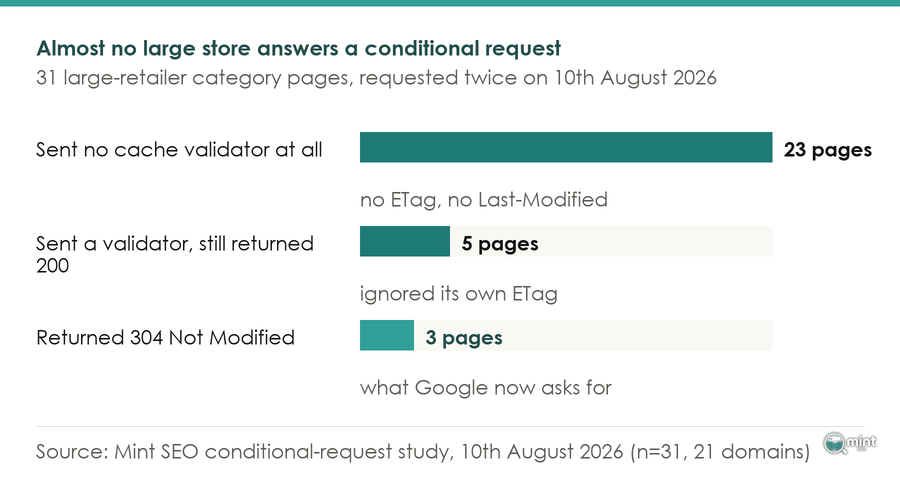
Only boots.com, gap.com and jdsports.co.uk answered correctly. Every other page re-sent its full body to a crawler that already held an identical copy.
That is a bandwidth bill and a slice of crawl capacity spent on nothing at all.
That middle row is the interesting failure. Five of the eight pages in our sample that did send an ETag still returned a full 200 response when we told them we already held that exact version. marksandspencer.com, target.com and fatface.com were among them.
Sending a validator and honouring one turn out to be different things. So check the response, never the configuration file.
If you take a single job from this article, take that one. It is a server configuration change, it is cheap, and on our sample roughly nine in ten large stores have not made it.
The Crawlers That Are Not Google
Shared crawl capacity is a Google-internal idea. Your origin server has no such luxury, because everything that crawls you draws on the same hardware.
A 48 day server log study posted to r/TechSEO measured the newer traffic. "AI bots do not execute JavaScript," u/AEOfix reported, so "server-side logging is the only way to measure it."
That dataset recorded GPTBot and ClaudeBot consuming sitemaps for the first time in March 2026. It also caught GPTBot hitting 114 requests a minute inside a three minute window.
Across those same 48 days no AI bot requested an llms.txt file once. If publishing one is on this quarter's plan, the logs say nothing is reading it yet.
My advice is to keep this in proportion and make it visible. A burst like that against an origin already re-sending full responses is a capacity problem wearing a different hat.
We cover the visibility half of this in our note on answer engine work.
How To Tell Whether Your Catalogue Has A Crawl Problem
That is four sections on crawl capacity, so here is the counterweight. A crawl problem is not the only thing that stalls enterprise ecommerce SEO. Plenty of big stores are held back by something else, and ten minutes will tell you which.
The Two Numbers Google Publishes
You have the thresholds from the top of this article. Google names the symptom to look for as "a large portion of their total URLs classified by Search Console as Discovered (currently not indexed)".
Google hedges its own numbers in the same breath. They are a rough estimate to help you classify your site, and "these are not exact thresholds."
That makes them a classification aid. No switch flips the moment you pass a page count.
Discovered Versus Crawled, And Why The Difference Decides Your Fix
Search Console's Page indexing report separates 'Discovered (currently not indexed)' from 'Crawled (currently not indexed)'. The first is a discovery problem and the second is a quality one, and they take opposite fixes.
Get those the wrong way round and you spend a quarter buying crawl capacity for pages Google already saw and rejected. It is the most expensive diagnostic mistake I see at this scale.
Logs settle the argument Search Console starts. Log file analysis is what shows which URLs Googlebot requests and how often, as opposed to which URLs a crawler tool can reach.
If you buy one tool for enterprise ecommerce SEO, buy the one that reads your logs.
Earlier than this stage, sequencing matters more than tooling. We publish the order we work in on a store's technical fixes, because the order decides whether the work pays back inside a quarter.
Where Mint SEO Fits On A Catalogue This Size
The work above is unglamorous and sequential. Done in the wrong order, enterprise ecommerce SEO burns a quarter and moves nothing.
Getting that sequence right on a large catalogue is what our Technical SEO service is for. It starts with your logs and your Search Console states, never your page count.
Your logs and your indexing report decide whether you have a discovery problem or a quality one.
Then we work the filters, the templates and the link graph in that order. You get told which of the three deserves your development time first.
I run this personally instead of handing it down a delivery chain. Eleven years and three million organic sessions in, the sequence above is still what decides whether a quarter of catalogue SEO pays for itself.
If your catalogue has outgrown page by page work, book a free 30 minute call and I will tell you which of those three jobs is costing you money right now.

About the author
John Butterworth
John Butterworth is the founder of Mint SEO, a Manchester ecommerce SEO agency he started in 2024. He has 11 years in SEO and digital marketing, previously running SEO departments for market-leading brands and several agencies. He specialises in Shopify and ecommerce SEO, and his work has ranked over 100 websites and driven more than 3 million organic visits. He speaks at industry events including the SEO Mastery Summit.
Connect on LinkedIn →