
Knowledge Hub
The Sitemap Changes Your Store Can Make (And The Ones It Cannot)
By John Butterworth · August 11, 2026
Your ecommerce sitemap is an output of your catalogue. On Shopify it gets built from whatever your catalogue holds at that moment. Shopify's guide to finding and submitting your sitemap says that "All Shopify stores automatically generate a sitemap.xml file that contains links to all your products". Your images and pages go in on the same basis, as do collections and blog posts.
Changing it therefore means changing the catalogue.
That is the whole difference. Each change you want in the file has to be made somewhere else first, and a few of the changes owners ask for cannot be made at all.
I am John Butterworth, founder of Mint SEO and 11+ years into ecommerce SEO. Indexation sits inside the technical SEO discipline of the eight-discipline programme we run for stores, and over three million organic sessions driven means I spend part of most weeks inside a coverage report with an owner who submitted a file and watched nothing happen.
Finding the file is where a lot of real stores fall over first. The August numbers below show how often.
What follows runs in the order the work happens. Find your ecommerce sitemap first, because everything after it needs the thing open in front of you.
What A Store Sitemap Is For (And What Belongs In It)
The Job The File Does
A sitemap lists the URLs on your site so that discovery costs Google less. The format is an open standard that Google and Bing both adopted, and the sitemap protocol states that "This document describes the XML schema for the Sitemap protocol" and nothing about what a search engine must then do with it.
Availability is the whole of the promise. A sitemap supplements the links a crawler already follows, so nothing in the format asks for indexing.
Taken together those two lines settle the file's job. It advertises, and whether Google acts on the advert gets decided elsewhere.
The URLs That Belong In A Sitemap
A listing signals something instead of instructing anything, and what it signals decides who qualifies. Go Fish Digital is a US agency whose Shopify research is sourced from the platform itself. They put the mechanism plainly in their sitemap guide: "All things being equal, URLs within your sitemap.xml will get crawled more often and will provide canonical signals to Google".
Read that second half carefully. A URL qualifies when the page agrees it should be indexed. In practice that is the canonical version returning a 200 with no noindex on it.
Most of that judgement is made for you on a hosted platform. Shopify decides inclusion from a product's status and its sales channel, so the file reflects your catalogue settings and leaves you checking the output.
The URLs That Have To Stay Out
Two conditions disqualify a URL, and both are the page contradicting its own listing. LOGEIX, which documents Shopify behaviour the platform's own help pages leave out, gives the first as "The page is set to noindex (as this conflicts with being in the sitemap" and the second as a page "canonicalised i.e. a duplicate of another page".
Either one refuses what the listing asks for. Filtered and paginated URLs are where an ecommerce sitemap picks up most of its junk, and both decisions get made long before the file sees them.
I have written separately about which filter URLs deserve to be crawled. Pagination raises the same question one layer down, and there is a companion piece on what to do with page two.
One absence worries owners unnecessarily. Only three of the 30 store sitemaps I read for this article listed the store's own homepage.
That one is deliberate. An SEO manager chased the same absence for two months before finding the cause on r/shopify: "I confirmed with support that they intentionally leave homepages out of sitemaps".
Where Your Store Serves Its Sitemap From
Read robots.txt Before You Guess At A File Name
Start at /sitemap.xml, because that is where a store usually keeps it. I fetched that path from 45 large ecommerce domains on 10th August 2026 and logged what each one returned, asking the same 45 for robots.txt as I went. Thirty of the 45 answered with a real file at that address.
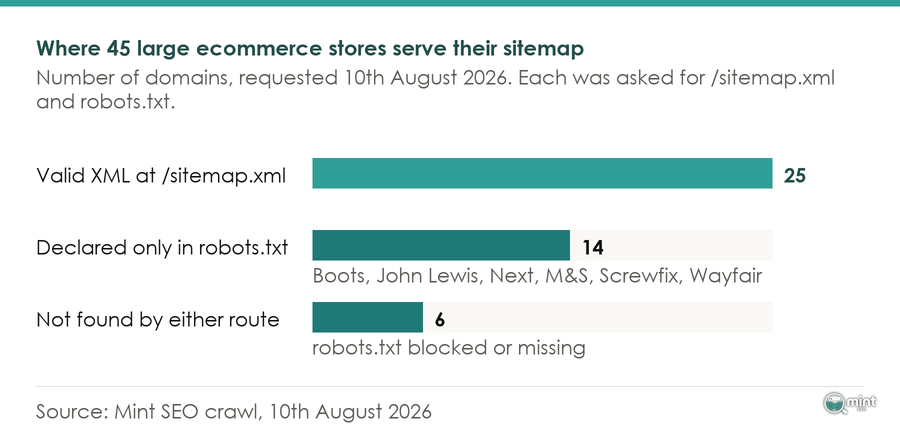
Fifteen came back with nothing at that address. Five of those fifteen hid the file from me everywhere I looked, and four of the five shut robots.txt to me as well.
The remaining ten were never missing, only somewhere else, at a path each store had picked for itself. John Lewis and Next sit in that group, as do Marks and Spencer, Screwfix and Wayfair.
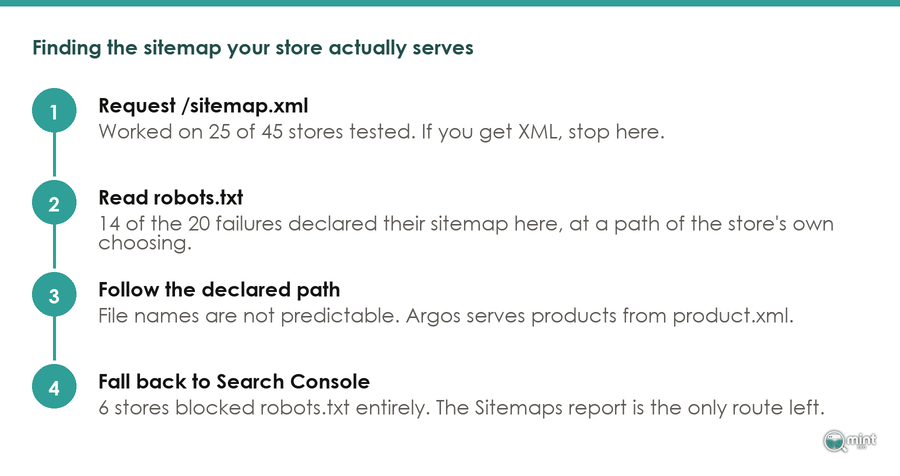
One request settles what guessing never would, because the Boots robots.txt file names its files outright. File names are no more predictable than paths either, and Argos serves its product URLs from product.xml.
Because of that, read robots.txt first. Four of the 30 working stores declared a different set of files there from the one /sitemap.xml served.
Boots and Myprotein are both in that group, so the address that answers is not always the set the store wants crawled.
The exception is a store that gives you neither. Five domains did exactly that, and Search Console is the only route left for those.
Submitting The File To Search Console
Registering it is a one off. Google's instruction runs "Using Google Search Console, submit your sitemaps or sitemap index file", after which Search Console re-reads it on its own schedule.
Doing that again after every catalogue change achieves nothing on a platform that regenerates the file for you. Registration buys you the Sitemaps report, which shows submitted against indexed per file.
What You Can And Cannot Change On A Hosted Platform
The seo.hidden Metafield And What Else It Switches On
Because the file is generated, taking a URL out happens in a setting somewhere else. On the seo.hidden metafield LOGEIX records that "Setting this to 1 triggers 3 actions: It removes the page from the sitemap It sets the page to noindex (a request to search engines to not add this page to their results) It sets the page to nofollow".
Three behaviours arrive on one switch, and that bundle suits a page you want gone from search altogether. It fits badly where you only wanted the URL out of the file, because no way exists to take the first behaviour without the other two.
Pushing a URL in is not on offer at all. A merchant asking why /collections/all was absent was told on r/shopify that "Shopify deliberately excludes /collections/all from the sitemap because it's not a real collection", and that generation "is also fully automated on Shopify so there is no way to manually force that specific URL into the file".
The Catalogue Settings That Change The File
With the file closed to you, the levers sit in the admin. Product status, availability and the sales channel a product publishes to are the inputs the generator reads, and a change there reaches the file within hours.
Some of the structure you might set out to build is already there. Twelve of the 30 working sitemaps I read carried Shopify's generated shape, with separate child files for products, collections, pages and blogs.
Image handling comes free on the same basis. Opening Ruggable's first product sitemap shows 2,460 product URLs with image entries attached, which is an image sitemap nobody configured.
Whether you get any of these levers at all is settled the day you choose where to host. Platforms differ more on what they let you touch than on what they generate, which is the axis I used when I ranked the platforms on their SEO ceiling.
The Sitemap Tags Google Throws Away
Why priority And changefreq Do Nothing
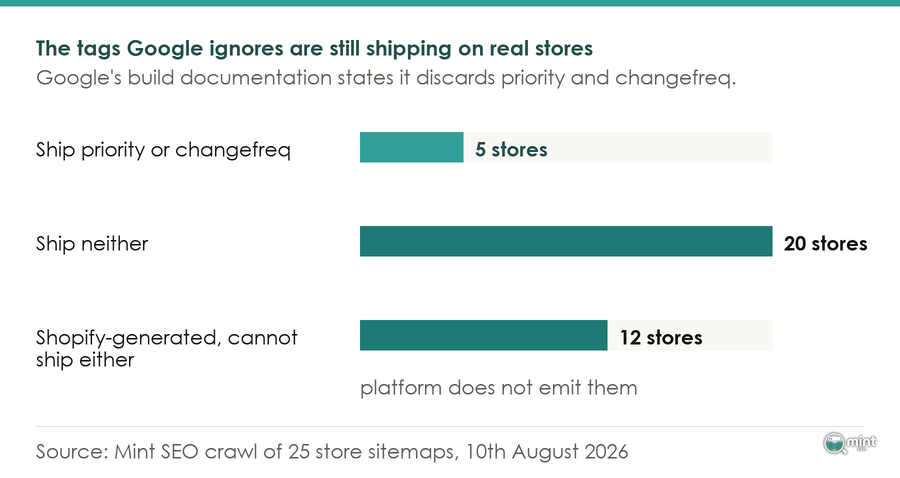
One sentence in Google's build documentation settles a great deal of received advice: "Google ignores <priority> and <changefreq> values".
Both tags stay valid in the protocol, which is why generators keep emitting them long after they stopped meaning anything. Eleni Tarantou, a specialist who authors crawling and indexing guidance for the practitioner-reviewed Women in Tech SEO Knowledge Hub, writes that "Traditional optional sitemap tags like changefreq and priority are generally ignored by Google today".
Five of the 30 stores I read still ship one or both of them, and none of the twelve Shopify sitemaps do. Their merchants were never offered the option, which turns out to have cost them nothing.
When lastmod Is Worth Setting
lastmod is the tag left worth having, on a condition. Its documentation reads "Google uses the <lastmod> value if it's consistently and verifiably (for example by comparing to the last modification of the page) accurate".
Accuracy gets judged across your whole site, never URL by URL. Replying on Bluesky on 16th July 2026, Gary Illyes, who has spoken for Google on crawling for over ten years, told a practitioner whose CMS had corrupted its dates that the site was "probably better off without the lastmods".
Digital Applied, the consultancy that reported the exchange, write that "Google's trust in the tag is effectively binary". What that means in practice is that your dates are believed or they are not, and one bad batch decides it for the lot.
So a platform stamping today's date on every product whenever you edit a template is spending credit the tag was meant to earn. Turning lastmod off is the better outcome there.
When One Sitemap File Stops Being Enough
The 50,000 URL Ceiling And Shopify's Earlier One
Google sets a firm ceiling: "All formats limit a single sitemap to 50MB (uncompressed) or 50,000 URLs". Past that the instruction is blunt, and it reads "If you have a larger file or more URLs, you must break your sitemap into multiple sitemaps".
Your platform's threshold lands a long way before Google's does. Shopify's International Growth SEO Lead Jackson Lo confirmed that once "sitemap_products_1 is close to 10,000 URLs. This creates a new child sitemap".
Both of those numbers bind on real catalogues. Fashion Nova's product file carried 42,245 URLs when I read it, leaving under eight thousand of headroom before the hard limit.
A catalogue that size sits one seasonal range away from splitting again. Knowing which of the two thresholds you are approaching tells you whether the change is yours to make or your platform's.
What Splitting Buys You In Search Console
Measurement is the payoff here, and crawling is not. Google notes that "This may be useful if you want to track the search performance of each individual sitemap in Search Console", while "You can optionally create a sitemap index file and submit that single index file to Google".
Eleni Tarantou recommends the same deliberate split: "Improve discovery: break the index down into smaller sitemaps". Your reporting then follows your own segments.
Indexed against submitted, read one segment at a time, shows you which part of your catalogue Google is declining. Large retailers already work this way, and Argos splits its catalogue across product.xml and product2.xml. The first of those held 38,883 URLs on the day I read it.
Reading it that way changes what you do next. A collection segment lagging behind a product segment is a content problem and not a crawling one, which is where how much copy a category page needs becomes the question to ask.
Why Your Products Are Still Not Indexed
What Discovered And Crawled Mean In Search Console
Google decides whether your file is worth opening at all. Reported in February 2026 by Search Engine Roundtable, which has covered search industry news daily since 2003, Google's John Mueller said that "If Google's not convinced that there's new & important content to index, it won't use the sitemap".
He has answered indexing questions publicly as a Search Advocate for over a decade.
Assuming it does open the file, two Search Console states get confused constantly. WebLinkr, a moderator who answers this weekly on r/SEO, describes the first as meaning that "the crawl manager blocked the page and the pages stuck here are probably stuck here for a while".
Crawled carries the opposite meaning. Google fetched your page and declined it, so listing the URL again changes nothing, because discovery was never the step that failed.
What Moves A Product Into The Index
Discovery is the whole of what a sitemap does, and only one of those two states involves it. Godfrey_0503 set the causes out in the right order on r/TechSEO: "Discovered usually points more toward crawl priority, internal linking, sitemap signals, or Google not feeling the URL is worth crawling yet".
Navigation is therefore where the work sits. A product reachable in two clicks from a collection that already earns crawls gets picked up sooner than one with nothing linking to it.
Doing that takes longer than pressing resubmit, which is most of the appeal of the file.
That appeal is why the same list keeps getting worked through. One merchant set out what they had tried on r/shopify: "Submitted my sitemap (/sitemap.xml) to Google Search Console, Requested indexing manually". Their products stayed missing until the store moved off a myshopify.com subdomain.
Their ecommerce sitemap had been right the whole time. Where a whole catalogue is affected the cause usually sits further upstream, and a broader sweep finds it faster than another resubmission will.
A separate piece covers what a site audit turns up on a store this keeps happening to.
Want A Second Pair Of Eyes On Your Store's Indexing
Nearly every indexing question that reaches me is answerable from two screens open side by side: the coverage report and the catalogue it describes. The links pointing at your products are the usual culprit.
Where that describes your store, the free 30 minute consultation is half an hour with me and your Search Console open. We find the segment Google has declined without telling you, establish whether the cause is the file or the linking, and you leave knowing which one to spend next week on.
Eleven years of this work has made the pattern fairly predictable. Book your free consultation and bring your Search Console access.

About the author
John Butterworth
John Butterworth is the founder of Mint SEO, a Manchester ecommerce SEO agency he started in 2024. He has 11 years in SEO and digital marketing, previously running SEO departments for market-leading brands and several agencies. He specialises in Shopify and ecommerce SEO, and his work has ranked over 100 websites and driven more than 3 million organic visits. He speaks at industry events including the SEO Mastery Summit.
Connect on LinkedIn →