
Knowledge Hub
Pick An Ecommerce Platform You Will Not Have To Migrate Off
By John Butterworth · August 13, 2026
Work out how to choose an ecommerce platform and you find three permanent decisions. Your product URL path, how much of the theme template you can edit, and whether you can touch the checkout.
Everything else on the usual criteria list can be changed after you launch. So most of how to choose an ecommerce platform is settling those three against your own catalogue first, then comparing features.
That order comes from the work. I run the ecommerce SEO retainers at Mint SEO myself, and the stores that reach me are almost never on a bad platform.
They are on one whose fixed decisions collided with their catalogue about eighteen months in. The work behind 47,910 organic clicks and 1,194 ranking keywords was done on platforms somebody else had already picked.
Below you get the order to work through, the three permanent decisions, what each shape of platform suits and the three-year cost. We also crawled 69 live storefronts on 13th August 2026 to see how much of the URL each platform hands over.
Work Through The Choice In This Order
Steps one and two can't be undone once the store is trading, which is the whole reason for settling them before you've opened a pricing page or booked a demo with anybody.
Steps three to six can be revisited. That sequence is most of how to choose an ecommerce platform without a migration at the end of it.
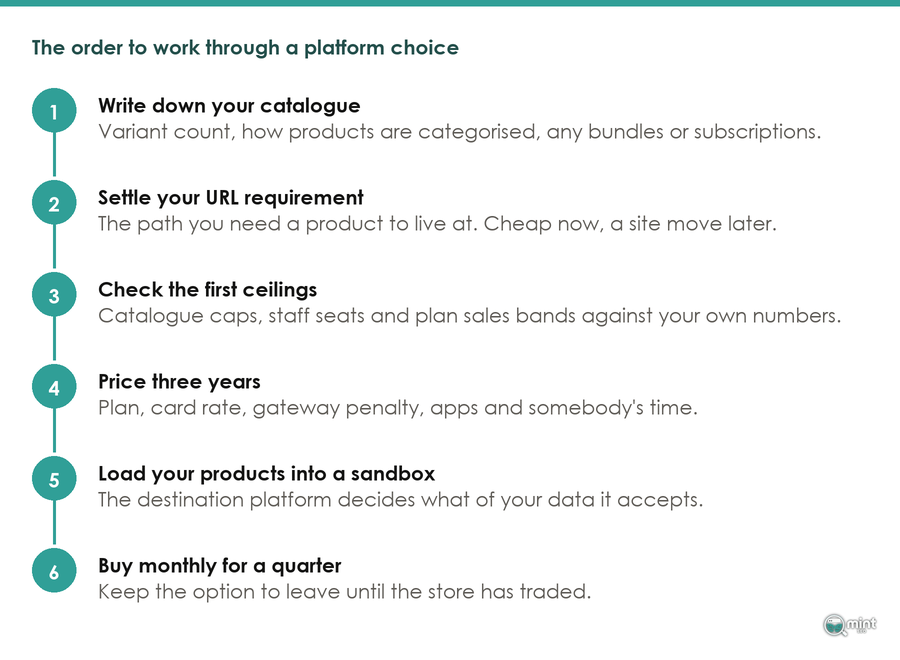
- 1) Write down your variant count and categories.
- 2) Decide what your product and category URLs must do.
- 3) Check the product and staff limits on each plan.
- 4) Price the whole bill over three years.
- 5) Load your own products into a sandbox store.
- 6) Buy monthly until the store has traded for a quarter.
Write Down Your Variant Count And Categories
Count your variants and write down how your products are categorised. Note anything sold as a bundle or a subscription, because those are the facts a platform either accommodates or does not.
Those facts eliminate platforms. Ambition eliminates nothing, so "we might go international" stays off the list for now.
Across the retainers and audits I run, three platform questions cost money later. They are the product and category URLs, the share of the template we can edit and checkout access.
Decide What Your Product And Category URLs Must Do
Write down the URL you want a product to live at before you look at a single feature. This requirement is cheap now and expensive after launch.
People who hire SEO help for a migration learn that in the wrong order. A hiring guide from shopexperts puts it plainly. SEO consultation during the Plus migration planning phase saves significant rework later.
The reason it gives is the one that matters here. A consultant can flag URL structure decisions while they're still cheap to change, and once you're trading that same decision is a site move.
Check The Product And Staff Limits On Each Plan
Every platform has a couple of ceilings your store meets before any of the others. Find them on purpose.
Wix caps a store at 50,000 products, per Style Factory. Shopify and Squarespace do not cap the count at all.
Staff seats are the other ceiling worth checking, and they are priced into the plan. Shopify's Advanced plan allows a team of up to 15 staff accounts, per the Commerce-UI pricing breakdown, so a growing team can push you up a tier on its own.
Lisa17, writing on Shopify's own merchant community, put it this way.
Squarespace is a great platform for creating clean, visually appealing websites. It works well for portfolios, blogs, and even small stores with simple needs.
Her qualifier is the useful part, and it is the one that decides whether the platform suits you: growing a store on it can feel limited over time.
That is what a ceiling looks like, and it does not announce itself on the pricing page.
Price The Whole Bill Over Three Years
Total the plan, the card rate, the apps and somebody's time. Do it over three years, because your plan fee is the only number that holds still and it is the smallest one.
Card rates move the total more than plans do. Working from Shero Commerce, the Shopify Payments online rate runs from 2.9% plus 30 cents on Basic down to 2.5% plus 30 cents on Advanced, and taking payments through a gateway Shopify does not embed adds 2% on Basic, 1% on Grow and 0.6% on Advanced on top of what that provider charges you.
Load Your Own Products Into A Sandbox Store
Open a sandbox store on each platform on your shortlist and load a real slice of your catalogue into it. Your destination platform decides what of your data it will accept, and the migration weekend is a bad time to learn that.
A WooCommerce migration thread on Shopify's merchant community records the specifics. Shopify is stricter on data validation than WooCommerce: invalid emails and phone numbers and mismatched order totals are rejected.
Merchants there also disable fulfilment and integration apps before importing, so nothing fires on a historic order. Ablestar_Daniel notes that Matrixify handles bulk migration and 301 redirects.
Buy Monthly Until The Store Has Traded For A Quarter
Pay monthly for three months. An annual discount is a bet on a decision you have not yet tested with real orders, real refunds and a real month of support tickets behind it.
As RetentionCheck has it, ecommerce platforms recorded 4.2% monthly churn in 2026, which annualises to 41.2%. Being unsure about your platform is the ordinary condition right across the market.
The Decisions The Platform Makes For You And Never Gives Back
Three things are fixed the day you launch, and every other criterion on the standard list is a setting, an app or a rebuild you can schedule for a quieter month.
Feature matrices score reversible and irreversible criteria identically, so this section separates them.
Who Owns The Product URL Path On Each Platform
We wanted to know how much of the URL each platform hands over. On 13th August 2026 we crawled 347 candidate storefronts, fingerprinted the platform from the markup, then followed one confirmed product link per store and reduced each product path to its fixed segments.
Of 347 candidate domains, 69 could be measured: 278 were dropped because the homepage would not serve to a scripted request, the platform could not be fingerprinted from markup, or no product link resolved.
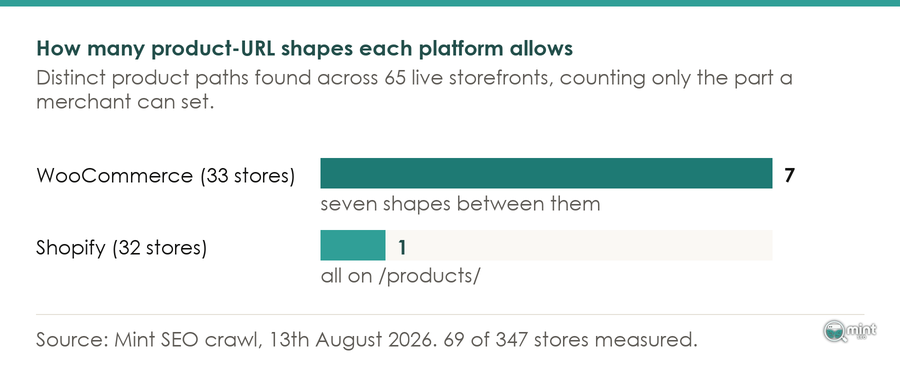
**Across 32 live Shopify storefronts, 31 served every product from the same /products/ path.** The one store that did not had replaced Shopify's storefront to get there, which tells you the segment is not a setting anybody found and switched off.
Four of the 32 varied at all, and every one of those varied by putting a market prefix in front of the same segment. Winebuyers is one, serving products from /en_GB/products/.
You can put something in front of the segment. The segment itself stays where Shopify puts it. That is the whole of the flexibility on offer, and it is worth knowing before you design a URL scheme around it.
**The same crawl measured 33 live WooCommerce storefronts and found seven different product-URL shapes between them.** They ran from /product/ on twenty-two of them to a three-category /shop/{cat}/{cat}/{cat}/ path on one, which is the spread you get when the platform holds no opinion.
Twenty-two of thirty-three kept the WordPress default anyway. On WooCommerce the control is worth having even when a store never uses it, because the store that does need it can have it without moving.
BigCommerce and Adobe Commerce returned two verified stores each in that crawl, too few to report a pattern.
Shopify also generates more than one path to the same product. Every product in a Shopify store is reachable at its own /products/ path and again at a collection-scoped path for each collection it belongs to.
The agency Amsive sets out the behaviour: Shopify sets the canonical to the clean /products/ URL by default. Your lever there is internal linking, which the theme controls.
So the practical question is not which shape is better. It is whether the shape you need is one the platform will let you have.
The Migration Cost Of Changing A Product URL
Changing those URLs after launch is a site move, and Google is direct about the commitment. Its site move documentation says to *"Keep the redirects for as long as possible, generally at least 1 year."*
Waiting is the other half of the bill. Google's own estimate is that *"a small to medium-sized website can take a few weeks for most pages to move, and larger sites take longer"*.
We have written that sequence up as a store migration checklist with a pass condition on every step. There is a longer piece on what an ecommerce migration moves and what it leaves behind.
Mapping the old URLs is manual work. Shopify lacks wildcard redirects, so generate explicit mappings and upload them, is how the migration thread puts it.
Merchants there lower their DNS TTL to around 300 seconds before switching, so the change propagates in minutes, where a default TTL can leave a day of half-served traffic. That is a detail you only learn from somebody who has done it.
That care is warranted, and the numbers say why. As Swell collates it, only 14% of businesses say they are satisfied with their current platform and 77% feel urgency to migrate within the next year, while 83% of data migration projects either fail or overrun their budget.
On those numbers, wanting to move is the common condition rather than the exception.
Which Parts Of The Theme Template You Can Edit
An SEO panel is not an editable template. Squarespace gives you customisable meta descriptions and clean URLs and Wix gives you customisable meta tags and URL slugs, as SEO Space sets out.
Controlling how the page itself gets built is a different thing, and on the builder tier that control is the one you are trading away.
Check which of those two levels of access you are buying before you commit to a theme.
At the other end of that scale, full control produces different-looking URLs. OXO runs Adobe Commerce and serves products from /shop/kitchenware/pop-containers.html, with its category inside the product URL.
That reads well, and it also means recategorising a product changes its address. Freedom brings that trade with it.
How Much Of The Checkout You Can Change
A hosted platform keeps the checkout under its own control, and it will close a route you were using to reach it. Since 2025 that has included Liquid: Shopify pulled checkout.liquid on 28th August that year, for every merchant on the platform.
Every store moved onto Checkout Extensibility, Plus or not.
If your business needs the checkout to do something unusual then that requirement picks the platform for you, and it is the one item on this list that cannot be worked around with an app.
The Three Shapes Of Platform, And Which Stores Each One Suits
Three arrangements are on offer. Somebody else runs the store, you run it, or you run only the front end.
That single choice settles more of the decision in front of you than any individual feature on any comparison table will.
Hosted Platforms Like Shopify And BigCommerce
You give up the fixed decisions and stop thinking about hosting, security and updates. For a first store that is the right trade.
Prices start low on this tier. Interobservers puts Wix ecommerce Core at $29 a month on annual billing, which buys a working store quickly.
Detection figures put the tier in proportion. They measure presence across the whole web, so a large share can still mean a lot of very small stores. On GravityKit's reading, as of May 2026 WooCommerce was detected on 6.64% of all measurable web origins and Shopify on 4.76%, with Wix eCommerce on 1.48%.
American Leather runs BigCommerce and serves products from a flat /products/langdon/ path, with Product structured data and a working add-to-cart. A product there can be recategorised without its address moving.
Self Hosted Platforms Like WooCommerce And Magento
Every decision a hosted platform makes for you comes back, including the ones you would rather it kept. WooCommerce leads the web on store counts.
Counts of this kind disagree because they sample different populations. Read the order they put the platforms in and treat the absolute number as approximate. As Red Stag Fulfillment collates it, StoreLeads data puts WooCommerce on 4.53 million stores and a 33.4% share against Shopify's 2.66 million stores and 19.6%.
Planet Natural is one of the twenty-two stores in our sample that kept /product/ exactly as WordPress ships it. Its URL freedom is real and mostly unspent.
What you do spend is on hosting, patching and updates. All three need an owner, and that owner is you or somebody you pay.
Consultants who work across the whole field are the useful signal here. The UK-based ecommerce SEO consultant Matt Jackson describes having helped over 233 stores with problems ranging from technical issues to platform migrations, with clients on Shopify, BigCommerce, Magento, WooCommerce and OpenCart.
Ranking work happens on all five of those platforms, which puts every one of them inside the range of what can be made to work. We have written separately about which platform gives a store the best shot at ranking.
Headless Builds And Your Own Front End
A headless build keeps the commerce engine and serves the pages from your own application. That is what puts the URLs back under your control.
Our crawl found one store in thirty-two doing it. Bloomscape runs on Shopify, still loads Shopify's own assets, and serves products from /product/money-tree/ instead of the path Shopify's storefront produces.
Understand what that costs. A headless build is a development project with a development budget, so it belongs in the launch plan alongside the theme and the migration window.
We set out when it pays in our piece on headless ecommerce.
What You Pay Shopify, WooCommerce And Adobe Commerce Over Three Years
On every platform in this article, the published subscription is the smallest line in the total.
Work the other lines against your own order volume, and give the card rate most of that attention, because it is the only line that scales with every order you take and therefore the only one that grows while you are not looking.
Shopify Plan Prices And Where They Cross Over
A Shopify pricing breakdown from Commerce-UI puts Basic at $39 a month, Grow at $105 and Advanced at $399 on monthly billing, with the same three plans at roughly $29, $79 and $299 paid annually. Committing for a year takes about a quarter off each tier.
The crossover point between Basic and Grow is worth working out. Working from the same Shero Commerce breakdown, for growing stores under about $1M a year in sales, Grow is the right plan.
Above that the question stops being the card rate. It becomes whether Advanced's reporting and shipping rates earn their own keep.
You don't need a spreadsheet for that. You need your card volume, and the month it last grew by a third. Those two numbers tell you which plan you will be on in a year.
Card Rates And Gateway Penalties
Several platforms charge extra for taking payments through a provider they do not embed. BigCommerce's Open Payment Provider Fee applies to eligible order GMV processed through a provider outside its embedded list, at 2.0% on Core, 1.0% on Growth and 0.6% on Scale.
Entry plans carry their own version of this. Squarespace charges 2% on physical products on its $16 Basic plan and waives that on Core at $23, per Interobservers' platform comparison, so its cheapest plan is the one that taxes every sale.
Hosting, Extensions And Licence Fees On Self Hosting
A free licence moves the cost. It doesn't remove it.
WooCommerce is free software, and the bill starts with somewhere to run it. WizCommerce puts managed WooCommerce hosting at $200 to $20,000 a year, with plugins charged on top at $100 to $750 a year each depending on what they do.
Run those numbers before you treat free as cheap. A store at the low end of that hosting range with four paid plugins is already past what Shopify Basic costs, and it still needs somebody to apply the updates.
The enterprise end prices on your revenue instead. Magento Open Source carries no licence fee, while Adobe Commerce is quote-based and starts around $22,000 a year on-premises, per Elogic Commerce.
That quote is not the budget, and treating it as one is how enterprise projects overrun before they launch.
Budget from the multiple instead. Total cost of ownership on Adobe Commerce typically runs two to three times the licence fee, per Swell, once hosting and development and maintenance are counted.
Free is the right price when you've already got the person who'll do the work.
The Platform Can Change The Deal After You Sign
Terms you choose on are not fixed either. Two platforms rewrote something material this year, and both changes landed on stores that had already committed.
The BigCommerce Repricing Of June 2026
BigCommerce renamed its plans on 1st June 2026. Standard became Core, Plus became Growth, Pro became Scale and Enterprise became Performance.
Renaming them was the small half of that update, because the sales bands moved underneath the names.
The same update cut the self-serve GMV ceilings: Core now covers trailing twelve-month GMV up to $30,000 and Growth up to $100,000, where those ceilings had been $50,000 and $180,000, so a store trading at $40,000 a year moved up a tier without changing anything it does. Read that as the cost of growth being repriced after the fact.
That is a property of the hosted model, and BigCommerce is one example of it. Lowering the band a plan covers raises what a growing store pays, with the headline price untouched.
Retired Tooling And Forced Upgrades
If your store ran a custom discount rule this year, you have already lived through this. Merchants lost the ability to edit or publish a Shopify Script on 15th April 2026, and the changelog set the end date two and a half months later, when *"All Shopify Scripts will cease to execute entirely"*.
What that forced on the merchants who had built on Scripts is the useful part. On the Shopify Merchants Community thread about the shutdown, Plus merchants are working through their Scripts one business rule at a time.
The consensus is not to convert everything 1:1, but to inventory each Script by business rule and choose the right replacement path. Discounts move to Shopify Functions or Function-based promotion apps, shipping and payment rules to delivery and payment customization Functions.
Order limits and buyer eligibility go somewhere else again, to Cart and Checkout Validation Functions.
Wholesale and bundle logic is the awkward one, and merchants report it often needing a niche app or custom development. None of that was work anybody chose to schedule.
Anything unusual you build on a hosted platform carries a maintenance liability whose date you do not control.
Get A Second Opinion On Your Platform Shortlist
Once you have two or three platforms written down, the three permanent decisions are all still free to change. That half hour is the cheapest insurance in this whole process, and it is the one most stores skip.
Take it before you sign anything. Mint SEO's free 30-minute consultation puts you on a call with me, the person who runs the retainers. Bring your shortlist, your variant count and the URL you want your products to live at.
We will go through how to choose an ecommerce platform against your own requirements, including which of them rule a platform out.
If you have already launched and one of the three has gone against you, our technical SEO work starts with that diagnosis.
Book your free consultation and bring the shortlist.
Half an hour on how to choose an ecommerce platform costs less than a migration. Half an hour on how to choose an ecommerce platform is cheaper than a migration, and it is the same half hour whether your store is trading or still on paper.

About the author
John Butterworth
John Butterworth is the founder of Mint SEO, a Manchester ecommerce SEO agency he started in 2024. He has 11 years in SEO and digital marketing, previously running SEO departments for market-leading brands and several agencies. He specialises in Shopify and ecommerce SEO, and his work has ranked over 100 websites and driven more than 3 million organic visits. He speaks at industry events including the SEO Mastery Summit.
Connect on LinkedIn →