
Knowledge Hub
B2B Ecommerce SEO Without Giving Away Your Trade Prices
By John Butterworth · October 3, 2026
Trade buyers usually pick a shortlist of suppliers before they ever call one. Your catalogue reaches that list through B2B ecommerce SEO, and on a trade store the login usually gets in the way.
Hide the catalogue behind it and Google sees a single login page. What works is a catalogue Google can crawl in full, with only the trade prices held back for buyers logged in to an account.
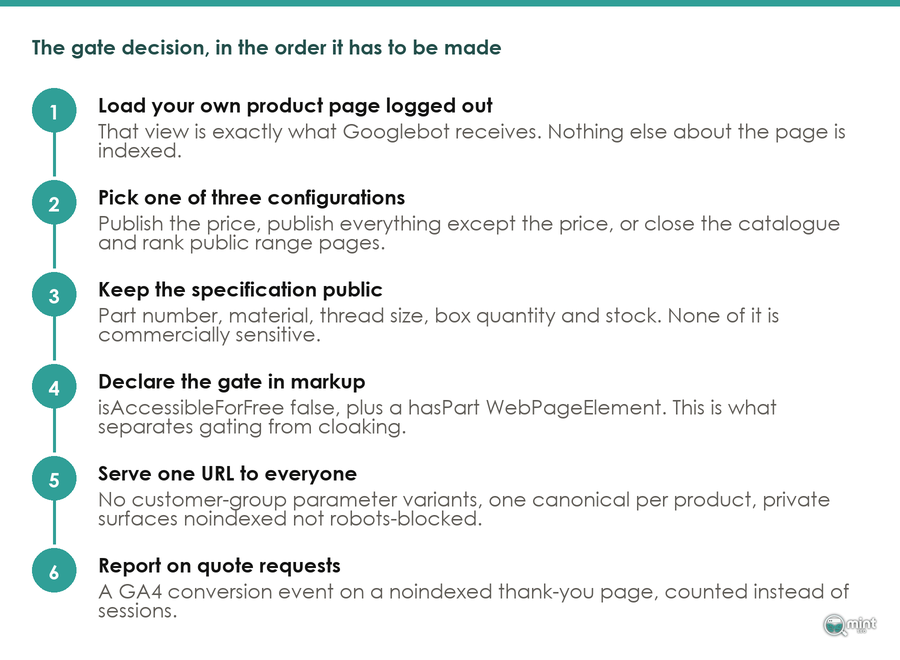
Trade prices can still leak. Themes and SEO apps write the price into the product markup even when the page hides it, so I’d check the page source a logged-out visitor receives before anything else. Then search one of your own part numbers and see which page Google shows for it.
B2B Ecommerce SEO Gets Your Catalogue Shortlisted Before A Buyer Calls
Trade buyers vet suppliers alone, compare them with colleagues and buy on account at a price agreed for their company. Your store has to make the case a rep used to make on the phone.
Buyers want it that way, with 61% of B2B buyers preferring to buy without a sales rep at all. The decision is usually made early too, since the winning supplier sat on the buyer's first shortlist 95% of the time. Buyers also hold what your website says against what the sales desk tells them, so keep the two saying the same thing about each product.
That buying pattern changes three things from retail SEO. Googlebot only sees what a logged-out visitor sees, so the trade login decides how much of the catalogue can rank. Trade buyers search by part number, specification and trade term.
A conversion changes too. It's a quote request or a new trade account, because the order itself often closes on account or over the phone.
That's why I'd measure B2B ecommerce SEO by the trade accounts it opens and the revenue they bring, with traffic as a side measure.
Let Google See Your B2B Catalogue Without Showing Trade Prices
The trade login is where a lot of B2B stores lose their rankings. Googlebot crawls your store as a logged-out visitor, so anything behind the wholesale login doesn't exist as far as search is concerned.
Keep the catalogue public and gate the price alone. The product name and specification stay visible to Google and to new trade buyers, and so do the datasheet, the minimum order quantity and the request-a-quote button. Only the customer-specific price list waits for sign-in.
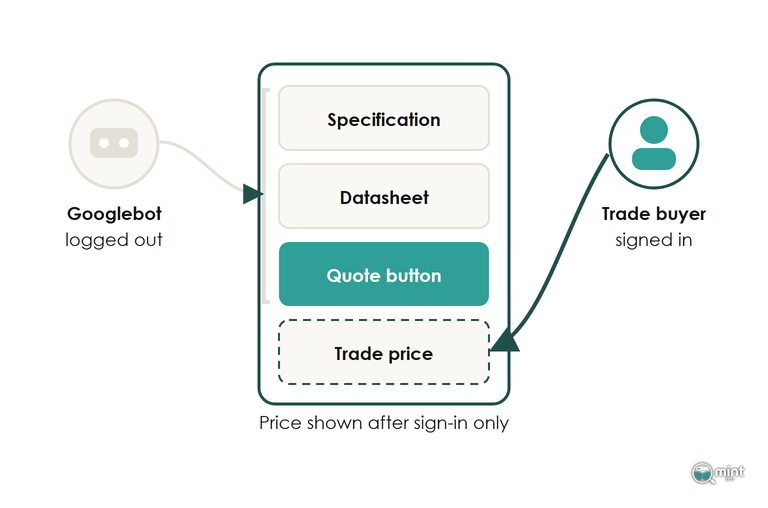
Most platforms support that split. On Shopify B2B the store stays publicly accessible unless you restrict it, with trade pricing and B2B-only products shown to signed-in company customers. Shopify's B2B features are available on its standard plans as well as Plus. Other platforms have a setting that hides the price from guests while the product page stays visible.
A Locked Catalogue Gets Indexed As One Login Page
Locking the whole store is the fix a trade supplier is most often handed when prices turn up in Google, and it takes specifications, replacement parts and datasheets out of search along with the price.
When every private URL shows the same sign-in form, Google treats those URLs as duplicates and indexes the login screen in their place. A buyer looking up your brand and a part number can land on a form.
If part of the site has to stay private, send logged-out visitors to a page that describes what sits behind the login, with a clear sign-in link. A page that can't be shown should return an "unauthorised" status code, not a login form served as content.
To see what Googlebot gets, run a product page through the live test in the URL Inspection tool in Google Search Console and open the screenshot. On a locked store it's the login form. Our guide to crawling and indexing basics covers what sits underneath all of this.
Hidden Prices Still Leak Through Product Markup
Hiding the price on the page doesn't keep it out of Google. Themes and SEO apps write the variant price into the product structured data. On Shopify the analytics script on each page can carry it as well, so a logged-out crawler receives the trade price while the page shows a sign-in button.
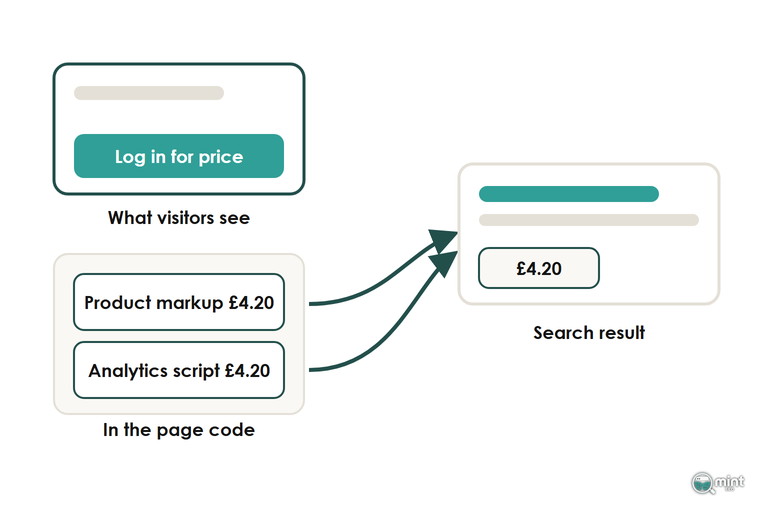
That's how a supplier ends up with wholesale prices beside its brand name in the search results.
I'd check the code a logged-out visitor receives before anything else on a gated store. Search the page source for the trade price and for the price field inside the JSON-LD block, then repeat it for a product with volume breaks.
Take the price out of the product markup for anything gated. Keep the public variant at list price and hold trade figures in the B2B catalogue, or in a field that only renders for signed-in company customers. Old prices drop out of the results once Google recrawls the fixed pages.
Product Markup Works Without A Public Price
Product markup is still worth adding to a gated catalogue. A Google product snippet accepts reviews or a rating in place of an offer. The page can describe the product, its brand and part number, and its review score with no price at all.
Mark up what the logged-out page shows and nothing it doesn't. Where a price block has to appear on the page for some visitors, the data-nosnippet attribute keeps that block out of the search snippet.
With the price question settled, structured data done properly is a genuine ranking advantage on a large catalogue. Leave FAQ schema off, though, since Google has deprecated it.
Build B2B Pages Around The Part Numbers Trade Buyers Search
The searches that bring in trade orders read like a line on a purchase order: a manufacturer code, a thread size, a grade of stainless. Your sales desk hears those strings every day, and a trade store ranks for them when each one lands on a page that prints the code and the specification as plain text.
Quote Requests Already Hold The Keyword List
Keyword tools show little volume for a part number, and their estimates for trade terms are directional at best. Your own data is a better guide for B2B ecommerce SEO. Start with the codes in quote requests and the sales inbox, then add the terms trade customers type into your site search and the B2B queries Search Console already shows you appearing for.
Shopify's Searches with no results report lists the terms that found nothing on your store. On a trade catalogue that's often a part number written the way the buyer writes it, with a space or a prefix your product data doesn't use.
In Search Console, a regex filter on the queries report pulls every part-number search out at once if the pattern matches your code format. Check any tool volume against those impressions and clicks before you plan pages around it. Those lists also shape the keyword plan for the rest of the store.
Each Category Page Comes Before Its Part-Number Pages
Start with the head terms: the category page for each product family a buyer names when they call, such as stainless hose clips or M8 coach bolts. That page holds the broad trade search, and each part-number page links up to it. A part-number page with no category above it has nothing passing it relevance and no route in for a buyer browsing the range.
Give each category page a short intro that says who the range is for, served high on the page with no cart or app code pushed above it. Put the specification detail and buying guidance under the product grid, where it builds relevance without getting between the buyer and the products.
Trade catalogues multiply URLs quickly because every grade, thread size, material and pack quantity becomes a filter. Index the combinations buyers type in full, such as a material with a size, and canonicalise or block the rest; our guide to faceted navigation covers how. I only treat crawl budget as a concern past a couple of thousand URLs, which most trade catalogues reach.
A Product Page Has To Answer What The Rep Used To
A trade product page ranks and converts when it answers what the buyer would otherwise call to ask. Put each answer in text on the page:
Datasheets can stay as PDFs as well, since Google indexes the text of a public PDF that isn't password-protected, but the core specification belongs in the page copy where it can rank.
The manufacturer's description comes through the distributor feed, and every stockist of the part number imports the same wording. A search on the code then pits your page against every other copy of the manufacturer's text, and Google tends to show only one of them.
Yours is worth ranking when it adds what your sales desk knows: what buyers fit it to, the parts it gets ordered with and the substitute you'd offer when it's out of stock. Everything else in product page SEO applies to a trade page as it does to any other.
Turn Search Visits Into Trade Accounts You Can Count
A ranking page earns the first visit, and a trade buyer rarely orders on it. The work carries on after the page ranks: keep the buyer close between visits, then count the trade accounts those visits open.
Capture B2B Buyers Between Visits With A Lead Magnet And Email Flows
Lead capture is part of B2B ecommerce SEO in its own right, because the decision runs over several visits and through a group of people, with 13 inside the buying company and nine outside it involved in a typical purchase.
Most of those people will never contact you directly.
By the time a buyer does get in touch, the shortlist is mostly set. A visitor who leaves without giving you a way back is usually lost to the supplier who stayed in touch.
Over a cycle that long the content does the selling, and your job is to keep the buyer close between visits with an offer worth an email address.
Send email flows that follow what the buyer looked at: the range, the application and the reorder cycle. A trade buyer who gets mail unrelated to their range stops opening it, and often stops considering the supplier.
Link each email back to the category and product pages that rank, so repeat visits land on the pages earning your search traffic. Capture forms and nurture sequences for stores are covered in more depth in lead generation for online stores.
Report B2B SEO On Quote Requests And New Trade Accounts
Because trade orders mostly close away from the checkout, an ecommerce revenue report undercounts what organic search brings a B2B store. Track the actions a buyer takes before the order: quote requests, trade-account applications, datasheet downloads and sample requests.
GA4 has a set of recommended lead events built for sales that close offline. The website sends generate_lead when the form is submitted. Your CRM then sends qualify_lead and working_lead as the sales team picks the enquiry up, and close_convert_lead marks the point the buyer becomes a customer.
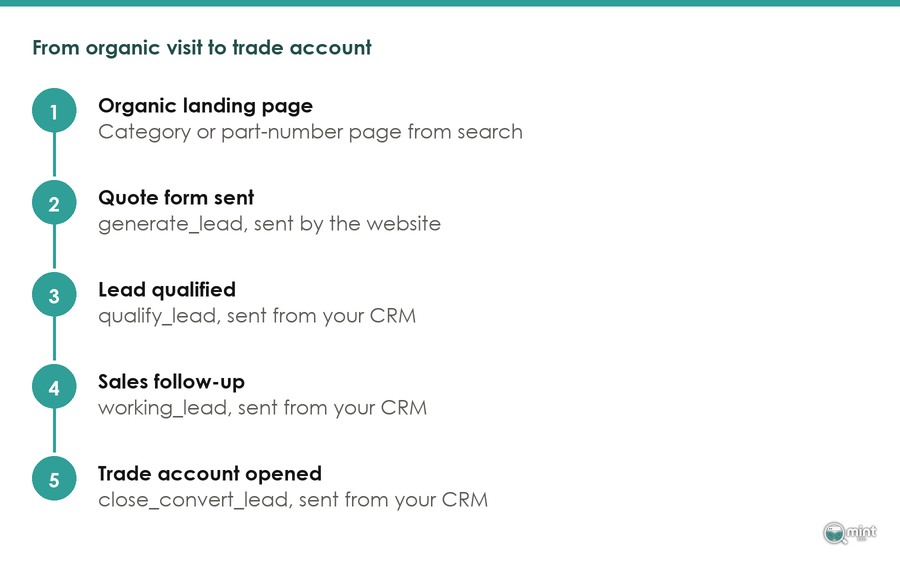
With those later stages coming back from the CRM, GA4's Lead acquisition report lets you see which channels and organic landing pages start the conversations that become accounts. Our guide to conversion tracking covers the set-up for the online orders alongside them.
Before you read any of it, separate searches for your company name from everything else. Existing trade customers search your name to reorder, so those visits say little about new business. Growth shows in the part-number and category searches that bring in buyers who don't know you yet. Judge the work on the revenue those new accounts bring, and use rankings to find out why when it stalls.
Hand The Trade Catalogue's SEO To People Who Do It Every Month
Trade catalogues keep changing, with new part numbers, new accounts and new price lists. Our monthly SEO retainer keeps the markup, category pages and part-number pages in step as they do. I run the retainers myself, so the person checking your price markup is the one planning your category pages.
Month-to-month work like this sits within the ecommerce SEO services we offer trade stores. Before any of it, get a free SEO audit of your store to see where you stand. It shows how much of your search traffic is branded and which commercial keywords competitors win where you’re not on page one. It comes back the same day as a two-page PDF, with no call and nothing to pay.

About the author
John Butterworth
John Butterworth is the founder of Mint SEO, a Manchester ecommerce SEO agency he started in 2024. He has 11 years in SEO and digital marketing, previously running SEO departments for market-leading brands and several agencies. He specialises in Shopify and ecommerce SEO, and his work has ranked over 100 websites and driven more than 3 million organic visits. He speaks at industry events including the SEO Mastery Summit.
Connect on LinkedIn →